SSS StorageDOCK Battery Compatibility with Victron Systems
Updated 19 September 2026 · By SolarNevs Research Desk, Dealer surveys + verified sources · 1 source · Method ↗
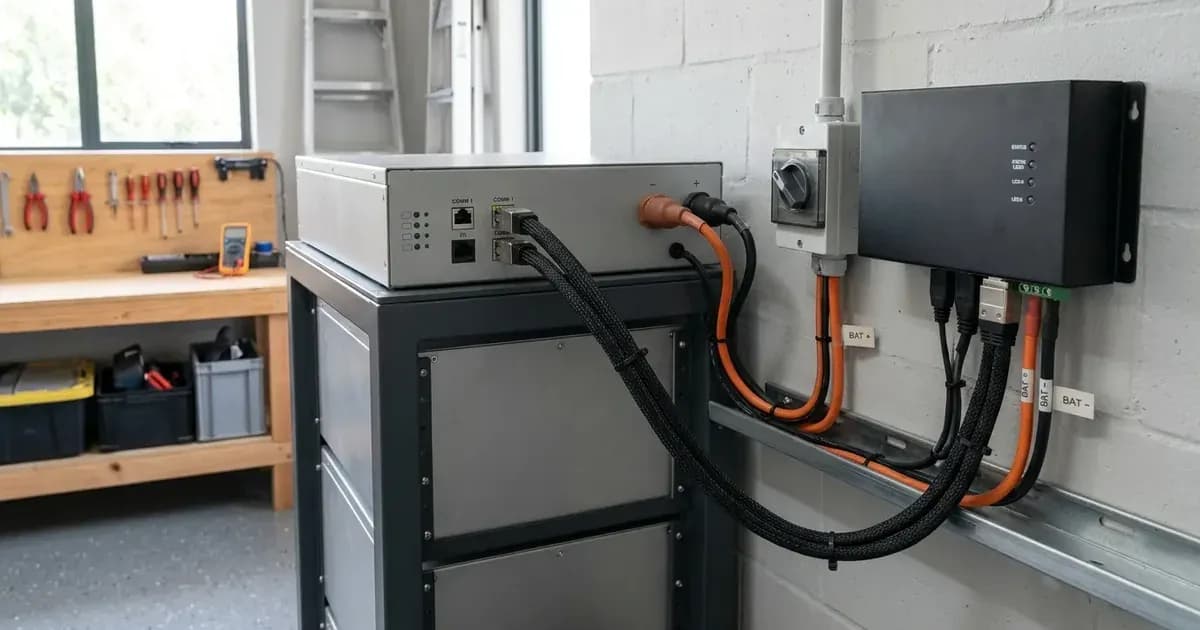
Key Takeaways
- SSS StorageDOCK batteries communicate with Victron GX devices using the BMS-Can protocol.
- All system components, including batteries and Victron devices, require specific minimum firmware versions for proper operation.
- Only 48V Victron inverter/charger models are compatible with SSS StorageDOCK batteries.
- Distributed Voltage and Current Control (DVCC) must be enabled and correctly configured on the Victron GX device.
How do I connect SSS StorageDOCK batteries to a Victron system?
Connecting SSS StorageDOCK batteries to a Victron energy system requires careful attention to hardware, firmware, and software configuration. These batteries, available in ES Range (Residential) and LV-Com Range (Commercial) models, communicate with Victron GX devices via BMS-Can. This guide outlines the necessary steps to ensure proper compatibility and functionality.
Compatibility and Hardware Requirements
Before beginning installation, verify that your Victron components are compatible and that you have the correct hardware.
Compatible Victron Products
SSS StorageDOCK batteries are designed to work with specific Victron product categories when connected to a supported GX device via BMS-Can.
- GX Devices: Cerbo GX, Cerbo-S GX, Ekrano GX
- Inverter/Chargers: VE.Bus Inverter/Chargers, RS range, EasySolar GX, MultiPlus-II GX
- Solar Chargers: SmartSolar MPPT
- Monitoring: Victron VRM Portal (for SOC, cell voltages, temperatures, and alarms)
It is important to note that only 48V Victron inverter/charger models are compatible with StorageDOCK batteries. 12V and 24V models are not supported.
Required Hardware
A compatible Victron GX device is essential. For communication, you will need a specific cable:
- VE.Can to CAN-bus BMS cable – Type B (Victron part number: ASS030520200).
StorageDOCK batteries include built-in CAN bus termination, meaning no external terminator is required on the battery end of the connection. However, a VE.Can Terminator is required on the Victron GX end. The StorageDOCK CAN port connects to a VE.Can port on the GX device, which must be configured for BMS-Can 500kbps. This is a separate bus from the Victron VE.Can (250kbps) typically used for other Victron devices.
Firmware Requirements
Ensuring all components have the minimum required firmware is critical for stable operation. It is always recommended to install the latest available firmware on all devices during commissioning.
Device | Minimum Firmware Version | Notes |
|---|---|---|
StorageDOCK ES Range BMS | v1.11 | All ES Range residential models |
StorageDOCK LV-Com BMS | v10.4 | All LV-Com commercial models |
Victron GX Device (Venus OS) | v3.70 | Cerbo GX, Cerbo-S GX, Ekrano GX |
VE.Bus Inverter/Charger | 556 |
|
SmartSolar MPPT VE.Can | v3.16 |
|
Victron GX Device Configuration
Once hardware is connected and firmware is updated, configure the Victron GX device.
1. Selecting the CAN-bus Profile
The GX device needs to be told to communicate with the battery using the correct protocol.
- On the Victron GX device, navigate to: Settings → Services → CAN-bus profile.
- Select: CAN-bus BMS (500 kbit/s).
2. Setting the Battery Monitor
After the GX device reboots and detects the StorageDOCK battery, you must designate it as the primary battery monitor.
- Navigate to: Settings → System Setup → Battery monitor.
- Select the StorageDOCK battery from the list of detected devices. This step ensures the GX device uses the BMS-provided State of Charge (SOC), voltage, and current data as the primary battery monitoring source.
3. DVCC Settings
DVCC (Distributed Voltage and Current Control) is the mechanism by which the GX device distributes the BMS-provided charge and discharge limits to connected Victron devices. DVCC must be active for StorageDOCK batteries to function correctly in a Victron system.
DVCC Setting | Required Value | Enforcement |
|---|---|---|
DVCC | ON | Forced ON |
SVS – Shared Voltage Sense | ON | Forced ON |
SCS – Shared Current Sense | OFF | Forced OFF |
STS – Shared Temperature Sense | Do not touch | Not enforced — left at user setting |
Parallel System Considerations
SSS StorageDOCK batteries can be connected in parallel to increase system capacity. A maximum of 8 units may be connected in parallel per StorageDOCK system.
When connecting multiple batteries, only one CAN cable connection to the GX device is required. This cable connects to the designated master battery unit. The master BMS aggregates Charge Current Limit (CCL) and Discharge Current Limit (DCL) values across all paralleled units and reports the combined limits to the GX device.
For specific models, the parallel current limits are as follows:
ES5.4K Parallel Limits
Units in Parallel | Max Discharge Current (DCL) | Max Charge Current (CCL) |
|---|---|---|
1 unit | 125A | 100A |
2 units | 250A | 200A |
3 units | 325A | 280A |
4 units | 400A | 360A |
ES18K Parallel Limits
Units in Parallel | Max Discharge Current (DCL) | Max Charge Current (CCL) |
|---|---|---|
1 unit | 400A | 320A |
2 units | 800A | 640A |
3 units | 1000A | 800A |
4 units | 1200A | 1000A |
For both ES5.4K and ES18K models, parallel aggregate current limits plateau at 3+ units. Additional units beyond this point do not proportionally increase the CCL or DCL.
SSS StorageDOCK Battery Specifications
SSS StorageDOCK batteries are available in two main ranges, both operating at a nominal voltage of 51.2V (16 cells × 3.2V per cell). Usable energy is calculated at 80% Depth of Discharge (DOD).
ES Range (Residential)
Model | Total Energy (kWh) | Usable Energy @ 80% DOD (kWh) | Nominal Voltage | Nominal Capacity | Max Charge (A) | Max Discharge (A) | Rec. Inverter (per 1 unit) |
|---|---|---|---|---|---|---|---|
ES5.4K | 5.4 | 4.32 | 51.2V | 106 Ah | 100 | 125 | 5 kVA |
ES7.4K | 7.4 | 5.9 | 51.2V | — | 100 | 125 | 5 kVA |
ES9.4K | 9.4 | 7.5 | 51.2V | — | 160 | 200 | 10 kVA |
ES12K | 12.0 | 9.6 | 51.2V | — | 160 | 200 | 10 kVA |
ES18K | 18.0 | 14.4 | 51.2V | 352 Ah | 320 | 400 | 15 kVA |
ES24K | 24.0 | 19.2 | 51.2V | — | 320 | 400 | 15 kVA |
LV-Com Range (Commercial)
Model | Capacity (kWh) | Nominal Voltage |
|---|---|---|
LV-Com16.4/300 | 16.4 | 51.2V |
LV-Com32.8/600 | 32.8 | 51.2V |
LV-Com49.2/900 | 49.2 | 51.2V |
LV-Com65.6/1000 | 65.6 | 51.2V |
LV-Com82/1000 | 82.0 | 51.2V |
LV-Com98.4/1000 | 98.4 | 51.2V |
Note that nominal capacity for ES7.4K, ES9.4K, ES12K, ES24K models, and Max Charge/Discharge currents and recommended inverters for LV-Com Range models are not provided in the available source material.
Safety: Electrical Installation Best Practices
Working with high-voltage battery systems requires strict adherence to safety protocols.
- Isolate Power: Always disconnect all power sources (PV, grid, battery) before making or breaking electrical connections. Verify zero voltage with a multimeter.
- Insulated Tools: Use only insulated tools to prevent accidental short circuits, especially when working near battery terminals. A spanner across a high-capacity battery bank can draw hundreds of amps, causing severe burns or equipment damage.
- Correct Polarity: Double-check all wiring for correct polarity before energizing the system. Incorrect polarity can damage batteries and connected equipment.
- Cable Sizing: Ensure all cables are appropriately sized for the maximum expected current to prevent overheating and fire hazards.
- Lithium Battery Handling: While SSS StorageDOCK batteries have internal BMS protection, avoid physical damage, extreme temperatures, or attempting to open the battery enclosure.
When to call a technician instead
If you are unsure about any step of the installation or configuration process, or if you encounter unexpected behavior after setup, it is best to consult a qualified solar technician. Incorrect wiring or configuration can lead to system malfunction, damage to components, or safety hazards. Always prioritize safety and professional expertise when dealing with complex electrical systems.
Frequently asked questions
What Victron devices are compatible with SSS StorageDOCK batteries?
SSS StorageDOCK batteries are compatible with Victron GX devices (Cerbo GX, Cerbo-S GX, Ekrano GX), VE.Bus Inverter/Chargers, RS range, EasySolar GX, MultiPlus-II GX, and SmartSolar MPPT solar chargers. Only 48V Victron inverter/charger models are supported.
What cable is needed to connect SSS StorageDOCK to a Victron GX device?
You need a VE.Can to CAN-bus BMS cable – Type B (Victron part number: ASS030520200). This cable connects the StorageDOCK CAN port to a VE.Can port on the GX device, configured for BMS-Can 500kbps.
What firmware versions are required for SSS StorageDOCK and Victron components?
Minimum firmware versions are v1.11 for StorageDOCK ES Range BMS, v10.4 for LV-Com BMS, v3.70 for Victron GX devices (Venus OS), 556 for VE.Bus Inverter/Chargers, and v3.16 for SmartSolar MPPT VE.Can.
How many SSS StorageDOCK batteries can be connected in parallel?
A maximum of 8 SSS StorageDOCK units may be connected in parallel per system. Only one CAN cable connection to the GX device is required, connecting to the designated master battery unit.
What are the essential DVCC settings for SSS StorageDOCK batteries?
DVCC (Distributed Voltage and Current Control) must be active. Shared Voltage Sense (SVS) should be ON, and Shared Current Sense (SCS) should be OFF. Shared Temperature Sense (STS) should be left at its user setting.
References
- Victron Energy SSS StorageDOCK Compatibility Page — accessed 23 August 2026
Related guides
More from schemes, subsidies & financing.