Victron Cegasa Battery Compatibility Guide
Updated 19 September 2026 · By SolarNevs Research Desk, Dealer surveys + verified sources · 1 source · Method ↗
Key Takeaways
- A Victron GX device is essential for communication between Victron equipment and Cegasa batteries.
- Specific minimum firmware versions are required for both the GX device and the inverter/charger.
- Correct VEConfigure settings for charge and inverter parameters prevent system issues and ensure optimal performance.
- Always ensure the battery bank size is appropriate for the solar array capacity to avoid over-current alarms.
How do I ensure compatibility between Victron systems and Cegasa eBick LV batteries?
Ensuring compatibility between Victron systems and Cegasa eBick LV batteries relies on establishing proper communication via a Victron GX device, verifying specific firmware versions, and applying correct VEConfigure settings. This guide outlines the necessary steps to integrate these components effectively.
Setting up Victron and Cegasa Communication and Configuration
This section details the step-by-step process for connecting and configuring your Victron system to work seamlessly with Cegasa eBick LV batteries.
- Verify Firmware Versions:
- Ensure your GX device (e.g., Cerbo GX) is running a minimum supported firmware version of v2.22.
- Confirm your Victron inverter/charger has a minimum supported firmware version of 469. Update firmware if necessary before proceeding.
- Connect Cegasa BMS to GX Device:
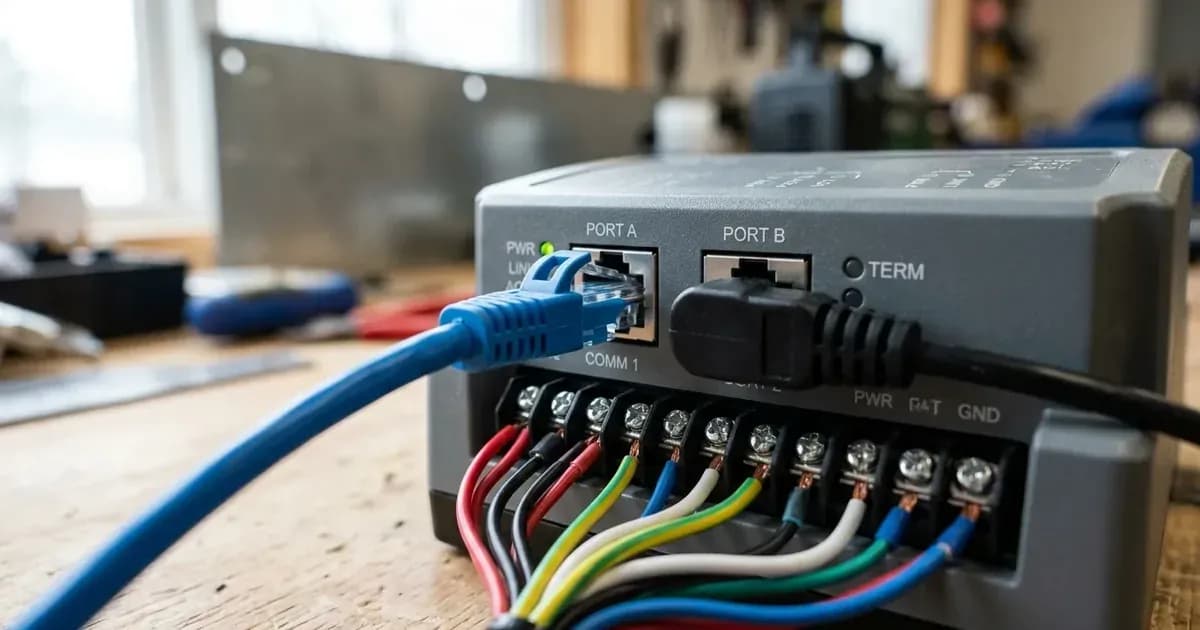
- Use a standard CAT5e or CAT6 network cable to connect the Cegasa BMS directly to the BMS-Can port on your Victron GX device. This connection is critical for the communication of charge and discharge limits, error codes, and state of charge.
- Install VE.Can Terminator:
- Connect the VE.Can terminator, typically supplied with your GX device, to the other unused BMS-Can port on the GX device. This ensures proper CAN-Bus signal integrity.
- Configure Cegasa BMS:
- Access the Cegasa BMS configuration via the Cegasa EViewer WebApp. Within this application, configure the inverter type according to your specific Victron inverter/charger model. Refer to Cegasa documentation for detailed instructions on this step.
- Apply VEConfigure Settings:
- Use Victron's VEConfigure software to apply the recommended charge and inverter parameters for Cegasa batteries. These settings are crucial for safe and efficient battery operation.
- Size Your Battery Bank Appropriately:
- When designing your system, ensure the battery bank capacity is sufficient for your solar array size. Using very large solar arrays with battery banks that are too small can lead to the BMS triggering over-current alarms and system shutdowns. The Cegasa EBick LV has a module capacity of 13.5 kWh, and the EBick LV 15 has a module capacity of 15 kWh. Both models support up to 20 modules, allowing for a maximum capacity of 270 kWh for the EBick LV and 300 kWh for the EBick LV 15.
Troubleshooting Common Compatibility Issues
Symptom detail | Likely cause | Fix |
|---|---|---|
BMS triggering over-current alarms and system shutdowns | Using very large solar arrays with battery banks that are too small, exceeding the limits of the batteries' ability to charge | Ensure your battery bank capacity is adequately sized for your solar array. Review system design to match charge capacity with generation. |
Victron VEConfigure Settings for Cegasa eBick LV Batteries
Proper configuration of your Victron inverter/charger is essential for optimal performance and longevity of your Cegasa eBick LV batteries. These settings ensure the battery operates within its specified parameters.
VEConfigure Charge Parameter Settings
These settings control how your Victron charger interacts with the Cegasa battery bank.
VEConfigure Charge Parameter | Setting |
|---|---|
Battery type | Lithium |
Charge curve | Adaptive |
Absorption voltage | 52.2 V |
Float voltage | 52 V |
Absorption time | 8 Hr |
Charge Current | 140A per battery module |
VEConfigure Inverter Parameter Settings
These settings define the operational limits for the inverter function, protecting the battery from excessive discharge.
VEConfigure Inverter Parameter | Setting |
|---|---|
DC input low shut-down | 44V |
DC input low restart | 48V |
DC input low pre-alarm | 45V |
Communication and Firmware Essentials
Effective communication between your Victron system and Cegasa batteries is managed through the BMS-Can connection on a Victron GX device. This setup facilitates the exchange of critical data, including charge and discharge limits, error codes, and the battery's state of charge.
Required Devices and Connections
A Victron GX device, such as a Cerbo GX, is required to establish the BMS-Can connection. Connect a standard CAT5e or CAT6 network cable between the Cegasa BMS and the BMS-Can port of the GX device. It is also necessary to connect a VE.Can terminator, supplied with the GX device, to the other BMS-Can port of the GX device to ensure stable communication.
Firmware Requirements
To ensure full compatibility and proper functionality, specific firmware versions are mandatory:
- GX Device Firmware: The minimum supported firmware version for the GX device is v2.22.
- Inverter/Charger Firmware: The minimum supported firmware version for the inverter/charger is 469.
Cegasa BMS Configuration
The inverter type must be configured within the Cegasa BMS itself. This is typically done via the Cegasa EViewer WebApp. Consult your Cegasa documentation for detailed instructions on how to perform this configuration.
Safety: Lithium Battery Systems
Working with lithium battery systems requires strict adherence to safety protocols. Lithium batteries, while efficient, can pose thermal risks if mishandled or improperly configured. Always ensure all power sources, including solar arrays, grid connections, and the battery bank, are disconnected before performing any wiring or maintenance. Use insulated tools to prevent accidental short circuits. Never attempt to open a lithium battery module, as this can expose you to hazardous components and void your warranty. The battery's internal Battery Management System (BMS) is designed to protect it; bypassing or tampering with it can lead to dangerous conditions.
Victron systems are not compatible with Cegasa high voltage configurations where battery voltage is increased beyond 48V nominal. Attempting to use such configurations can lead to system damage or unsafe operation.
When to call a technician instead
While this guide provides detailed steps for compatibility and configuration, certain situations require professional assistance. If you encounter persistent communication errors, unexplained system shutdowns, or if you are unsure about any wiring or configuration steps, it is best to consult a qualified solar technician. Any modifications or repairs beyond the scope of this guide, especially those involving opening battery modules or altering internal BMS settings, should only be performed by authorized service personnel. Attempting advanced repairs or bypassing safety mechanisms can void your warranty and create hazardous conditions.
Frequently asked questions
What Victron devices are compatible with Cegasa eBick LV batteries?
Victron inverters/chargers and solar chargers are compatible when paired with a GX device for BMS-Can communication. This connection is essential for charge and discharge limits, error codes, and state of charge.
What firmware versions are required for Victron and Cegasa compatibility?
The GX device requires a minimum firmware version of v2.22. The inverter/charger needs a minimum supported firmware version of 469 for proper operation with Cegasa batteries.
What are the recommended charge settings for Cegasa eBick LV batteries with Victron?
Configure the battery type as Lithium and the charge curve as Adaptive. Set the absorption voltage to 52.2 V and the float voltage to 52 V. An absorption time of 8 hours is recommended.
How do I connect the Cegasa BMS to a Victron GX device?
Connect a standard CAT5e or CAT6 network cable between the Cegasa BMS and the BMS-Can port of the GX device. A VE.Can terminator, supplied with the GX device, must be connected to the other BMS-Can port.
Can I use Cegasa high voltage batteries with Victron systems?
Victron systems are not compatible with Cegasa high voltage configurations where the battery voltage is increased beyond 48V nominal.
References
- Victron Energy Battery Compatibility: Cegasa — accessed 23 August 2026
Related guides
More from schemes, subsidies & financing.