Livoltek Battery SOC and Alarm LED Meanings Guide
Updated 6 September 2026 · By SolarNevs Research Desk, Dealer surveys + verified sources · 4 sources · Method ↗
Key Takeaways
- Livoltek battery modules use a simplified two color status LED: Green indicates normal operation, while Red indicates an active fault or low state of charge (SOC ≤8%).
- If the Red LED remains illuminated continuously for more than 12 hours, official documentation instructs you to contact technical support — no user side fix is published for that state.
- Livoltek hybrid inverters manage discharge cutoffs through "Discharge End-up SOC" parameters settable from 10% to 100%.
- Livoltek low-voltage packs (BLF-B51100, BLF51-5) operate at 51.2 V nominal across a 40–58.4 V operating window (maximum continuous current ratings are specified at 25°C; charge strictly within 0–55°C for BLF-B51100 or 0–50°C for BLF51-5, and never below 0°C).
- Batteries kept in storage must be measured and recharged at least once every 3 months to prevent permanent cell under voltage damage (or revived using the app Emergency Charge function to 54 V, which auto-exits after 2 h, strictly within your model's published charge window — 0–55°C for the IP21 BLF-B51100, 0–50°C for the IP65 BLF51-5 — and never below 0°C).
How do I interpret the status lights on my Livoltek battery?
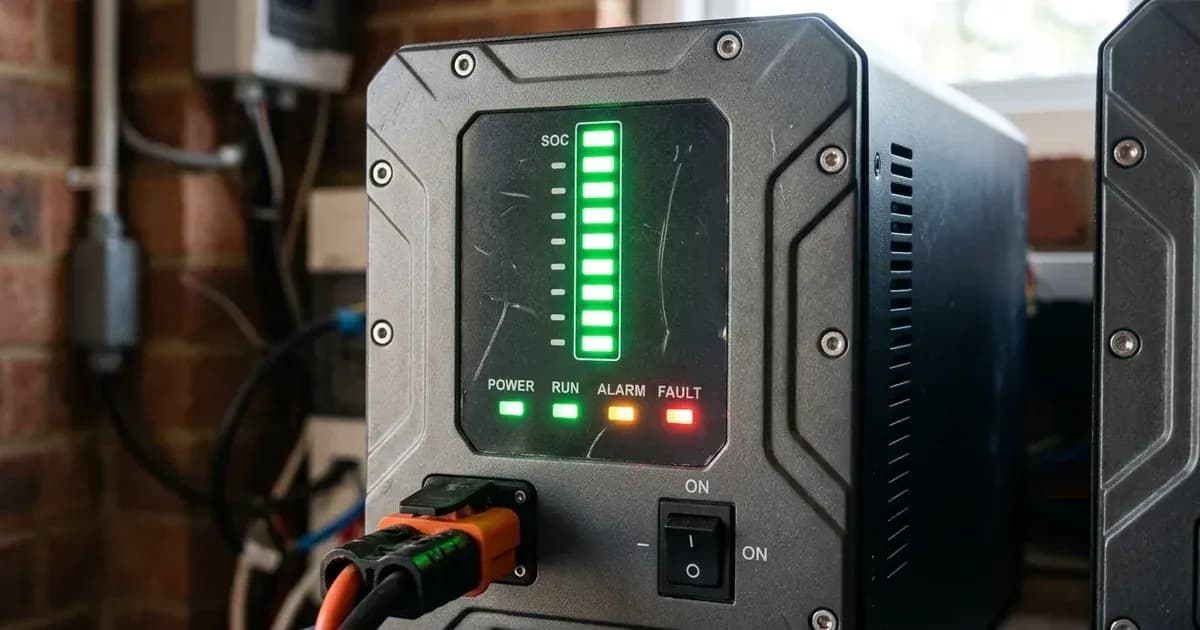
Livoltek low-voltage residential batteries (including the BLF-B51100 IP21 indoor unit and the BLF51-5 IP65 outdoor model) utilize a streamlined front panel LED indicator combined with inverter-side LCD telemetry and mobile app monitoring to report operational health. Rather than a multi segment charge level bar, Livoltek packs communicate essential operational status through a single dual color LED interface.
The first step in diagnosing your Livoltek battery is checking whether the front indicator is solid Green (normal status) or solid Red — and remembering that Red carries two documented meanings at once: an active battery fault, or a state of charge at or below 8%.
Comprehensive Livoltek LED Status and Fault Table
The table below compiles official LED behavior from the Livoltek BLF-B51100 and BLF51-5 user manuals:
Battery LED Color | Operating Condition | Operational Meaning | Recommended User Action |
|---|---|---|---|
Green (Solid ON) | Normal Status | Battery works well / normal status. | No action required; normal charge/discharge active. |
Red (Solid ON) | Fault or Low State of Charge | Fault in the battery — or SOC ≤ 8%. | Recharge battery immediately from solar or grid. |
Red (Solid >12 Hours) | Genuine Internal Fault | Genuine internal battery fault; the manual documents no user side fix. | Disconnect DC isolator and contact technical support. |
Note that this two color table is the entire battery-side LED behavior Livoltek publishes: the manuals document no blink codes, buzzer patterns, or off state meanings, so deeper diagnostics rely on the paired inverter's display and the monitoring app.
Inverter-Side Alarm Telemetry and Diagnostic Workflow
Because the battery-side LED provides high level binary status, specific diagnostic telemetry is displayed on the paired Livoltek hybrid inverter LCD screen or mobile monitoring portal:
- "BMS Lost":
- Display: BATTERY LED on + FAULT LED on, SYSTEM off, on the Livoltek Hyper inverter faceplate.
- Meaning: BMS communication lost between inverter and battery. The manual's fix is to "Check battery type and communication of the BMS cable. Restart the inverter"; escalate to dealer if repeating. On the RJ45 link, Pin 1 (orange/white) is BMS_CAN_H and Pin 2 (orange) is BMS_CAN_L — and because Livoltek and Pylontech define those pins differently, a cable borrowed from a Pylontech install is a common cause. On parallel banks, confirm the supplied terminal resistor is fitted in COM2 of the last battery.
- "BMS Fault":
- Meaning: An internal BMS communication failure. The manual's instruction is to restart; dealer support if recurring.
- "BAT Volt Fault":
- Meaning: Battery voltage is outside permissible range — which the manual attributes to the wrong battery quantity or spec, or to a bad connection. Check the pack count and spec against what the inverter expects, then the cable connections and DC breaker. For reference, the LV packs are specified for a 40–58.4 V operating window (with charging restricted to 0–55°C for IP21 or 0–50°C for IP65).
- "Low battery":
- Meaning: Battery voltage is too low. The manual's remedy is to recharge battery. Restore solar or grid charging and watch whether the SOC reading climbs back.
If your inverter sounds repetitive alarms during low battery states, refer to our diagnostic guide on inverters beeping continuously.
When your Livoltek battery illuminates a solid Red LED indicator, follow this systematic diagnostic workflow:
- Check Terminal Voltage Under Rest: Measure the DC voltage across the battery power terminals with a multimeter while the module is disconnected from active loads. Livoltek publishes the 40–58.4 V operating window but no voltage to SOC table, so read the result against that window: a pack sitting near the bottom of it is consistent with the depleted state meaning of the red light, while a reading outside the window is the condition the inverter reports as BAT Volt Fault.
- Initiate Grid or Solar Recovery Charge: Power on the inverter and apply solar or utility charging. If the red LED was only reporting SOC ≤ 8%, it should return to the documented solid green once charging brings the pack back up. Livoltek does not publish a recovery time or a voltage at which the LED switches over, so judge progress from the SOC figure on the inverter rather than from the clock.
- Inspect Inter module Daisy Chaining in Parallel Stacks: On multi module installations (supporting up to 5 units in parallel), check whether the red indicator is confined to a single unit or present across all modules. If only one module shows red, the two documented meanings still apply to that pack alone — a fault in it, or its SOC at or below 8%. Verify its chaining before anything else: COM2 of each battery goes to COM1 of the next, and the supplied RJ45 terminal resistor belongs in COM2 of the last battery in the chain.
- Perform a Controlled Cold Restart: Turn off the external DC circuit breaker, switch off the battery power rocker, then wait — the Livoltek manual requires at least 10 minutes after power-off before you touch terminals or begin maintenance (always using insulated tools, as shorting terminals discharges hundreds of amperes). Power the battery back on and restart the inverter.
Understanding Livoltek SOC Thresholds and Cutoff Parameters
Livoltek hybrid inverters provide granular State of Charge management settings to protect lithium cells from destructive over discharge:
- Discharge End-up SOC @ Grid: Sets the minimum battery percentage allowed when utility grid power is present (programmable 10%–100%). Once this threshold is reached, the inverter ceases battery discharge and powers domestic loads directly from the grid.
- Discharge End-up SOC @ EPS: Sets the emergency reserve cutoff during off grid load shedding blackouts (programmable 10%–100%). Livoltek publishes the settable range but not a recommended value, so choose it from how much reserve your own load shedding schedule actually demands.
- Emergency Charge: For a pack that has experienced excessive discharge and will not wake up, the inverter carries an Emergency Charge function you trigger from the app. It charges the battery to 54 V and auto-exits after 2 h (charging strictly within your model's published charge window — 0–55°C for the IP21 BLF-B51100, 0–50°C for the IP65 BLF51-5 — and never below 0°C). Livoltek also recommends running it at first installation.
Operating Limits and Thermal Management in Pakistan
Livoltek BLF series batteries use prismatic LFP (LiFePO4) cells with natural cooling, and the manuals publish a specific envelope for each model rather than one brand wide number:
- Operating Temperature Window: The BLF-B51100 (IP21) charges between 0–55°C and discharges from −20–55°C. The BLF51-5 (IP65) is tighter at both ends: charging 0–50°C, discharging −10–55°C. Neither pack may be charged below 0°C.
- Depth of Discharge Ratings: The BLF-B51100 is rated 90% DoD; the BLF51-5 IP65 manual claims 100% DoD. Quote whichever applies to the model on your wall — there is no single Livoltek DoD figure covering both.
- Continuous Current and Thermal Ratings: Livoltek hybrid installations require heavy battery cabling of ≥25 mm² for battery current >100 A with an external DC breaker ≥125 A, while operating within the documented 0–55°C (IP21) or 0–50°C (IP65) charge limits (with maximum continuous charge/discharge current specified at 25°C). Livoltek does not publish a capacity fade curve against ambient temperature, so read the 55°C ceiling as a survival limit rather than a comfortable place to run a battery through a Pakistani summer. Learn why LFP chemistry withstands local climates in our guide on why LiFePO4 beats other lithium chemistries for Pakistani heat and review battery life under Pakistani heat and depth of discharge.
- BMS Architecture: Understand internal safety balancing in our guide on BMS functions and battery protection.
If communication faults prevent reading battery SOC, refer to our walkthrough on Livoltek communication fault fixes.
Safe Handling and Maintenance Protocols
Observe these mandatory safety rules when maintaining Livoltek battery systems:
- Storage Maintenance: Never leave Livoltek batteries in storage for more than 3 months without measuring the pack and recharging it. That interval is the manual's; Livoltek does not publish a target storage SOC, so charge it rather than guessing at a percentage (using Emergency Charge to 54 V within your model's published charge window — 0–55°C for the IP21 BLF-B51100, 0–50°C for the IP65 BLF51-5 — if required).
- Weight Precautions: Livoltek BLF-B51100 units weigh 44 kg and BLF51-5 units weigh 55 kg; always use two people (two-person lift) and heavy duty wall anchors.
- Emergency Isolation: Disconnect the external ≥125 A two-pole DC circuit breaker (with battery cable ≥25 mm²) and use insulated tools before servicing battery or inverter terminals—as an accidental short across terminals can discharge hundreds of amperes—then wait at least 10 minutes after power-off before touching them.
- Ventilation and Environment: Install IP21 units indoors only — that rating is not rain rated — in a dry room away from direct sun. The manuals permit 5%–95% humidity and operating altitude <4000 m, and the pack should stay inside its published charging window.
- Fire Safety and First Aid: If a surrounding fire occurs, extinguish it before the battery catches; if the battery has caught fire, do not try to extinguish the fire and evacuate people immediately. If electrolyte exposure occurs, rinse eyes with flowing water for 15 minutes and seek medical attention; wash skin with soap and water; if ingested, induce vomiting and seek medical care. Never dispose of modules in household garbage; packs are WEEE-marked for professional recycling.
When to call a technician instead
Contact a certified solar technician or authorized Livoltek service center under the following conditions:
- The battery Red LED remains continuously lit for more than 12 hours despite active charging.
- The battery will not wake after deep discharge or long storage, and does not respond to the inverter's Emergency Charge function.
- The battery casing exhibits physical distortion, liquid leakage, or overheating. Livoltek treats a damaged pack as unfit for use: repack it in its original container and return it to the distributor rather than attempting a repair. The same applies to any pack that has been wet or submerged — do not access it.
- Warranty claim processing: Livoltek provides 5-year local warranty coverage in Pakistan through authorized distributors. Ensure your serial number is registered on the Livoltek portal at livoltek.com/registration.html.
Figures as of August 2026.
Still showing the fault? Book a technician
If the steps above did not clear it, tell us the inverter or battery and the exact code. We pass it to a technician who covers your city; visit charges are quoted before they come.
How this pays for the site: the technician or verifier pays SolarNevs a fixed introduction fee. Nobody pays to be recommended, and you are free to use our free guides instead.
Frequently asked questions
What does a solid red light on a Livoltek battery indicate?
According to Livoltek official manuals, a solid red LED indicates either an active battery fault OR that the State of Charge has dropped to ≤8%. If the red light stays on for more than 12 hours, the BLF-B51100 manual treats it as a genuine internal fault and instructs you to contact technical support — it publishes no user side fix.
What does a solid green light on a Livoltek battery indicate?
A solid green LED is the manual's 'battery works well / normal status' indication. That is all it reports: it is a high level health light, not a communications light, so a green battery with a blank SOC reading still means you check the inverter display for BMS Lost or BMS Fault.
Why does my Livoltek battery stop discharging at 10% or 20% SOC?
Livoltek hybrid inverters enforce programmable 'Discharge End-up SOC @ Grid' and 'Discharge End-up SOC @ EPS' thresholds (settable from 10% to 100%). The battery refuses discharge below these configured thresholds to preserve reserve capacity for grid outages.
What is the operating voltage range of a Livoltek 51.2V low-voltage battery?
The official operating voltage range for Livoltek BLF-B51100 and BLF51-5 IP65 modules is 40–58.4 V (51.2 V nominal; maximum continuous charge/discharge currents are specified at 25°C). Charging is permitted strictly within the published 0–55°C (for IP21 BLF-B51100) and 0–50°C (for IP65 BLF51-5) temperature windows, and charging is strictly prohibited below 0°C.
How long can a Livoltek battery be stored without recharging?
Livoltek engineering manuals state that batteries stored unused must be measured and recharged every 3 months to prevent destructive deep discharge of internal LFP cells (revived via Emergency Charge to 54 V which auto-exits after 2 h, strictly within your model's published charge window — 0–55°C for the IP21 BLF-B51100, 0–50°C for the IP65 BLF51-5 — and never below 0°C).
References
- Livoltek BLF-B51100 User Manual PDF — accessed 23 August 2026
- Livoltek BLF51-5 IP65 User Manual PDF — accessed 23 August 2026
- Livoltek iPower HES 3–6 kW User Manual PDF — accessed 23 August 2026
- Livoltek Pakistan Official 5kWh Product Page — accessed 23 August 2026
Related guides
More from inverter errors & fixes.