Phoenix Battery Inverter Settings and Pairing Guide
Updated 7 September 2026 · By SolarNevs Research Desk, Dealer surveys + verified sources · 5 sources · Method ↗
Key Takeaways
- Always select "Flooded" ("FLD" on Growatt SPF 5000 ES, "FLd" on Axpert) or "Use Batt V" on your solar inverter when pairing Phoenix tubular batteries.
- Inverters default to AGM (56.4 V bulk on 48V), which causes chronic undercharging on flooded tall-tubular banks that require 58.4 V bulk absorption and 54.0 V float (setpoints referenced to 25°C; hot installations require -3 to -5 mV/cell/°C temperature compensation above 25°C).
- Phoenix Power Cube TX series batteries operate on voltage-charged mode only; no comms protocol, no cable/pinout, and no BMS/CAN are present.
- Equalization deliberately drives cells into the explosive hydrogen gassing region and requires active ventilation away from sparks and flames; perform it only if a hydrometer test (wearing eye protection against sulfuric acid) shows specific gravity spread exceeding 0.030 across cells.
- Configure 48V banks with 4 × 12V TX in series, matching both model and age, and restrain batteries in place.
Why are my Phoenix batteries not charging correctly with my solar inverter?
The most frequent cause of poor performance when pairing Phoenix tubular batteries with a solar inverter is an incorrect battery chemistry setting. The off-grid and hybrid inverters sold in Pakistan commonly ship with the battery type preset to AGM — on Growatt and Axpert-family units that AGM preset charges to 56.4 V bulk absorption on a 48V bank. Phoenix Power Cube TX tall-tubular batteries want the flooded preset's 58.4 V bulk charging to fully convert lead sulfate back into active sponge lead (both figures are 25°C reference setpoints; hot installations require -3 to -5 mV/cell/°C temperature compensation above 25°C). Running on AGM presets causes persistent daily undercharging and shortens backup time.
Your primary pairing action is switching Program 05 from AGM to Flooded (or selecting "Use Batt V" on Deye hybrid platforms).
Diagnosis and Setting Verification
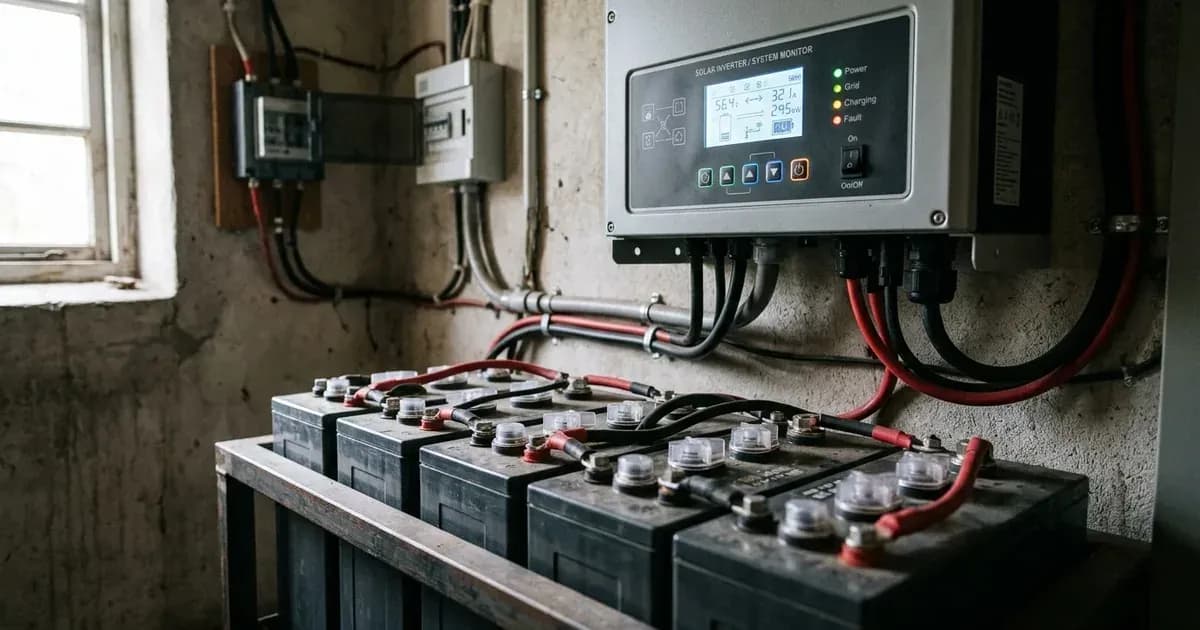
Phoenix Power Cube TX series batteries are flooded tall-tubular lead-acid units without digital communication ports or microcontrollers. Inverters control their charging cycle based entirely on voltage thresholds and current limits programmed into the menu:
- Select Flooded Chemistry Mode:
- Growatt SPF 5000 ES: Program 05 defaults to AGM. Switch setting to "Flooded" (FLD).
- Axpert-Class Units (Inverex Aerox/Veyron, Fronus, Knox, Crown): Program 05 defaults to AGM. Change setting to "Flooded" (FLd).
- Deye Hybrid Inverters (SUN-5/8/10/12K SG04LP3): In the Battery Mode menu, select "Use Batt V". Never select "Lithium", as flooded tubular banks lack digital state-of-charge reporting.
- Set Bulk / Absorption Voltage Thresholds:
- Set 48V systems (4 × 12V TX in series) to 58.4 V (29.2 V on 24V inverters; Prog 26 default on Axpert is 28.2 V / 56.4 V while flooded preset is 29.2 V / 58.4 V) at 25°C reference (apply -3 to -5 mV/cell/°C temperature compensation above 25°C in ambient heat). On Deye units, the manufacturer's recommended "Wet" absorption figure is 14.7 V [59.0 V], above the 57.6 V default setting.
- Set Float Standby Voltage:
- Configure float to 54.0 V on 48V systems (27.0 V for 24V units; Prog 20 on Growatt, Prog 27 on Axpert) at 25°C reference (apply -3 to -5 mV/cell/°C temperature compensation in ambient heat). On Deye units, the recommended "Wet" float is 13.7 V [55.0 V], in place of the 53.6 V default.
- Leave Equalization Disabled Until a Hydrometer Says Otherwise:
- Equalization delivers a controlled overcharge (2.55-2.65 V/cell = 15.3-15.9 V per 12V unit per Rolls manual; referenced to 25°C) to reverse sulfate buildup and de-stratify electrolyte in tall tubular cells. Because equalization deliberately drives cells into the explosive hydrogen gassing region, conduct it only in an actively ventilated space away from sparks and open flames. Both Growatt (Prog 43) and the Axpert family (Prog 30) ship with equalization disabled (default OFF). Leave it disabled unless per-cell hydrometer readings (wearing eye protection because hydrometer testing draws sulfuric acid out of the cell; never test hot or gassing cells) show a specific gravity spread exceeding 0.030 across cells — unnecessary equalization damages healthy cells, and running one is an installer-grade task performed only after a full bulk and absorption charge with temperature watched. On Growatt SPF 5000 ES, equalization unlocks only in Flooded/User mode; Prog 44 voltage defaults to 54.0 V (set higher for tubular), Prog 45 time defaults to 60min, Prog 46 timeout to 120min, and Prog 47 interval to 30 days. On Axpert units, Prog 31 equalization voltage defaults to 29.2 V / 58.4 V and Prog 35 interval to 30 days (0-90). On Deye, equalization defaults to 57.6 V (set 59.0 for Wet) for 3.0 hr every 30 days.
- Program Maximum Charging Current:
- Configure charging current to 0.1-0.2 C10 per comparable tubular datasheets. For a 185Ah bank (such as 4 × 12V TX-1800), the Osaka datasheet prescribes 12A initial current for the 185Ah class; on Deye hybrid inverters, the manufacturer recommends Ah × 20% for flooded batteries (e.g. 185Ah → ~37A, with a 40A default). For a 230Ah bank (such as 4 × 12V TX-2500), the datasheet specifies 16A initial current for the 230Ah class. On Growatt SPF 5000 ES units, Prog 11 utility charge current defaults to 30A (10-80A settable, with max AC charging 80A).
- Set Low DC Cutoff Voltage:
- On Growatt SPF 5000 ES, Prog 21 defaults to 42.0 V (40.0-48.0 settable; auto lead-acid curve: 42.0 V @ <20% load, 40.8 V @ 20-50%, 38.4 V @ ≥50% load). On Axpert units, Prog 29 is settable from 21.0-24.0 V (24V) / 42.0-48.0 V (48V), fixed regardless of load. On battery-side specifications, stop discharging at ~11.8 V resting (=discharged). Setting cutoff lower forces deep discharges that shorten the 1250 cycles @ 80% DoD retailer-published rating.
Inverter Settings for Phoenix Tubular Batteries
Because Phoenix publishes no TX-series datasheet and no charge-voltage spec, the parameters below combine inverter manufacturer flooded profiles with comparable tall-tubular specifications (Osaka OPzS 12V tubular datasheet):
Inverter Platform | Battery-Type Setting | Bulk / Absorption | Float Voltage | Low-DC Cutoff | Max Charge Current | Equalization |
|---|---|---|---|---|---|---|
Growatt SPF 5000 ES | Program 05 = "FLD" (default AGM) | Flooded preset 58.4 V [14.6]; User-def prog 19 default 56.4 V (48.0-58.4) | 54.0 V [13.5] (prog 20) | Prog 21 default 42.0 V (40.0-48.0 settable) | Prog 11 utility default 30A (10-80A); max AC charging 80A | Prog 43 default OFF; prog 44 default 54.0 V (set higher for tubular); 45 time 60min; 46 timeout 120min; 47 interval 30 days |
Voltronic Axpert / Inverex Aerox | Program 05 = "FLd" (default AGM) | Prog 26 default 28.2 V / 56.4 V; flooded preset 29.2 V / 58.4 V [14.6] | Prog 27 default 27.0 V / 54.0 V [13.5] | Prog 29 settable 21.0-24.0 V (24V) / 42.0-48.0 V (48V) | Max charging current programs 02/11 (model-dependent) | Prog 30 default OFF; prog 31 default 29.2 V / 58.4 V; prog 35 interval 30 days (0-90) |
Deye SUN-5/8/10/12K SG04LP3 | Batt Mode = "Use Batt V" (voltage mode) | "Wet" recommended 14.7 V [59.0 V]; default absorption setting 57.6 V | Wet recommended 13.7 V [55.0 V]; default 53.6 V | Set in V under Use Batt V (installer sets; no flooded preset value printed) | Max A Charge/Discharge default 40A; Deye recommends Ah × 20% (e.g. 185Ah → ~37A) | Equalization V 57.6 default (set 59.0 for Wet), every 30 days, 3.0 hr; TEMPCO field |
Victron BlueSolar (Reference) | Lead-acid preset | Default absorption 14.4 V | Default float 13.8 V | n/a (charge controller) | — | — |
Comparable Battery-Side Spec (Osaka OPzS) | Flooded tall tubular | Cycle CV 14.4-14.7 V / 12V; boost 14.1-14.4 V | Standby 13.8-14.2 V / 12V | Stop discharging at ~11.8 V resting (=discharged) | 0.1-0.2 C10 (12A initial for 185Ah class, 16A for 230Ah class) | 2.55-2.65 V/cell (15.3-15.9 V per 12V unit per Rolls manual) till SG 1.260 |
Figures as of August 2026.
Platform Rebadging and Practical Bank Wiring Rules
Many inverter brands sold in Pakistan — including Inverex (Aerox/Veyron), Fronus, Knox, and Crown — belong to the Voltronic Axpert family. Their internal menus mirror the shared Axpert-family platform manual, so confirm exact program numbers against your own unit's manual. When setting up these inverters with Phoenix tubular batteries, use the Axpert Program 05 Flooded values. Read our full analysis on who actually makes Knox, Fronus, and Crown inverters.
Sizing and String Installation Precautions
- Series String Matching: Connect 4 × 12V TX in series for a 48V inverter system. Match both model and age; mixing old and new units drags the entire string.
- Interconnect Cable Gauge: Blown DC fuses, loose or corroded terminals, and undersized or overlong cables create high resistance, voltage drop, and overheating under load.
- Tightening Discipline: Kill power first and use insulated tools to tighten terminal connections snugly without hammering (never forced), because a spanner dropped across a battery bank shorts hundreds of amperes. Apply petroleum jelly on connection exteriors and fit felt washers against corrosion. Phoenix publishes no torque specification.
- Physical Restraint: Secure and restrain or clamp the battery in place during installation.
To avoid critical wiring and string configuration errors, consult our guide on solar battery installation mistakes and cable sizing.
If you encounter persistent charging faults, refer to our troubleshooting walkthrough on Phoenix battery not charging and low backup fixes.
Safety: Working with Flooded Lead-Acid Batteries
Observe these mandatory safety practices when installing or configuring flooded battery systems:
- Explosive Hydrogen Ventilation: Hydrogen off-gassing during bulk, absorption, and equalization is explosive; ACTIVE ventilation is REQUIRED for flooded banks. Maintain strictly no flame, sparks, or smoking near the bank. Never seal a flooded bank in an airtight box.
- Corrosive Sulfuric Acid: Electrolyte is sulfuric acid. Wear protective rubber gloves and eye protection for hydrometer readings and watering. Keep water within reach for accidental splashes.
- Distilled Water Discipline: Never add acid — use distilled water only ("add distilled water to raise the electrolyte level"); tap water minerals degrade the battery. Inexperienced users must never attempt replacing lost electrolyte. Add water to discharged batteries only before recharging; frequent watering needs suggest overcharging.
- Hydrometer Testing Limits: Do not take hydrometer readings from a hot or gassing battery, or immediately after topping up water (mixing takes days). Full specific gravity is 1.260 @ 25°C (ladder: 1.220=75%, 1.190=50%, 1.150=25%, 1.120=discharged). Corrective equalization or a load test is triggered when SG spread >0.030 across cells.
- Temperature Discipline: Flooded batteries achieve best performance and life at 20°C. High heat (>25°C) cuts backup time and accelerates degradation (battery life halves with sustained heat). Implement temperature compensation of -3 to -5 mV/cell/°C above 25°C.
- Heavy Lifting Precautions: TX-1800 (12V 185Ah, 5 plates/cell) weighs 56kg and TX-2500 (12V 230Ah, 7 plates/cell) weighs ~63kg. Always use a two-person lift and restrain/clamp the battery in place.
- Inverter Stored Energy and PV Arrays: Inverter capacitors hold lethal charge up to 5 min after shutdown. PV DC strings are live whenever light falls on panels.
When to call a technician instead
Contact a certified solar technician or an official Phoenix customer care center under these conditions:
- You are unsure about 48V series wiring, DC breaker sizing, or inverter menu programming.
- The inverter raises a hardware fault alarm or trips upon connecting the bank — consult the unit's manual.
- One cell gravity sits far below others or the bank won't reach absorption/equalization voltage in an actively ventilated space (dead/failed cell adding resistance; "cell short" is community shorthand — verify using a per-cell hydrometer while wearing eye protection against sulfuric acid before accepting a replacement verdict).
- Water loss is rapid with a boiling smell (indicating overcharging, excessive equalization driving explosive hydrogen gassing, or voltage too high for temperature).
- Storage self-discharge recovery: Old stock batteries require monthly recharging in storage per official Phoenix tips.
- Customer care offices: Phoenix maintains a nationwide dealer network plus 10-11 official customer-care offices (Karachi, Lahore, Faisalabad, Gujranwala, Multan, Peshawar, Rawalpindi, Sahiwal, Sukkur, Quetta, Hyderabad) with main line +92 (021) 36881827.
- Warranty verification: Phoenix publishes no TX-series datasheet, no charge-voltage spec, no warranty terms, and no price list. Retailer listings advertise 12-month free replacement (some say 6 months); obtain your dealer-stamped warranty card in writing. Retailer warranty terms require maintained water levels and exclude leakage after installation. Retail price anchors range from Rs 37,000-60,000 / Rs 43,000-53,000 (TX-1800) and Rs 45,000-74,000 (TX-2500). Check current market pricing in our Phoenix battery price guide for Pakistan.
For professional maintenance standards, consult our guide on when to call a solar technician.
Figures as of August 2026.
Still showing the fault? Book a technician
If the steps above did not clear it, tell us the inverter or battery and the exact code. We pass it to a technician who covers your city; visit charges are quoted before they come.
How this pays for the site: the technician or verifier pays SolarNevs a fixed introduction fee. Nobody pays to be recommended, and you are free to use our free guides instead.
Frequently asked questions
What battery type setting should I use for a Phoenix tubular battery?
Phoenix Power Cube TX series batteries are flooded tall-tubular lead-acid units. In your inverter settings, select 'Flooded' (FLD on Growatt SPF 5000 ES, FLd on Axpert-family units, or 'Use Batt V' on Deye). Inverters default to AGM (56.4 V bulk on 48V), which causes chronic undercharging on flooded tall-tubular banks that require 58.4 V bulk absorption (both are 25°C reference setpoints; hot installations require -3 to -5 mV/cell/°C temperature compensation above 25°C). Never use AGM or Lithium presets.
Why doesn't Phoenix provide specific charge voltage settings?
Century Engineering (Phoenix) publishes no TX-series datasheet, no charge-voltage spec, no warranty terms, and no price list. Installers configure parameters using comparable tall-tubular manufacturer documentation (such as the Osaka OPzS 12V tubular datasheet) and inverter manufacturer flooded profiles.
Do Phoenix tubular batteries use communication cables with solar inverters?
No. Phoenix TX-series tubular batteries have no comms protocol, no cable or pinout, and no internal BMS or CAN communication. They pair with inverters strictly through voltage-mode sensing.
What are the recommended charge voltages for a Phoenix tubular battery?
On a 48V bank (4 × 12V TX in series), select the Flooded preset for 58.4 V bulk absorption and 54.0 V float. On Deye hybrid units, use 'Use Batt V' with the manufacturer-recommended 'Wet' profile of 14.7 V [59.0 V] bulk (57.6 V default) and 13.7 V [55.0 V] float (53.6 V default). Note that flooded batteries perform best at 20°C; ambient heat above 25°C reduces backup time and accelerates degradation, requiring -3 to -5 mV/cell/°C temperature compensation.
How often should I equalize a Phoenix tubular battery bank?
Equalization delivers a controlled overcharge (2.55-2.65 V/cell = 15.3-15.9 V per 12V unit per Rolls manual; 25°C reference setpoint requiring -3 to -5 mV/cell/°C temperature compensation in ambient heat) only after a full bulk and absorption charge as an installer-grade task with temperature watched. Because equalization deliberately drives the cell into the explosive hydrogen gassing region, perform it only in an actively ventilated space away from sparks and open flames. Growatt (Prog 43) and Axpert (Prog 30) ship with equalization disabled (default OFF). Leave it disabled unless hydrometer testing (wearing eye protection because it draws corrosive sulfuric acid out of the cell; never test hot or gassing cells) shows a specific gravity spread across cells exceeding 0.030; when enabled, inverter defaults run it on a 30-day interval for 60min.
References
- Growatt SPF 5000 ES User Manual — accessed 23 August 2026
- Voltronic-family Solar Inverter User Manual — accessed 23 August 2026
- Deye SUN-(5-12)K-SG04LP3 User Manual — accessed 23 August 2026
- Osaka OPzS 12V Tubular Datasheet — accessed 23 August 2026
- Phoenix Battery Official Tips Page — accessed 23 August 2026
Related guides
More from inverter errors & fixes.