Huawei SUN2000 Grid Fault Codes: Troubleshooting Inverter Disconnection
Updated 7 September 2026 · By SolarNevs Research Desk, Dealer surveys + verified sources · 2 sources · Method ↗
Key Takeaways
- Huawei SUN2000 grid fault codes indicate issues with the AC power grid, preventing the inverter from operating safely.
- Always begin troubleshooting by checking the AC circuit breaker and physical connections to the grid.
- Never attempt to modify grid protection settings without explicit consent from your local power operator.
- If basic checks do not resolve the issue, or if a "Device Fault" (code 2064) appears, contact a qualified technician.
What does a Huawei SUN2000 grid fault code mean?
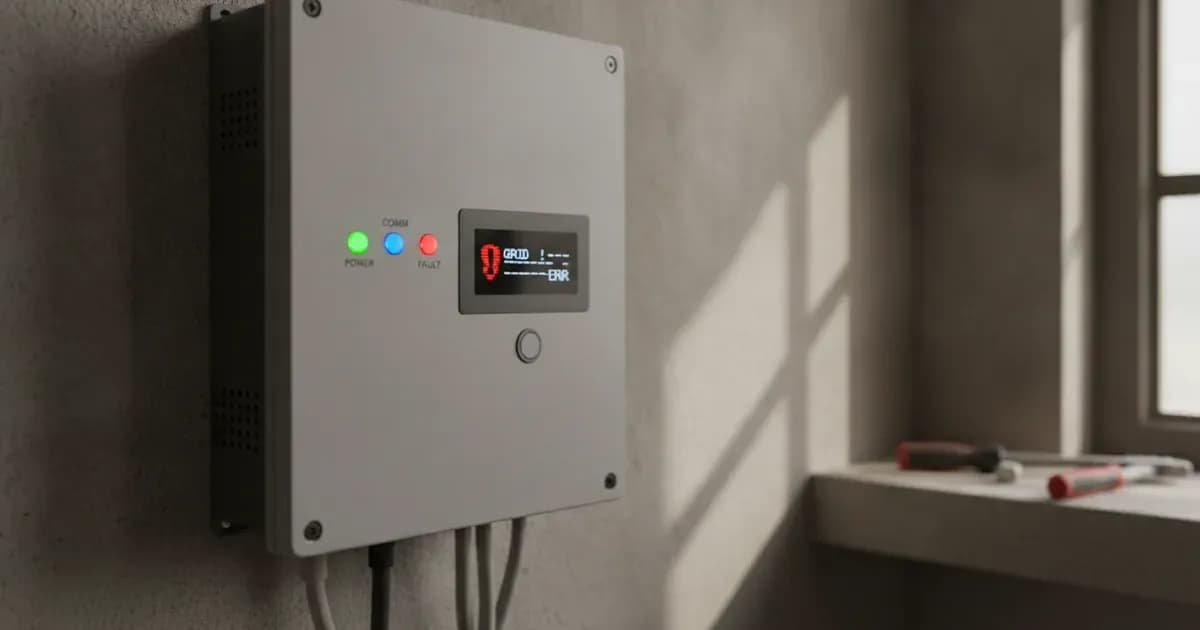
Grid fault codes on Huawei SUN2000 and SUN2000L inverters indicate an issue with the connection to the alternating current (AC) power grid. This means the inverter cannot safely export power to your home or the utility grid. The most common cause is a temporary grid instability, a power outage, or a disconnected AC circuit. The first thing you should check is the AC circuit breaker and the physical connections between your inverter and the grid.
Diagnosis
Follow these steps to diagnose a grid fault on your Huawei SUN2000 inverter. Always prioritize safety by ensuring all power is off before inspecting physical connections.
- Identify the Specific Fault Code:
- Check the inverter's display screen or access the FusionSolar (for L1 series) or FusionHome (for L series) app to view the active alarm code. Note down the specific code (e.g., 2032, 2033, 2034). This code will guide your troubleshooting.
- Verify AC Grid Status:
- Observe if other electrical appliances in your home are working. If there is a general power outage, the inverter will correctly disconnect from the grid for safety. The SUN2000 automatically recovers after detecting that the power grid becomes normal.
- If only your solar system is affected, proceed to the next step.
- Inspect AC Connections and Breakers:
- Locate the AC circuit breaker connected to your Huawei SUN2000 inverter. Ensure it is in the "ON" position. If it has tripped, reset it once. If it trips again immediately, do not force it back on.
- Visually inspect the AC output power cable connections at both the inverter and the grid connection point (e.g., main distribution board). Ensure all connections are tight and free from damage. Do not connect or disconnect power cables with power on.
- Check Grid Voltage and Frequency (if safe and equipped):
- If you are a qualified professional (certified electrician) with appropriate safety equipment, and have ensured the inverter is isolated from AC and DC power and waited 5 minutes for internal components to discharge to a safe voltage, you may measure the grid voltage and frequency at the inverter's AC output terminals. Be aware of potential burn hazards from hot surfaces. Failure to follow safety instructions can result in serious injury or death and void your warranty.
- Compare these readings to the inverter's specified operating range (e.g., Rated Output Voltage 220 V/230 V/240 V, Adapted Power Grid Frequency 50 Hz/60 Hz for L1 models).
- Significant deviations indicate a grid issue that may require intervention from your local power operator.
- Review Inverter Grid Protection Settings:
- Access the inverter's settings via the FusionSolar or FusionHome app. Navigate to the grid protection parameters.
- For alarms like "Grid Undervoltage" (2033), "Grid Overvoltage" (2034), "Grid Overfrequency" (2036), or "Grid Underfrequency" (2037), the manual states that you may modify the protection thresholds. This must only be done with the consent of the local power operator. Incorrect settings can cause instability or damage.
Cause/fix table section
Symptom detail | Likely cause | Fix |
|---|---|---|
Inverter not generating power, code 2032 | Grid Failure (e.g., outage, AC circuit disconnected) | Check the AC voltage. Check whether the AC circuit is disconnected or the AC circuit breaker is OFF. |
Inverter not generating power, code 2033 | Grid Undervoltage | If occasional, inverter recovers automatically. If frequent, check if grid voltage is within allowed range. If not, contact local power operator. If yes, modify grid undervoltage protection threshold via app/SmartLogger/NMS with operator consent. Check connection between AC switch and output power cable. |
Inverter not generating power, code 2034 | Grid Overvoltage | If occasional, inverter recovers automatically. If frequent, check if grid voltage is within allowed range. If not, contact local power operator. If yes, modify grid overvoltage protection threshold via app/SmartLogger/NMS with operator consent. Check if peak grid voltage is too high. |
Inverter not generating power, code 2035 (SUN2000L only) | Unbalanced Grid Voltage | Check that the grid voltage is within the normal range. Check the connection of the AC output power cable. If the cable connection is proper but the alarm occurs frequently and affects the power production of the PV plant, contact the local power operator. |
Inverter not generating power, code 2036 | Grid Overfrequency | If occasional, inverter recovers automatically. If frequent, check if grid frequency is within allowed range. If not, contact local power operator. If yes, modify grid overfrequency protection threshold via app/SmartLogger/NMS with operator consent. |
Inverter not generating power, code 2037 | Grid Underfrequency | If occasional, inverter recovers automatically. If frequent, check if grid frequency is within allowed range. If not, contact local power operator. If yes, modify grid underfrequency protection threshold via app/SmartLogger/NMS with operator consent. |
Inverter not generating power, code 2038 | Unstable Grid Frequency | If occasional, inverter recovers automatically. If frequent, check if grid frequency is within allowed range. If not, contact local power operator. |
Inverter not generating power, code 2039 | Output Overcurrent | Inverter detects external working conditions and recovers automatically. If frequent, check for output short-circuit. If fault persists, contact dealer or Huawei technical support. |
Inverter not generating power, code 2040 | Output DC Component Overhigh | Inverter detects external working conditions and recovers automatically. If frequent, contact dealer or Huawei technical support. |
Inverter not generating power, code 2051 | Abnormal Residual Current | If occasional, inverter recovers automatically. If frequent, check if impedance between PV string and ground is too low. |
Inverter not generating power, code 2061 (SUN2000L only) | Abnormal Grounding | If you are a qualified professional (certified electrician) and have ensured the inverter is isolated from AC and DC power and waited 5 minutes for internal components to discharge to a safe voltage, check that the PE cable for the SUN2000L is connected properly. Check that the voltage between the SUN2000L neutral wire and ground is within the normal range. If an isolation transformer is connected, set OFF due to abnormal grounding to Disable. Be aware of potential burn hazards from hot surfaces. Failure to follow safety instructions can result in serious injury or death and void your warranty. |
Inverter not generating power, code 2062 | Low Insulation Resistance | If you are a qualified professional (certified electrician) and have ensured the inverter is isolated from AC and DC power and waited 5 minutes for internal components to discharge to a safe voltage, check the output impedance of the PV array to ground and rectify any short circuits or poor insulation. Also, check that the PE cable of the SUN2000 is correctly connected. If impedance is low in rainy/cloudy days, set Insulation resistance protection using the mobile app, SmartLogger, or NMS. Be aware of potential burn hazards from hot surfaces. Failure to follow safety instructions can result in serious injury or death and void your warranty. |
Inverter not generating power, code 2063 | Overtemperature | Check the ventilation and ambient temperature of the SUN2000 installation position. If the ventilation is poor or the ambient temperature exceeds the upper threshold, improve the ventilation and heat dissipation. When working near the inverter, be aware that the enclosure and heat sink can be very hot during operation, posing a burn risk. Ensure proper electrical safety if any electrical components are accessed. Failure to follow safety instructions can result in serious injury or death and void your warranty. |
Inverter not generating power, code 2064 | Device Fault | Ensure all power is off and wait 5 minutes for internal components to discharge to a safe voltage before operating the AC output switch and DC input switch. Then, turn them on after 5 minutes. If the fault persists, contact your supplier. Failure to follow safety instructions can result in serious injury or death and void your warranty. |
Inverter not generating power, code 2070 (SUN2000-L1 only) | Active Islanding | Check that the grid connection voltage of the SUN2000 is normal. |
Inverter not generating power, code 2011 (SUN2000-L1) | String Reversed | If you are a qualified professional (certified electrician) and have ensured the inverter is isolated from AC and DC power and waited 5 minutes for internal components to discharge to a safe voltage, check whether the PV string is reversely connected to the SUN2000. If yes, wait until the PV string current decreases below 0.5 A, set DC switch to OFF, and adjust the PV string polarity. Be aware of potential burn hazards from hot surfaces. Failure to follow safety instructions can result in serious injury or death and void your warranty. |
Inverter not generating power, code 2011 (SUN2000L) | String Reversed | If you are a qualified professional (certified electrician) and have ensured the inverter is isolated from AC and DC power and waited 5 minutes for internal components to discharge to a safe voltage, check whether the PV string is reversely connected to the SUN2000L. If so, wait until the solar irradiance declines at night and the PV string current reduces to below 0.5 A, then turn off the DC switch and safely correct the PV string polarity. Be aware of potential burn hazards from hot surfaces. Failure to follow safety instructions can result in serious injury or death and void your warranty. |
Inverter not generating power, code 2021 | AFCI Check Failure | Ensure all power is off and wait 5 minutes for internal components to discharge to a safe voltage before operating the AC output switch and DC input switch. Then, turn them on after 5 minutes. If the fault persists, contact your dealer or Huawei technical support. Failure to follow safety instructions can result in serious injury or death and void your warranty. |
Inverter not generating power, code 61440 (SUN2000-L1) | Monitoring Unit Faulty | Ensure all power is off and wait 5 minutes for internal components to discharge to a safe voltage before operating the AC output switch and DC input switch. Then, turn them on after 5 minutes. If the fault persists, replace the monitoring board or contact your dealer Huawei technical support. Failure to follow safety instructions can result in serious injury or death and void your warranty. |
Inverter not generating power, code 2075 (SUN2000L) | Peripheral Port Short Circuit | If you are a qualified professional (certified electrician) and have ensured the inverter is isolated from AC and DC power and waited 5 minutes for internal components to discharge to a safe voltage, turn off the AC and DC switches on the SUN2000L and safely disconnect the peripheral from the Alarm port. Then power on the SUN2000L again and clear the alarm manually. If the alarm persists, contact your supplier to rectify the fault. If the alarm is cleared, it indicates that the port on the SUN2000L is normal. Then, if you are a qualified professional (certified electrician) and have ensured the peripheral is de-energized, safely check that the pins in the power port on the peripheral are not short-circuited. Failure to follow safety instructions can result in serious injury or death and void your warranty. Replace the peripheral, and then start a self-check to check that the port functions properly. If you are a qualified professional (certified electrician) and have ensured the inverter is isolated from AC and DC power and waited 5 minutes for internal components to discharge to a safe voltage, safely replace the peripheral, and then start a self-check to check that the port functions properly. Be aware of potential burn hazards from hot surfaces. Failure to follow safety instructions can result in serious injury or death and void your warranty. |
Grid Protection Behavior and Settings
Huawei SUN2000 inverters incorporate various grid protection features to ensure safe and stable operation. These protections are designed to disconnect the inverter from the grid if conditions fall outside acceptable parameters, preventing damage to the inverter and ensuring grid stability.
Both SUN2000-(2KTL-5KTL)-L1 and SUN2000L-(2KTL-5KTL) series inverters support anti-islanding protection, which prevents the inverter from feeding power into a grid segment that has been disconnected from the main utility. They also feature DC reverse polarity protection, insulation monitoring, residual current monitoring, AC short-circuit protection, AC overcurrent protection, DC surge protection, AC surge protection, and AC overvoltage protection. The L1 series additionally features overtemperature protection. The SUN2000-L1 series additionally supports arc fault protection.
For the SUN2000L series, additional features like Low Voltage Ride-Through (LVRT) and High Voltage Ride-Through (HVRT) can be enabled or disabled. LVRT allows the inverter to remain connected during temporary grid voltage sags, with a threshold for triggering LVRT between 50%Vn and 92%Vn. HVRT allows it to remain connected during temporary grid voltage swells, with a threshold between 105%Vn and 130%Vn. These settings, along with frequency change rate protection, are configurable but should only be adjusted by qualified personnel with grid operator approval. The SUN2000L also has an "OFF due to abnormal grounding" setting, which is enabled by default but can be disabled if an isolation transformer is connected and the inverter is properly grounded.
Safety: Electrical Hazards and High Temperatures
Working with solar inverters involves significant electrical hazards. Huawei manuals emphasize that only qualified professionals or trained personnel (certified electricians) should perform installation, operation, and maintenance.
- Electrical Shock Hazard: Never work with power on during installation. Ensure proper grounding for all equipment. Do not connect or disconnect power cables while the system is energized. All electrical connections must comply with local standards.
- Delayed Discharge: After power-off, high voltage can persist within the inverter. It takes approximately 5 minutes for the internal components to discharge to a safe voltage. Always wait this specified time before touching internal components.
- Burn Warning: The inverter's enclosure and heat sink can become very hot during operation. Avoid touching these surfaces to prevent burns. The operating temperature range for L1 models is –25° C to +60° C, with derating above +45° C. For L models, it is –30° C to +60° C, also derated above +45° C.
- Battery Safety: If your system includes a battery, be aware that battery short circuits can cause personal injury or fire. Never connect or disconnect battery cables when the inverter is running. Ensure the DC switch and all other switches are OFF before connecting battery cables.
When to call a technician instead
While some grid fault issues can be resolved with basic checks, there are clear limits to DIY troubleshooting. You should call a qualified technician or your installer if:
- The AC circuit breaker repeatedly trips after being reset.
- The fault code persists after you have performed all basic checks (e.g., checking connections, verifying grid status).
- You encounter a "Device Fault" alarm (code 2064), which indicates an internal inverter malfunction.
- You are asked to modify grid protection thresholds by your local power operator, as this requires specific knowledge and tools.
- You are uncomfortable or unsure about any step in the troubleshooting process, especially those involving electrical measurements or internal components.
- The issue involves a "Monitoring Unit Faulty" (code 61440) or "Faulty Power Collector" (code 2067) alarm, as these often require specialized diagnosis and part replacement.
- Any fault persists for a long time and affects the energy yield of your power plant.
Attempting repairs or modifications beyond the scope of basic checks can void your warranty, damage the equipment, or pose serious safety risks. Always consult the official Huawei manual for your specific inverter model or contact authorized service personnel.
Still showing the fault? Book a technician
If the steps above did not clear it, tell us the inverter or battery and the exact code. We pass it to a technician who covers your city; visit charges are quoted before they come.
How this pays for the site: the technician or verifier pays SolarNevs a fixed introduction fee. Nobody pays to be recommended, and you are free to use our free guides instead.
Frequently asked questions
What does 'Grid Failure' (code 2032) mean on a Huawei SUN2000 inverter?
The 'Grid Failure' alarm (code 2032) indicates that the inverter has detected an issue with the AC grid connection, such as a power outage or a disconnected AC circuit. The inverter will stop generating power to protect itself and the grid.
How do I fix a 'Grid Undervoltage' (code 2033) alarm on my Huawei SUN2000 inverter?
If the 'Grid Undervoltage' alarm (code 2033) occurs occasionally, the power grid may be temporarily abnormal, and the SUN2000 automatically recovers. If it occurs frequently, check if the power grid voltage is within the allowed range. If not, contact your local power operator. If it is within range, you may modify the grid undervoltage protection threshold through the mobile app, SmartLogger, or NMS with the consent of the local power operator.
Why does my Huawei SUN2000 inverter show 'Grid Overfrequency' (code 2036)?
A 'Grid Overfrequency' alarm (code 2036) means the grid frequency is outside the acceptable range. If the alarm occurs occasionally, the power grid may be temporarily abnormal, and the SUN2000 automatically recovers. If it occurs frequently, check whether the power grid frequency is within the allowed range. If not, contact the local power operator. If it is within range, you may modify the grid overfrequency protection threshold through the mobile app, SmartLogger, or NMS with the consent of the local power operator.
What is 'Active Islanding' (code 2070) on a Huawei SUN2000-L1 inverter?
The 'Active Islanding' alarm (code 2070) indicates that the SUN2000-L1 inverter has detected that it is operating independently of the main grid. To address this, you should check that the grid connection voltage of the SUN2000 is normal.
Can I adjust grid protection thresholds on my Huawei SUN2000 inverter?
Yes, for issues like grid undervoltage, overvoltage, overfrequency, and underfrequency, you can modify protection thresholds through the mobile app, SmartLogger, or NMS. However, this must always be done with the explicit consent of your local power operator to ensure grid stability and safety.
References
- Huawei SUN2000-(2KTL-5KTL)-L1 User Manual — accessed 23 August 2026
- Huawei SUN2000L-(2KTL-5KTL) User Manual — accessed 23 August 2026
Related guides
More from inverter errors & fixes.