Solis Battery Communication Fault: Troubleshooting 'CAN Fail' Error
Updated 7 September 2026 · By SolarNevs Research Desk, Dealer surveys + verified sources · 1 source · Method ↗
Key Takeaways
- The "CAN Fail" error on your Solis inverter most often points to a problem with the communication cable or connection between the inverter and the battery.
- Always begin troubleshooting by physically inspecting the communication cable and ensuring it is correctly and securely connected.
- Before touching any wiring or internal components, disconnect all power sources to the inverter and battery to prevent electrical hazards.
- If basic cable and connection checks do not resolve the issue, or if you suspect internal damage, contact a qualified technician.
Safety: Disconnecting Power and Handling Components
Working with solar inverters and batteries involves significant electrical hazards. Always prioritize safety.
- Disconnect All Power: Before performing any inspection or maintenance, ensure the inverter is completely isolated from all power sources. This includes the utility grid, the PV array, and the battery. The PV array supplies a DC voltage when exposed to sunlight, even if the inverter is off.
- Wait 5 Minutes: Do not touch any inner live parts until 5 minutes after disconnection from the utility grid and the PV input. This allows capacitors within the inverter to discharge, reducing the risk of electric shock.
- Wear Protective Gear: The operator must wear technicians’ gloves during the whole process in case of any electrical hazards.
- No User-Serviceable Parts: There are no user-serviceable parts inside the Solis inverter. Refer servicing to qualified and accredited service technicians. Removing the cover without authorization may void the warranty.
- Hot Surfaces: The surface temperature of the inverter can reach up to 75℃ (167℉). To avoid risk of burns, do not touch the surface of the inverter while it’s operating. Turn off the inverter and let it cool down before any maintenance or cleaning.
- Battery Compatibility: The inverter must be installed with compatible battery models. Any defect, damage or collateral loss due to using a non-compatible battery is not in the scope of inverter warranty or compensation.
What does 'CAN Fail' mean on your Solis inverter?
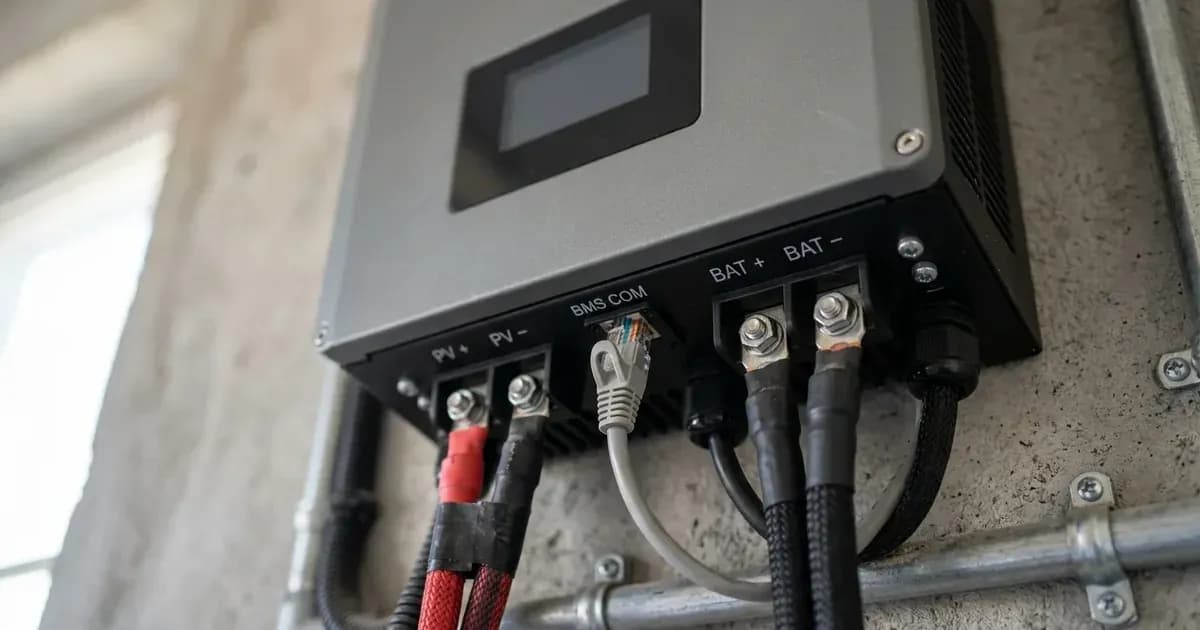
The "CAN Fail" error displayed on your Solis S5-EH1P-L hybrid inverter indicates a communication breakdown between the inverter and your lithium battery's Battery Management System (BMS). This means the inverter cannot properly exchange data with the battery, which is essential for safe and efficient operation. The most common cause is an issue with the CAN communication cable or its connections.
Diagnosis
WARNING: Always refer to the 'Safety: Disconnecting Power and Handling Components' section at the beginning of this article and follow all precautions before attempting any diagnostic steps involving physical interaction with the inverter or battery.
Follow these steps to diagnose the "CAN Fail" error on your Solis inverter. Always ensure proper safety precautions are followed before proceeding.
- Check the Inverter Display: Confirm that the LCD screen on your Solis inverter explicitly displays the "CAN Fail" error code. This verifies the specific fault you are troubleshooting.
- Power Down the System: Before inspecting any cables, turn off the inverter and the battery. Disconnect the AC input, PV input, and then the battery. Wait at least 5 minutes after disconnecting all power sources before proceeding, as energy can remain stored in capacitors.
- Inspect the CAN Communication Cable:
- Visually examine the entire length of the CAN cable connecting the inverter to the battery. Look for any signs of physical damage, such as cuts, kinks, or frayed insulation.
- Ensure the cable is securely plugged into the designated CAN port on both the Solis inverter and the battery. A loose connection is a frequent cause of communication errors.
- Verify that you are using the correct type of CAN cable as specified by your battery manufacturer. Some batteries require a special cable.
- Verify Battery Compatibility: Confirm that your connected lithium battery model is listed as compatible with the Solis S5-EH1P-L series inverter. The inverter must be installed with compatible battery models.
- Check Battery Voltage: The manual suggests verifying the battery voltage is within standards if a "NO-Battery" error occurs, which can sometimes be related to communication issues. Measure the battery voltage at the inverter connection point using a multimeter.
- Confirm Battery Brand Selection: If the inverter displays a "BatName-FAIL" error, it indicates an incorrect battery brand selection. Access the inverter's settings and ensure the selected battery model matches your actual battery. This function is for authorised technicians only, and improper access may void the warranty.
Cause/fix table section
Symptom detail | Likely cause | Fix |
|---|---|---|
"CAN Fail" on LCD | CAN communication failure between inverter and battery | Check cable conditions, ensure it is plugged into the correct CAN port on both the battery and inverter, and confirm you are using the right cable type. |
"BatName-FAIL" on LCD | Wrong battery brand selection in inverter settings | Confirm whether the battery model selection in the inverter's settings is consistent with the actual battery installed. |
"NO-Battery" on LCD | Battery is not connected or battery voltage is outside standard range | Verify the battery voltage is within standards. Measure battery voltage at the inverter connection point. |
"OV-Vbatt" or "UN-Vbatt" on LCD | Battery overvoltage or undervoltage detected | Verify battery voltage is within standards. Measure battery voltage at the inverter connection point. If the fault persists after restarting the system, contact the battery manufacturer. |
"OV-Vbatt-H/OV-BUS-H" on LCD | Battery overvoltage hardware failure or VBUS fault | Check if the battery circuit breaker is tripping. Check if the battery is damaged. |
Communication Protocols and Settings
The Solis S5-EH1P-L inverter uses a dedicated CAN Port for communication with lithium battery Battery Management Systems (BMS). This port facilitates the exchange of critical data, such as State of Charge (SOC), voltage, and current, allowing the inverter to manage battery charging and discharging effectively.
The manual lists several compatible lithium-ion battery models for the Solis S5-EH1P-L series, including:
- BYD Box Pro 2.5-13.8
- LG Energy Solution RESU 3.3/6.5/10/13 (CEI 0-21)
- Pylontech US2000(CEI 0-21)/US3000(CEI 0-21)/ForceL1/ForceL2/Phantom-S/US2000C/US3000C/UP5000
- Dyness Powerdepot/Powerbox/B4850
- Puredrive 48V-100Ah
- AOBOET Uhome-LFP 6.8kWh
- WECO 5K3-R20
- Green Home E11
- Soluna 4K PACK
- Highstar HSD5870
- Freedom Won Lite FL5.2
- KODAK LV5200
- FOX L051100-A
- CATL GSL 51.2V-100Ah
- ZETARA POWER 48V-100Ah
For lithium-ion batteries, the inverter typically communicates with the battery's BMS to determine charge and discharge parameters. The manual provides SOC-based settings for lithium-ion batteries:
- OverDischg SOC: Default 20%, adjustable from 10% to 40%.
- ForceCharge SOC: Default 10%, adjustable from 5% to OverDischg SOC.
- ForceChg Limit: Default 100A, adjustable from 0A to 100A.
These settings allow you to define the battery's operational limits, but the BMS of the compatible battery primarily dictates the specific voltage and current profiles.
When to call a technician instead
You should contact a qualified and accredited service technician if:
- The "CAN Fail" error persists after you have thoroughly checked the communication cable, its connections, and confirmed battery compatibility.
- You observe any physical damage to the inverter or battery communication ports that you cannot safely address.
- The inverter displays other internal fault codes alongside "CAN Fail" that suggest a more complex issue.
- You are unsure about any step in the troubleshooting process or uncomfortable working with high-voltage electrical systems.
- Accessing advanced settings is required, as this function is for authorised technicians only, and improper access and operation may result in abnormal results and damage to the inverter, potentially voiding the warranty.
Attempting repairs beyond basic external checks can be dangerous and may void your Solis inverter's warranty.
Still showing the fault? Book a technician
If the steps above did not clear it, tell us the inverter or battery and the exact code. We pass it to a technician who covers your city; visit charges are quoted before they come.
How this pays for the site: the technician or verifier pays SolarNevs a fixed introduction fee. Nobody pays to be recommended, and you are free to use our free guides instead.
Frequently asked questions
What does 'CAN Fail' mean on a Solis inverter?
The 'CAN Fail' error on a Solis inverter indicates a communication failure between the inverter and the connected lithium battery's Battery Management System (BMS). This typically means the inverter cannot properly exchange data with the battery.
How do I check the battery communication cable for a Solis inverter?
Before any physical inspection, you must first completely isolate the inverter from all power sources (utility grid, PV array, and battery). Wait at least 5 minutes after disconnection to allow capacitors to discharge. Wear technicians’ gloves. Note that there are no user-serviceable parts inside the inverter, and removing the cover without authorization may void the warranty. Once these safety precautions are strictly followed, visually inspect the CAN cable for any damage, kinks, or loose connections. Ensure it is securely plugged into the designated CAN port on both the Solis inverter and the battery. Verify you are using the correct cable type as specified by your battery manufacturer.
What batteries are compatible with Solis S5-EH1P-L inverters?
The Solis S5-EH1P-L series is compatible with several lithium-ion battery models, including BYD Box Pro 2.5-13.8, LG Energy Solution RESU 3.3/6.5/10/13 (CEI 0-21), Pylontech US2000(CEI 0-21)/US3000(CEI 0-21)/ForceL1/ForceL2/Phantom-S/US2000C/US3000C/UP5000, Dyness Powerdepot/Powerbox/B4850, Puredrive 48V-100Ah, AOBOET Uhome-LFP 6.8kWh, WECO 5K3-R20, Green Home E11, Soluna 4K PACK, Highstar HSD5870, Freedom Won Lite FL5.2, KODAK LV5200, FOX L051100-A, CATL GSL 51.2V-100Ah, and ZETARA POWER 48V-100Ah.
Can I use a non-compatible battery with my Solis inverter?
No, the inverter must be installed with compatible battery models. Using a non-compatible battery may lead to defects, damage, or collateral loss, and any such issues are not covered by the inverter's warranty or compensation.
What is the CAN port used for on a Solis inverter?
The CAN Port on a Solis S5-EH1P-L inverter is primarily used for CAN communication between the inverter and a lithium battery's BMS. It can also be optionally used for connecting a battery temperature sensor when a lead-acid battery is in use.
References
- Solis S5-EH1P(3-6)K-L EUR Inverter Manual V1.3 — accessed 23 August 2026
Related guides
More from inverter errors & fixes.