Hybrid Inverter Not Exporting to Grid: Troubleshooting Guide
Updated 6 September 2026 · By SolarNevs Research Desk, Dealer surveys + verified sources · 7 sources · Method ↗
Key Takeaways
- The most common reasons for no grid export are incorrect inverter settings or issues with the Current Transformer (CT) or smart meter.
- Always begin troubleshooting by checking your inverter's display or monitoring app for its current operating mode and any error codes.
- Before touching any wiring, always isolate all power sources to the inverter, including PV, battery, and AC grid connections.
- If persistent insulation faults, arc faults, or internal hardware errors appear, stop DIY troubleshooting and contact a qualified technician.
Why is my hybrid inverter not exporting power to the grid?
Your hybrid inverter may not be exporting power to the grid primarily due to incorrect configuration settings or issues with the external metering devices like Current Transformers (CTs) or smart meters. The first step is to check the inverter's display or monitoring application for its current operating mode and any related alarms.
Diagnosis
Follow these steps to diagnose why your hybrid inverter is not exporting power to the grid.
- Check Inverter Operating Mode:
- Observation: The inverter display or monitoring app shows a "Zero Export" or "Self-Use" mode active.
- Meaning: The inverter is intentionally preventing power export to the grid. This is a common setting to maximize self-consumption or comply with local regulations.
- Action: Proceed to the "Understanding Inverter Export Settings" section to adjust the mode for your specific inverter brand.
- Verify CT/Smart Meter Installation:
- Observation: The inverter displays an error related to the CT or smart meter, or the export readings are inaccurate/zero despite sufficient PV generation.
- Meaning: The inverter relies on these devices to measure grid power flow and control export. Incorrect installation, wiring, or a faulty device will prevent proper export.
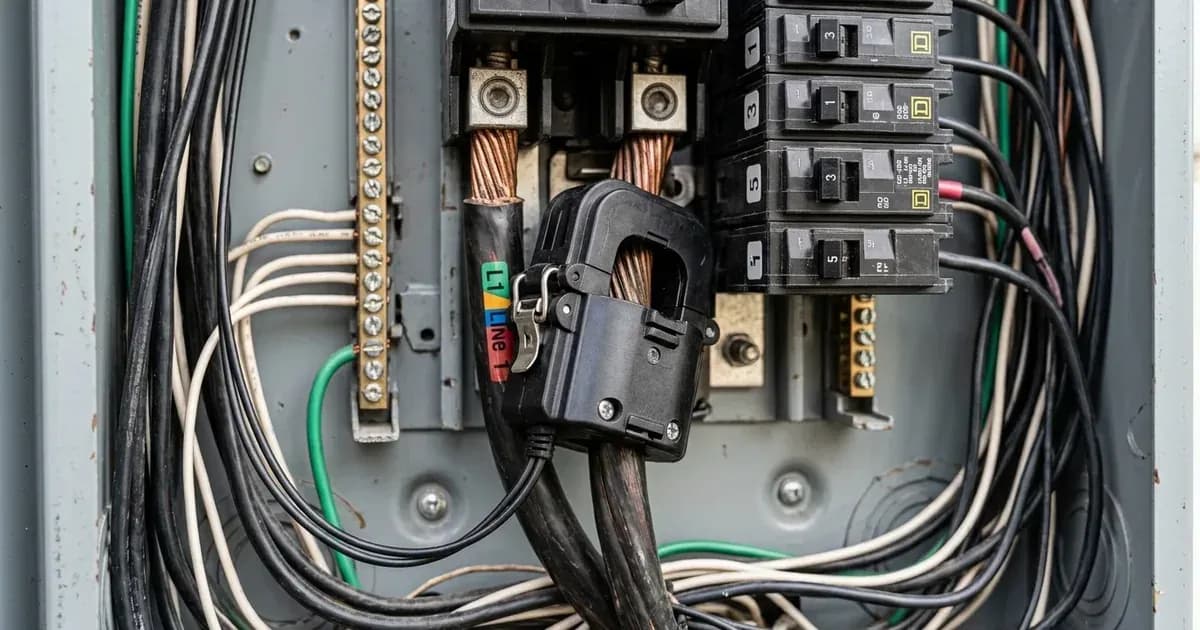
- Action: Check the physical installation of the CT or smart meter, paying close attention to wiring and arrow direction as specified in your inverter's manual.
- Inspect Grid Connection Status:
- Observation: The inverter shows a "Grid Fault" or "Anti-islanding" alarm, or the grid connection indicator is off.
- Meaning: The inverter has detected an issue with the utility grid connection or has intentionally disconnected for safety. This prevents any power export.
- Action: Ensure the AC grid breaker is on. If the fault persists, contact your utility provider or a qualified electrician.
- Look for Specific Error Codes:
- Observation: The inverter displays error codes such as "Isolation Failure," "ARC Fault," or "Residual Current Fault."
- Meaning: These codes indicate safety-related issues that will prevent the inverter from operating, including exporting to the grid.
- Action: Refer to the "Cause/fix table" for specific error code meanings and initial troubleshooting steps. These often require professional attention.
Cause/fix table
Symptom detail | Likely cause | Fix |
|---|---|---|
Inverter not exporting, "Zero Export" mode active (Deye SG03LP1/SG01LP1) | Inverter configured to prevent grid export. | Change setting from "Zero Export To Load" or "Zero Export To CT" to "Selling First" mode. |
Inverter not exporting, "Grid connection with zero power" active (GoodWe ET, Huawei SUN2000-L1) | Inverter configured to prevent grid export. | Change "Grid-tied point control" to "Unlimited" or "Grid connection with limited power (kW)/(%)". |
Inverter not exporting, "Self Use Mode" or "Backup Mode" active (Solis S5-EH1P-L) | Inverter configured to prioritize self-consumption or backup, not grid export. | Change "Storage Mode Select" to "Feed In Priority Mode". |
Inverter not exporting, "Export power Set" OFF or "Backflow Power" 0W (Solis S5-EH1P-L) | Export control function disabled or set to zero. | Set "Export power Set" to ON and configure "Backflow Power" to allow desired export (e.g., a value greater than 0W). |
Inverter not exporting, CT/smart meter error or inaccurate readings (Deye, GoodWe, Solis, Fox ESS) | Incorrect CT/smart meter installation, wiring, or faulty device. | Verify CT arrow direction (Deye SG03LP1: arrow to inverter; Deye SG01LP1: arrow to grid; GoodWe ET: "House(K) →Grid(L)"; Solis S5-EH1P-L: arrow to grid; Fox ESS H1(G2): arrow to grid). Check RS485 connections (e.g., Deye CHNT DDSU666: RS485B, RS485A; Solis Eastron SDM120CT: Pin 9 – RS485B, Pin 10 – RS485A). |
Inverter not exporting, "Iso Fault" or "Residual Current Fault" (Fox ESS H1(G2)) | Insulation problem or high residual current detected. | Check if the insulation of electric wires is damaged. Wait for a while to check if back to normal. If persists, seek help. |
Inverter not exporting, "Isolation Failure" (GoodWe ET) | Ground insulation impedance of PV string is too low. | Check resistance between earth & inverter frame (should be close to zero). Check resistance between PV+/PV-/BAT+ and earth. Restart inverter. |
Inverter not exporting, "2062 Low Insulation Resistance" (Huawei SUN2000-L1) | Low insulation resistance in PV array. | Check PV array output impedance to ground. Check PE cable connection. If persists, set Insulation resistance protection via app/SmartLogger/NMS. |
Growatt SPF ES inverter not exporting to grid | Growatt SPF ES is an off-grid inverter. | This inverter model is not designed for grid-tied operation or export. |
Understanding Inverter Export Settings
Hybrid inverters offer various modes to manage power flow between PV, battery, load, and the grid. If your inverter is not exporting, the first area to check is its operational settings.
Deye SG03LP1 and SG01LP1 Series
Deye inverters provide distinct settings to control grid export:
- Zero Export To Load: "Hybrid inverter will only provide power to the backup load connected. The hybrid inverter will neither provide power to the home load nor sell power to grid." For SG01LP1, this is true "if the 'solar sell' behind is not enabled." The built-in CT detects and reduces power.
- Zero Export To CT: "Hybrid inverter will not only provide power to the backup load connected but also give power to the home load connected. If PV power and battery power is insufficient, it will take grid energy as supplement. The hybrid inverter will not sell power to grid." For SG01LP1, this is true "if the 'solar sell' behind is not enabled." This mode requires an external CT or smart meter.
- Selling First: "This Mode allows hybrid inverter to sell back any excess power produced by the solar panels to the grid." The PV energy is used for the load, then to charge the battery, and then excess energy flows to the grid. If time of use is active, battery energy can also be sold to the grid.
- Zero-export Power: For zero-export modes, this parameter sets the grid output power. It is "Recommend to set it as 20-100W to ensure the hybrid inverter won't feed power to grid."
- Export power limiter (SG01LP1 only): This setting "is used to setup the maximum output power allowed to flow to grid." For a SUN-7.6K-SG01LP1-EU, the limit is 8820W, and for a SUN-8K-SG01LP1-EU, it is 8320W.
For Deye SG03LP1 models, the CT arrow should point towards the inverter. For Deye SG01LP1 models, the CT arrow should point towards the grid. For meter connections, Deye SG03LP1 and SG01LP1 use RS485 for CHNT DDSU666 (RS485B, RS485A) and EASTRON SDM630 (RS485B, RS485A).
Growatt SPF ES Series
It is important to note that the Growatt SPF ES series, including models like the SPF 3500 ES and SPF 5000 ES, is described as a "multifunctional off grid solar inverter." This means these inverters are designed to operate independently of the utility grid and do not support grid-tied operation or power export. If you have a Growatt SPF ES inverter, it will not export to the grid by design.
GoodWe ET Series
GoodWe ET inverters use "Grid-tied point control" to manage export:
- Unlimited: Allows full export of excess power to the grid.
- Grid connection with zero power: Configures the inverter to export zero power to the grid. This requires a Smart Meter with a CT. The closed-loop controller can be set to "SDongle/SmartLogger" for cascaded systems or "Inverter" for a single unit. The limitation mode is "Total power."
- Grid connection with limited power (kW) or (%): Configures the inverter to limit power export to a specified value. This also requires a Smart Meter with a CT. The "Maximum grid feed-in power" specifies the active power transmitted to the grid.
A Smart Meter with a CT is "compulsory for ET system installation." The CT direction must be "House(K) →Grid(L)."
Solis S5-EH1P-L Series
Solis inverters use "Storage Mode Select" to determine power flow:
- Self Use Mode: "PV Power Using Priority: Load>Battery>Grid." This mode maximizes self-consumption, storing excess PV in the battery before exporting.
- Feed In Priority Mode: "PV Power Using Priority: Load>Grid>Battery." This mode prioritizes feeding excess PV to the grid after serving the load, often used to gain subsidies, then charges the battery.
- Export power Set: This function enables or disables export control. It must be ON to allow export.
- Backflow Power: This parameter "is to set the max allowed export power at the meter location." If set to 0W, no power will be exported.
- FailSafe ON/OFF: If ON, "the inverter will shutdown once it loses communication with the meter in case of any backflow power exceeding the limit."
For Solis S5-EH1P-L, the CT orientation "must be correct, otherwise the system will not work properly." The arrow on the CT should point "towards to grid." For Eastron SDM120CT, RS485 Pin 9 is RS485B and Pin 10 is RS485A. For Acrel ACR10R-16DTE, RS485 Pin 7 is RS485B and Pin 8 is RS485A.
Huawei SUN2000-L1 Series
Huawei inverters also use "Grid-tied point control":
- Unlimited: Allows full export.
- Grid connection with zero power: Configures the inverter to export zero power. The closed-loop controller can be set to "SDongle/SmartLogger" for cascaded systems or "Inverter" for a single unit. The limitation mode is "Total power."
- Grid connection with limited power (kW) or (%): Configures the inverter to limit power export to a specified value. The "Maximum grid feed-in power" specifies the active power transmitted to the grid.
A power meter (DDSU666-H or DTSU666-H) is required for grid-tied point control (zero export).
Fox ESS H1(G2) Series
Fox ESS inverters use "Export limitation setting":
- Soft Limit: "After setting the Export Limit value, the inverter export power is limited to below the set value within 15s."
- Hard Limit: "After setting the Export Limit value, the inverter will detect the export power in real time according to the CT or meter, and trigger the inverter to disconnect from the grid and shut down if the soft limit time requirement is not met; if the CT or meter communication is lost, the inverter will also trigger the disconnection and shut down."
For Fox ESS H1(G2), the CT "should be clamped on the main live line of the grid side. The arrow on the CT should be pointing towards the grid." The white cable connects to CT+, and the black cable connects to CT-. A "Meter/CT Self-Test Function" is available on the screen, which "can only be applied when both the battery and the grid are connected."
Safety
Working with hybrid inverters and grid connections involves high voltages and currents. Always prioritize safety.
- Isolate All Power: Before inspecting or adjusting any wiring, always ensure the inverter is completely de-energized. This means turning off the AC grid breaker, the DC PV input switch, and the battery disconnect switch.
- Insulated Tools: Use only insulated tools when working with electrical connections to prevent accidental short circuits or electric shock. A spanner across a battery bank can short hundreds of amps, causing severe burns and damage.
- CT/Meter Installation: When installing or checking Current Transformers (CTs) or smart meters, ensure the main grid power is off. Incorrect CT wiring or direction can lead to inaccurate readings and improper inverter operation, potentially causing backfeed into the grid when not intended.
- Anti-Islanding Protection: All listed hybrid inverters (Deye, GoodWe, Solis, Huawei, Fox ESS) include "Anti-islanding Protection." This critical safety feature automatically disconnects the inverter from the grid if the utility grid loses power, preventing dangerous backfeed into a de-energized grid. Do not attempt to bypass or disable this feature.
- Insulation Faults: If your inverter reports an "Isolation Failure," "Low Insulation Resistance," or "Res Cur Fault," it indicates a potential electrical leakage. This is a serious safety hazard. Do not operate the system until the fault is diagnosed and repaired by a qualified technician.
When to call a technician instead
While many export issues can be resolved with settings adjustments or simple wiring checks, some problems require professional intervention. You should call a qualified solar technician if:
- Persistent Error Codes: The inverter displays error codes related to internal hardware faults, insulation failures, or arc faults that do not clear after basic troubleshooting steps. For example, Deye's F30 (DC over current fault of the hardware), GoodWe's "Isolation Failure," Solis's "PV ISO-PRO" or "ARC-FAULT," Huawei's "2002 DC Arc Fault" or "2062 Low Insulation Resistance," or Fox ESS's "Iso Fault," "Res Cur Fault," or "Res Cur HW Fault" often indicate issues beyond DIY repair.
- Physical Damage: There is visible damage to the inverter, wiring, CT, or smart meter.
- Unexplained Behavior: The inverter behaves erratically, or you cannot determine the cause of the no-export issue despite following all troubleshooting steps.
- Warranty Concerns: You are unsure if performing a specific troubleshooting step might void your inverter's warranty. Always consult the manufacturer's warranty terms.
- Off-Grid Inverters: If you have an off-grid inverter, such as the Growatt SPF ES series, and are trying to make it export to the grid, a technician will confirm that the unit is not designed for this function.
- Grid Code Compliance: If you suspect the issue is related to complex grid code compliance settings or utility requirements, a professional can ensure your system meets local standards.
Still showing the fault? Book a technician
If the steps above did not clear it, tell us the inverter or battery and the exact code. We pass it to a technician who covers your city; visit charges are quoted before they come.
How this pays for the site: the technician or verifier pays SolarNevs a fixed introduction fee. Nobody pays to be recommended, and you are free to use our free guides instead.
Frequently asked questions
Why is my Deye inverter not exporting to the grid?
Your Deye inverter may be configured for 'Zero Export To Load' or 'Zero Export To CT' mode, preventing grid export. Check the 'Selling First' setting to allow export. Ensure the CT is correctly installed with the arrow pointing towards the inverter for SG03LP1 models, or towards the grid for SG01LP1 models, and that 'Zero-export Power' is set between 20-100W.
How do I enable grid export on my GoodWe ET inverter?
To enable grid export on a GoodWe ET inverter, ensure the 'Grid-tied point control' setting is not configured for 'Grid connection with zero power'. Select 'Unlimited' or 'Grid connection with limited power' and set the desired export limit. A Smart Meter with CT is compulsory for the ET system, and the CT direction must be 'House(K) →Grid(L)'.
What does 'Zero Export' mean for my hybrid inverter?
'Zero Export' means your inverter is configured to prevent any excess power from being sent back to the utility grid. This is typically achieved by monitoring grid flow with a Current Transformer (CT) or smart meter and adjusting inverter output to only meet local load demands and charge batteries.
Can my Growatt SPF ES inverter export power to the grid?
No, the Growatt SPF ES is a multifunctional off-grid solar inverter. It is designed to operate independently of the utility grid and does not support grid-tied operation or power export.
My Solis inverter is not exporting. What should I check?
For Solis S5-EH1P-L inverters, verify the 'Storage Mode Select' is set to 'Feed In Priority Mode' to prioritize grid export after loads. Ensure 'Export power Set' is ON and 'Backflow Power' is configured to allow export (e.g., not 0W). Check that the CT orientation is correct, with the arrow towards the grid.
What is anti-islanding protection and how does it affect grid export?
Anti-islanding protection is a safety feature that automatically disconnects your inverter from the grid if the utility grid loses power. This prevents the inverter from feeding power into a de-energized grid, which could endanger utility workers. All listed hybrid inverters, including Deye, GoodWe, Solis, Huawei, and Fox ESS, integrate this protection and will cease grid export if an islanding condition is detected.
References
- Deye SUN-3.6K-SG03LP1-EU Manual — accessed 23 August 2026
- Deye SUN-7.6K-SG01LP1-EU Manual — accessed 23 August 2026
- Growatt SPF 3500-5000 ES Manual — accessed 23 August 2026
- GoodWe ET User Manual — accessed 23 August 2026
- Solis S5-EH1P(3-6)K-L EUR Manual — accessed 23 August 2026
- Huawei SUN2000-L1 User Manual — accessed 23 August 2026
- Fox ESS H1(G2) Manual — accessed 23 August 2026
Related guides
More from inverter errors & fixes.