Tesla Inverter No Output: Troubleshooting and Fixes in Pakistan
Updated 7 September 2026 · By SolarNevs Research Desk, Dealer surveys + verified sources · 3 sources · Method ↗
Important Disambiguation: This article refers to solar inverters manufactured by Tesla Industries (Pvt) Ltd, an indigenous Pakistani company founded in 1992. Tesla Industries Pakistan has no affiliation, corporate relationship, or shared ownership with Tesla, Inc. / Tesla Motors (USA). Their products, such as Infinity HLE, HSC, HSE, and Axpert inverters, operate on separate platforms and are not compatible with US Tesla products. For information on Tesla Motors products in Pakistan, refer to our guide on /pk/guides/electric/tesla-in-pakistan-grey-import-reality-check.
Key Takeaways
- The most common reason for no output is critically low battery voltage or a tripped AC output breaker.
- Always start by checking the inverter's display for any active fault codes or a completely blank screen.
- Never attempt internal repairs on the inverter yourself; high DC voltages can be lethal.
- If basic checks like battery voltage, breakers, and standby mode do not restore output, contact an authorized technician.
Why is my Tesla inverter not providing any output power?
A Tesla inverter that shows no output power typically points to either a critically low battery state, an an active fault condition, or a tripped circuit breaker. The first step is to observe the inverter's display and status indicators to determine if it is completely off, showing a fault code, or appears to be on but without AC output.
Diagnosis Steps for No Output
Follow these steps to systematically diagnose why your Tesla inverter is not providing output power.
- Check the Inverter Display and Status Indicators.
- Completely Blank Screen: If the inverter's LCD display is dark, with no LEDs or buzzer response when you press the power switch, the battery voltage is likely far too low, below 1.4V per cell. This means less than 16.8V on a 24V bank or less than 33.6V on a 48V bank. It could also indicate reversed battery polarity.
- Brief Startup then Shutdown: If the LCD, LEDs, and buzzer activate for approximately 3 seconds during startup and then the unit shuts down completely, the battery voltage is too low to sustain operation. The inverter requires a minimum of 1.91V per cell to start, which is below 22.9V on a 24V bank or below 45.8V on a 48V bank.
- Display Active, No Fault Code, No Output: The inverter appears to be on, showing parameters on the LCD, but no power is delivered to your loads.
- Display Active, Showing Fault Code: The inverter is on and displaying a specific fault code (e.g., Fault 05, 07, 51, 58). Refer to our comprehensive guide on /pk/guides/fixes/tesla-pk-inverter-error-codes-list for a full list of Tesla inverter error codes.
- Verify Battery Voltage.
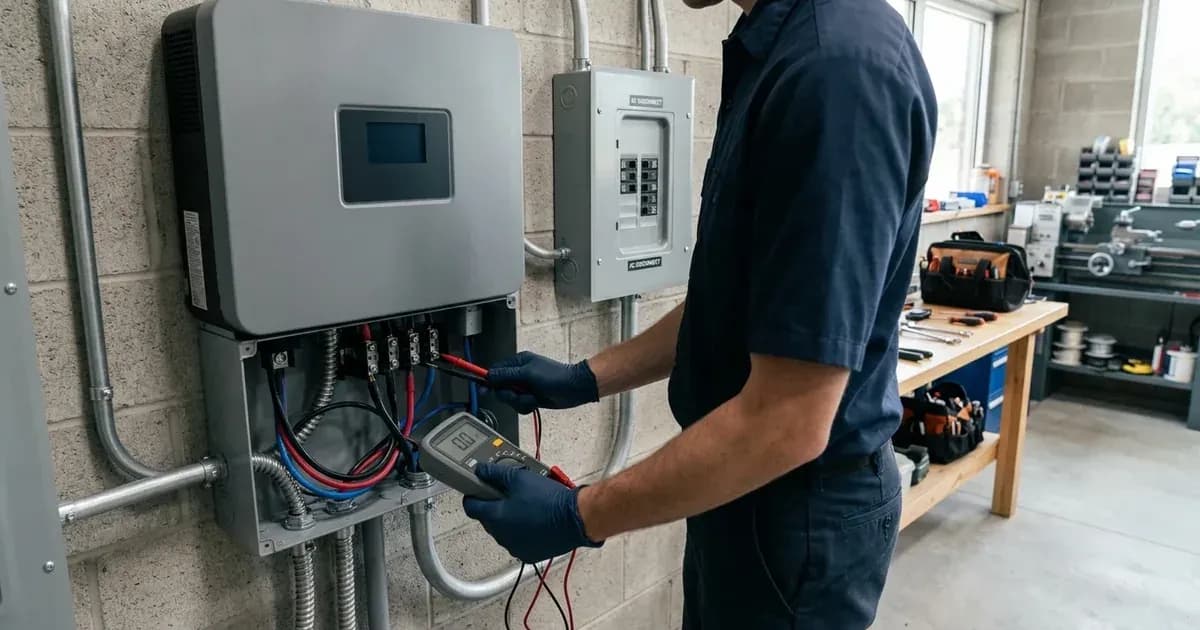
- If you are comfortable and qualified to do so, use a multimeter with insulated leads to measure the DC voltage directly across your battery terminals, ensuring all safety precautions are followed. When working near battery terminals or wiring, always use insulated tools to prevent accidental short circuits. If unsure, contact a qualified technician.
- Compare this reading against the low battery shutdown thresholds. If the voltage is too low, the inverter will not produce output.
- Ensure your battery bank is adequately charged from solar or the utility grid.
- Check the AC Output Circuit Breaker.
- Locate the AC output circuit breaker in your main distribution box or on the inverter itself (if equipped).
- If it is in the "OFF" or "TRIPPED" position, reset the AC output circuit breaker, ensuring you are comfortable and qualified to do so. If unsure, contact a qualified electrician. A tripped breaker indicates an overload or short circuit on the AC output side.
- Confirm Inverter is Not in Standby Mode.
- Ensure the power rocker switch, usually located on the bottom or side of the inverter, is in the "ON" position. If it is "OFF," the LCD may still display parameters if grid/PV is connected, but the inverter will not output power.
- Inspect for Fault Lockouts.
- Even if a fault code is not immediately visible, certain conditions can cause an inverter to enter a fault lockout state, preventing output. These include:
- Fault 05 (Output short circuited): A direct short on the AC output wiring.
- Fault 07 (Overload time out): Connected load exceeded the inverter's capacity for too long. For more details, see /pk/guides/fixes/tesla-pk-inverter-overload-fault-fix.
- Fault 02 (Over temperature): Internal temperature exceeded 100°C.
- Fault 51 (Over current or surge): An instantaneous current surge was detected.
- Fault 58 (Output voltage is too low): AC output voltage dropped below 190VAC.
- Check Cold Start Voltage Requirements.
- If you are attempting to start the inverter without any AC grid input, ensure the battery voltage meets the cold start requirements. Tesla 24V models need a minimum of 23.0Vdc, while 48V models require 46.0Vdc to initialize.
Cause/Fix Table for No Output
Symptom detail | Likely cause | Fix |
|---|---|---|
Inverter completely blank, no display, no LEDs, no buzzer | Battery voltage far too low (<1.4V/cell for 24V/48V systems) or reversed battery polarity. | If you suspect incorrect battery polarity, immediately contact a qualified technician. Do not attempt to check or correct battery wiring yourself. A spanner across a battery bank can short hundreds of amps, causing severe burns or explosions. Recharge battery from an external source or replace if faulty. |
Inverter LCD/LEDs/buzzer active for ~3 seconds, then shuts off | Battery voltage too low to sustain startup (<1.91V/cell for 24V/48V systems). | Recharge battery from an external source (grid or another charger) or replace battery. |
Inverter display active, no fault code, but no AC output | Inverter in standby mode (power switch OFF), AC output breaker tripped, or low battery DC cut-off reached. | Ensure inverter power rocker switch is ON. Reset the AC output circuit breaker, ensuring you are comfortable and qualified to do so. If unsure, contact a qualified electrician. Recharge battery. |
Inverter display active, showing Fault 05 | Output short circuited. | Turn off AC output breaker immediately; inspect load wiring, neutral loops, and appliances for short circuits. Clear the short and restart. |
Inverter display active, showing Fault 07 | Overload time out. | Reduce connected loads by switching off heavy appliances. Reset the inverter. Consider enabling overload bypass (Program 23) if applicable. |
Inverter display active, showing Fault 02 | Over temperature. | Ensure adequate ventilation (≥200mm side, ≥500mm top clearance). Ensure the inverter is fully powered down and isolated before carefully clearing air intake filters. Technicians must wait at least 5 minutes after isolating PV, battery, and AC grid disconnects before removing chassis covers. If unsure, consult the inverter manual or a technician. Reduce heavy continuous loads. Allow inverter to cool. |
Inverter display active, showing Fault 51 | Over current or surge. | Disconnect heavy motor startup loads. Restart the unit. If the error happens again, please return to a repair center. |
Inverter display active, showing Fault 58 | Output voltage is too low. | Reduce connected load. Check battery capacity and health. If unloaded output voltage remains low, service is required. |
Inverter does not start without grid power, even with charged battery | Battery voltage below cold start threshold. | Ensure 24V models have at least 23.0Vdc and 48V models have at least 46.0Vdc to cold start. |
Inverter Settings and Battery State
The operational state of your battery bank and specific inverter settings play a critical role in whether your Tesla inverter will provide output.
Low DC Cut-Off Voltage (Program 29): Tesla inverters are designed to protect your batteries from over-discharge. If the battery voltage drops below the set low DC cut-off voltage, the inverter will stop providing AC output to prevent irreversible battery damage.
- For 24V systems, the default low DC cut-off is 21.0V (AGM). For tubular batteries, a setting of 22.0V is often recommended to prevent deep sulfation, and for LiFePO4 batteries (when not using BMS communication), 24.0V is recommended.
- For 48V systems, the default is 42.0V (AGM). For tubular batteries, 44.0V is recommended, and for LiFePO4 batteries (when not using BMS communication), 48.0V is recommended. For lithium packs with BMS communication, selecting PYL or Lib in Program 05 auto-configures charge voltages and switches cut-offs to SOC percentage. Ensure your battery voltage is consistently above these thresholds. If your batteries frequently hit this cut-off, it may indicate insufficient battery capacity for your loads or a charging issue.
Output Source Priority (Program 01): While less common for a complete "no output" scenario, incorrect output source priority can affect when the inverter uses battery power.
-
SBU(Solar-Battery-Utility) is a common setting where the inverter prioritizes solar, then battery, then utility. If solar is unavailable and the battery is low, it should switch to utility. -
USB(Utility first) prioritizes grid power, only using battery when the grid is absent. If your inverter is set toUSBand the grid is present but the inverter still has no output, it points to a problem with the inverter's ability to draw from the grid or a fault condition.
Overload Bypass (Program 23): If your inverter frequently trips due to overload (Fault 07), enabling overload bypass (bYE) can prevent a complete shutdown. When enabled, the unit will transfer to line mode if an overload occurs in battery mode, allowing the grid to power the loads instead of the inverter shutting down. This prevents a "no output" situation from an overload, but it relies on a healthy grid connection.
Safety: Working with Inverters
Working with solar inverters involves significant electrical hazards. Always prioritize safety.
- High Voltage DC: Solar arrays can generate open-circuit voltages up to 500VDC on single-phase Infinity HLE / Axpert models and up to 1000VDC on three-phase HSC / Infini Plus series. These high DC voltages do not have zero-crossing points and create persistent, lethal electrical arcs.
- Capacitor Discharge: Internal high-voltage DC bus capacitors retain dangerous electrical charges even after the inverter is shut down and disconnected. Technicians must wait at least 5 minutes after isolating PV, battery, and AC grid disconnects before removing chassis covers.
- Ventilation: Tesla Infinity HLE, HSE, and Axpert lines have an IP21 rated enclosure, meaning they are designed for indoor installation in a dry, ventilated, dust-controlled area. Ensure adequate airflow (e.g., ≥200mm side and ≥500mm top clearance) to prevent overheating and potential fire hazards.
- Insulated Tools: When working near battery terminals or wiring, always use insulated tools to prevent accidental short circuits. A spanner across a battery bank can short hundreds of amps, causing severe burns or explosions.
- Eye Protection: Wear appropriate eye protection when inspecting batteries, especially flooded lead-acid types, as they contain corrosive electrolyte.
When to call a technician instead
While basic troubleshooting can resolve many "no output" issues, some problems require professional intervention. You should call an authorized Tesla Industries Pakistan technician if:
- The inverter displays internal component failure fault codes (e.g., Fault 08, 09, 53, 57).
- The inverter remains completely blank or shuts down immediately after checking battery voltage and polarity.
- You suspect internal hardware damage, such as a burnt smell or visible damage inside the unit.
- The problem persists after you have performed all the recommended diagnostic steps.
- You are uncomfortable or unqualified to perform electrical checks.
- Your inverter is still under the standard 1-Year to 2-Year official repair/replacement warranty. Attempting unauthorized internal repairs will void your warranty.
For authorized service, contact Tesla Industries Pakistan at their head office in Islamabad or service centers in Lahore and Karachi. You can find their contact details on their official web portal: https://tesla-pv.com/.
Still showing the fault? Book a technician
If the steps above did not clear it, tell us the inverter or battery and the exact code. We pass it to a technician who covers your city; visit charges are quoted before they come.
How this pays for the site: the technician or verifier pays SolarNevs a fixed introduction fee. Nobody pays to be recommended, and you are free to use our free guides instead.
Frequently asked questions
Why is my Tesla inverter completely blank with no display or lights?
A completely blank Tesla inverter, showing no display or LEDs, typically indicates an extremely low battery voltage, specifically below 1.4V per cell. This translates to less than 16.8V on a 24V bank or less than 33.6V on a 48V bank. If you suspect reversed battery polarity, immediately contact a qualified technician. Do not attempt to check or correct battery wiring yourself. A spanner across a battery bank can short hundreds of amps, causing severe burns or explosions.
My Tesla inverter turns on briefly then shuts down. What is wrong?
If your Tesla inverter activates its LCD, LEDs, and buzzer for approximately 3 seconds during startup before shutting down, the battery voltage is likely too low. The inverter requires a minimum of 1.91V per cell to start, which is below 22.9V on a 24V bank or below 45.8V on a 48V bank.
What is the cold start voltage for a Tesla inverter?
Tesla inverters require a minimum DC input voltage to start without AC grid assistance. For 24V models, this is 23.0Vdc, and for 48V models, it is 46.0Vdc. If the battery voltage is below these thresholds, the inverter cannot cold start.
How do I check if my Tesla inverter has a fault preventing output?
Check the inverter's LCD display for any active fault codes. Common faults that prevent AC output include Fault 05 (output short circuit), Fault 07 (overload), Fault 02 (over-temperature), and Fault 51 (over current or surge). For faults involving wiring or internal components, contact a qualified technician. For Fault 05, contact a qualified electrician to inspect load wiring and remove abnormal loads. For Fault 51, restart the unit, and if the error happens again, return to a repair center.
My Tesla inverter is on, but there is no AC output to my home. What should I check?
First, ensure the inverter is not in standby mode (power rocker switch is ON). Check for any active fault codes on the LCD. Have a qualified electrician verify that the AC output circuit breaker in your distribution box has not tripped. Also, confirm your battery voltage is above the low DC cut-off threshold (e.g., 22.0V for 24V tubular batteries).
References
- Voltronic Power Axpert VM IV-4K6K-TWIN Off-grid manual — accessed 23 August 2026
- Tesla Infinity HLE 6KW Hybrid Solar Inverter Retail Listing — accessed 23 August 2026
- Tesla Infinity HLE V Inverter Manual — accessed 23 August 2026
Related guides
More from inverter errors & fixes.