Lithium Battery Inverter Compatibility Errors and BMS Fixes
Updated 2 August 2026 · By SolarNevs Research Desk, Dealer surveys + verified sources · 19 sources · Method ↗
Lithium Battery Inverter Compatibility Errors and BMS Fixes
{/* visual_plan: stat_block */}
Key Takeaways
- Pylontech's PowerCube-X1 manual defines its RJ45 CAN port as pin 2 GND, pin 4 CANH, pin 5 CANL (verified July 2026).
- Deye CAN communication uses the same pins 4 and 5, so a straight-through Ethernet cable works; Growatt commonly needs the RS485 port with Pylontech profile 2, or the CAN port with BMS profile 52 (verified July 2026).
- The error names differ but mean the same thing, including Growatt Warning 20, Solis CAN_Comm-Fail or BAT_Comm-Fail, GoodWe BMS fail, Deye F58, and Inverex and Knox "BMS lost" (verified July 2026).
- Deye also raises F60, F61 and F62 for BMS-commanded protections, which are the battery talking, not a comms failure (verified July 2026).
- Lithium retails at roughly Rs 40,000-55,000 per kWh in Pakistan (July 2026), so a mis-set battery profile that shortens pack life is a six-figure mistake, not a nuisance.
What does a BMS communication error mean?
A lithium pack is not a passive tank of energy. Its Battery Management System decides the charge voltage, the charge and discharge current limits, the cell balancing and the protection trips, and it expects to tell the inverter all of that over a data link. When that link is broken or misunderstood, the inverter has two choices, which are to refuse to use the battery, or fall back to a fixed internal profile and charge it blind.
Both outcomes are bad, but the second is worse, because it is silent. An inverter running a lithium pack on a stored lead-acid profile will hold it at an absorption voltage no lithium chemistry wants and will cycle it in a window the cells were never specified for. The pack does not fail on Tuesday. It fails in year two, out of warranty, and the dealer says you must have overloaded it.
The names differ by brand. Growatt shows Warning 20 for battery communication error. Solis shows CAN_Comm-Fail, BAT_Comm-Fail or No Battery. GoodWe shows battery communication fail or BMS fail. Deye and Sunsynk show BMS comm fail or lithium comm error, with fault code F58 defined as battery BMS communication fault. Inverex and Knox show BMS lost or battery comm fail. Same problem, six vocabularies.
One important distinction. Deye's F60, F61 and F62 are not communication failures. They are the BMS successfully telling the inverter to stop, where F60 is battery over or under voltage under BMS protection, F61 is battery overcurrent under BMS protection, and F62 is the BMS having stopped charge or discharge. Those mean the link is working and the battery is unhappy. Do not treat them as a cable problem.
Which five things break the link?
Field triage from installers and manufacturers converges on the same short list, and it is worth working through it in this order because the cheap causes are also the common ones.
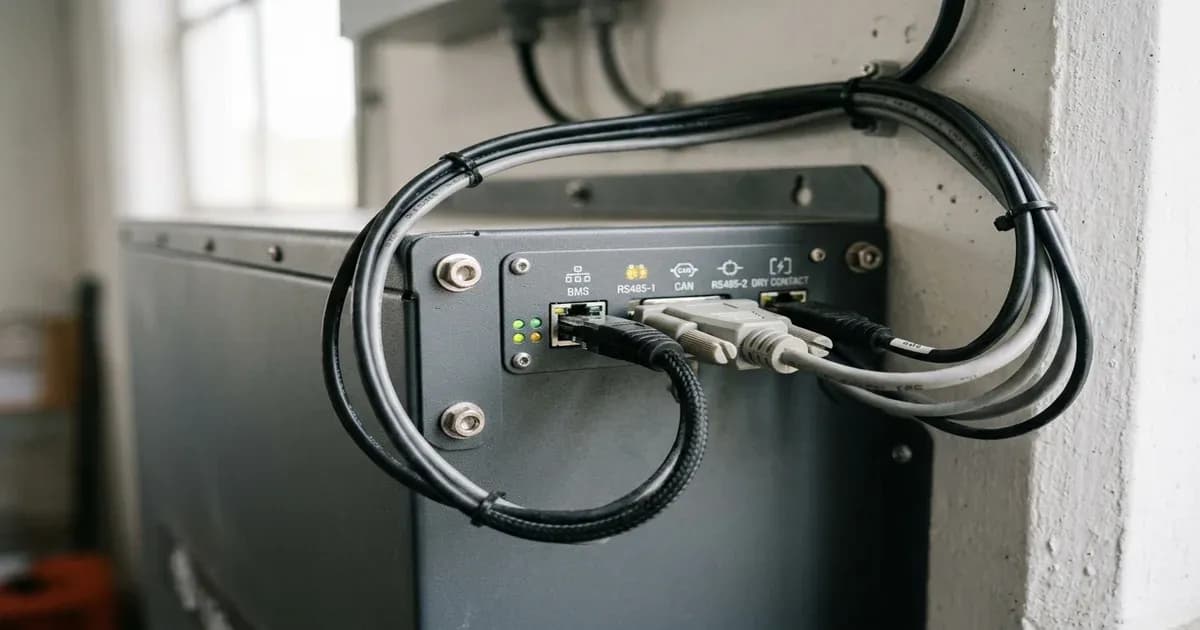
Wrong port. CAN and RS485 ports sit next to each other on both the battery and the inverter, they take the same RJ45 plug, and they are not interchangeable. Plugging a CAN cable into an RS485 socket is one of the most frequent installation errors reported in Pakistan.
Wrong pinout. This is the one that eats afternoons. A standard LAN patch lead is not guaranteed to land CAN-H and CAN-L on the pins your pair expects. Pylontech's PowerCube-X1 documentation defines the port as pin 2 GND, pin 4 CANH, pin 5 CANL. Deye CAN uses pins 4 and 5 as well, which is why a straight-through Ethernet cable works on that combination. Other combinations need the manufacturer-supplied cable or a crossover of specific pins, and using a generic LAN lead instead is how a working-looking install communicates nothing.
Wrong protocol code. Modern inverters carry a numbered table of battery protocols. Growatt with Pylontech is commonly documented as profile 2 on the RS485 port, or BMS profile 52 with a straight-through cable on the CAN port. Deye's own configuration guidance is to select the lithium type and then select the code provided for the specific battery brand and model, and warns explicitly that generic codes such as 00 or 12 exist on some pairings but should never be chosen without checking the compatibility table. Choosing generic lithium instead of the battery's actual protocol is a documented, very common cause.
Wrong link order or DIP switches in a multi-module bank. Rack and stack batteries use master and slave addressing set by DIP switches, and a defined Link-In and Link-Out order. Get the address wrong and only one module talks, or none do.
Termination. CAN buses need a 120 ohm terminator at each end, no more and no fewer. Both a missing terminator and a duplicate terminator produce intermittent, maddening comms behaviour that looks like a bad cable.
{/* visual_plan: comparison */}
What goes wrong specifically when you upgrade from tubular to lithium?
This is the highest-risk job in the Pakistani retrofit market right now, because the inverter stays and only the battery changes, and everybody's attention is on the new hardware.
The battery type setting stays on lead-acid. This is the headline failure. A flooded or AGM profile applies an absorption stage and a float stage that lithium chemistry does not want, and holds a voltage that a LiFePO4 pack should not sit at. If the BMS is not communicating, nothing stops it.
The voltage arithmetic is different. A 48V lead-acid bank and a 48V lithium bank are not the same thing. A 16-cell LiFePO4 pack is nominally 51.2V, because each cell is nominally 3.2V, and a fully charged pack sits in the low 53V region. Charge and cut-off voltages carried over from a tubular configuration will be wrong at both ends.
The low-voltage disconnect is set for lead-acid. Tubular banks are typically configured to cut around 50 percent depth of discharge to protect plate life. A lithium pack will happily go far deeper, and the inverter's old setting will either waste most of the capacity you just paid for, or in the opposite direction sit below the BMS trip and let the BMS disconnect the pack abruptly under load, which the inverter reports as a fault.
The charge current is set too low. Tubular banks are charged gently. Lithium accepts far more current, and leaving the old limit in place means the battery never reaches full charge in a Pakistani winter day, which the owner reads as a defective pack.
The comms were never connected at all. Very common. The old tubular bank had no data link, so nobody ran one. The new lithium pack is installed, the power cables are landed, and the RJ45 is left in the box. The system appears to work. It is charging blind.
The commercial stakes are real. Lithium in Pakistan runs roughly Rs 40,000-55,000 per kWh (July 2026), so a 10kWh pack is a substantial purchase, and BESS imports rose 220 percent to 4.6 GWh in 2025 while only around 4 percent of solar homes have batteries at all. A lot of these packs are being installed by people doing it for the first time.
{/* visual_plan: step_flow */}
How do you diagnose it properly, in order?
Work from cheapest to most expensive, and change one thing at a time.
First, confirm the battery is awake. Many lithium packs ship in a shipping or sleep state and need the wake or power button held before they will do anything. An inverter reporting No Battery on a pack that has never been woken is not a comms problem.
Second, verify the port. Read the label on the battery, not the label on the inverter, and confirm you are in CAN or RS485 as the protocol you selected requires.
Third, verify the cable. Use the manufacturer-supplied lead if one exists. If you must make one, confirm the pin mapping at both ends with a tester rather than assuming a patch lead is correct. Check both plugs for bent or pushed-back pins, which is a frequent physical cause.
Fourth, verify the protocol selection. Set the battery type to lithium and then set the specific brand and model protocol code, not the generic lithium entry.
Fifth, verify addressing and termination in multi-module banks, with DIP switch addresses unique and sequential, Link-In and Link-Out in the correct order, and one 120 ohm terminator at each end of the bus.
Sixth, power-cycle properly. Shut down the inverter, isolate DC, isolate AC, wait for the capacitors to discharge, then bring the battery up first and the inverter second. A surprising number of comms faults are a handshake that never completed at startup.
Only after all six does it make sense to suspect a failed BMS board or a failed communication port on the inverter.
What should you demand from the seller before you buy?
{/* visual_plan: callout_card */}
Three things, in writing, before money changes hands.
A named compatibility entry. Not "yes sir, it is compatible". The specific protocol code number for your exact inverter model paired with your exact battery model, and ideally a screenshot of the manufacturer's compatibility table showing that pairing. If the seller cannot produce it, they have not done this pairing before.
The correct comms cable in the box, with the pinout documented. A generic LAN patch lead handed over with a shrug is a warning sign.
Commissioning evidence. A photograph of the inverter's battery screen showing live BMS data, including pack voltage, state of charge, cell temperature, and charge and discharge current limits, read from the battery rather than estimated by the inverter. That single screenshot proves the link works and is the only meaningful acceptance test for the job.
We will say the uncomfortable part directly. In a market where the battery costs more than the inverter, the incentive to declare a pairing "compatible" and move on is enormous, and the failure appears eighteen months later as a capacity complaint that is nearly impossible to attribute. The commissioning screenshot is your protection, and it costs the installer thirty seconds. If they resist it, that tells you what you need to know.
Frequently Asked Questions
Why does my inverter say BMS communication failed?
Almost always cable, port, pinout or protocol. Check you are in the right port for the protocol, that the pinout matches CAN-H and CAN-L, and that the inverter's battery protocol code matches the battery brand.
Can I keep my old settings after switching from tubular to lithium?
No. Lead-acid charge profiles overcharge lithium and lead-acid low-voltage cut-offs sit far below a lithium BMS trip point. Change the battery type to lithium and select the correct protocol code.
Which RJ45 pins does Pylontech use for CAN?
Pylontech's PowerCube documentation lists pin 4 as CANH and pin 5 as CANL, with pin 2 as GND. Deye CAN uses the same pins 4 and 5, so a straight-through cable works.
References
- Pylontech PowerCube-X1 operation manual, RJ45 port pin definition
- Growatt inverter and Pylontech batteries BMS communications guide
- Voltacon, connecting the Growatt SPF5000-ES to Pylontech US5000 BMS cable
- Deye hybrid 12k CAN communication with inverter BMS, pin usage discussion
- Wattuneed, Deye hybrid inverter configuration guide 2026, battery protocol codes
- Deye inverter fault code list F01-F64
- Solar Inverters Pakistan, lithium battery BMS communication failed with solar inverter
- Eneronix, BMS-inverter communication troubleshooting
- EG4, BMS setup guide for batteries and inverters
- LiFePO4 battery voltage chart, 12V 24V 36V 48V
- Pakistan Solar Traders, lithium battery prices in Pakistan 2026
- Enon Traders, inverter battery compatibility guide 2026
Frequently asked questions
Why does my inverter say BMS communication failed?
Almost always cable, port, pinout or protocol. Check you are in the right port for the protocol, that the pinout matches CAN-H and CAN-L, and that the inverter's battery protocol code matches the battery brand.
Can I keep my old settings after switching from tubular to lithium?
No. Lead-acid charge profiles overcharge lithium and lead-acid low-voltage cut-offs sit far below a lithium BMS trip point. Change the battery type to lithium and select the correct protocol code.
Which RJ45 pins does Pylontech use for CAN?
Pylontech's PowerCube documentation lists pin 4 as CANH and pin 5 as CANL, with pin 2 as GND. Deye CAN uses the same pins 4 and 5, so a straight-through cable works.
References
- ManualsLib — accessed 26 July 2026
- Power Forum — accessed 26 July 2026
- DIY Solar Power Forum — accessed 26 July 2026
- Solarway Suppliers — accessed 26 July 2026
- Voltacon Solar — accessed 26 July 2026
- Solar Inverters PK — accessed 26 July 2026
- Inverter Error Codes — accessed 26 July 2026
- Solar Deals — accessed 26 July 2026
- Eneronix — accessed 26 July 2026
- EG4 Electronics — accessed 26 July 2026
- DIY Solar Power Forum — accessed 26 July 2026
- WattUneed — accessed 26 July 2026
- LiPower Group — accessed 26 July 2026
- DIY Solar Power Forum — accessed 26 July 2026
- Enon Traders — accessed 26 July 2026
- Sun Saviour — accessed 26 July 2026
- Pakistan Solar Traders — accessed 26 July 2026
- Solar Hub — accessed 26 July 2026
- NEPRA — accessed 26 July 2026
Related guides
More from inverter errors & fixes.