Dyness Battery & Solis Inverter Troubleshooting Guide (Ireland)
Updated 19 September 2026 · By SolarNevs Research Desk, Dealer surveys + verified sources · 4 sources · Method ↗
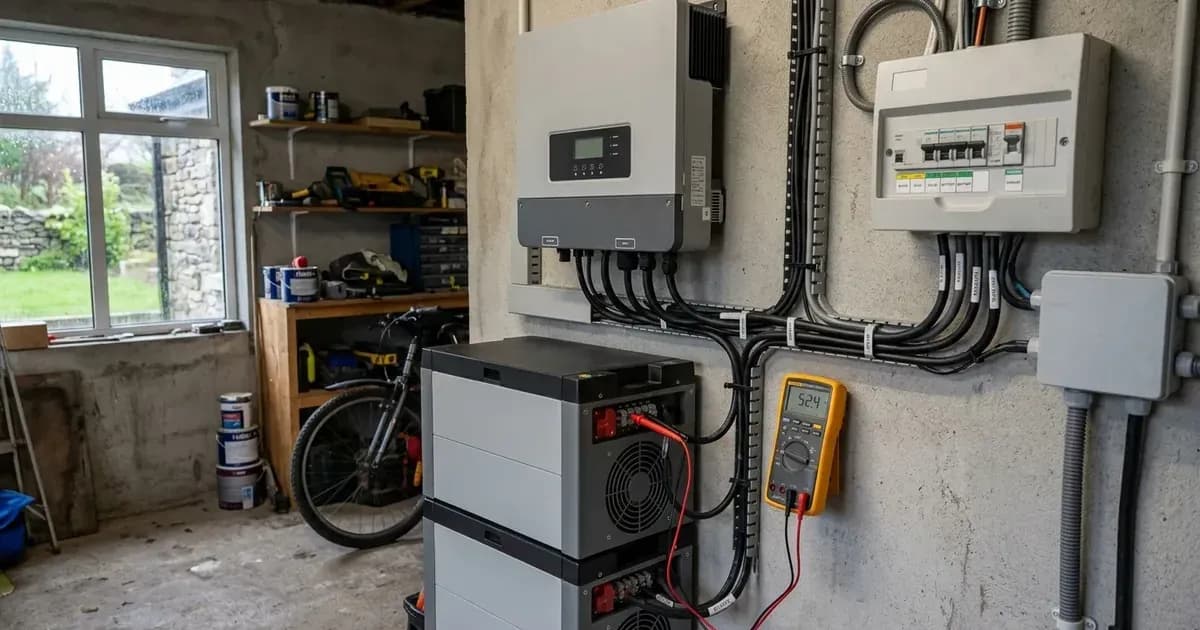
Pairing Dyness 48V low-voltage lithium battery storage with Solis hybrid inverters—such as the S6-EH1P6K-L-EU and S5-EH1P series—is one of the most common residential energy storage architectures across Ireland. When properly integrated, the battery management system (BMS) dynamically governs state of charge (SOC), charging voltages, and maximum current limits across changing seasonal conditions.
However, when communication fails or addressing mismatches occur, the inverter flags alarms such as Batt_Comm_FAIL or No Battery. These faults prevent energy storage, interrupt night-rate charging under Irish time-of-use tariffs, and prevent solar self-consumption. Resolving these issues requires systematic verification of DIP switch addressing, CAN bus pinout continuity, and SolisCloud local inverter parameters.
1. System Sizing & Architecture Rules
Across the Dyness low-voltage product line—including the A48100, B4850, DL5.0C, and Powerbox Pro models—the manufacturer establishes standardized communication and addressing principles:
- Universal Architecture: All DYNESS batteries have the same DIP switch settings and cable connections, simplifying parallel expansion and field replacements.
- Capacity Ratio: It is recommended to use the battery in at least a 1:2 configuration. For example, pairing a hybrid inverter such as the S6-EH1P6K-L-EU requires multiple battery modules to deliver adequate peak discharge currents without triggering overcurrent shutdown.
- DC Overcurrent Protection: Install a DC breaker or fuse between the inverter and battery to protect both devices. Switch it on after turning on the batteries. In Powerbox Pro units, an integrated heavy-duty DC circuit breaker is located on the enclosure side.
[!WARNING]High-current 48V battery systems present severe short-circuit and arc flash hazards. Never connect or disconnect DC battery power cables while the DC breaker is closed or the inverter is operational. Always isolate the AC grid breaker, open the external DC battery isolator, and verify zero voltage at terminals before touching conductor ends.
2. DIP Switch Addressing & Communication Cabling
A frequent cause of communication loss on multi-module Dyness banks is incorrect hardware addressing on the battery front panels:
- Cable Architecture: Use a standard pin-to-pin cable for connections between the battery and the inverter, as well as between batteries. Regardless of the number of inverters or batteries in parallel, the master battery should always communicate with the master inverter.
- Inverter to Master Battery Link: Establish the INV-BAT connection by connecting the RJ45 communication lead from the master battery CAN IN port to the inverter BMS port.
- Inter-Battery Daisy Chaining: For the BAT-BAT connections across parallel modules, connect from the master CAN OUT port to the slave 1 CAN IN port, then from slave 1 CAN OUT to slave 2 CAN IN, cascading sequentially.
- Master Module DIP Address: The master unit's factory default setting is 0010, so there’s no need to open the cover to make any changes. You can use it directly as is.
- Slave Module Addressing: For slave units, open their covers and set the internal 1# module to 0000. All subsequent slave units in the bank must have their primary module set to 0000 to prevent CAN bus address collision.
3. Power-On & Wakeup Sequence
Energizing a Solis and Dyness storage system must follow an exact chronological sequence to prevent inrush surges from tripping the battery BMS into self-protection:
- Ensure all DC battery cables, CAN communication cables, and AC grid connections are securely seated.
- Turn on the ON/OFF rocker switch on all Dyness battery modules in the bank.
- Press and hold the master switch (SW) for 3 seconds to power on all the batteries. In case the wiring and setup are correct all slave batteries will turn on automatically and you will see LED indication on each battery module. On Powerbox Pro units, press and hold the power switch for 3 seconds.
- Once the battery LED indicators illuminate green and the contactor engages, switch on the external DC breaker or fuse located between the battery and the inverter.
- Finally, close the AC circuit breaker in the main distribution board and turn the inverter DC rotary switch to ON.
4. Inverter Software Configuration & Working Modes
With the hardware powered and communication established, the inverter requires local configuration via Bluetooth using the SolisCloud mobile tool:
- Enable Bluetooth on your mobile device, open the SolisCloud application, and select More Tools > Local Operation > Connect with Bluetooth without logging into an online account.
- Select the inverter serial number, select Installer account type, and set your local access password.
- In Quick Settings, choose the correct battery model, in our case “Dyness LV”. Click on 'Next Step.'
- Configure the AC energy meter, verify CT clamp orientation on the main tails, and select the national grid code corresponding to Ireland.
- Select your operating mode: Self-Use Mode is designed to optimize the consumption of solar energy within a residential setting. In this mode, the system prioritizes directing all photovoltaic (PV) energy generated towards powering the home. Excess daytime generation charges the Dyness modules, and stored energy discharges during peak evening hours.
- Solis recommends activating the 'Allow Charging from Grid' option. Once the battery reaches the Forcecharge SOC, it will use the grid to charge the battery, preventing deep discharge.
- Configure charging and discharging parameters by setting the charge or discharge current within the range of 0-50A according to the continuous current capability of your battery bank.
5. Safe Electric Standards & Compliance in Ireland
All residential battery storage systems in Ireland must satisfy strict regulatory provisions enforced by Safe Electric and the Commission for Regulation of Utilities:
- Hazard Warning Signage: Safe Electric rules require that the designer should consider durable indelible signage to instruct the user how to achieve full disconnection of all sources of supply to the installation, and warnings of where hazardous voltages may be present related to battery storage systems, DC supplies from PV modules etc.
- Testing and Inspection: In accordance with NSAI I.S. 10101, the new installation shall be tested in accordance with Chapter 6. Also, see clause 712.6.101 for additional system documentation, commissioning tests and inspection requirements as per I.S. EN 62446.
- REC Responsibility: Any permanent modification to the domestic consumer unit or battery sub-distribution circuits must be performed and certified with a Certificate of Completion by a Registered Electrical Contractor (REC).
Frequently asked questions
Which battery selection protocol is required for Dyness on a Solis inverter?
Select Dyness-LV (or Dyness_L) within the Battery Select submenu in Advanced Settings, entering engineering passcode 0010 to confirm the CAN protocol configuration.
What DIP switch setting is used on a master Dyness module with Solis?
Set pin 3 to the ON position with pins 1, 2, and 4 OFF (binary 001000) for standard 9600 baud communication, or set pin 6 ON for specific CAN communication profiles.
Are domestic battery storage systems permitted in unventilated attics in Ireland?
Under SEAI Domestic Solar PV Code of Practice guidelines, battery units should not be located in unventilated roof spaces or habitable rooms without adequate airflow and fire barriers.
References
- Solis Service Center - Dyness A48100 and S6 Setup Guide — accessed 17 September 2026
- Solis Service Center - Dyness S5 / RHI Hybrid Guide — accessed 17 September 2026
- Safe Electric Ireland - Solar PV Technical Guidance — accessed 17 September 2026
- SEAI Domestic Solar Photovoltaic Code of Practice — accessed 17 September 2026
Related guides
More from inverter errors & fixes.