Fronius GEN24 Plus: PV Point and Full Backup Setup Guide
Updated 6 September 2026 · By SolarNevs Research Desk, Dealer surveys + verified sources · 3 sources · Method ↗
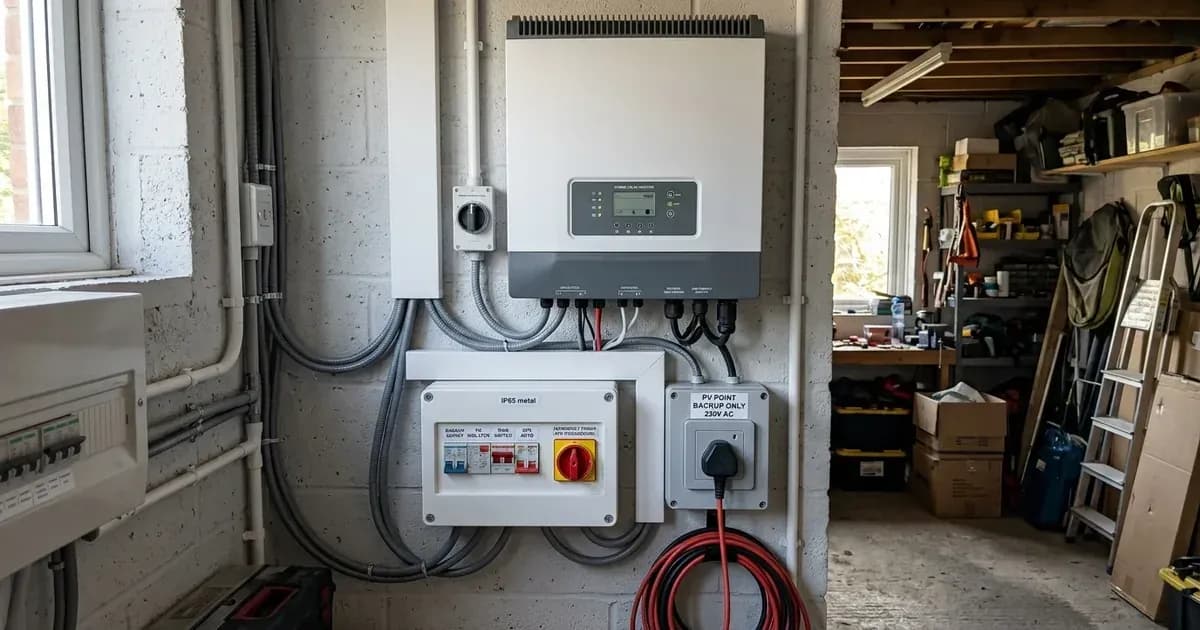
The Fronius GEN24 Plus inverter series, including the single-phase Primo GEN24 Plus and three-phase Symo GEN24 Plus, offers versatile backup power solutions. These hybrid inverters are engineered for solar energy storage installations globally and provide options ranging from basic emergency power to comprehensive whole-home backup during grid outages.
This guide details the setup and operational differences between the integrated PV Point emergency socket and the Full Backup system, along with essential commissioning and safety procedures.
Understanding PV Point: Battery-Free Emergency Power
The Fronius GEN24 Plus inverters feature an integrated PV Point, which provides a basic level of emergency power without requiring a battery.
How PV Point Works
The PV Point functions as a single-phase backup power source. It can supply power up to its rated socket capacity directly from the PV array, even if no battery is connected to the system. This feature ensures that critical loads can be powered during a grid outage, offering a fundamental level of energy security.
Implementing Full Backup: Whole-Home Grid Outage Protection
For comprehensive protection against grid outages, the Fronius GEN24 Plus can be configured for Full Backup mode. This setup automatically supplies the entire household during a power cut.
Full Backup Requirements
Full Backup mode requires a connected high-voltage battery. The GEN24 Plus interfaces directly with high-voltage lithium battery storage systems such as the BYD Battery-Box Premium HVS/HVM and LG RESU FLEX via dedicated DC terminals.
A critical component for Full Backup functionality is an external automatic transfer switch (ATS) or contactor box. This device is necessary to isolate the household's electrical circuits from the grid during an outage, allowing the inverter to safely power the home in islanded mode.
Commissioning with the Solar.start App
Commissioning your Fronius GEN24 Plus inverter and its backup features is streamlined using the Solar.start mobile app. This application allows you to wirelessly commission inverters, configure network settings, and set up energy storage systems directly from your mobile device.
Optimizing Performance: Dynamic Peak Manager
The GEN24 Plus inverters incorporate a built-in Dynamic Peak Manager algorithm. This advanced Maximum Power Point Tracking (MPPT) technology optimizes the PV yield, even under challenging conditions such as partial array shading.
Safety First: DC Disconnection and Earthing
Working with solar inverters requires strict adherence to safety protocols. Before performing any maintenance or opening connection areas on your Fronius GEN24 Plus inverter, ensure the system is safely de-energized.
Safe DC Disconnection Procedure
- Turn off the DC isolator.
- Wait at least 5 minutes for internal capacitors to discharge. This waiting period is crucial to prevent electrical shock hazards.
- Only after the discharge time has elapsed, proceed with opening connection areas.
Protective Earthing and Bonding
It is essential to ensure that the inverter chassis ground is securely bonded to the main electrical installation earthing terminal. Proper earthing provides critical protection against electrical faults.
Grid Compliance and Standards
The Fronius GEN24 Plus inverters are designed with certified anti-islanding protection, ensuring safe operation and compliance with international grid standards such as VDE-AR-N 4105. For net metering installations in Pakistan, NEPRA's Distributed Generation and Net Metering Regulations (SRO 892/2015) require grid-connected inverters to comply with UL 1741 and IEEE 1547-2003, with IEC 61215 also referenced for the wider system components. Confirm with your installer that the GEN24 Plus's grid-protection parameters are set to these NEPRA-referenced limits before commissioning.
Still showing the fault? Book a technician
If the steps above did not clear it, tell us the inverter or battery and the exact code. We pass it to a technician who covers your city; visit charges are quoted before they come.
How this pays for the site: the technician or verifier pays SolarNevs a fixed introduction fee. Nobody pays to be recommended, and you are free to use our free guides instead.
Frequently asked questions
What are the essential requirements for fronius gen24 plus pv point and full backup setup guide?
Verify system specifications, local regulations, and standard installation safety procedures prior to commissioning.
How do I ensure regulatory compliance?
Ensure all equipment is approved on relevant regulatory registries and installed by accredited certified professionals.
References
- Fronius Symo GEN24 Plus Operating Instructions — accessed 27 August 2026
- Fronius Solar.start commissioning app (official product page) — accessed 27 August 2026
- AEDB Net-Metering Reference Guide (NEPRA SRO 892/2015) — accessed 31 August 2026
Related guides
More from inverter errors & fixes.