SolarMax Inverter Error Codes and Troubleshooting Guide
Updated 6 September 2026 · By SolarNevs Research Desk, Dealer surveys + verified sources · 5 sources · Method ↗
Key Takeaways
- SolarMax Error 01 indicates cooling fan failure or mechanical blockage.
- Error 05 signals output short circuit requiring immediate load disconnection.
- Error 51 indicates overcurrent protection activation during heavy load startup.
- Repair costs for SolarMax inverters in Pakistan range from Rs 3,000 to Rs 18,000 (July 2026).
Introduction
SolarMax off-grid and hybrid inverters, including the Falcon, Orion, and Onyx series, are widely installed across Pakistan for residential backup power. Equipped with digital LCD screens, SolarMax inverters display specific numerical error codes when system parameters deviate from safe operational limits. This guide details every common SolarMax error code, explaining root causes, step-by-step solutions, and local repair pricing in major Pakistani cities including Lahore, Karachi, Rawalpindi, Peshawar, and Multan.
What do common SolarMax inverter error codes mean?
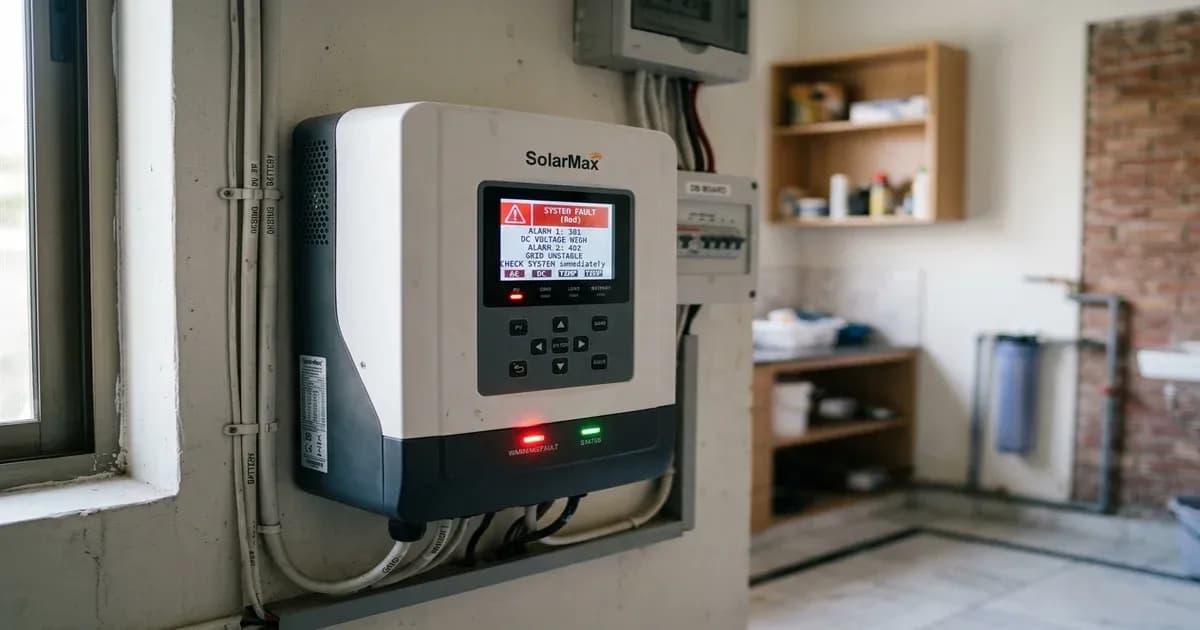
SolarMax inverters use two-digit numerical error codes to notify users of operational faults, hardware protection trips, and environmental warnings. Prompt identification of these codes prevents equipment damage and restores home power quickly. The Axpert-class SolarMax hybrids — ORRA, SOLON, ORION and FALCON — display faults with an F prefix (F01, F05, F51) and display warnings as a bare flashing number (01, 07, 10, 15, 16, 32). A fault means the inverter has shut down; a warning means it is still running but is telling you something is wrong. This guide uses the manufacturer's fault numbering, and each code below has a full page under SolarMax error codes.
Error Code | Fault / Alarm Meaning | Root Cause | Primary Remedy & Action |
|---|---|---|---|
F01 / 01 | Cooling fan locked | Mechanical dust blockage or seized fan bearing | Clean external grille; replace fan if fault recurs |
Error 02 | Over-temperature fault | Restricted airflow or ambient temperature exceeding 45°C | Maintain 20 cm side and 50 cm top/bottom clearance |
Error 03 | Battery over-voltage | Overcharging or battery string voltage mismatch | Check battery spec/quantity; return unit if overcharged |
Error 04 | Low battery voltage | Cell voltage below cutoff (~1.91V/cell threshold) | Check grid availability to charge; verify cable tightness |
Error 05 | Output short circuit | Direct contact between live and neutral AC conductors | Switch off AC output; disconnect loads and test individually |
Error 07 | Overload timeout | Load exceeds 110% of continuous rated capacity | Shed high-draw appliances (irons, heaters, water pumps) |
Error 51 | Inrush overcurrent | Extreme compressor or motor startup surge on MOSFETs | Restart unit once; if fault repeats, send to repair centre |
Error 01 indicates cooling fan lock. Note the manufacturer's own split: fault 01 is the fan locked while the inverter is off, while the same physical problem detected while it is running is warning 01, three beeps every second. Error 03 signals battery voltage too high, and SolarMax's troubleshooting table splits it in two — a genuinely over-charged battery, for which the manufacturer's instruction is to return the unit to a repair centre, and a battery voltage that is simply too high for the machine, for which the instruction is to check that the specification and quantity of batteries meet requirements. No SolarMax document states a 60V threshold for a 48V bank; do not use one.
Error 04 indicates low battery voltage, showing that battery charge levels have fallen below safe operating cutoffs. Error 05 signals output short circuit, which trips immediately when live and neutral AC output lines make direct electrical contact.
Error 07 indicates overload timeout, occurring when connected AC load exceeds 110% of inverter rating for extended periods. Error 51 signals overcurrent protection, which trips instantly when heavy inductive motor loads create extreme current spikes. Understanding these code definitions simplifies system maintenance for residential users across urban centers.
How do you troubleshoot SolarMax Error 01 fan fault and Error 02 over-temperature?
SolarMax Error 01 fan fault and Error 02 over-temperature are closely linked thermal protection alarms. When Error 01 appears, turn off the inverter completely and inspect external cooling fan grilles located on the side or bottom of the chassis.
Isolate the unit first — switch the inverter off, then open the AC input breaker, the battery breaker and the PV isolator, and wait until the LCD is dark. Then use a soft brush or a short burst of dry compressed air to clear accumulated dust, cobwebs and lint from the outside of the grille. Do not push a screwdriver, wire or any other tool through the grille to turn the blades, and do not open the case: the manual's safety instructions say not to disassemble the unit, and the fan sits beside components that hold a charge after shutdown. If Error 01 returns after cleaning, stop. The manufacturer's entire remedy for fault 01 is "replace the fan", which is a job for your dealer or a qualified installer — and running the inverter with a dead fan is what turns Error 01 into Error 02 and then into a failed power board.
For Error 02 over-temperature faults, check installation clearances around the inverter cabinet. The manual asks for approximately 20 centimetres of clearance to each side and approximately 50 centimetres above and below the unit — not 20 centimetres all round. The same manual states the unit is suitable for mounting on concrete or other non-combustible surface only, and must not be mounted on flammable construction materials: an inverter screwed to a plywood or chipboard back-board, or to a wall lined with foam or thermopore, is a fire risk and needs an installer to remount it. Ensure the inverter is not mounted near heat-generating equipment or exposed to direct sunlight inside hot utility rooms. In addition, installing external ventilation fans improves heat dissipation during summer heatwaves when ambient temperatures exceed 45°C — the general specification for these models stops at 50°C ambient.
What causes SolarMax Error 05 short circuit and Error 51 overcurrent?
Error 05 output short circuit and Error 51 overcurrent originate from severe electrical loads on the inverter AC output terminals. Error 05 is triggered by damaged electrical wiring, burnt appliance sockets, or internal insulation breakdown inside connected electrical devices.
Error 51 overcurrent trips when motor loads, such as refrigerator compressors, water pumps, or air conditioner units, draw massive inrush current during startup. If total inrush current exceeds the peak surge capacity of the inverter MOSFET power bridge, Error 51 activates instantly to protect power transistors.
To clear these errors, switch off the main AC output circuit breaker and leave it off. Turn off the inverter switch, wait thirty seconds, and turn the inverter back on with every load disconnected. Before you re-energise anything, look and smell for a burning or fishy plastic smell, a browned or melted socket, a blackened MCB or scorch marks around a fitting — if you find any of those, stop and call a qualified electrician, and do not switch that circuit on again. Otherwise re-connect household appliance circuits one at a time to identify the specific circuit triggering the protection. When one of them brings the fault back, leave it off and get an electrician to it rather than switching it on again to check; each retry is another arc at the fault point. Never uprate or bypass a breaker to keep a tripping circuit alive — the manufacturer's line-mode specification lists that circuit breaker as the output short-circuit protection.
Error 51 has a hard stop-condition that most guides omit. SolarMax's troubleshooting table allows exactly one attempt: "Restart the unit, if the error happens again, please return to repair center." If Error 51 comes back, or if either code appears with the output breaker open and nothing connected, the fault is inside the inverter. Shut the system down at AC, PV and battery, and call your dealer. Do not open the case, and do not keep power-cycling into an internal fault.
How do you fix SolarMax Error 04 low battery and Error 07 overload?
SolarMax Error 04 low battery appears when battery voltage drops below minimum programmed cutoff thresholds during power outages. The manual quotes the threshold per cell, not per pack: below about 1.91V per cell the inverter lights up for roughly three seconds at start-up and then shuts down, and below about 1.4V per cell it will not respond at all. On a 12V lead-acid block that is about 11.5V. Read the battery voltage from the inverter's own LCD rather than probing the terminals, and if it reads low, check utility grid input availability to initiate charging.
Inspect battery cables visually for loose terminal bolts, corrosion, warm terminals, or undersized wiring. High resistance across battery terminals causes artificial voltage drops under load, triggering Error 04 prematurely. Do not clean, retighten or re-lug the terminals yourself: a battery bank cannot be switched off, it delivers hundreds of amps into a dropped spanner, and the manual warns explicitly about using metal tools around batteries. Have an electrician do it. If the pack is lithium and its BMS has cut out on low-voltage protection, use the wake-up procedure your battery manufacturer publishes or have them do it — do not open the pack, do not bypass or "reset" the BMS by disconnecting it, and never put a bench charger onto the cells. If the display is completely dead with no indication at all, stop: the manual lists reversed battery polarity as one cause of that, and it is an installer-level fault.
Error 07 overload timeout occurs when running loads exceed continuous inverter rating. Calculate total wattage of active household appliances. Turn off non-essential loads such as electric irons, washing machine heaters, and water pumps to bring total power draw within continuous rated capacity. Setting program priority modes appropriately balances solar and battery contributions. In addition, verifying AC output breaker sizing ensures proper current protection across all backup power circuits.
What are SolarMax inverter repair costs in Pakistan?
SolarMax inverters can be serviced at authorized repair shops and independent technician centers located in major Pakistani cities including Lahore, Rawalpindi, Faisalabad, and Karachi. Repair costs depend on damaged components.
Replacing a broken DC cooling fan costs between Rs 3,000 and Rs 5,000 (July 2026). Repairing control board logic circuits or replacing damaged driver ICs ranges from Rs 6,000 to Rs 10,000 (July 2026). Replacing damaged MOSFET power transistor banks on smaller ORRA and SOLON class units costs between Rs 10,000 and Rs 18,000 (July 2026). These are independent workshop figures, not SolarMax's; before authorising any repair, check the warranty term written on your invoice, because SolarMax's published parts cover differs by model (two years on the Orion Ultra datasheet, five on the Onyx UL) and an unauthorised repair will end it.
Always demand high-grade replacement MOSFETs and original control ICs during repairs to ensure long-term operational stability and prevent repeat hardware failures. Proper installation of thermal padding under replacement power devices extends operational life significantly.
Still showing the fault? Book a technician
If the steps above did not clear it, tell us the inverter or battery and the exact code. We pass it to a technician who covers your city; visit charges are quoted before they come.
How this pays for the site: the technician or verifier pays SolarNevs a fixed introduction fee. Nobody pays to be recommended, and you are free to use our free guides instead.
Frequently asked questions
What is Error 01 on a SolarMax inverter?
Fault F01 is the cooling fan locked while the inverter is off, usually from dust or a seized bearing. Isolate the unit and clean the grille from the outside only — never push a tool through it. SolarMax's remedy for fault 01 is to replace the fan, so if it returns, call your dealer.
How do I fix Error 05 on my SolarMax inverter?
F05 is an output short circuit. Switch the AC output breaker off and leave it off, disconnect all loads, and restore the circuits one at a time. If you find a burning smell, a melted socket or scorch marks, stop and call a qualified electrician. If F05 latches with nothing connected, the fault is inside the inverter — call your dealer and do not open the case.
Why does my SolarMax inverter show Error 51?
F51 is instantaneous over-current or surge, usually a motor or compressor inrush. SolarMax's troubleshooting table allows exactly one restart: if F51 happens again, return the unit to a repair centre rather than power-cycling it repeatedly.
References
- SolarMax SM-ORION-DUAL-4KW user manual v1.0 (68 pp, scanned) — Faults Reference Code, Warning Indicator and TROUBLE SHOOTING tables; the fault meanings and remedies on this page come from here — accessed 2 August 2026
- Voltronic Power Axpert VM III user manual v1.8 — the OEM platform the Axpert-class SolarMax hybrids are built on; corroborates the same fault table, the 20 cm side / 50 cm above-and-below clearance an — accessed 2 August 2026
- SolarMax Pakistan — official site and downloads page (22 datasheets; no user manual and no fault-code list published) — accessed 2 August 2026
- Solar Citizen Pakistan — accessed 25 July 2026
- W11Stop Pakistan — accessed 25 July 2026
Related guides
More from inverter errors & fixes.