Victron MultiPlus and Quattro Parallel and Three-Phase Configuration Guide
Updated 6 September 2026 · By SolarNevs Research Desk, Dealer surveys + verified sources · 1 source · Method ↗
Key Takeaways
- Victron parallel and three-phase systems are complex and require specific knowledge.
- All units in a VE.Bus system must be the same type, size, and firmware version.
- Incorrect configuration, especially non-symmetrical installations, can lead to system malfunction and inaccurate monitoring.
- Untrained or inexperienced installers should not attempt these complex setups; professional assistance is strongly recommended.
How to configure Victron MultiPlus and Quattro inverters for parallel or three-phase operation?
To configure Victron MultiPlus and Quattro inverters for parallel or three-phase operation, you must ensure all units are compatible and have identical firmware and compatibility IDs. These systems are complex and require careful planning and execution.
Diagnosis
Proper configuration of Victron VE.Bus systems for parallel or three-phase operation relies on strict adherence to compatibility and setup requirements. Follow these steps to diagnose potential issues or ensure correct setup:
- Verify Unit Compatibility:
- Check: Confirm that all inverters intended for parallel or three-phase configuration are MultiPlus or Quattro models that use VE.Bus.
- Meaning: This manual applies to components that use VE.Bus, for example, MultiPlus, Quattro and some larger VE.Bus inverters. This information does not apply to the Multi RS and Inverter RS models, which use a VE.Can interface (not VE.Bus).
- Note: MultiPlus-II 8k, 10k, and 15k models can only be connected in parallel if an external AC transfer switch is used.
- Check Firmware Versions:
- Check: Ensure that all units in your system have the exact same firmware version.
- Meaning: All units in one system must be the same type and firmware version; this includes same size, system voltage, and feature set. Always update all units to the latest firmware version during commissioning of the system.
- Confirm Compatibility IDs:
- Check: Verify the Compatibility ID for all units in the VE.Bus system.
- Meaning: Make sure that the 4-digit number in the compatibility ID of all units in the VE.Bus system is identical. Additionally, make sure that units in a single phase (so parallel units) have an identical letter in the compatibility ID.
- Assess System Symmetry (for three-phase):
- Check: For three-phase systems, ensure a symmetrical installation.
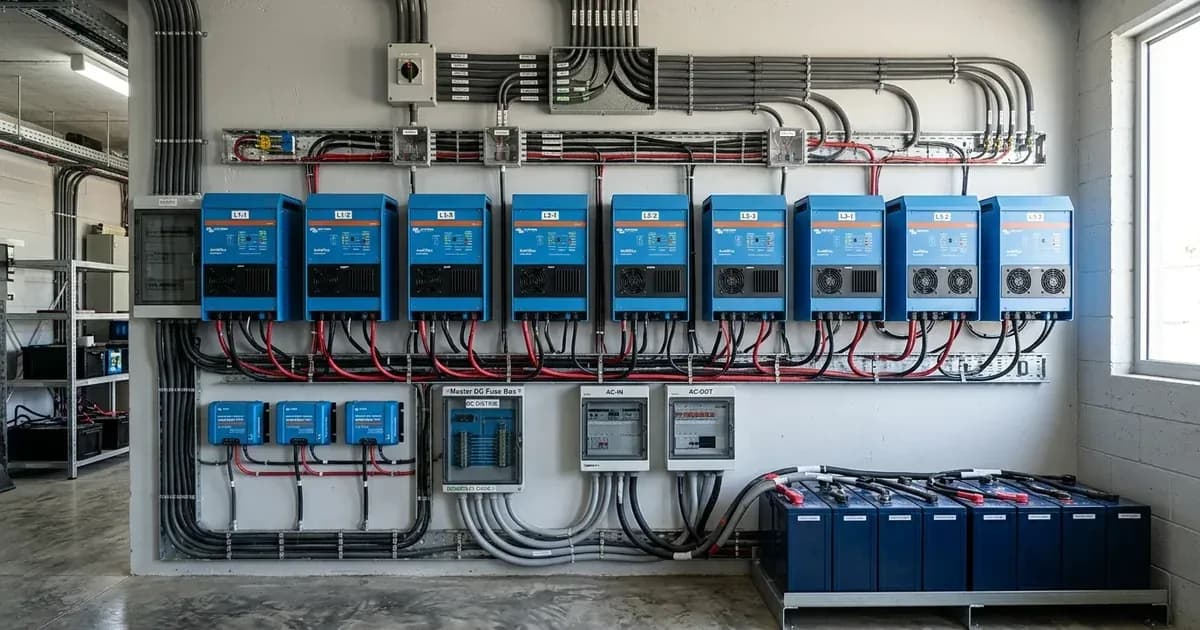
- Meaning: Non-symmetrical installations (e.g., 2 units on L1, 3 on L2, 3 on L3) can lead to issues where numbers and information shown on the GX device as well as VRM portal will or can be wrong, and controlling the system, for example setting input current limits will not always work properly either.
Cause/fix table section
Symptom detail | Likely cause | Fix |
|---|---|---|
Incorrect numbers/information on GX device or VRM portal, or improper control of system (e.g., setting input current limits) | Non-symmetrical installation (e.g., 2 units on L1, 3 on L2, 3 on L3) when using monitoring devices like VE.Bus Smart Dongle or GX device. | Ensure symmetrical installation. All units in one system must be the same type and firmware version. |
System malfunction or failure to operate in parallel/three-phase | Mismatched firmware versions or compatibility IDs between units. | Update all units to the latest identical firmware version during commissioning. Ensure the 4-digit number in the compatibility ID of all units is identical, and units in a single phase have an identical letter in the compatibility ID. |
MultiPlus-II 8k, 10k, or 15k models not paralleling correctly | Missing or incorrectly configured external AC transfer switch. | Install and configure an external AC transfer switch as required for these specific MultiPlus-II models when paralleling. |
Configuration Guide for VE.Bus Parallel and Three-Phase Systems
Configuring Victron MultiPlus and Quattro inverters for parallel or three-phase operation requires adherence to specific guidelines to ensure system stability and performance. These guidelines primarily concern unit compatibility, firmware, and communication settings.
Unit Compatibility and Requirements: The core of any parallel or three-phase Victron system is the use of compatible VE.Bus devices, such as MultiPlus and Quattro inverters. It is critical that all units in one system must be the same type and firmware version; this includes same size, system voltage, and feature set. This ensures consistent operation and communication across the entire setup.
Firmware and Compatibility ID: During commissioning, it is essential to always update all units to the latest firmware version. Beyond firmware, a unique identifier called the Compatibility ID plays a crucial role. You must make sure that the 4-digit number in the compatibility ID of all units in the VE.Bus system is identical. For units operating in parallel within a single phase, it is also necessary to make sure that units in a single phase (so parallel units) have an identical letter in the compatibility ID. These IDs facilitate proper synchronization and communication between the inverters.
Specific Model Considerations: Certain models have unique requirements. For instance, MultiPlus-II 8k, 10k, and 15k models can only be connected in parallel if an external AC transfer switch is used. It is also important to note that this information does not apply to the Multi RS and Inverter RS models, which use a VE.Can interface (not VE.Bus), meaning their configuration for multi-unit systems follows different protocols.
System Configuration Tools and Limitations: Victron provides tools like the VE.Bus System Configurator for setting up these complex systems. However, there are limitations. While VE.Bus System Configurator allows setting up a system using Multis (each having a single AC input), that is configured to have multiple separate AC inputs, such system is not supported by GX devices. This means that if you configure a system with multiple separate AC inputs using the VE.Bus System Configurator, the numbers and information shown on the GX device as well as VRM portal will or can be wrong, and controlling the system, for example setting input current limits will not always work properly either. For accurate monitoring and control via a GX device, ensure your system design is compatible with GX device support.
You can also use our /pk/tools to help with system sizing.
Safety: Complex System Installation
Parallel and Multiphase systems are complex. We do not support or recommend that untrained and/or inexperienced installers work on these size systems. Attempting to install or modify such systems without proper training can lead to equipment damage, system failure, or safety hazards.
Victron Energy emphasizes professional training for these advanced configurations. Victron is able to provide specific training for these systems to distributors via their regional sales manager. Additionally, there is advanced training theory and practical videos and competency exams for 3 phase and parallel installation and commissioning available on Victron Professional -> Online Training. You will require an installer account on Victron Professional to access it.
It is strongly advised to first get experience with smaller systems. If you are new to Victron, please start with simpler designs, so that you become familiar with the necessary training, equipment and software required.
When to call a technician instead
Given the complexity of parallel and three-phase Victron systems, it is highly recommended to seek professional assistance in several scenarios:
- Lack of Experience: If you are untrained and/or inexperienced with complex Victron systems, it is best to hire a professional.
- Design and Commissioning: It is also recommended to hire an installer that has experience with these more complex Victron systems, for both the design and the commissioning.
- System Malfunctions: If your GX device or VRM portal shows incorrect information, or system control is not working properly due to a non-symmetrical installation, a qualified technician can help correct the configuration.
- Firmware and Compatibility ID Issues: If you are unable to ensure all units have identical firmware versions or correct Compatibility IDs, a professional can perform these critical updates and settings adjustments.
- Warranty Concerns: Improper installation by untrained personnel may void your product warranty.
Frequently asked questions
Which Victron models support parallel and three-phase configurations?
MultiPlus and Quattro models that use VE.Bus are designed for parallel and three-phase systems. MultiPlus-II 8k, 10k, and 15k models require an external AC transfer switch for parallel connection. Multi RS and Inverter RS models use a VE.Can interface and are not covered by this configuration guide.
Do all units in a Victron parallel or three-phase system need the same firmware?
Yes, all units in one system must be the same type and firmware version. This includes having the same size, system voltage, and feature set. It is recommended to update all units to the latest firmware version during commissioning.
What is the Compatibility ID and why is it important for Victron multi-unit systems?
The Compatibility ID is a 4-digit number that must be identical across all units in a VE.Bus system. Additionally, units connected in parallel within a single phase must have an identical letter in their Compatibility ID. This ensures proper communication and operation.
Can I configure a Victron system with multiple separate AC inputs using a GX device?
While the VE.Bus System Configurator allows setting up a system using Multis with multiple separate AC inputs, such a system is not supported by GX devices. This means monitoring and control via a GX device or VRM portal may not work properly.
Is it safe to install a complex Victron parallel or three-phase system myself?
Parallel and Multiphase systems are complex. Victron does not support or recommend that untrained and/or inexperienced installers work on these size systems. It is strongly recommended to gain experience with smaller systems first or hire an installer experienced with complex Victron systems for both design and commissioning.
References
- Victron Energy VE.Bus Parallel and Three Phase Systems Manual — accessed 23 August 2026
Related guides
More from what to buy — and how not to get cheated.