Solis CT Clamp Direction: Smart Meter Polarity & Phase Rotation Guide
Updated 18 September 2026 · By SolarNevs Research Desk, Dealer surveys + verified sources · 2 sources · Method ↗
Key Takeaways
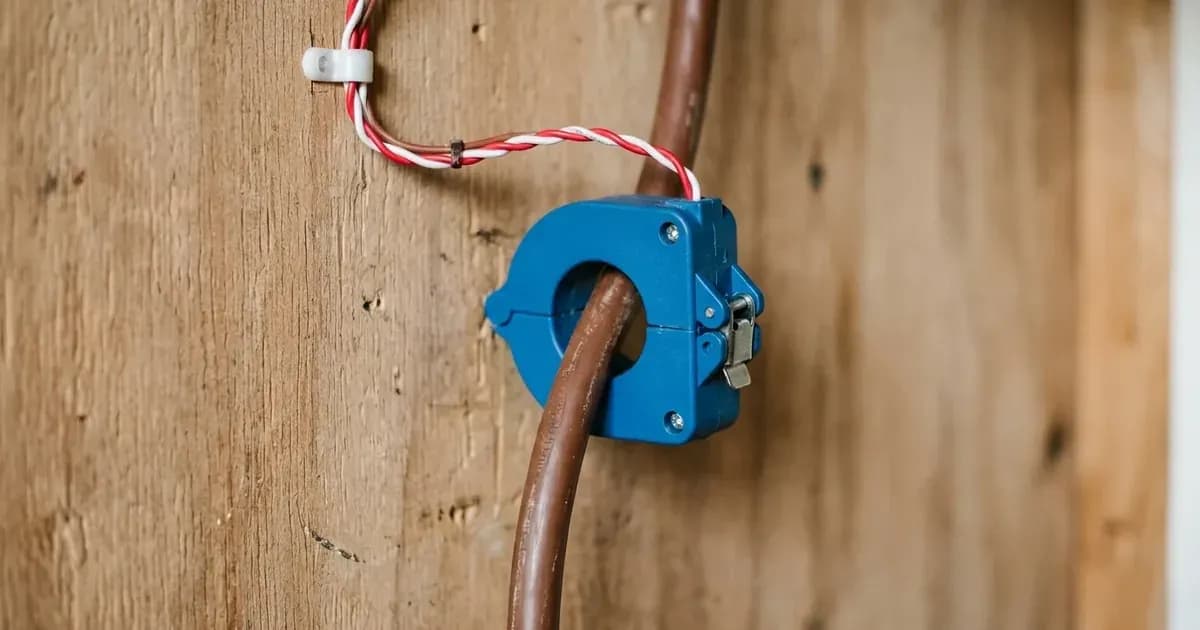
- The physical orientation arrow on the Solis current transformer clamp must face towards the incoming grid connection.
- Solis real power logic defines positive real power (+kW) as export and negative real power (-kW) as import from the grid.
- Never disconnect secondary CT signal leads while the cable carries current; opening a secondary circuit under load induces dangerous high voltage.
- Verify internal export power management settings using passcode 0010, setting the CT sampling ratio to 3000:1 with failsafe mode enabled.
Why is my Solis inverter reading power flow backwards?
When a solar inverter or energy storage system displays household load that mirrors solar generation, charges batteries from the grid during high-tariff periods, or trips export limitation boundaries, the root cause is almost always an inverted current transformer (CT) clamp or mismatched smart meter phase rotation.
Proper commissioning of smart meters and current transformers is critical for the stable operation of Solis systems. Whether installing a Solis Export Power Manager (EPM) controller or an energy storage hybrid inverter, system control loops depend entirely on directional measurement accuracy.
Errors in CT polarity cause the inverter to mistake energy consumption for generation. Under UK export control regulations, this causes false throttling or compliance trips; see our UK export limitation compliance guide.
Physical CT placement and arrow direction
Physical positioning on the incoming service head dictates whether the meter registers true household balance:
- Golden Placement Rule: CTs must be clamped onto the incoming lines before any electrical branching, directly after the main service switch or utility meter but before the distribution busbars and breakers feeding site loads and the inverter. Only in this position can the meter register net energy balance.
- Cable Selection: The clamp must be installed on the live (hot) wire at the grid connection point.
- Arrow Orientation: The arrow on the CT must face towards the grid.
- Single-Inverter Limitation: The direct CT clamp method is suitable only for systems with one inverter; multi-inverter sites require an external controller.
For metering requirements under British export schemes, see our UK smart export metering guide.
Understanding Solis real power logic
To diagnose polarity errors accurately on the inverter display or SolisCloud portal:
Telemetry State | Directional Sign | System Power Flow Interpretation |
|---|---|---|
Grid Export Mode | Positive Real Power (+kW) | Solar generation exceeds site demand; excess active power flows out into the utility network |
Grid Import Mode | Negative Real Power (-kW) | Home demand exceeds solar output; active power is drawn from the utility grid |
Diagnostic Metric | Active Power in kW | Always monitor active power in kW on a per-phase basis (L1, L2, L3) rather than kVA or reactive power |
During a forced pure import test (with solar isolated and home loads active), all monitored phases must display negative active power (-kW). If a phase displays +kW while importing, its CT clamp is reversed.
Phase rotation verification: the single-conductor isolation test
On three-phase installations, pairing a voltage channel with a CT from another phase introduces a 120° phase angle error, causing the meter to read approximately 50% lower active power due to the 120° phase shift where cos 120° = -0.5.
To isolate phase matching:
- Attach All CTs to One Conductor: Clamp all CTs to a single conductor by temporarily attaching CT1, CT2, and CT3 to the same physical phase conductor (such as Phase L1).
- Establish Baseline Load: Ensure active site consumption; the current on the phase must be at least 5A (approx. 1 kW active load) to ensure conclusive readings above electrical noise.
- Analyze Display: Only the matching voltage channel will display high active power and correct power factor; mismatched channels will read approximately 50% lower active power.
- Align Channels: Keep CT1 on L1, and move remaining CTs to their respective phases until each channel pair matches correctly.
For broader commercial electrical installation rules, consult our UK solar electrical installation guide.
Safe physical CT rotation procedure
If diagnostics reveal that a CT clamp is facing the wrong direction:
- Observe Secondary Circuit Safety: Do not disconnect secondary CT signal wires (S1/S2) while the primary conductor is under load! Opening a secondary CT circuit under load generates high voltage that can damage the transformer or meter terminal block.
- Rotate on Primary Cable: Physical CT rotation is the recommended and safest method: unclip the CT and rotate it 180° directly on the power cable. The reading will immediately invert from +kW to -kW without touching secondary signal terminals.
Internal EPM configuration on the inverter LCD
Once physical placement is verified, configure export power management parameters through the front control panel:
- Enter Setup Menu: Advanced Settings → Password: 0010 → Internal EPM Set.
- Select Operating Mode: For monitoring only, select mode select LoadMonitor_CT (Option 5). For export control, select mode select Current Sensor (Option 6).
- Set Sampling Ratio: Set the CT sampling ratio to 3000:1.
- Enable Continuous Logging: Advanced Settings → Password: 0010 → 24H Switch → Enable.
- Configure Backflow and Failsafe: Set the backflow power limit according to your DNO agreement, and ensure failsafe mode is set to ON.
For utility connection requirements, consult our ENA EREC G98 micro-generator guide.
Safety rules for CT installation
Working inside electrical service heads involves unmetered incoming utility conductors:
- Never Cut Live Meter Tails: Never cut, strip, or alter incoming mains service tails; split-core CTs clamp around insulated cables without breaking conductors.
- Secondary Circuit Protection: Always keep secondary leads connected to the meter or shorted together during mechanical handling.
- De-Energize Surrounding Switchgear: Isolate consumer unit main switches before clamping cables near live busbars.
- No Secondary Disconnection Under Load: Opening secondary leads while primary current flows creates lethal open-circuit voltage spikes.
When to call a qualified electrician
Contact an MCS-certified electrician if:
- The incoming mains meter tails are tightly bundled without sufficient separation to clip a CT clamp.
- Three-phase voltage sequence testing requires testing inside the main three-phase distribution board.
- The smart meter reports persistent communication loss over its meter communication line.
- Internal EPM settings fail to retain calibration ratios across power cycles.
Frequently asked questions
Which way should the arrow point on a Solis CT clamp?
According to official Solis installation rules, the clamp must be installed on the live wire at the grid connection point, and the arrow on the CT must face towards the grid.
How does Solis telemetry represent import and export active power?
Solis meters use directional real power logic where positive real power (+kW) indicates export, and negative real power (-kW) indicates import from the grid.
What is the safest way to correct a reversed CT clamp on a live cable?
Observe the safety warning: never disconnect secondary CT signal wires while the primary conductor is under load; use physical CT rotation to unclip the clamp and rotate it 180° directly on the power cable.
What CT sampling ratio is required for single-phase Solis inverters?
When configuring export control through Internal EPM Set using passcode 0010, select Current Sensor mode and set the CT sampling ratio to 3000:1.
References
- Solis Technical Guide Smart Meter Phase Rotation and CT Polarity Verification — accessed 15 September 2026
- Solis Seminar 76 Export Power Management and Load Monitoring By CT — accessed 15 September 2026
Related guides
More from inverter errors & fixes.