GivEnergy CT Clamp Direction and Meter Reading Backwards: Troubleshooting Guide
Updated 18 September 2026 · By SolarNevs Research Desk, Dealer surveys + verified sources · 4 sources · Method ↗
Key Takeaways
- Inverted energy flow on GivEnergy dashboards—such as the battery charging from the grid during peak daylight—is almost always caused by a reversed CT clamp arrow.
- The physical orientation rule is clear: Ensure the ID1 CT is facing towards the consumer unit.
- Always isolate the mains AC supply and switch off the inverter before handling meter tails or consumer unit cables to prevent shock hazards.
- Never cut or extend CT clamp wiring; doing so alters electrical calibration and permanently distorts power monitoring.
Why is my GivEnergy system showing solar or grid flow backwards?
A common frustration for British homeowners after commissioning a GivEnergy hybrid or AC coupled system is watching the mobile app show power flowing in the wrong direction. The dashboard might show the home exporting power when boiling an electric kettle, or the battery discharging into the grid at maximum rate on a sunny afternoon.
This symptom points directly to a telemetry direction mismatch between the grid meter and the inverter control board. The inverter relies entirely on real-time current measurements to decide whether to charge the battery, hold charge, or discharge to cover household demand.
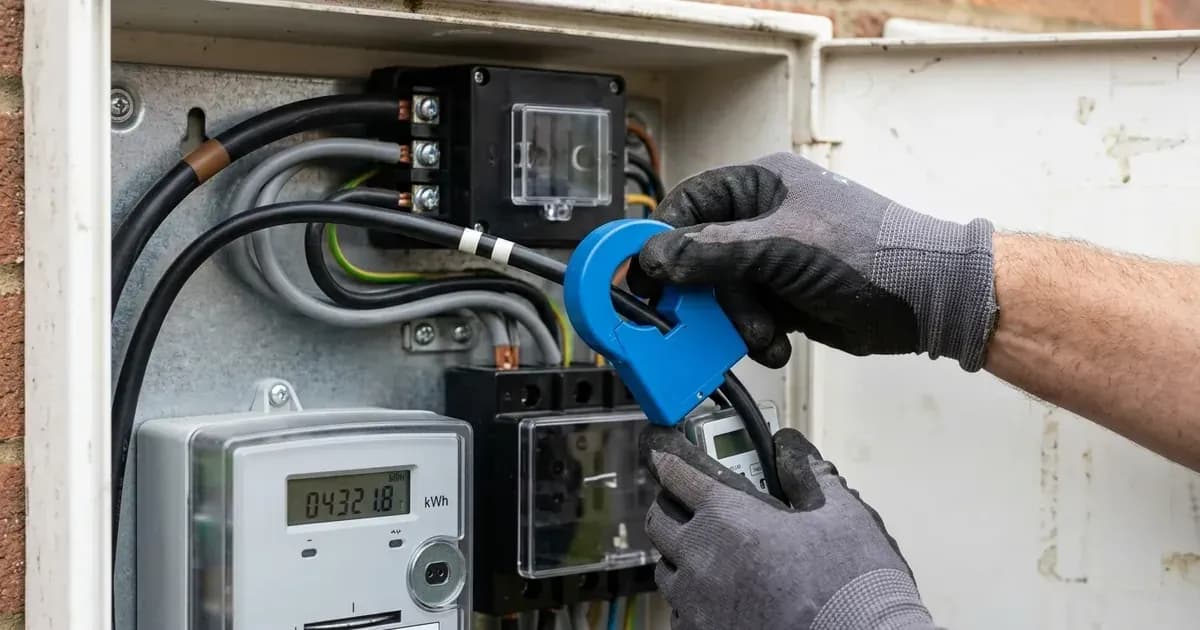
The manufacturer documentation defines the rule: Ensure the ID1 CT is facing towards the consumer unit. If the clamp is installed backwards with the arrow pointing toward the incoming distribution cut-out or supplier meter, the inverter inverts every calculation, mistaking domestic consumption for solar export.
For official export recording standards and supplier settlement, see our guide to Smart Export Guarantee metering rules and how the Smart Export Guarantee works.
Step-by-step diagnosis for reversed metering
Follow this structured troubleshooting checklist to verify and correct your metering hardware:
- Observe Real-Time Dashboard Responses: Turn on a high-power household appliance, such as a kettle or immersion heater. If the GivEnergy dashboard shows export increasing rather than import increasing, your CT clamp or meter polarity is reversed.
- Inspect the ID1 CT Clamp Arrow: Locate the grid CT clamp clamped around the main incoming live meter tail. Ensure the ID1 CT is facing towards the consumer unit.
- Verify Meter Communications: Check the inverter screen or portal for
ELECTRICITY_METER_COM_FAIL. Ensure that the meter communications are stable and connected into the correct socket on the underside of the inverter. - Check Portal Meter Allocations: On the installer portal, check whether meters are registered. If the system reports
Meters Not Enabled, you must navigate to remote control and enable meters to the amount installed. - Inspect Secondary PV Metering: In AC-coupled installations where third-party solar generation is monitored, ensure that the relevant PV CT clamp is positioned correctly and that communication is stable.
For half-hourly export switching requirements, refer to our half-hourly dynamic export switching guide.
Metering error codes and configuration table
The table below outlines official commissioning error messages, root causes, and manufacturer-mandated fixes:
Error Message | Failure Cause | Corrective Action |
|---|---|---|
Inverted import/export graphics | CT clamp orientation backwards | Ensure the ID1 CT is facing towards the consumer unit |
Inverted energy counters on EM115 | AC voltage or RS485 communication line inverted | Ensure that the polarity of both power and communications are correct on the EM115 Meter |
Generation unrecorded | Additional solar array missing CT clamp | Ensure that all generation sources are being monitored correctly |
ELECTRICITY_METER_COM_FAIL | RS485 data lead loose or unseated | Ensure that the meter communications are stable and connected into the correct socket on the underside of the inverter |
Meters Not Enabled | Meter quantity set to zero in commissioning | Ensure that you have input meters into the commission, if so go to my inverters > remote control > enable meters to the amount installed. |
Meters enabled but not being read | Cable plugged into wrong port or damaged pair | Ensure that the meter communications are stable and connected into the correct socket on the underside of the inverter, please see the installation manual for reference. |
Hardware rules and cable integrity
GivEnergy enforces strict hardware constraints on current transformers and digital energy meters:
- Cable Extension Prohibition: The manufacturer training manual specifies that CT clamp cables must not be cut down or extended! Splicing extra length into the factory cable introduces resistance variations that corrupt current readings.
- Blue CT Clamp Specification: The Blue CT clamp allows one source of generation to be monitored, it can be found in the box with all AC Coupled inverters and comes with a 5m cable.
- Secondary Energy Metering: When the Blue CT clamp is not suitable or multiple generation sources need to be monitored, an ID2 EM115 meter can be installed.
- Inverter Connection Port: All meter leads must be routed into the designated port: Meter Communications and LAN on the underside of the inverter.
- Commissioning String Rules: When configuring portal parameters, if monitoring a single PV inverter with either a CT clamp or meter you input this as ONE string, ensuring you input the PV per INVERTER that we are monitoring either with the CT clamp or a meter.
For general electrical installation and bonding standards, consult our UK solar electrical installation guide.
Safety: Meter tails and electrical isolation
Inspecting and repositioning CT clamps requires working around incoming mains cables:
- Mains Meter Tail Hazards: The main service tails connecting the cut-out fuse, electricity supplier meter, and consumer unit carry continuous unmetered electrical energy. Never unclamp or position a CT near damaged insulation.
- Safe Power Isolation: Before opening any trunking or routing communications cables into your consumer unit, switch off the main consumer unit switch and isolate the inverter AC and DC circuits to prevent electric shock.
- Secure Latching: When closing the CT clamp around a meter tail, ensure the plastic hinge snaps shut firmly. A partially open CT clamp core will saturate magnetically and produce erratic readings.
When to contact an approved installer
While unhooking and reversing a split-core CT clamp around an external insulated meter tail is straightforward, modifying terminal connections inside an Eastron EM115 meter or accessing the commissioning portal requires an accredited engineer.
GivEnergy provides a 12-year warranty on inverters from the installation date. If your meter communication displays ELECTRICITY_METER_COM_FAIL despite correct wiring, contact GivEnergy technical support on 01377 252 874 or call your certified installer for diagnostic assistance.
Frequently asked questions
Which way should the arrow point on a GivEnergy CT clamp?
Official GivEnergy commissioning instructions state: Ensure the ID1 CT is facing towards the consumer unit. If the arrow points toward the supplier meter instead, the inverter interprets home load as export.
What causes ELECTRICITY_METER_COM_FAIL on GivEnergy inverters?
This alarm indicates lost RS485 communication between the inverter and the meter. Verify that meter communications are stable and connected into the correct socket on the underside of the inverter.
Can you extend or cut down a GivEnergy CT clamp cable?
No. The official training manual strictly specifies: CT clamp cables must not be cut down or extended! Altering cable length changes circuit resistance and causes severe measurement inaccuracy.
What should I check if my GivEnergy EM115 meter reads backwards?
Ensure that the polarity of both power and communications are correct on the EM115 Meter. If phase and neutral or Modbus A and B data wires are transposed, energy accumulation values invert.
References
- GivEnergy Commissioning Portal Fault Codes and Recommendations — accessed 29 August 2026
- GivEnergy Installer Training Manual V14 — accessed 29 August 2026
- GivEnergy Installer Portal Commissioning Guide — accessed 29 August 2026
- GivEnergy Generation 3 Hybrid Inverter Installation Manual — accessed 29 August 2026
Related guides
More from inverter errors & fixes.