Solis Wi-Fi Datalogger Offline: Stick Reset and Portal Triage Guide
Updated 18 September 2026 · By SolarNevs Research Desk, Dealer surveys + verified sources · 2 sources · Method ↗
Key Takeaways
- The most frequent connectivity barrier is attempting to pair with 5GHz Wi-Fi; the datalogger hardware only supports 2.4GHz signals.
- The local web setup portal is accessed at IP 10.10.100.254 using credentials admin:admin while connected directly to the logger network.
- Ensure router signal strength RSSI remains above 15% and verify that port 10000 UDP outbound traffic is not blocked by router firewalls.
- Always isolate power before performing multimeter pin checks on the underside communication connector.
Why is my Solis Wi-Fi datalogger offline?
When a Solis solar inverter stops uploading telemetry to the SolisCloud monitoring platform, the inverter itself usually continues generating solar electricity normally. The communication blackout indicates an issue between the external datalogger stick, the domestic Wi-Fi router, and the manufacturer cloud servers.
In official technical support records, connectivity failures trace back to five core root causes:
- Trying to connect to 5GHz signal (Solis DLS-W only supports 2.4GHz signals).
- Router password is incorrect.
- Router signal strength is low.
- Router has a firewall blocking the data.
- WiFi datalogger firmware is out of date.
Resolving communications ensures that solar production data is preserved for monitoring self-consumption and validating export data under the Smart Export Guarantee scheme.
Physical connection and hardware reset
Before modifying home network settings, check physical mounting and status indicators on the stick:
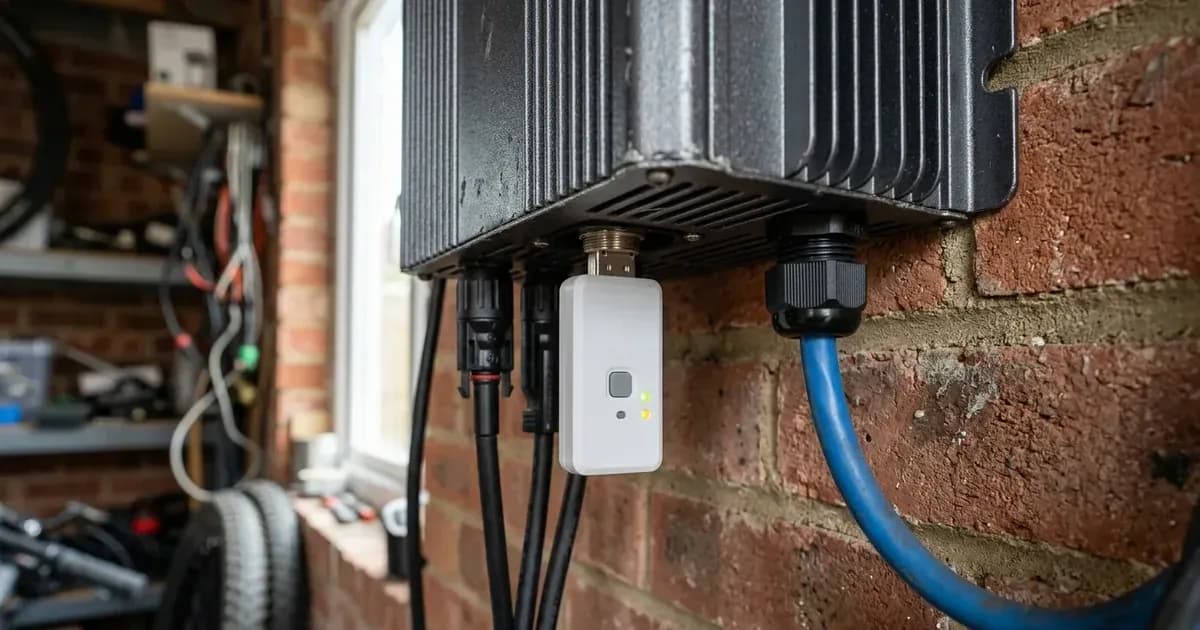
- Physical Mounting: Connect the WIFI stick by attaching it to the green plug on the bottom of all Solis inverters. Ensure the threaded locking collar is hand-tightened to prevent moisture ingress.
- Access Point Broadcast: Verify that the stick is emitting its setup wireless network. If it is not broadcasting, conduct a physical hardware reset.
- Five-Second Reset Procedure: Ensure the stick is connected to the inverter to receive operational power, and press the button for 5 seconds to reset.
Accessing the local web configuration portal
To link the datalogger to your home broadband router:
- Connect to Stick Network: From your smartphone, tablet, or laptop, open Wi-Fi settings and connect to the access point broadcast by the stick.
- Open Web Browser: Open a browser and navigate directly to the configuration page: go to the web browser and go to 10.10.100.254 and password is admin:admin.
- Avoid Search Bar Redirects: A common commissioning mistake is that the installer puts 10.10.100.254 in the search bar rather the address bar (top bar), which triggers an internet search rather than opening the local portal.
- Confirm Inverter Address Detection: Once logged in, navigate to the network status screen; if the WIFI stick does not show a connected inverter, check the address of the inverter to verify communication synchronization.
For domestic metering and telemetry requirements, see our UK smart export metering guide.
Electrical pin voltage diagnostics
If the web portal fails to detect the inverter despite a secure physical connection, technicians must measure DC supply and communication bus voltages at the green socket:
Test Channel | Physical Measurement Points | Expected Electrical Value |
|---|---|---|
DC Power Supply | Technician check pins 1 and 2 | Confirm 5VDC supply from internal inverter auxiliary board |
Serial Data Lines | Technician check pins 3 and 4 | Confirm 1.5 - 1.7 VDC across serial communication conductors |
If zero voltage is detected across pins 1 and 2, the internal auxiliary power supply board or socket ribbon cable has failed. For general electrical wiring standards across the UK, consult our UK solar electrical installation guide.
Router signal strength and firewall exceptions
If the stick successfully connects to your home Wi-Fi network but data does not appear on SolisCloud:
- Signal Strength Threshold: In the local portal network menu, verify the RSSI (signal strength) is higher than 15%. If RSSI is 15% or lower, relocate the router closer or install a 2.4GHz Wi-Fi range extender.
- Dual-Band Band Steering: Most UK broadband routers combine 2.4GHz and 5GHz under a single network name; split the bands or disable 5GHz temporarily during setup.
- Outbound Firewall Exceptions: If high-security firewall profiles are active on the broadband router, ensure outbound data transmission is permitted:
- Destination server IP: 47.88.8.200
- Outbound transmission port: 10000
- Communication transport protocol: UDP
Allow 5 to 10 minutes after saving network settings for cloud telemetry to refresh on your mobile dashboard.
Safety rules for datalogger maintenance
Working around the base of a solar inverter requires electrical awareness:
- Isolate AC and DC Before Probing: When measuring voltages on internal socket pins, take extreme care not to short adjacent pins together.
- Weatherproof Enclosure Integrity: Always ensure the weatherproof gasket is seated cleanly when screwing the stick into the green connector; water ingress into the bottom socket will trip ground fault interrupters.
- Do Not Open Inverter Casing: Datalogger reset and setup never require opening the main high-voltage inverter enclosure. For grid safety standards, review our UK micro-generator connection guide.
When to contact technical support
Escalate to your installer or Solis service if:
- Pin testing confirms 5VDC power, but the stick emits no LED indicator lights and fails to broadcast an access point.
- The logger repeatedly reboots every few minutes, indicating corrupted internal firmware.
- Physical damage or moisture corrosion is present inside the green connector socket.
Frequently asked questions
Why is my Solis Wi-Fi stick offline on SolisCloud?
Common causes include trying to connect to a 5GHz signal when the stick only supports 2.4GHz, an incorrect router password, low Wi-Fi signal strength, router firewall restrictions, or outdated logger firmware.
How do you perform a hardware reset on a Solis Wi-Fi stick?
With the stick attached to the inverter for power, press the button for 5 seconds to reset; the indicator lights will flash simultaneously to confirm reboot.
Why won't 10.10.100.254 open during Solis Wi-Fi setup?
A frequent mistake is that the installer puts 10.10.100.254 in the search bar rather the address bar (top bar), or the mobile device disconnected from the logger access point.
How do technicians test power pins on the inverter communication port?
Isolate power supplies before touching pins, then have a technician check pins 1 and 2 for 5VDC power and check pins 3 and 4 for 1.5 - 1.7 VDC data voltage.
References
- Solis Service Center DLS-W Solis WIFI Stick Troubleshooting Guide — accessed 15 September 2026
- Solis Service Center Solis WIFI Dongle Setup Instructions DLS-W — accessed 15 September 2026
Related guides
More from inverter errors & fixes.