Sunsynk Data Logger Offline: Wi-Fi Reconnection and Gateway Setup Guide
Updated 18 September 2026 · By SolarNevs Research Desk, Dealer surveys + verified sources · 2 sources · Method ↗
Key Takeaways
- When a Sunsynk data logger drops offline, the inverter continues generating and storing solar energy normally, but remote cloud telemetry and mobile monitoring pause.
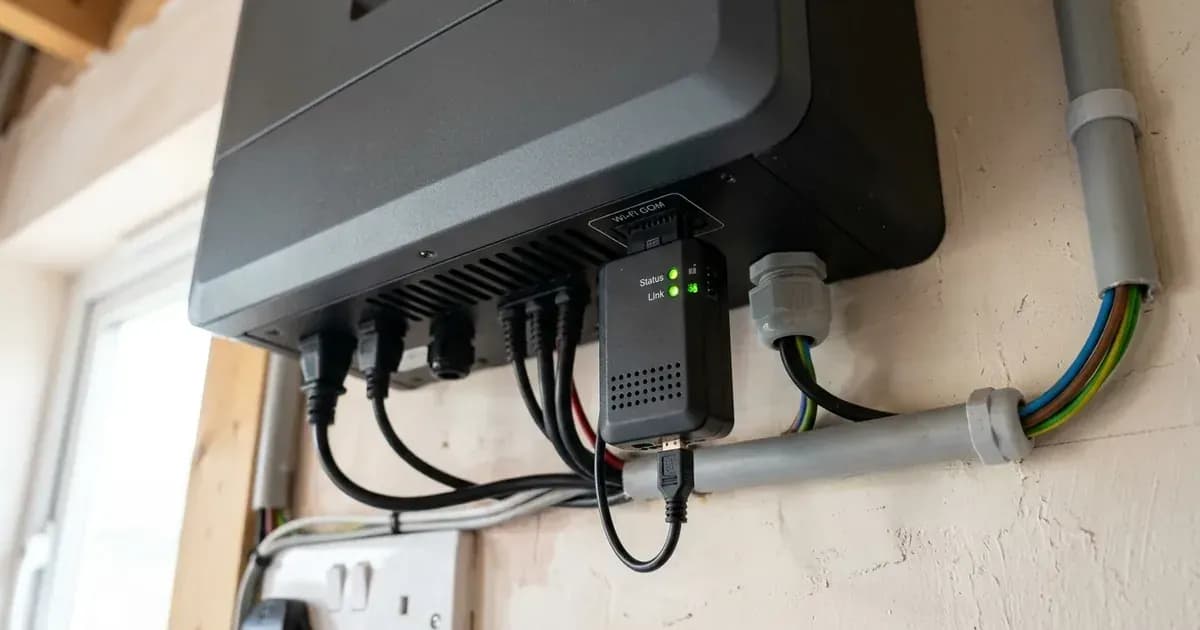
- Physical mounting requires firmly seating the logger into the DB9 interface of the inverter and securing it with two screws using a Phillips screwdriver.
- Reconnection is achieved by joining the logger standalone access point (SSID EAP- followed by the last 5 digits of the serial number) using default password 12345678.
- Direct network configuration is completed through a local web browser by browsing to IP address 10.10.10.1 and scanning for home broadband networks.
- Where wireless distance causes persistent dropouts, installers can feed a hardwired patch lead through the base grommet into the dedicated RJ45 socket.
Why has my Sunsynk data logger gone offline?
Sunsynk hybrid solar inverters rely on an external communications stick—commonly referred to as a data logger—to transmit real-time performance telemetry to the Sunsynk Connect cloud servers. When the Sunsynk Connect smartphone app or web platform indicates your plant is offline, remote visibility and automated tariff scheduling stop updating.
Fortunately, an offline data logger does not shut down solar generation or battery storage operations. The inverter internal microprocessor continues executing its programmed charging and grid-tied functions autonomously. However, loss of communication prevents homeowners from tracking self-consumption, verifying battery status, or managing dynamic export incentives detailed in our Smart Export Guarantee guide.
The most frequent causes of communication failure include:
- Changes to the home broadband router, network name (SSID), or Wi-Fi security password.
- Router firmware updates that merge wireless bands or disable legacy communication modes.
- Physical displacement or loose seating of the logger within the inverter connection bay.
- Transient local internet service provider outages or dynamic host configuration failures.
Restoring cloud telemetry requires verifying physical connections and executing official network provisioning procedures.
Physical installation: DB9 interface mounting
Before troubleshooting software settings or resetting home routers, verify the mechanical connection between the data logger and the inverter chassis.
Sunsynk hardware guidelines specify the correct installation procedure:
- Locate the communications port on the underside of the inverter casing.
- Insert the Data Logger into the DB9 interface of the inverter.
- Align the mounting flanges with the pre-drilled chassis holes.
- Insert the two screws that come with the Data Logger trough the holes and then tighten them with a Phillips screwdriver.
Ensuring both retaining screws are tightened firmly prevents vibrations, thermal expansion, or accidental cable knocks from breaking serial pin contact. Loose pins on the DB9 connector frequently mimic intermittent Wi-Fi drops.
General British wiring and renewable installation standards are explored in our UK solar electrical installation guide.
Accessing the logger access point: EAP hotspot pairing
The Sunsynk Wi-Fi data logger incorporates an independent wireless access point mode that allows direct smartphone or tablet pairing without requiring active home broadband.
To initiate wireless pairing:
- Stand near the inverter with your mobile smartphone, tablet, or laptop.
- Open wireless network options: to connect the data logger to the Wi-Fi you need to go to the Wi-Fi setting on your device and search for it.
- Review the available network list: you will see an available connection with the SSID ‘EAP-*’ (‘*’ are the last 5 digits of the serial number on the data logger).
- Select the matching network identifier: 1. Select the correct connection and then enter the password 12345678.
- If the default password is not recognized: If this password is not accepted, please try using the KEY that appears on the data logger.
- If your mobile operating system warns that the network has no internet connection, tap Keep Connection to remain paired with the logger local hotspot.
Local browser configuration: 10.10.10.1 gateway setup
Once your smartphone or computer is authenticated to the logger EAP network, you can access the onboard configuration web server directly through a browser.
Follow this four-step provisioning sequence:
- Navigate to Gateway Address: Open the internet browser on the same device and search the IP address 10.10.10.1.
- Scan Available Broadband Networks: Once connected click ‘Scan’ to search the Wi-Fi list and you should then see your Wi-Fi connection.
- Select Home Network and Input Credentials: Select your internet / Wi-Fi connection enter your password and click ‘Connect’.
- Disconnect Hotspot and Reconnect Domestic Network: Once your data logger is connected to your Wi-Fi, you can then disconnect from the data loggers EAP connection and connect back to your usual wi-fi connection.
Within two to four minutes of rebooting, the indicator lights on the logger casing will transition to steady green, indicating successful local wireless link and internet cloud connection.
Grid synchronisation and export protection parameters are governed by national regulations reviewed in our micro-generator grid connection guide.
Hardwired alternative: RJ45 ethernet connection
For installations situated in basements, plant rooms, or external garages where thick brick walls or distance degrade wireless signals, Sunsynk provides a direct hardwired local area network alternative.
Sunsynk technical instructions detail the shell disassembly and cable routing:
- Use a flat-blade screwdriver to press the buckles on the left and right sides of the shell to release the external casing.
- Pass the network cable through its specific hole at the bottom of the shell.
- Then insert the RJ45 plug into the RJ45 socket.
- To ensure long-term environmental protection, place the sealing plug with the hole on the network cable.
Advantages of Hardwired Ethernet
- Immunity to Wireless Interference: Eliminates connection drops caused by household microwave ovens, baby monitors, or neighbouring Wi-Fi routers.
- Zero Reconfiguration on Router Changes: When broadband service providers replace home routers, wired Ethernet links reconnect automatically via DHCP without entering passwords.
- Instant Cloud Latency: Direct wired connections provide instant telemetry updates, ensuring smooth tracking across mobile monitoring applications.
Ensure external outdoor cable runs utilize exterior-grade UV-stable Ethernet cable to prevent moisture degradation over time.
Electrical safety precautions during communications maintenance
While the communications logger operates on extra-low voltage logic circuitry, working adjacent to inverter electrical compartments requires care.
Always isolate primary AC supplies and DC photovoltaic string circuits before manipulating internal modules or removing enclosure covers. Ensure that structural protective bonding remains secure and uncompromised throughout any maintenance activity.
When to escalate to Sunsynk technical support
If the data logger refuses to broadcast its EAP access point, fails to establish an IP connection at 10.10.10.1, or suffers persistent hardware lockups after multiple reboot attempts, contact your MCS installer or Sunsynk engineering support.
Ensure you have recorded the inverter serial number, installation date, and full display event log before opening a service enquiry. Keeping your monitoring hardware online guarantees continuous data logging, ensuring full visibility over your system generation and optimal returns under domestic export tariffs.
Frequently asked questions
Why is my Sunsynk data logger showing offline in Sunsynk Connect?
Loggers go offline when local broadband credentials change, router wireless channels shift, or the physical DB9 port connection becomes loose.
What is the default Wi-Fi password for a Sunsynk data logger hotspot?
The factory default password for the logger access point is 12345678, connecting to an SSID formatted as EAP- followed by the last 5 digits of the serial number.
How do you access the Sunsynk logger local configuration portal?
After connecting your phone or laptop to the logger EAP wireless hotspot, open an internet browser and navigate to IP address 10.10.10.1 to scan for your home router.
Can you connect a Sunsynk inverter to broadband via a wired Ethernet cable?
Yes. For sites with weak wireless signal, a hardwired network cable can be passed through the bottom shell and inserted directly into the internal RJ45 socket.
References
- Sunsynk Technical Support Connecting to Internet — accessed 29 August 2026
- Sunsynk Single-Phase Inverter User Manual — accessed 29 August 2026
Related guides
More from inverter errors & fixes.