Victron and Panasonic DCB-105 Battery Compatibility and Setup Guide
Updated 18 September 2026 · By SolarNevs Research Desk, Dealer surveys + verified sources · 1 source · Method ↗
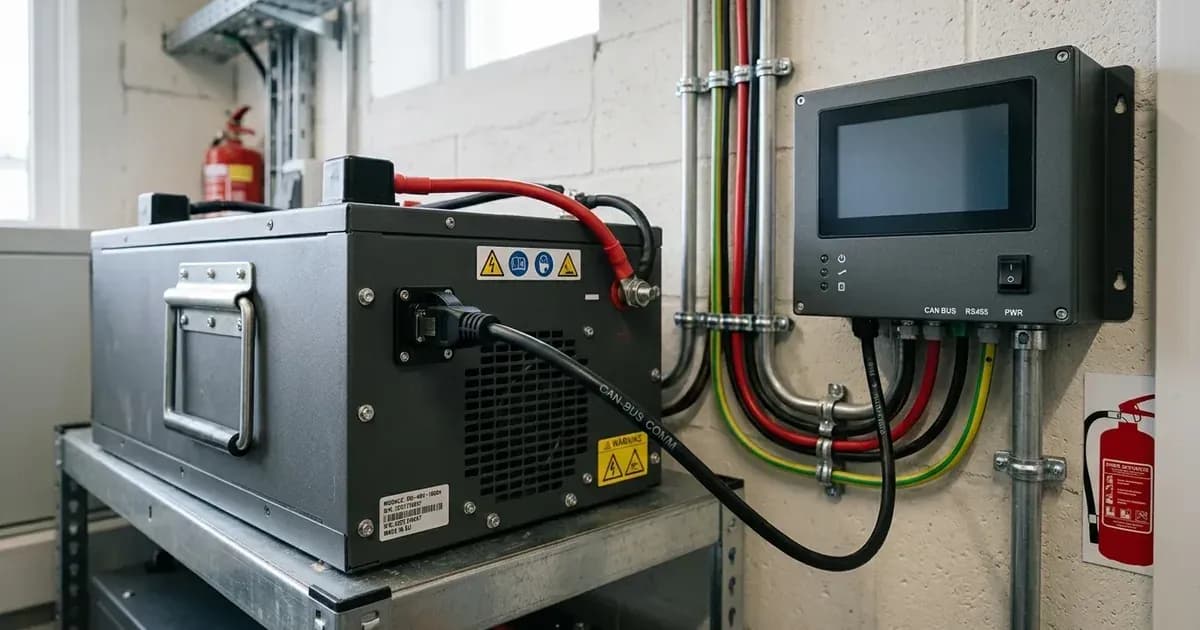
Key Takeaways
- The Panasonic DCB-105 is a 48V Smart Li-ion battery designed for India, requiring a Control Interfacing Unit (CIU) for Victron integration.
- Proper CAN bus communication between the CIU and Victron Color Control GX is critical for system operation and battery visibility.
- Specific VEConfigure and ESS Assistant settings are necessary for optimal performance and battery protection.
- Always disconnect all power sources (PV, battery, AC) before making any physical connections to avoid electrical hazards.
How do I connect and configure Panasonic DCB-105 Smart Li-ion batteries with Victron Energy systems?
Connecting and configuring Panasonic DCB-105 Smart Li-ion batteries with Victron Energy systems primarily involves establishing proper communication via the Panasonic Control Interfacing Unit (CIU) and then applying specific settings within the Victron Color Control GX (CCGX) and VEConfigure software. The most common issue is incorrect communication cable wiring, which prevents the battery from being recognized.
Diagnosis and Setup Steps
Follow these steps to correctly wire and configure your Panasonic DCB-105 batteries with a Victron system.
- Verify Battery Model and Region:
- Check: Confirm you are using a Panasonic DCB-105 battery.
- Meaning: This guide is specifically for the Panasonic DCB-105, which is designed for use in India only. Other regions or battery models may have different compatibility requirements.
- Inspect Communication Cables:
- Check: Ensure the communication cable between the Victron Color Control GX (CCGX) and the Panasonic Control Interfacing Unit (CIU) is securely connected.
- Meaning: If this cable is not properly connected, the battery will stop charging or discharging after 10 minutes, and it will not appear on the CCGX display.
- Wire the CAN Bus Communication:
- Step 1: Plug one end of the communication cable into one of the VE.Can sockets on the back of the CCGX.
- Step 2: Plug the other end of the cable into the CAN port of the data converter, which is part of the CIU.
- Step 3: Insert a VE.Can terminator into the other unused VE.Can socket on the CCGX. The CCGX package includes two terminators; only one is needed for this setup.
- Meaning: This establishes the necessary CAN bus communication pathway between the Victron system and the Panasonic battery's CIU.
- Connect Multiple Batteries (if applicable):
- Step 1: If using multiple Panasonic DCB-105 battery modules, parallel them using the RJ-45 cable supplied by Panasonic. Connect these cables to the link ports on the batteries.
- Step 2: Ensure all batteries communicate in slave mode and are connected to the CIU.
- Meaning: The system is designed to auto-configure itself for multiple parallel batteries, requiring no additional software changes for this aspect.
- Configure Color Control GX (CCGX):
- Step 1: On the CCGX, navigate to the menu path:
Settings → Services → CAN-profile. - Step 2: Select the "CAN-bus BMS (500 kbits/s)" CAN-profile.
- Meaning: This setting enables the CCGX to correctly interpret the CAN bus communication from the Panasonic CIU.
- Step 1: On the CCGX, navigate to the menu path:
- Verify Battery Visibility on CCGX:
- Check: After proper wiring and CCGX configuration, the Panasonic battery should be visible as a battery in the device list on the CCGX. If multiple batteries are connected, a single entry will represent all of them.
- Meaning: Successful visibility confirms that communication is established. The parameters option within the battery page will show the actual battery charge and discharge limits.
- Apply VEConfigure Settings:
- Step 1 (General Tab):
- Check "Enable battery monitor".
- Set "Battery capacity" to 56Ah multiplied by the number of battery modules.
- Leave "State of charge when bulk finished" and "Charge efficiency" at their default settings, as they are not used in this setup.
- Step 2 (Charger Tab):
- Set "Battery type" to "Lithium".
- Set "Charge curve" to "Fixed".
- Set "Absorption voltage" to 52 V.
- Set "Float voltage" to 52 V.
- Set "Absorption time" to 1h.
- Meaning: These settings ensure the Victron inverter/charger correctly manages the Panasonic DCB-105 battery according to its specifications.
- Configure ESS Assistant Settings:
- Step 1: Select the "Fourth battery type" in the ESS Assistant.
- Step 2: Set "Sustain" to 49.0V.
- Step 3: Configure dynamic cut-off values as follows:
- 0.005C = 46.14V
- 0.25C = 45.24V
- 0.7C = 44.60V
- 2C = 44.10V
- Step 4: Do not change the "Restart offset" setting.
- Meaning: These ESS Assistant settings define the operational voltage limits and behavior for the battery within the Victron Energy Storage System.
Cause/Fix Table
Symptom detail | Likely cause | Fix |
|---|---|---|
Battery stops charging/discharging after 10 minutes and does not show on CCGX display | Communication cable between CCGX and CIU not properly connected | Ensure the communication cable is securely connected between the Victron Color Control GX (CCGX) and the Panasonic Control Interfacing Unit (CIU). Verify CAN bus wiring and termination. |
Max charge current changes between 0A and 25A after charging | Batteries are fully charged (100% SOC) and no longer accept charge until discharged below 95% | This is normal behavior. The battery will accept charge again once its State of Charge (SOC) drops below 95%. |
Victron System Settings for Panasonic DCB-105
Proper configuration of your Victron inverter/charger and Color Control GX is essential for the safe and efficient operation of the Panasonic DCB-105 battery. The following table details the required settings.
Setting Name | Value | Protocol / Location |
|---|---|---|
VEConfigure Settings - General tab |
|
|
Enable battery monitor | Checked | VEConfigure |
Battery capacity | 56Ah * number of battery modules | VEConfigure |
State of charge when bulk finished | Default | VEConfigure |
Charge efficiency | Default | VEConfigure |
VEConfigure Settings - Charger tab |
|
|
Battery type | Lithium | VEConfigure |
Charge curve | Fixed | VEConfigure |
Absorption voltage | 52 V | VEConfigure |
Float voltage | 52 V | VEConfigure |
Absorption time | 1h | VEConfigure |
ESS Assistant |
|
|
Battery type | Fourth battery type | ESS Assistant |
Sustain | 49.0V | ESS Assistant |
Dynamic cut-off values (0.005C) | 46.14V | ESS Assistant |
Dynamic cut-off values (0.25C) | 45.24V | ESS Assistant |
Dynamic cut-off values (0.7C) | 44.60V | ESS Assistant |
Dynamic cut-off values (2C) | 44.10V | ESS Assistant |
Restart offset | Do not change | ESS Assistant |
Color Control GX Configuration |
|
|
CAN-bus BMS CAN-profile | 500 kbits/s | Settings → Services → CAN-profile |
Safety: Lithium-ion Battery Handling
Working with lithium-ion batteries and high-voltage DC systems requires strict adherence to safety protocols. The Panasonic DCB-105 is a Smart Li-ion battery with an in-built BMS, which provides protection, but general electrical safety practices remain crucial.
- Disconnect Power: Always disconnect all power sources, including solar PV, battery, and AC input, before making or breaking any electrical connections.
- Insulated Tools: Use only insulated tools when working on battery terminals or other electrical components. A spanner across a battery bank can short hundreds of amps, causing severe burns and equipment damage.
- No Short Circuits: Never short-circuit battery terminals. This can cause extreme heat, fire, or explosion.
- Ventilation: Ensure adequate ventilation in the battery installation area. While Li-ion batteries do not typically off-gas hydrogen like flooded lead-acid batteries, good ventilation helps manage temperature.
- Eye Protection: Wear appropriate eye protection when working near batteries.
- Physical Damage: Avoid physical damage to the battery casing. A damaged lithium-ion battery can be a fire hazard.
- Temperature: The optimal performance of lithium-ion batteries is temperature-dependent. While specific operating temperature ranges for the DCB-105 are not provided, extreme temperatures can degrade performance and safety.
When to call a technician instead
While many configuration steps can be performed by a competent DIY installer, there are situations where professional assistance is necessary.
- Persistent Communication Errors: If, after following all wiring and configuration steps, the battery still does not appear on the CCGX or communication errors persist, a deeper diagnostic may be required. This could indicate a fault with the CIU, the CCGX, or the battery's internal BMS.
- Unusual Battery Behavior: Any signs of physical damage, overheating, swelling, or unusual odors from the battery should prompt immediate disconnection (if safe to do so) and contact with a qualified technician.
- High Voltage Risks: If you are uncomfortable working with high-voltage DC systems, or if the installation environment presents complex electrical challenges, it is always safer to consult a certified solar or electrical technician.
Frequently asked questions
What is the Panasonic DCB-105 battery?
The Panasonic DCB-105 is a 48V Smart Li-ion battery with an in-built Battery Management System (BMS) and protection controls. It is designed for use in India only and communicates with an upper system via Modbus RTU (RS-485) over an RJ-45 port.
How does the Panasonic DCB-105 integrate with Victron Energy systems?
The Panasonic DCB-105 integrates with Victron Energy systems through a Panasonic Control Interfacing Unit (CIU). This CIU, comprising a PLC and data converter, connects to the Victron Color Control GX via CAN bus for monitoring and control.
What is the capacity of a Panasonic DCB-105 battery module?
Each Panasonic DCB-105 battery module has a capacity of 56Ah. When setting up your Victron system, you should set the total battery capacity to 56Ah multiplied by the number of battery modules in your system.
What is the maximum charge/discharge current for the Panasonic DCB-105?
For optimized performance, the maximum charge and discharge current for the Panasonic DCB-105 is limited to 25A. Although the datasheet indicates a maximum of 50A, the system limits it to 25A for performance optimization.
Why does my Panasonic DCB-105 stop charging or discharging after 10 minutes and not appear on the CCGX?
This symptom typically indicates that the communication cable between your Victron Color Control GX (CCGX) and the Panasonic Control Interfacing Unit (CIU) is not properly connected. Ensure this cable is securely plugged in.
References
- Victron Energy Live - Battery Compatibility: Panasonic DCB-105 — accessed 23 August 2026
Related guides
More from schemes, subsidies & financing.