Victron Sunwoda Battery Compatibility Guide for Pakistan Solar Systems
Updated 9 September 2026 · By SolarNevs Research Desk, Dealer surveys + verified sources · 1 source · Method ↗
Key Takeaways
- A Victron GX device is essential for managing Sunwoda batteries in a Victron system.
- Proper CAN-Bus wiring and termination are critical for reliable communication.
- Ensure all Victron components and Sunwoda batteries meet minimum firmware requirements.
- The battery's internal BMS controls charge and discharge limits, which the Victron system respects.
- Always address communication issues promptly to prevent system instability or battery damage.
How do I connect Sunwoda batteries to a Victron system?
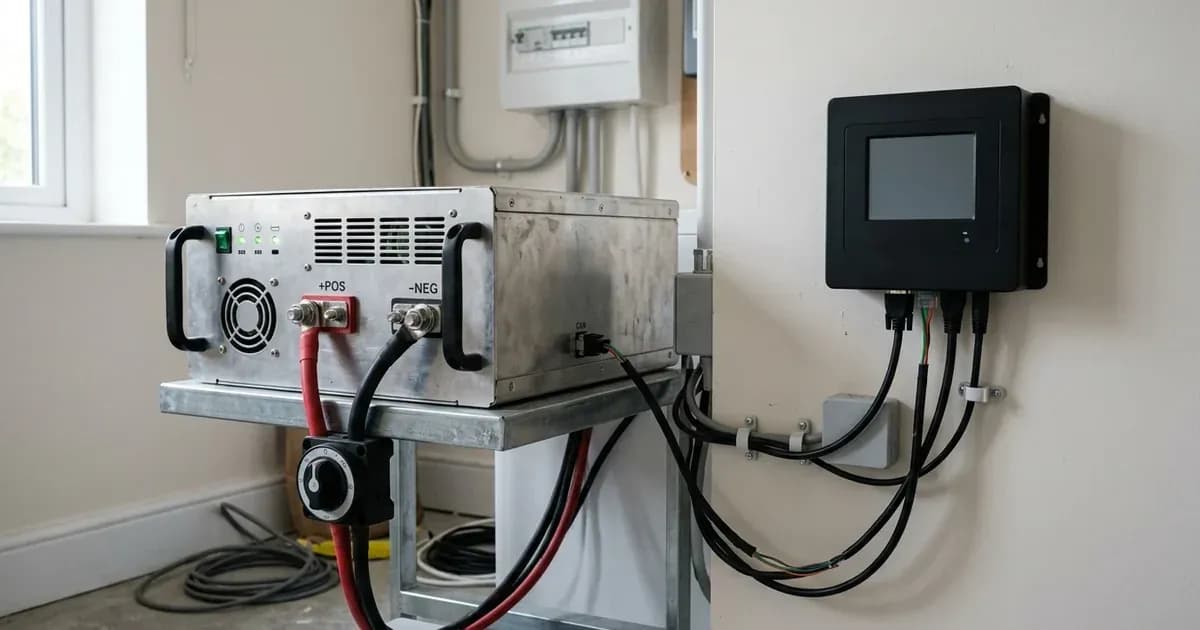
Connecting Sunwoda Atrix and SunESS batteries to a Victron Energy system requires specific components and careful setup to ensure proper communication and operation. The core of this integration relies on a Victron GX device and a CAN-Bus connection.
To establish compatibility, you need a Victron GX device, such as a Cerbo GX. This device acts as the central communication hub for your solar system. It is essential to use the BMS-Can (500 kbit/s) connection type on the GX device for these batteries. This connection facilitates the exchange of critical data, including charge and discharge limits, error codes, and the battery's state of charge.
Connection Steps:
- Identify Required Components:
- A Victron GX device (e.g., Cerbo GX).
- A Sunwoda Atrix or SunESS battery.
- A VE.Can to CAN-bus BMS type A Cable, part number ASS030710018.
- VE.Can terminators.
- Check Firmware Versions:
- Ensure your GX device runs a minimum firmware version of v3.60.
- Verify the Sunwoda battery has a minimum firmware version of V1.11.
- For VE.Bus inverter/charger models (Multi, MultiPlus, Quattro, RS), the minimum supported firmware is 469.
- For RS models, the minimum supported firmware is 1.16.
- Wire the CAN-Bus Cable:
- Take the VE.Can to CAN-bus BMS type A Cable.
- Plug the side labeled "Battery BMS" into the Sunwoda battery's BMS port.
- Plug the side labeled "Victron VE.Can" into one of the VE.Can sockets on your GX device.
- Install CAN-Bus Terminators:
- Plug a VE.Can terminator into the other unused VE.Can socket on the GX device.
- The Sunwoda battery does not have a built-in CAN terminator, so you must connect one of the VE.Can terminators to the last battery in your battery bank. This ensures proper signal integrity on the CAN-Bus network.
- Connect Inverter/Chargers and Solar Chargers:
- All 48V Victron Multi, MultiPlus, Quattro, and RS inverter/charger models are compatible. These units must be connected to the GX device via their VE.Bus connection port.
- All 48V BlueSolar and SmartSolar MPPT Chargers are compatible. Connecting these solar chargers to the GX device is mandatory, as the GX device uses this connection to regulate charge currents and voltages based on battery BMS data.
What are the essential Victron settings for Sunwoda batteries?
When integrating Sunwoda batteries with a Victron system, certain settings are automatically managed or require specific configurations to ensure optimal performance and safety. The Victron GX device plays a key role in this.
- DVCC (Distributed Voltage and Current Control): This feature is automatically enabled when a compatible Sunwoda battery is connected via CAN-Bus. DVCC allows the battery's BMS to control the charge and discharge parameters of the Victron system components.
- SVS (Shared Voltage Sense): This setting is automatically disabled when using Sunwoda batteries. The battery's internal voltage sensing is prioritized.
- STS (Shared Temperature Sense): This setting is also automatically disabled. The battery's internal temperature sensors provide the necessary data.
- Target Voltage (CVL): The target charge voltage is automatically controlled by the Sunwoda battery's BMS. The Victron system will follow the BMS's instructions, and the target voltage will decrease if the actual battery voltage exceeds 54.5V.
- Cell Balancing: Sunwoda batteries feature an internal balancing range of 2900mV to 3600mV per cell. This ensures that individual cells within the battery pack remain balanced for longevity and performance.
It is crucial to allow the battery's BMS to manage these parameters. Do not attempt to manually override these settings unless specifically instructed by Sunwoda or Victron support, as this could lead to battery damage or system instability.
How do I troubleshoot common Sunwoda-Victron communication issues?
Communication problems between your Sunwoda battery and Victron GX device can prevent your system from operating correctly. These issues often manifest as the battery not appearing on the GX device display or incorrect data readings.
Diagnosis Steps:
- Check CAN-Bus Cable Connection:
- Observation: The battery is not reliably showing up on the GX device display.
- Meaning: This often indicates an issue with the physical CAN-Bus connection.
- Action: Ensure the VE.Can to CAN-bus BMS type A Cable (part number ASS030710018) is securely plugged into both the "Battery BMS" port on the battery and the "Victron VE.Can" port on the GX device.
- Verify CAN-Bus Terminators:
- Observation: Intermittent communication or no battery detected.
- Meaning: Improperly connected CAN-Bus terminators can disrupt the communication signal.
- Action: Confirm that a VE.Can terminator is plugged into the unused VE.Can socket on the GX device. Also, ensure a VE.Can terminator is connected to the last battery in your bank, as Sunwoda batteries do not have built-in terminators.
- Inspect Firmware Versions:
- Observation: Battery connected but not recognized, or specific features are not working.
- Meaning: Outdated firmware on either the GX device or the Sunwoda battery can cause compatibility issues.
- Action: Check that the GX device firmware is at least v3.60 and the Sunwoda battery firmware is at least V1.11. Update firmware if necessary, following manufacturer guidelines.
- Confirm GX Device Requirement:
- Observation: Attempting to operate the system without a GX device.
- Meaning: A GX device is a mandatory component for Sunwoda battery compatibility with Victron systems.
- Action: Ensure a GX device (e.g., Cerbo GX) is installed and powered.
What do Sunwoda battery alarms mean in a Victron system?
Sunwoda batteries have built-in protection mechanisms that trigger specific responses and indicators in case of abnormal conditions. These are communicated to the Victron GX device.
Symptom detail | Likely cause | Fix |
|---|---|---|
Battery not reliably showing up on GX device display | Improperly connected CAN-Bus cable and terminators | Check cable connections and terminator placement on both GX device and battery. Ensure cable part number ASS030710018 is used. |
Battery over voltage protection triggers | Battery cell voltage is 3.6V or higher | The battery's charging MOSfets are disconnected, stopping charging. The protection will automatically clear when the voltage drops. |
Charging stops, fault indicator light is red | Battery is overcharged | The charging MOSfets are disconnected. The fault indicator light of the battery displays red. Protection automatically clears when the voltage drops, and charging resumes. |
Battery automatically shuts down due to low voltage | Complete discharge | The battery's internal BMS has triggered low voltage protection. Recharge the battery as soon as possible. |
Safety: Operating Sunwoda Batteries with Victron Systems
Operating Sunwoda batteries, like any lithium battery system, requires adherence to specific safety protocols, especially when integrated with a Victron system. The battery's internal Battery Management System (BMS) is your primary safety mechanism.
- BMS Connection is Critical: DO NOT attempt to operate the battery cells normally without connection to the BMS. The BMS is responsible for monitoring cell voltage, temperature, and current, and for protecting the battery from overcharge, over-discharge, and over-current conditions. Without a functional BMS connection, the battery is vulnerable to damage and poses a safety risk.
- Over Voltage Protection: The battery over voltage protection triggers when the battery cell voltage is 3.6V or higher. In such an event, the charging MOSfets of the battery are disconnected, stopping charging. This prevents damage to the cells from excessive voltage. The protection will automatically clear when the voltage drops to a safe level, and charging will resume.
- Overcharge Protection: If the battery becomes overcharged, the charging MOSfets of the battery are disconnected, stopping charging. The fault indicator light of the battery will display red. This is a critical safety feature to prevent thermal runaway or other hazards. When the voltage drops, the protection will be automatically cleared, and charging will resume.
- Low Voltage Protection: Sunwoda batteries will automatically shut down due to low voltage if they experience a complete discharge. This protects the cells from irreversible damage. Ensure your system is sized correctly and your charge sources are reliable to prevent frequent deep discharges. For guidance on sizing your battery bank, refer to our general guide on battery sizing.
Always ensure all connections are secure and inspect cables for damage regularly. Never bypass safety features or attempt repairs on internal battery components without proper training and authorization.
When to call a technician instead
While many compatibility issues can be resolved with careful troubleshooting, there are situations where professional assistance is necessary. You should contact a qualified solar technician or your battery supplier if:
- You have followed all troubleshooting steps, but the battery still does not communicate with the Victron GX device.
- The battery displays persistent fault codes or red indicator lights that do not clear automatically.
- You observe any physical damage to the battery, cables, or Victron components.
- You are unsure about any wiring steps or safety procedures.
- The system exhibits unexpected behavior, such as rapid voltage drops or unusual noises.
Attempting to repair complex internal battery issues or making incorrect wiring changes can void your warranty and pose significant safety risks. Support for Sunwoda batteries should first come from your battery supplier.
Frequently asked questions
What Victron components are required for Sunwoda battery compatibility?
A Victron GX device, such as a Cerbo GX, is required for communication. All 48V Victron MultiPlus, Quattro, and RS inverter/charger models are compatible, as are all 48V BlueSolar and SmartSolar MPPT Chargers.
Which communication protocol should I use for Sunwoda batteries with Victron?
It is essential to use the BMS-Can (500 kbit/s) connection type of a GX device. This allows for communication of charge and discharge limits, error codes, and the battery's state of charge.
What is the minimum firmware version for Victron GX devices to work with Sunwoda batteries?
The minimum supported GX firmware version is v3.60. For VE.Bus models, the minimum supported firmware is 469, and for RS models, it is 1.16.
How do I connect the CAN-Bus cable between a Sunwoda battery and a Victron GX device?
Use the VE.Can to CAN-bus BMS type A Cable, part number ASS030710018. Plug the side labeled 'Battery BMS' into the battery and the side labeled 'Victron VE.Can' into the GX device. Ensure terminators are correctly installed.
What happens if a Sunwoda battery is overcharged in a Victron system?
The charging MOSfets of the battery are disconnected, stopping charging. The battery's fault indicator light will display red. Protection automatically clears when the voltage drops, and charging resumes.
References
- Victron Energy Battery Compatibility: Sunwoda — accessed 23 August 2026
Related guides
More from inverter errors & fixes.