Crown Micro Xavier Inverter Battery Settings and Pairing Guide
Updated 6 September 2026 · By SolarNevs Research Desk, Dealer surveys + verified sources · 3 sources · Method ↗
Key Takeaways
- Incorrect battery type or voltage settings are a common cause of poor battery performance or damage.
- Always verify your inverter's battery program settings against your battery manufacturer's specifications first.
- Disconnect all AC, DC, and battery power sources and wait at least 5 minutes for internal capacitors to discharge before making any physical wiring changes to your inverter or battery bank.
- If you are unsure about specific settings for your battery type, or if your battery is showing signs of damage, consult a qualified technician.
How do I set up my Crown Micro Xavier inverter for my battery type?
To correctly set up your Crown Micro Xavier inverter for your specific battery type, you must select the appropriate battery preset or configure user-defined voltage parameters. This involves choosing between AGM, Flooded, or User-Defined options, then adjusting bulk charging, floating charging, and low DC cut-off voltages to match your battery manufacturer's recommendations.
Verifying Your Battery Settings
Before proceeding with any adjustments to your inverter's settings, it is critical to prioritize safety. Please thoroughly review the 'Safety: Working with Batteries and Inverters' section of this guide. Disconnect all AC, DC, and battery power sources and wait at least 5 minutes for internal capacitors to discharge before making any physical wiring changes to your inverter or battery bank. Proper battery settings are crucial for the longevity and performance of your battery bank. Incorrect settings can lead to undercharging, overcharging, or premature battery degradation. Follow these steps to verify and adjust your Crown Micro Xavier inverter's battery settings.
- Identify your inverter model: Crown Micro Xavier inverters have different program numbers and voltage ranges depending on the model (e.g., Xavier 3KW, Xavier-1200VA-MPPT, Xavier-2400VA-MPPT, X-3KVA-M).
- Consult your battery manufacturer's specifications: Obtain the recommended bulk (absorption), float, and low voltage cut-off settings for your specific battery model and chemistry.
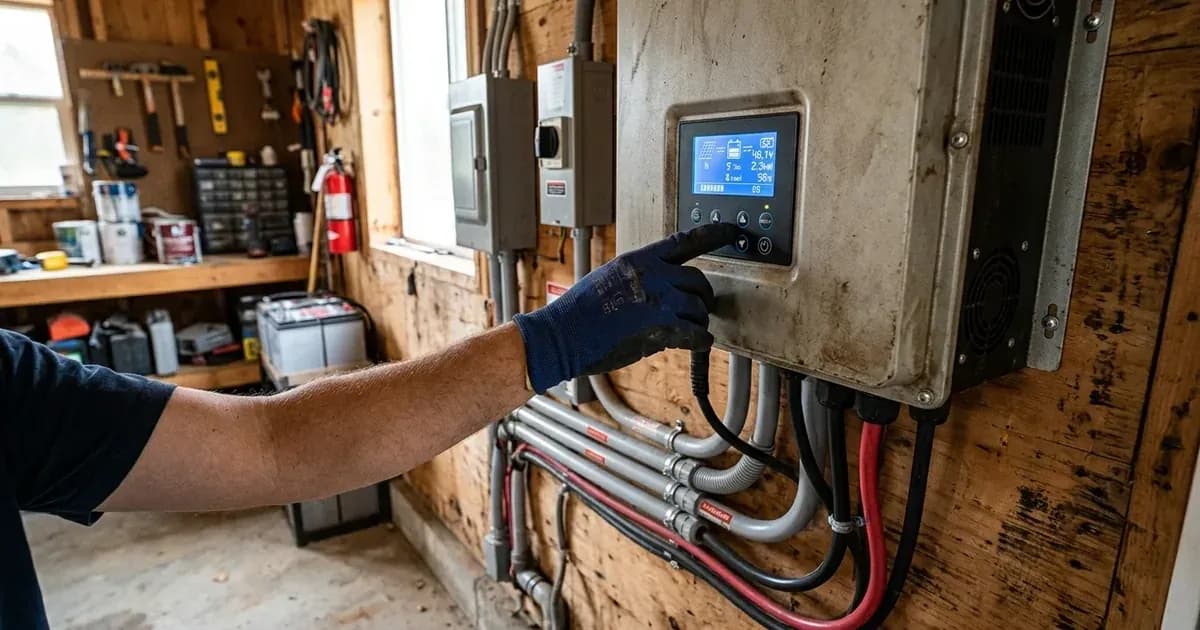
- Access the inverter's program settings: Use the inverter's display and buttons to navigate to the battery-related programs. The specific program numbers vary by inverter model.
- Select the correct battery type: Choose 'AGM', 'Flooded', or 'User-Defined' as appropriate. If using a battery type not explicitly listed (e.g., LiFePO4), you will need to use the 'User-Defined' option.
- Adjust voltage settings: Carefully input the bulk charging voltage, floating charging voltage, and low DC cut-off voltage according to your battery's specifications. For flooded batteries, also check the equalization voltage.
Crown Micro Xavier Battery Settings Table
The following tables detail the battery settings for various Crown Micro Xavier inverter models. Always cross-reference these values with your battery manufacturer's data sheet, especially when using the 'User-Defined' option.
Xavier 3KW (24V System)
Setting Name | Program | Battery Type | Default Value | User-Defined Range |
|---|---|---|---|---|
Battery Type | 05 | AGM (default) | N/A | N/A |
|
| Flooded | N/A | N/A |
|
| User-Defined | N/A | N/A |
Bulk Charging Voltage (C.V voltage) | 26 | Flooded Battery | 29.2V | N/A |
|
| AGM / Gel Battery | 28.2V | N/A |
|
| User-Defined (24V system) | N/A | 25.0V to 31.5V (Increment 0.1V) |
Floating Charging Voltage | 27 | Default | 27.0V | N/A |
Low DC Cut-off Voltage | 29 | Default | 21.0V | N/A |
|
| User-Defined (24V system) | N/A | 21.0V to 24.0V (Increment 0.1V) |
Battery Equalization Voltage | 31 | Default | 29.2V | N/A |
|
| User-Defined (24V system) | N/A | 25.0V to 31.5V (Increment 0.1V) |
Max Charging Current (Solar) | N/A | N/A | 100Amp | N/A |
AC Charging Current (Max) | N/A | N/A | 80Amp (@VI/P=230Vac) | N/A |
Xavier-1200VA-MPPT (12V System)
Setting Name | Program | Battery Type | Default Value | User-Defined Range |
|---|---|---|---|---|
Battery Type | 02 | AGM (Default) | N/A | N/A |
|
| Flooded | N/A | N/A |
|
| User-defined | N/A | N/A |
Bulk Charging (C.V voltage) | 04 | Default (12V model) | 14.1V | N/A |
|
| User-defined (12Vdc model) | N/A | 13.0V to 14.6V (Increment 0.1V) |
Floating Charging Voltage | 05 | Default (12V model) | 13.5V | N/A |
|
| User-defined (12Vdc model) | N/A | 13.0V to 14.6V (Increment 0.1V) |
Low DC Cut-off Voltage | 06 | Xavier-1200VA-MPPT default setting | 9.9V | N/A |
|
| User-defined | N/A | 9.9V to 12.0V (Increment 0.1V) |
Maximum Solar Charging Current | N/A | N/A | 60 A | N/A |
Maximum AC Charging Current | N/A | N/A | 10 A or 25 A | N/A |
Xavier-2400VA-MPPT (24V System)
Setting Name | Program | Battery Type | Default Value | User-Defined Range |
|---|---|---|---|---|
Battery Type | 02 | AGM (Default) | N/A | N/A |
|
| Flooded | N/A | N/A |
|
| User-defined | N/A | N/A |
Bulk Charging (C.V voltage) | 04 | Default (24V model) | 28.2V | N/A |
|
| User-defined (24Vdc model) | N/A | 26.0V to 29.2V (Increment 0.2V) |
Floating Charging Voltage | 05 | Default (24V model) | 27.0V | N/A |
|
| User-defined (24Vdc model) | N/A | 26.0V to 29.2V (Increment 0.2V) |
Low DC Cut-off Voltage | 06 | Xavier-2400VA-MPPT default setting | 19.8V | N/A |
|
| User-defined | N/A | 19.8V to 24.0V (Increment 0.2V) |
Maximum Solar Charging Current | N/A | N/A | 60 A | N/A |
Maximum AC Charging Current | N/A | N/A | 10 A or 25 A | N/A |
X-3KVA-M (Xavier 3KVA) (24V System)
Setting Name | Program | Battery Type | Default Value | User-Defined Range |
|---|---|---|---|---|
Battery Type | 05 | AGM (default) | N/A | N/A |
|
| Flooded | N/A | N/A |
|
| User-Defined | N/A | N/A |
Bulk Charging Voltage (C.V voltage) | 26 | Flooded Battery | 29.2V | N/A |
|
| AGM / Gel Battery | 28.2V | N/A |
|
| User-Defined (24V system) | N/A | 25.0V to 30.0V (Increment 0.1V) |
Floating Charging Voltage | 27 | Default | 27.0V | N/A |
|
| User-Defined (24V system) | N/A | 25.0V to 30.0V (Increment 0.1V) |
Low DC Cut-off Voltage | 29 | Default | 21.0V | N/A |
|
| User-Defined (24V system) | N/A | 21.0V to 24.0V (Increment 0.1V) |
Battery Equalization Voltage | 31 | Default | 29.2V | N/A |
|
| User-Defined (24V system) | N/A | 25.0V to 30.0V (Increment 0.1V) |
Max Charging Current (Solar) | N/A | N/A | 40Amp | N/A |
Max Charging Current (AC charger plus solar charger) | N/A | N/A | 60Amp | N/A |
AC Charging Current (Max) | N/A | N/A | 25Amp(@VI/P=230Vac) | N/A |
Considerations for Lithium Batteries (LiFePO4)
Crucially, the Xavier 3KW manual explicitly states: 'To reduce risk of injury, charge only deep-cycle lead acid type rechargeable batteries. Other types of batteries may burst, causing personal injury and damage.' Therefore, LiFePO4 batteries should NOT be used with the Xavier 3KW model. For other models, where the manual does not contain this explicit prohibition, if you are considering using lithium batteries, it is critical to:
- Consult your battery manufacturer's data sheet: Obtain the precise bulk, float, and low voltage cut-off settings for your specific LiFePO4 battery, including any temperature compensation requirements.
- Understand your BMS: Most LiFePO4 batteries include a Battery Management System (BMS) that handles overcharge, over-discharge, and balancing. Ensure your inverter settings do not conflict with or override your BMS protections.
- Verify compatibility: Confirm that your specific Crown Micro Xavier inverter model is compatible with LiFePO4 batteries, as some older models may not be designed for their charging profiles.
Safety: Working with Batteries and Inverters
Working with batteries and solar inverters involves significant electrical hazards. Always prioritize safety.
- Disconnect Power: To reduce risk of electric shock, disconnect all wirings before attempting any maintenance or cleaning. Turning off the unit will not reduce this risk. Internal capacitors can remain charged for 5 minutes after disconnecting all sources of power.
- Qualified Personnel: Only qualified personnel can install this device with battery. (Xavier 3KW manual)
- Do Not Disassemble: Do not disassemble the unit. Take it to a qualified service center when service or repair is required. Incorrect re-assembly may result in a risk of electric shock or fire. (Xavier 3KW manual)
- Do Not Disassemble: Do not disassemble this inverter yourself. It contains no user-serviceable parts. Attempt to service this inverter yourself may cause a risk of electrical shock or fire and will void the warranty from the Manufacturer. (Xavier-1200VA-MPPT / Xavier-2400VA-MPPT manuals)
- Insulated Tools: Use insulated tools to reduce the chance of short-circuit when installing or working with the inverter, the batteries, or other equipment attached to this unit.
- Metal Tools: Be very cautious when working with metal tools on or around batteries. A potential risk exists to drop a tool to spark or short circuit batteries or other electrical parts and could cause an explosion. (Xavier 3KW manual)
- Metal Tools: Careful to reduce the risk or dropping a metal tool on the batteries. It could spark or short circuit the batteries and could cause an explosion. (Xavier-1200VA-MPPT / Xavier-2400VA-MPPT manuals)
- Battery Type: To reduce risk of injury, charge only deep-cycle lead acid type rechargeable batteries. Other types of batteries may burst, causing personal injury and damage. (Xavier 3KW manual)
- Wiring: Ensure battery wires are connected correctly: positive (+) to positive (+) and negative (-) to negative (-). Do not place anything between inverter terminals and the ring terminals, as overheating may occur. Do not apply anti-oxidant substance on the terminals before terminals are securely tightened.
- Ventilation for Flooded Batteries: Provide ventilation to outdoors from the battery compartment. The battery enclosure should be designed to prevent accumulation and concentration of hydrogen gas at the top of the compartment. NEVER smoke or allow a spark or flame in vicinity of a battery. (Xavier-1200VA-MPPT / Xavier-2400VA-MPPT manuals)
- Frozen Batteries: NEVER charge a frozen battery. (Xavier 3KW manual)
- Eye Protection: Have plenty of fresh water and soap nearby in case battery acid contacts skin, clothing, or eyes. Avoid touching eyes while working near batteries. (Xavier-1200VA-MPPT / Xavier-2400VA-MPPT manuals)
When to call a technician instead
If you are uncertain about any setting, or if your inverter displays fault codes related to battery voltage (e.g., "03 Battery voltage is too high", "04 Battery voltage is too low"), it is best to consult a qualified technician. Attempting to service the inverter yourself may cause a risk of electrical shock or fire and will void the warranty from the manufacturer. If the battery shows signs of physical damage, swelling, or leakage, it should be inspected by a professional.
Still showing the fault? Book a technician
If the steps above did not clear it, tell us the inverter or battery and the exact code. We pass it to a technician who covers your city; visit charges are quoted before they come.
How this pays for the site: the technician or verifier pays SolarNevs a fixed introduction fee. Nobody pays to be recommended, and you are free to use our free guides instead.
Frequently asked questions
What are the default battery settings for Crown Micro Xavier inverters?
Default settings vary by model and battery type. For example, the Xavier 3KW defaults to AGM with specific Bulk and Floating Charging Voltages. Always verify settings against your battery manufacturer's specifications, as charge setpoints for lead-acid batteries are typically temperature-compensated, though the manual does not provide a specific temperature reference for these values.
How do I set up a user-defined battery type on my Crown Micro Xavier inverter?
Before making any adjustments, please review the 'Safety: Working with Batteries and Inverters' section of this guide. Select 'User-Defined' in the Battery Type program (Program 05 for Xavier 3KW and X-3KVA-M, Program 02 for Xavier-1200VA-MPPT and Xavier-2400VA-MPPT models). Then, manually adjust Bulk Charging Voltage, Floating Charging Voltage, and Low DC Cut-off Voltage according to your battery manufacturer's data sheet.
What is the maximum charging current for Crown Micro Xavier inverters?
The maximum solar charging current is 100Amp for the Xavier 3KW, 60 A for Xavier-1200VA-MPPT and Xavier-2400VA-MPPT, and 40Amp for the X-3KVA-M. AC charging currents also vary by model.
Can I use lithium batteries with Crown Micro Xavier inverters?
For the Xavier 3KW model, the manual explicitly states: 'To reduce risk of injury, charge only deep-cycle lead acid type rechargeable batteries. Other types of batteries may burst, causing personal injury and damage.' Therefore, LiFePO4 batteries should NOT be used with the Xavier 3KW. For other models, where the manual does not contain this explicit prohibition, if you are considering using lithium batteries, consult your lithium battery manufacturer for recommended settings and ensure compatibility.
What is the low DC cut-off voltage for Crown Micro Xavier inverters?
The default low DC cut-off voltage is 21.0V for 24V models like the Xavier 3KW and X-3KVA-M, and 9.9V for the 12V Xavier-1200VA-MPPT. These can be adjusted within a specified range in the User-Defined settings.
References
- Xavier 3KW User Manual — accessed 23 August 2026
- Crown Micro XAVIER 1.2-2.4-M Solar manual — accessed 23 August 2026
- Crown Micro Xavier 3KVA User Manual — accessed 23 August 2026
Related guides
More from inverter errors & fixes.