GoodWe ET Series Three Phase Hybrid And Lynx Home F Battery Setup Guide
Updated 15 September 2026 · By SolarNevs Research Desk, Dealer surveys + verified sources · 6 sources · Method ↗
Key Takeaways
- GoodWe ET series inverters are three-phase hybrid systems with integrated high-voltage battery interfaces.
- Lynx Home F batteries are modular, stacking in series, and communicate via CAN-Bus BMS.
- Initial setup and grid profile configuration are performed using the SolarGo mobile app.
- The system provides UPS-level backup power, switching over in under 10 milliseconds during outages.
Setting Up Your GoodWe ET Series Inverter and Lynx Home F Battery System
Setting up a GoodWe ET series three-phase hybrid inverter with Lynx Home F high-voltage batteries involves careful electrical connections, communication setup, and software configuration. This guide outlines the process for the GW5K-10K-ET inverter models and Lynx Home F storage, ensuring a safe and compliant installation. The system is designed for both residential and commercial applications, supporting standard three-phase electrical distribution systems.
Understanding the GoodWe ET and Lynx Home F Architecture
The GoodWe ET series three-phase hybrid inverters, specifically the GW5K-10K-ET models, are designed with dual Maximum Power Point Trackers (MPPTs) and integrated high-voltage battery interfaces. This architecture allows for efficient solar energy harvesting and direct connection to high-voltage battery storage.
Component / Subsystem | Hardware / Configuration | Functional Role |
|---|---|---|
Inverter Platform | GoodWe GW5K-10K-ET Series | Three-phase hybrid inverter with dual MPPTs |
Battery Storage | Lynx Home F High-Voltage Series | Modular series-stacked LFP battery managed by intelligent PCU |
Battery Comms | Dedicated BMS CAN-Bus Port | Live telemetry, charge/discharge control, and cell balancing |
Emergency Backup | Dedicated EPS Backup Port | Automated UPS-level power switchover in under 10 milliseconds |
Configuration Tools | SolarGo App & SEMS Portal | Local Bluetooth commissioning and remote cloud fleet monitoring |
The Lynx Home F battery system consists of modular units that stack in series. An intelligent power control unit manages the overall DC voltage of the stacked battery system. This modular design allows for scalability to meet varying energy storage needs. The inverter also features a dedicated EPS (Emergency Power Supply) backup output, which provides UPS-level power to essential circuits during grid outages. This automated off-grid power capability ensures continuity for critical loads, with a switchover time of under 10 milliseconds.
Connecting the Lynx Home F Battery to Your ET Inverter
Proper connection of the Lynx Home F battery to the GoodWe ET inverter is critical for system operation and safety. This process involves both power and communication wiring.
- Modular Stacking: Lynx Home F battery modules stack in series. Ensure each module is securely connected according to the battery manufacturer's instructions. An intelligent power control unit manages the system DC voltage.
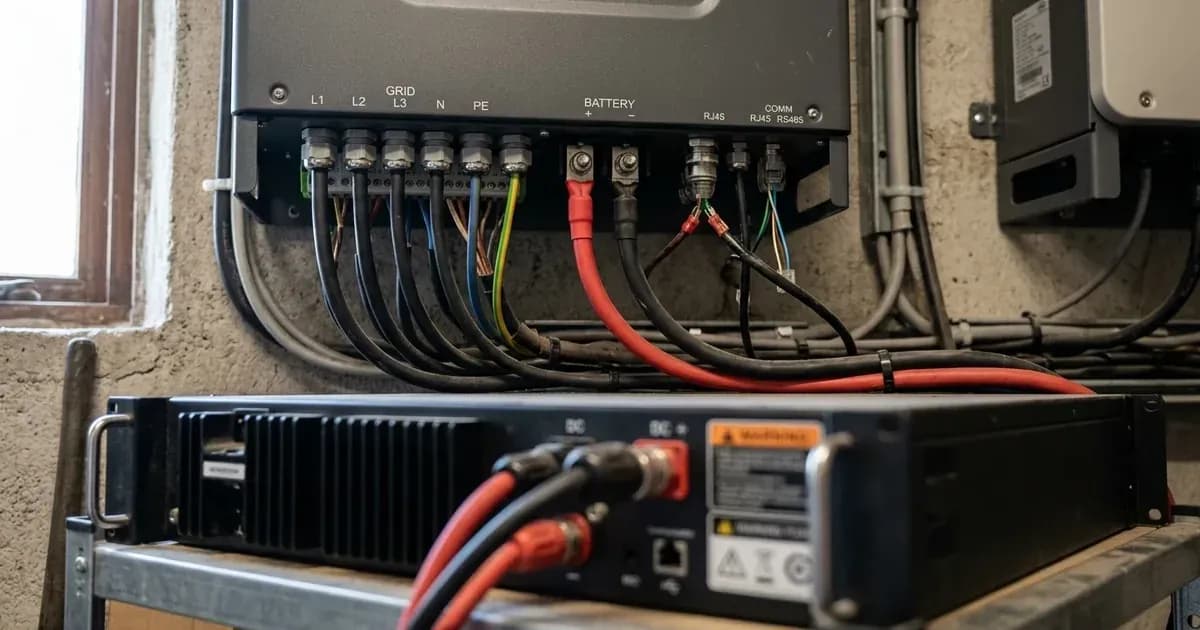
- DC Power Connection: Connect the high-voltage DC power cables from the Lynx Home F battery system to the designated battery terminals on the GoodWe ET inverter. Observe correct polarity.
- BMS Communication: Connect the master battery's BMS CAN communication cable to the dedicated BMS port on the inverter. This connection enables the inverter and battery management system to communicate, ensuring safe and efficient charging and discharging.
- Protective Earth Bonding: Bond the inverter chassis ground and the battery metal enclosure to the main installation earthing terminal. This step is crucial for electrical safety and compliance.
Commissioning with the SolarGo App and SEMS Portal
Once the physical connections are complete, the system requires commissioning to configure its operation parameters and grid profile.
- Local Commissioning with SolarGo App: Initial commissioning, including battery setup and grid profile configuration, is managed via the SolarGo mobile app. Use a Bluetooth connection to connect your mobile device to the inverter. Follow the app's prompts to set up the system according to local grid requirements and battery specifications.
- Remote Management with SEMS Portal: For ongoing monitoring, remote firmware updates, and configuration management, the system supports connection to the GoodWe SEMS Portal. This VRM (Virtual Reality Monitoring) cloud portal allows for remote oversight and adjustments.
Safety Procedures for Installation and Maintenance
Safety is paramount when working with high-voltage solar and battery systems. Always adhere to these procedures to prevent injury and damage.
- DC Battery Disconnect: Before performing any work on the battery or inverter, switch off the DC battery isolator. After switching off, wait at least 5 minutes for internal capacitors to discharge. This waiting period ensures that residual energy is safely dissipated.
- Earthing: Ensure that the inverter chassis ground and the battery metal enclosure are securely bonded to the main installation earthing terminal. This protective earthing is a fundamental safety measure against electrical shock.
- Accredited Installer Work: The configuration of grid profiles and advanced inverter settings should only be performed by an accredited installer. Incorrect settings can lead to grid instability, equipment damage, or non-compliance with local regulations. Never attempt to change grid-protection settings yourself, as this can breach your connection agreement.
- Anti-Islanding Protection: The GoodWe ET series complies with international microgeneration safety and grid protection standards, including certified anti-islanding protection. This feature automatically disconnects the inverter from the grid during an outage to protect utility workers.
What the Published Sources Do Not Tell You
While the provided official documentation details the technical specifications and setup procedures for the GoodWe ET series inverters and Lynx Home F batteries, it does not specify certain granular details. For instance, precise CAN-Bus pinout diagrams with wire colours or specific baud rates are not included. Similarly, detailed step-by-step instructions for every screen within the SolarGo app during commissioning are beyond the scope of this general overview.
official documentation also does not provide specific battery voltage ranges for different Lynx Home F module counts, only stating that modules stack in series and an intelligent power control unit manages the system DC voltage. For exact voltage parameters, installers should consult the specific Lynx Home F battery manual. Furthermore, while the system supports three-phase grid distribution, specific regional grid codes or utility-specific connection requirements are not detailed here, as these vary by location and distribution network operator. Always consult your local grid operator for specific connection requirements.
Still showing the fault? Book a technician
If the steps above did not clear it, tell us the inverter or battery and the exact code. We pass it to a technician who covers your city; visit charges are quoted before they come.
How this pays for the site: the technician or verifier pays SolarNevs a fixed introduction fee. Nobody pays to be recommended, and you are free to use our free guides instead.
Frequently asked questions
What are the primary technical requirements for goodwe et series three phase hybrid and lynx home f battery setup guide?
Key requirements include compliance with local grid codes, correct equipment certification, and proper electrical isolation.
Who is authorized to install and inspect goodwe et series three phase hybrid and lynx home f battery setup guide?
All high-voltage DC, AC grid tie-in, and switchboard modifications must be performed by a qualified, accredited electrical professional.
How is export power limited in goodwe et series three phase hybrid and lynx home f battery setup guide?
Export limiting is achieved using certified bidirectional smart meters or power sensors providing dynamic feedback to the inverter system.
References
- GoodWe ET PLUS+ Series (GW5K-ET to GW10K-ET) three-phase hybrid inverter product page - 180-600V battery range, <10ms UPS-level backup switchover — accessed 6 September 2026
- GoodWe ET Series 5-10kW downloads - datasheets, grid-code certificates and battery compatibility lists — accessed 6 September 2026
- GoodWe Lynx Home F Series downloads - user manuals, datasheets and compatibility lists — accessed 6 September 2026
- GoodWe Lynx F G2 high-voltage LFP battery product page - stackable modules, ET-series compatibility — accessed 6 September 2026
- GoodWe SolarGo App User Manual EN, V2.5 (PDF) - hybrid inverter Bluetooth/WLAN connection, safety country and battery settings — accessed 6 September 2026
- NEPRA (Prosumer) Regulations 2026, SRO 251(I)/2026 (PDF) - interconnection application, protection requirements and IEC/IEEE standards for distributed generation — accessed 6 September 2026
Related guides
More from inverter errors & fixes.