Huawei Sun2000 M1 Three Phase Hybrid And Luna2000 Battery Setup Guide
Updated 15 September 2026 · By SolarNevs Research Desk, Dealer surveys + verified sources · 3 sources · Method ↗
Key Takeaways
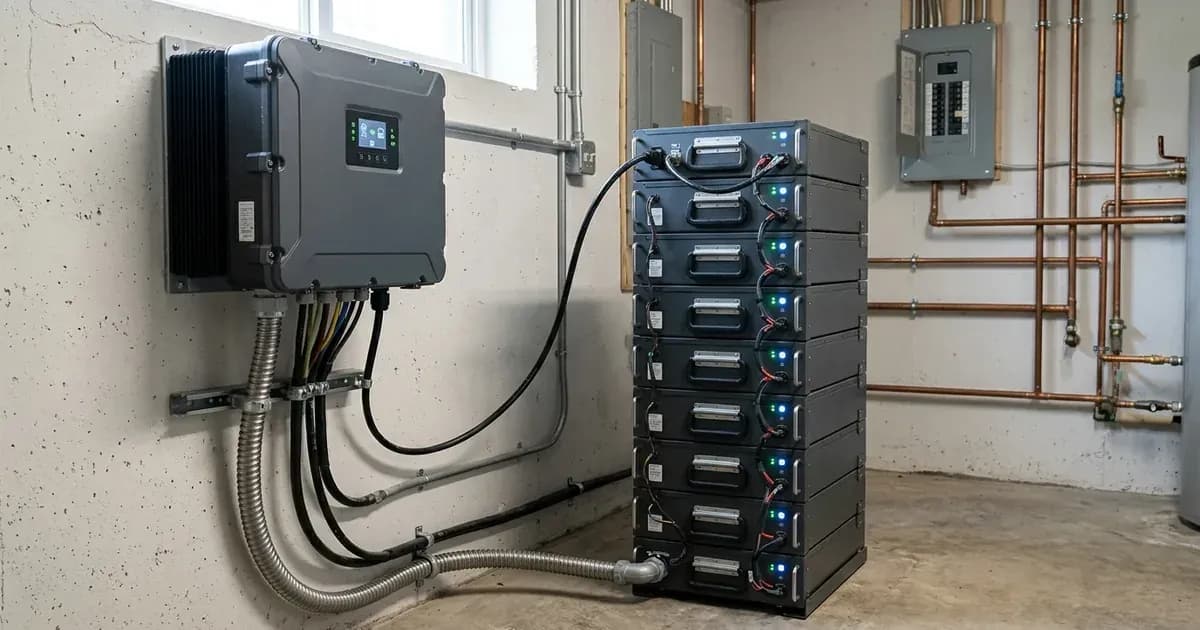
- Huawei SUN2000-M1 inverters integrate high-voltage battery DC ports and support module optimizers.
- LUNA2000 batteries are modular 5kWh packs with independent optimizers, allowing flexible expansion.
- Battery communication uses an RS485/CAN cable connected to a dedicated BMS port on the inverter.
- System commissioning and configuration are managed through the FusionSolar (SolarGo) mobile app.
- Always switch off the DC battery isolator and wait at least 5 minutes before working on the system.
Understanding Your Huawei Hybrid System
The Huawei SUN2000-M1 three-phase hybrid inverter and LUNA2000 battery storage system form a comprehensive energy solution. These systems are engineered for residential and commercial off-grid and grid-parallel energy storage systems worldwide. The SUN2000-M1 inverters integrate high-voltage battery DC ports with direct module optimizer support.
The LUNA2000 battery systems feature modular 5kWh packs. Each pack includes independent built-in energy optimizers. This design allows for 100% depth of discharge and supports mixed new and old pack expansion. This means you can add to your battery capacity over time without needing to replace the entire system. The system is compatible with standard single-phase and three-phase electrical distribution systems globally.
Essential Connections: Battery and Grid
Proper connection of your LUNA2000 battery to the SUN2000-M1 inverter is critical for system operation. You must connect the master battery BMS CAN communication cable to the dedicated BMS port on the inverter. This cable facilitates the flow of data between the battery management system (BMS) and the inverter, ensuring efficient charge and discharge cycles.
For uninterruptible power supply to essential circuits, connect these circuits to the dedicated AC-out-1 terminal on the Backup Box. The Backup Box provides automatic islanding transfer, ensuring power continuity during grid outages for the connected loads.
Commissioning with the FusionSolar App
The initial setup and configuration of your Huawei hybrid system are performed using a mobile application. Commissioning, battery setup, and grid profile configuration are managed via the SolarGo mobile app. This app is also widely known as the FusionSolar App.
The app guides you through the necessary steps to bring your system online. It allows you to set grid parameters, monitor performance, and manage your energy flow. The system also supports remote firmware and configuration management via a VRM cloud portal, enabling diagnostics and updates from a distance.
Safety First: Before and During Setup
Working with electrical systems requires strict adherence to safety protocols. Before performing any maintenance or installation work on your Huawei SUN2000-M1 inverter or LUNA2000 battery, you must switch off the DC battery isolator. After switching it off, wait at least 5 minutes for internal capacitors to discharge. This waiting period helps prevent electrical shock hazards.
It is also essential to ensure proper earthing for your system. Bond the inverter chassis ground and battery metal enclosure to the main installation earthing terminal. This protective enclosure earth continuity is a fundamental safety measure against electrical faults. Always use insulated tools when tightening or disconnecting terminals, and ensure power is isolated to prevent short circuits.
System Capabilities and Management
The Huawei SUN2000-M1 and LUNA2000 system is designed with advanced capabilities for safety and flexibility. It complies with international microgeneration safety and grid protection standards, including certified anti-islanding grid safety. This ensures the system safely disconnects from the grid during outages, protecting utility workers.
The system's universal residential and commercial scope means it can be deployed in various settings. Its remote cloud fleet diagnostics capability allows for efficient monitoring and troubleshooting. This feature enables service providers to manage and update your system remotely, ensuring optimal performance and longevity.
What You Can Check Yourself, and What You Cannot
As a homeowner, you can perform basic visual inspections and monitor your system's performance through the FusionSolar app. You can check for visible damage to cables or enclosures and ensure all indicators on the inverter and battery are functioning as expected. You can also review energy production and consumption data within the app.
System Maintenance Scope | Homeowner Permission | Accredited Installer Requirement |
|---|---|---|
Enclosure & Hardware | External visual check for damage and indicator status | Enclosure opening, internal board repairs, and capacitor-discharge servicing |
System App & Telemetry | Daily yield and consumption monitoring in FusionSolar app | Commissioning setup, grid profile selection, and remote cloud fleet diagnostics |
Electrical & Backup Wiring | Inspect external cable runs and isolation switches | Connect BMS CAN communication cables and Backup Box AC-out-1 essential circuits |
Grid & Protection Settings | View operational parameters in read-only mode | Configure DNO connection parameters and certified anti-islanding protection |
However, any tasks involving internal wiring, changing grid protection settings, or modifying system parameters beyond basic user settings must be performed by an accredited installer. Grid-protection settings are set by an accredited installer, and changing them can breach your connection agreement with your network operator. Opening the inverter or battery enclosure, replacing components, or re-pinning connectors should only be done by authorized service personnel after isolating PV, battery, and AC breakers and waiting the manual's specified capacitor-discharge time.
What the published sources do not tell you
While official documentation provides a clear overview of the Huawei SUN2000-M1 and LUNA2000 system architecture and setup process, it does not include specific numerical values for all operational parameters. For instance, detailed charge and discharge current limits, specific voltage setpoints for different battery states, or precise temperature compensation figures for charging are not provided. These values are typically found in the full commissioning manual or technical datasheets, which are often intended for accredited installers.
official documentation also does not detail specific error codes or troubleshooting steps beyond general safety warnings. For in-depth diagnostics or advanced configuration, an accredited installer with access to the comprehensive manufacturer documentation and specialized tools would be required.
```
Still showing the fault? Book a technician
If the steps above did not clear it, tell us the inverter or battery and the exact code. We pass it to a technician who covers your city; visit charges are quoted before they come.
How this pays for the site: the technician or verifier pays SolarNevs a fixed introduction fee. Nobody pays to be recommended, and you are free to use our free guides instead.
Frequently asked questions
What are the primary technical requirements for huawei sun2000 m1 three phase hybrid and luna2000 battery setup guide?
Key requirements include compliance with local grid codes, correct equipment certification, and proper electrical isolation.
Who is authorized to install and inspect huawei sun2000 m1 three phase hybrid and luna2000 battery setup guide?
All high-voltage DC, AC grid tie-in, and switchboard modifications must be performed by a qualified, accredited electrical professional.
How is export power limited in huawei sun2000 m1 three phase hybrid and luna2000 battery setup guide?
Export limiting is achieved using certified bidirectional smart meters or power sensors providing dynamic feedback to the inverter system.
References
- Huawei SUN2000-3/4/5/6/8/10KTL-M1 user manual, quick guide and datasheet downloads — accessed 6 September 2026
- Huawei LUNA2000-5/10/15-S0 Smart String ESS product page - 5 kWh modules, per-module optimizer and mixed old/new pack expansion — accessed 6 September 2026
- NEPRA (Alternative and Renewable Energy) Distributed Generation and Net Metering Regulations, 2015 - SRO 892(I)/2015 notification — accessed 6 September 2026
Related guides
More from inverter errors & fixes.