Knox Inverter WiFi Setup Guide
Updated 6 September 2026 · By SolarNevs Research Desk, Dealer surveys + verified sources · 1 source · Method ↗
Key Takeaways
- Knox inverters support WiFi monitoring, either built-in or via an external datalogger.
- Specific step-by-step WiFi configuration instructions are not detailed in the general manual.
- Ensure stable power and correct physical connections for any communication module.
- If WiFi setup fails, a qualified technician should be consulted to avoid damage or voiding warranty.
How do I set up WiFi on my Knox inverter?
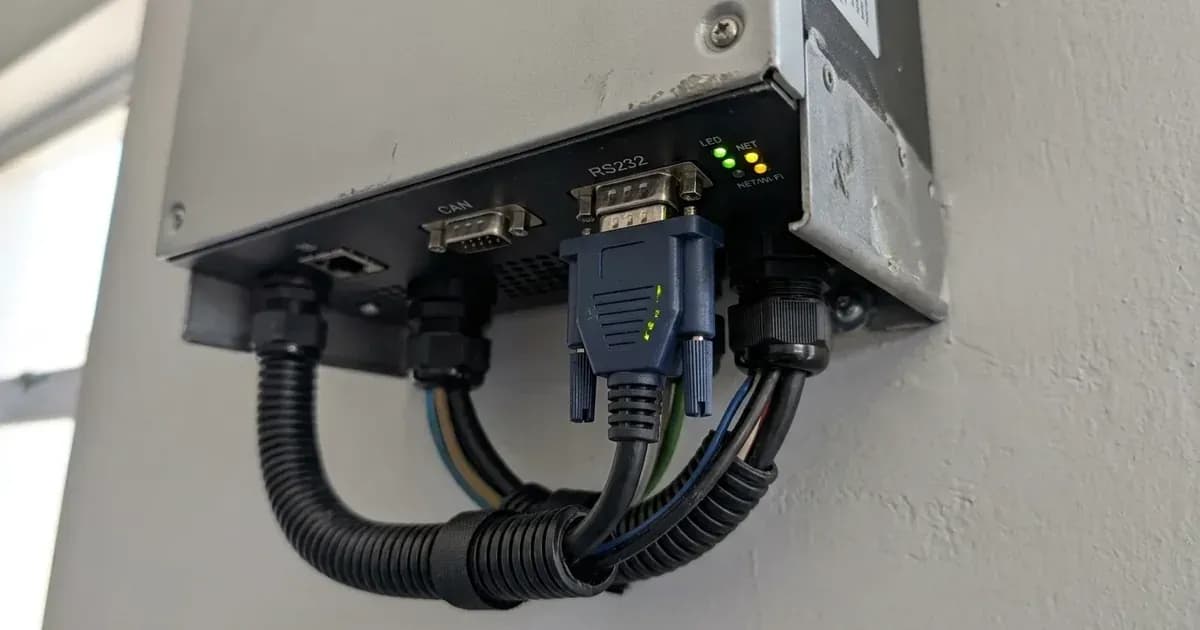
Knox hybrid inverters, which are rebadged Deye units, support WiFi monitoring. This allows you to view your system's performance data remotely. The inverter features a built-in WiFi interface, and some models may also use an optional WiFi Datalogger connected via an RS232 port.
Diagnosis
Troubleshooting WiFi setup issues often involves checking basic connections and inverter status. The manual does not provide specific WiFi error codes or detailed setup steps, so general communication checks are necessary.
- Check Inverter Power and Status: Ensure your Knox inverter is powered on and operating normally. The inverter's display should show no critical fault codes.
- Verify WiFi Module Presence: Confirm if your inverter model has a built-in WiFi interface or requires an external WiFi Datalogger. If an external datalogger is used, ensure it is securely connected to the RS232 port.
- Inspect Physical Connections: For external dataloggers, ensure the cable connecting it to the inverter's RS232 port is firmly seated. For any built-in WiFi, ensure no physical damage is visible to the inverter casing around the WiFi module area.
- Inverter Restart: WARNING: Before performing any power cycling, ensure you follow all safety procedures for disconnecting AC and DC power as outlined in the 'Safety: Electrical and Battery Hazards' section, and allow sufficient time for capacitors to discharge. Improper power cycling or failure to follow safety procedures could lead to damage, electric shock, or fire, and may void your 5-year warranty. If unsure, consult qualified personnel. Then, try turning off both the DC and AC power to the inverter, waiting for one minute, and then turning them back on.
- Check Network Environment: Ensure your local WiFi network is operational and within range of the inverter. Obstructions or distance can interfere with signal strength.
Cause/fix table
Symptom detail | Likely cause | Fix |
|---|---|---|
WiFi monitoring not working | WiFi module not powered or connected | Ensure inverter is powered on; verify external WiFi Datalogger is securely connected to the RS232 port. |
No remote data visible | WiFi module not configured | Refer to specific Wi-Fi Plug illustrations (if available) or consult a qualified technician for configuration steps. |
Intermittent connection | Weak WiFi signal or network interference | Relocate the inverter or WiFi router for better signal, or consider a WiFi extender. |
Inverter not appearing on app | Incorrect app or network settings | Double-check the mobile application's instructions and ensure the inverter is connected to the correct local network. |
WiFi Monitoring and Communication Setup
Knox inverters offer WiFi monitoring capabilities, allowing you to track your solar system's performance remotely. The manual states that the inverter "Supports WIFI monitoring" and includes a "Built-in" WiFi Interface. For models requiring an external "Wi-Fi Plug," the manual advises referring to specific illustrations for configuration, which are not provided in the general documentation.
In addition to WiFi, Knox inverters support other communication protocols for system integration:
- BMS Communication: The inverter features "BMS 485 Port" and "BMS CAN Port" for communication with compatible battery management systems (BMS). This allows the inverter to receive critical battery data and optimize charging and discharging.
- Energy Meter Communication: An "RS485 Port" is available for communication with an energy meter, though some hardware versions may not include this port. This enables precise monitoring of energy flow.
- WiFi Datalogger: An "RS232 Port" is used to connect an external "WiFi datalogger." This device provides WiFi monitoring functionality, potentially as an alternative to a built-in module or for specific system configurations.
When configuring any settings on your Knox inverter, be aware that "Menu/program numbering can differ by model and firmware on rebadged units." Always "match settings by NAME rather than number" to ensure correct configuration.
Safety: Electrical and Battery Hazards
Working with solar inverters and batteries involves significant electrical hazards. Always prioritize safety to prevent electric shock, fire, or damage to equipment.
- Qualified Personnel: "Only qualified personnel can install this device with battery." Do not attempt installation or complex repairs unless you are trained and certified.
- Disconnection: Before any maintenance or cleaning, "disconnect all wires" from the inverter. Simply turning off the unit does not eliminate the risk of electric shock.
- Disassembly: "Do not disassemble the inverter." Opening the unit can expose you to dangerous voltages and may void your warranty.
- Grounding: The inverter "should be connected to a permanent grounded wiring system." Ensure proper grounding according to local regulations to prevent electric shock.
- Battery Safety: Be extremely cautious when working with metal tools on or around batteries. "Dropping a tool may cause a spark or short circuit, even an explosion." Ensure correct battery polarity; "Reverse polarity connection will damage the inverter." Never charge a frozen battery.
When to call a technician instead
While basic checks can be performed, the detailed setup of communication modules and complex troubleshooting often requires professional expertise.
- Lack of Specific Instructions: The manual indicates that specific "illustrations of the Wi-Fi Plug" are needed for configuration, but these are not provided. Without these detailed steps, attempting advanced setup may lead to incorrect configuration or system issues.
- Persistent Issues: If you have performed basic checks and your WiFi monitoring or other communication features are still not working, contact a qualified technician.
- Warranty Concerns: "Attempts to modify/alter/repair" the inverter by unauthorized personnel can void the "5 years" warranty. Incorrect installation or commissioning, or failure to comply with instructions, are also listed as warranty exclusions.
- Safety Risks: If you are unsure about any step or suspect an electrical issue, do not proceed. Contact a professional to ensure your safety and the integrity of your solar system.
Still showing the fault? Book a technician
If the steps above did not clear it, tell us the inverter or battery and the exact code. We pass it to a technician who covers your city; visit charges are quoted before they come.
How this pays for the site: the technician or verifier pays SolarNevs a fixed introduction fee. Nobody pays to be recommended, and you are free to use our free guides instead.
Frequently asked questions
What is the Knox inverter WiFi feature?
Knox hybrid inverters support WiFi monitoring, allowing you to remotely track your system's performance. This feature is built-in or accessible via an optional WiFi Datalogger, depending on the specific inverter model.
How do I connect my Knox inverter to WiFi?
The Knox inverter manual refers to specific illustrations for Wi-Fi Plug configuration which are not provided. Ensure your inverter has stable power and the WiFi module is correctly installed. The setup typically involves connecting to the inverter's WiFi network and configuring it via a mobile application or web interface.
What is the Knox WiFi Datalogger for?
The Knox WiFi Datalogger connects to the inverter's RS232 port to provide WiFi monitoring capabilities. This is an alternative or supplementary method to the built-in WiFi interface, depending on your inverter model.
Can I monitor my Knox inverter remotely?
Yes, Knox inverters support remote monitoring via WiFi. Once configured, you can use a compatible mobile application to view real-time data and system status from your solar installation.
What if my Knox inverter WiFi setup fails?
If your WiFi setup fails, first ensure the inverter has stable power. For any physical checks or restarts, always refer to the 'Safety: Electrical and Battery Hazards' section and ensure all power is safely disconnected and capacitors are discharged. If the issue persists, consult a qualified technician, as detailed setup steps are not universally documented and may require professional assistance.
References
- Deye SUN-3.6-6K-SG03LP1-EU Series Manual Ver2.2 — accessed 23 August 2026
Related guides
More from inverter errors & fixes.