Deye Inverter WiFi and Solarman Logger Setup Guide
Updated 6 September 2026 · By SolarNevs Research Desk, Dealer surveys + verified sources · 3 sources · Method ↗
Key Takeaways
- Deye inverters require an optional WiFi Plug or datalogger for remote monitoring via platforms like Solarman.
- The WiFi Plug connects to a dedicated WiFi Interface port, while a datalogger uses the RS232 port.
- Configuration details for the WiFi Plug are typically found in its own accessory manual.
- Always ensure all connections are secure and follow safety guidelines when installing or troubleshooting.
How do I set up WiFi monitoring for my Deye inverter with Solarman?
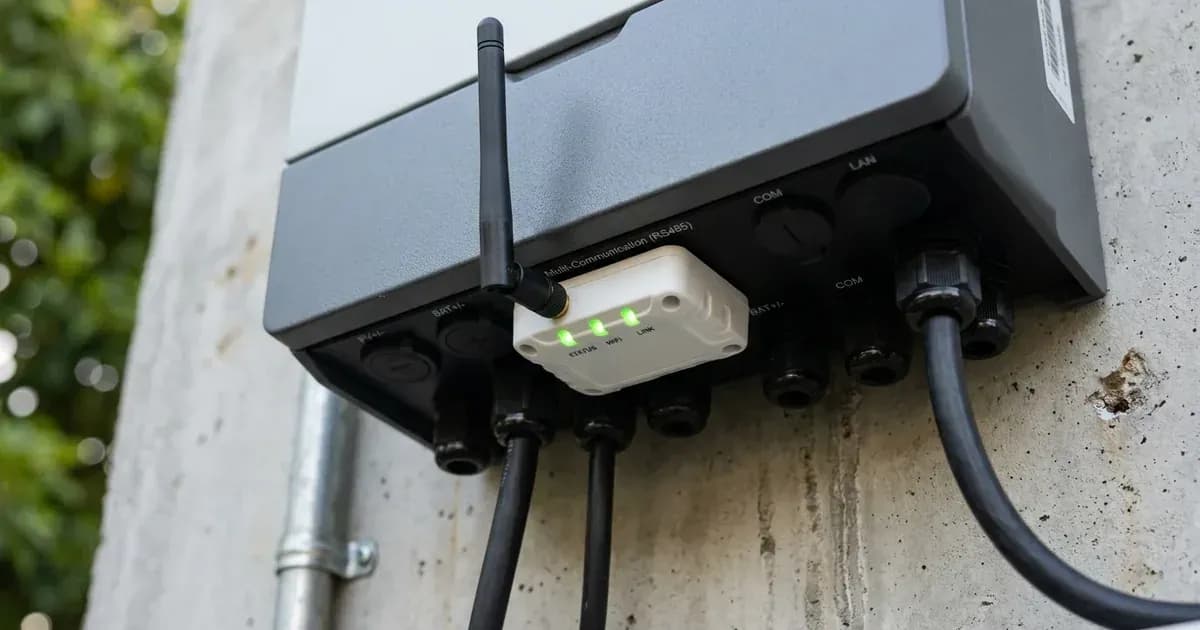
Deye inverters use an optional WiFi Plug or a datalogger to connect to monitoring platforms like Solarman. The WiFi Plug connects to a dedicated WiFi Interface port, while a datalogger connects via the RS232 port. These accessories enable remote system access and performance tracking.
Diagnosis
If your Deye inverter is not communicating with the Solarman app or showing data, follow these steps to diagnose the connection.
- Verify WiFi Plug Installation:
- Check: Locate the dedicated WiFi Interface port on your Deye inverter. For SG03LP1 and SG01LP1 series, this is labeled "19". For SG04LP1 series, it is labeled "18". Confirm that the optional WiFi Plug is securely inserted into this port.
- Meaning: If the plug is missing or loose, the inverter cannot establish a WiFi connection. The WiFi Plug is an optional accessory and is not a standard configuration.
- Inspect Datalogger Connection (if applicable):
- Check: If you are using a separate WiFi datalogger, ensure it is connected to the inverter's RS232 port.
- Meaning: An improperly connected datalogger will prevent data transmission. The RS232 port is specifically used to connect the WiFi datalogger.
- Review WiFi Plug Configuration:
- Check: Refer to the specific illustrations and instructions provided with your WiFi Plug accessory.
- Meaning: The configuration process for the WiFi Plug is detailed in its own manual, not the inverter manual. Incorrect settings on the plug itself will prevent communication.
- Confirm RS232 Pinout:
- Check: If using an RS232 datalogger, verify the pinout for the RS232 port. The pin definitions are: Pin 1: D-GND, Pin 5: TX, Pin 6: RX, Pin 7: 12Vdc.
- Meaning: Incorrect wiring of the RS232 cable can lead to communication failures.
- **Identify Logger Interface Type (for SG01LP1, SG04LP1 models):
- Check: Some Deye inverter models, specifically SG01LP1 and SG04LP1, have two types of logger interfaces: DB9 and USB. Visually confirm which type is present on your inverter.
- Meaning: Using the wrong type of datalogger or cable for the available interface will prevent connection.
Cause/fix table section
Symptom detail | Likely cause | Fix |
|---|---|---|
No remote monitoring data in Solarman app | WiFi Plug not installed or configured | Always disconnect all power sources to the inverter before installing the optional WiFi Plug into the dedicated WiFi Interface port (labeled "19" for SG03LP1/SG01LP1, "18" for SG04LP1). Refer to the plug's manual for configuration and full safety instructions, including warranty information. |
Datalogger not communicating with inverter | Datalogger not connected to the correct port | Always disconnect all power sources to the inverter before connecting the datalogger to the inverter's RS232 port. For some SG01LP1 and SG04LP1 models, verify if the logger interface is DB9 or USB. Refer to the datalogger's manual for full safety instructions, including warranty information. |
Communication errors with RS232 datalogger | Incorrect RS232 pinout or faulty cable | Always disconnect all power sources to the inverter before inspecting or manipulating RS232 wiring. Verify the RS232 port pin definitions: Pin 1: D-GND, Pin 5: TX, Pin 6: RX, Pin 7: 12Vdc. Ensure the cable is correctly wired and undamaged. Refer to the inverter and datalogger manuals for full safety instructions, including warranty information. |
WiFi Plug not connecting to network | Plug-specific configuration issues | Refer to the illustrations and manual provided with the WiFi Plug accessory for detailed setup steps. |
Inverter not recognized by monitoring platform | Datalogger or WiFi Plug is an optional accessory and not present | Purchase the appropriate optional accessory (WiFi Plug or datalogger). Always disconnect all power sources to the inverter before installation. Refer to the accessory's manual for installation and full safety instructions, including warranty information. |
Deye Inverter WiFi and Datalogger Interfaces
Deye hybrid inverters are designed with connectivity in mind, but remote monitoring capabilities like those offered by Solarman require additional hardware. Your inverter will have a dedicated port for this purpose, but the monitoring device itself is an optional accessory.
There are generally two ways to enable remote monitoring:
- WiFi Plug: This is a compact accessory that plugs directly into a dedicated WiFi Interface port on the inverter. For Deye SG03LP1 and SG01LP1 series inverters, this port is labeled "19". On SG04LP1 series inverters, it is labeled "18". The configuration of this WiFi Plug is typically covered in its own separate manual, which provides specific illustrations and setup steps. The WiFi Plug is listed as an optional accessory in the parts list.
- WiFi Datalogger via RS232: Alternatively, a WiFi datalogger can be connected to the inverter's RS232 port. This port is specifically used to connect the WiFi datalogger. The RS232 port has a defined pinout: Pin 1: D-GND, Pin 5: TX, Pin 6: RX, Pin 7: 12Vdc. Some models, such as the SG01LP1 and SG04LP1, may have different logger interfaces, including DB9 and USB types. It is important to check your specific inverter model to identify the correct logger interface.
For a more general guide on setting up Solarman loggers, you can refer to our article on Solarman Logger Setup Guide. If you encounter other communication issues, our guides on Deye Inverter Error Codes List and Deye Battery Communication Fault Fix may also be helpful.
Safety: Working with Inverter Connections
Always prioritize safety when working with your Deye inverter. Disconnect all power sources before making or checking any connections.
- Electrical Shock Risk: To reduce the risk of electric shock, disconnect all wires before attempting any maintenance or cleaning. Turning off the unit will not reduce this risk.
- Wiring by Professionals: All wiring must be performed by a professional person.
- Disconnect Power: Be sure that the AC power source is disconnected before attempting to wire it to the unit.
- Grounding: The inverter should be connected to a permanent grounded wiring system, complying with local requirements. The ground cable shall be connected to the ground plate on the grid side to prevent electric shock.
- No Short Circuits: Never cause AC output and DC input to be short-circuited. Do not connect to the mains when DC input is short-circuited.
When to call a technician instead
If you have followed all the troubleshooting steps and your Deye inverter still does not communicate with the Solarman platform, or if you are unsure about any wiring or configuration steps, it is best to contact a qualified technician. The manufacturer, Ningbo Deye Inverter Technology Co., Ltd., advises contacting your local dealer or service center if fault messages persist after restarting. Provide them with your inverter's serial number, distributor information, on-grid power generation date, a detailed problem description (including any fault codes or indicator statuses), and your contact information. Attempting repairs or modifications without proper training can void your warranty and pose significant safety risks.
Still showing the fault? Book a technician
If the steps above did not clear it, tell us the inverter or battery and the exact code. We pass it to a technician who covers your city; visit charges are quoted before they come.
How this pays for the site: the technician or verifier pays SolarNevs a fixed introduction fee. Nobody pays to be recommended, and you are free to use our free guides instead.
Frequently asked questions
How do I connect my Deye inverter to WiFi?
Always disconnect all power sources to the inverter before inserting or removing any accessories to avoid electric shock. Refer to the inverter and WiFi Plug manuals for full safety instructions and warranty information. Deye inverters connect to WiFi using an optional WiFi Plug accessory. This plug inserts into a dedicated WiFi Interface port on the inverter. Configuration details are typically found in the WiFi Plug's own manual.
What is the Solarman logger for Deye inverters?
Always disconnect all power sources to the inverter before connecting any accessories to avoid electric shock. Refer to the inverter and datalogger manuals for full safety instructions and warranty information. The Solarman logger is an optional datalogger accessory for Deye inverters. It connects to the inverter's RS232 port to enable remote monitoring and data transmission via WiFi to the Solarman platform.
Where is the WiFi port on a Deye inverter?
On Deye SG03LP1 and SG01LP1 series inverters, the dedicated WiFi Interface port is labeled '19'. For SG04LP1 series inverters, this port is labeled '18'.
Do Deye inverters come with a WiFi module?
No, the WiFi Plug or datalogger is an optional accessory. It is not included as a standard component with Deye inverters and must be purchased separately for remote monitoring capabilities.
What port is used for the WiFi datalogger on Deye inverters?
Always disconnect all power sources to the inverter before connecting any accessories to avoid electric shock. Refer to the inverter and datalogger manuals for full safety instructions and warranty information. The RS232 port on Deye inverters is used to connect the WiFi datalogger. Some models may also feature DB9 or USB logger interfaces for this purpose.
References
- Manual_SUN_3.6_6K_SG03LP1_EU_Deye_Ver2.2.pdf — accessed 23 August 2026
- BManualSUN-3-6K-SG04LP1-EU-SM220260427en.pdf — accessed 23 August 2026
- BManualSUN-76-8K-SG01LP1-EU20260625en.pdf — accessed 23 August 2026
Related guides
More from inverter errors & fixes.