SolisCloud Data Logger Offline Fix for Solis S5-EH1P-L Inverters
Updated 7 September 2026 · By SolarNevs Research Desk, Dealer surveys + verified sources · 1 source · Method ↗
Key Takeaways
- The most likely cause for an offline data logger is an improper physical connection to the inverter's COM port.
- Always ensure the Solis Data Logger's black ring is rotated clockwise to secure it, without rotating the main body.
- Rotating the main body of the data logger can cause serious damage to both the logger and the inverter's COM port.
- If basic physical checks do not resolve the issue, or if damage is suspected, stop DIY troubleshooting and contact a qualified technician.
Why is your SolisCloud Data Logger offline?
Your Solis Data Logger is likely offline because of an issue with its physical connection to the Solis S5-EH1P-L inverter or a conflict in COM port usage. The first step to resolve this is to verify the logger is correctly and securely installed on the inverter's COM port.
Diagnosis
Follow these steps to diagnose why your Solis Data Logger might be offline:
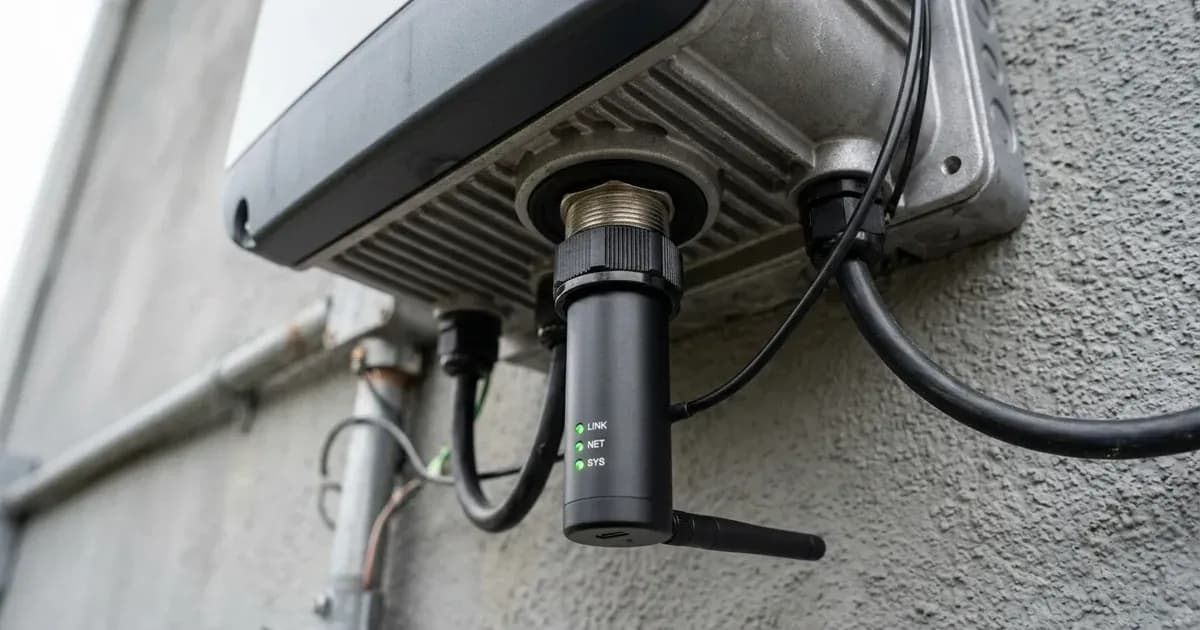
- Inspect the Data Logger Connection: Locate the Solis Data Logger on your S5-EH1P-L inverter. Ensure it is fully inserted into the COM port. The manual states that the Solis Data Logger connects to the COM port.
- Check the Securing Ring: Once inserted, verify that the black ring on the Solis Data Logger has been rotated clockwise to secure the connection. This step is crucial for establishing a stable physical link.
- Confirm No Main Body Rotation: Ensure that only the black ring was rotated during installation, not the main body of the data logger. The manufacturer warns that rotating the main body of the Solis Data Logger may damage the logger and the inverter COM port.
- Verify COM Port Exclusivity: The COM Port on the inverter can be used for Solis Data Logger Connection or Modbus RTU communication with a 3rd party external device. Confirm that the COM port is not being used for another communication purpose simultaneously, which could cause a conflict.
- Check Inverter Display: Look for any general communication errors or alarms on the inverter's LCD display. While there is no specific "logger offline" error code listed in the manual, other communication-related issues might be indicated.
- Network Status (if WiFi/GPRS logger): If your Solis Data Logger uses Wi-Fi or GPRS for communication, ensure your local Wi-Fi network is operational and within range, or that the GPRS signal is strong. The inverter supports optional Wi-Fi and GPRS communication methods.
Cause/fix table
Symptom detail | Likely cause | Fix |
|---|---|---|
SolisCloud data logger offline, no data | Data Logger not securely connected to the COM port. | Insert the Solis Data Logger fully into the COM port and rotate the black ring clockwise to secure the connection. |
Data logger offline, potential damage | Main body of the Solis Data Logger was rotated during installation. | Ensure only the black ring is rotated. If damage is suspected, contact a qualified technician for inspection and repair. |
Data logger offline, COM port conflict | The inverter's COM port is being used by another device for Modbus RTU communication. | Ensure the COM port is exclusively dedicated to the Solis Data Logger for monitoring purposes. |
Solis Data Logger Setup and Communication Checks
Proper installation of the Solis Data Logger is essential for reliable data transmission to SolisCloud. The Solis S5-EH1P-L Hybrid Inverter Series uses a dedicated COM port for the data logger connection.
- Prepare the COM Port: First, remove the watertight cap from the COM port on your Solis S5-EH1P-L inverter.
- Insert the Data Logger: Carefully insert the Solis Data Logger into the COM port, ensuring it matches the joint.
- Secure the Connection: Rotate the black ring on the Solis Data Logger in a clockwise direction to secure the connection. It is critical to avoid rotating the main body of the Solis Data Logger, as this may damage the logger and the inverter COM port.
- Verify Communication: Once physically connected, the data logger should begin transmitting data. Check the SolisCloud platform or monitoring website to confirm that data is being received. The Solis Data Logger provides optional Wi-Fi and GPRS communication.
- COM Port Functionality: Remember that the COM Port is primarily used for Solis Data Logger Connection. It can also be used for Modbus RTU communication with a 3rd party external device, but typically not simultaneously with the data logger. The CAN Port is used for CAN communication between the inverter and a lithium battery BMS, or for a battery temperature sensor with lead-acid batteries. The RS-485 Meter Port is for communication between inverter and the compatible smart meter. It is necessary to realize the normal hybrid control logics.
Safety
Working with solar inverters involves electrical hazards. Always prioritize safety.
- Electrical Hazards: Do not touch any inner live parts until 5 minutes after disconnection from the utility grid and the PV input. There is a risk of electric shock from energy stored in capacitors of the Inverter; do not remove the cover for 5 minutes after disconnecting all power sources.
- Qualified Personnel: Operations must be accomplished by a licensed technician or Solis authorized person. The operator must put on technicians’ gloves during the whole process in case of any electrical hazards.
- Warranty: Warranty may be voided if the cover is removed without authorization. Unauthorized access to advanced settings may also void the warranty.
- Physical Damage: Do not rotate the main body of the Solis Data Logger. It may damage the logger and the inverter COM port.
When to call a technician instead
You should contact a qualified and accredited service technician if:
- You have performed all the physical connection checks and the Solis Data Logger remains offline.
- You suspect physical damage to the data logger or the inverter's COM port.
- The inverter displays any internal fault codes that are not directly related to simple communication issues.
- You need to access advanced settings, as this function is for authorised technicians only. Improper access and operation may result in abnormal results and damage to the inverter, and unauthorized access may void the warranty.
- There are no user serviceable parts inside, refer servicing to qualified and accredited service technicians.
Still showing the fault? Book a technician
If the steps above did not clear it, tell us the inverter or battery and the exact code. We pass it to a technician who covers your city; visit charges are quoted before they come.
How this pays for the site: the technician or verifier pays SolarNevs a fixed introduction fee. Nobody pays to be recommended, and you are free to use our free guides instead.
Frequently asked questions
Why is my Solis Data Logger not connecting to SolisCloud?
The most common reason for a Solis Data Logger to be offline is an improper physical connection to the inverter's COM port. Ensure the logger is fully inserted and its black ring is securely tightened clockwise.
What should I check if my Solis S5-EH1P-L inverter's data logger is offline?
First, verify the physical connection of the Solis Data Logger to the COM port. Make sure it is inserted correctly and the black ring is rotated clockwise to secure it. Also, confirm the COM port is not being used for other communications like Modbus RTU.
Can I rotate the main body of the Solis Data Logger during installation?
No, you must not rotate the main body of the Solis Data Logger. Rotating only the black ring is necessary to secure the connection. Rotating the main body can damage both the logger and the inverter's COM port, potentially leading to electrical hazards or voiding your warranty. Always ensure the inverter is isolated from all power sources (grid and PV) and capacitors have discharged before any physical intervention. Refer to the Safety section for full details.
What is the function of the COM port on a Solis S5-EH1P-L inverter?
The COM port on a Solis S5-EH1P-L inverter is used for connecting the Solis Data Logger for monitoring. It can also be optionally used for Modbus RTU communication with a third-party external device.
When should I contact a technician for an offline Solis Data Logger?
If you have checked the physical connection, ensured the COM port is not in conflict, and the logger remains offline, or if you suspect physical damage to the logger or inverter port, it is time to contact a qualified technician.
References
- Solis S5-EH1P(3-6)K-L EUR V1.3 Manual — accessed 23 August 2026
Related guides
More from inverter errors & fixes.