Sunsynk CT Clamp Direction and Meter Wiring: Complete UK Diagnostic Guide
Updated 18 September 2026 · By SolarNevs Research Desk, Dealer surveys + verified sources · 4 sources · Method ↗
Key Takeaways
- Accurate current transformer (CT) orientation is critical for self-consumption tracking, dynamic battery scheduling, and grid export limitation.
- The primary side of the CT needs to be clamped on the Grid live line on the main supply feeding the building, pointing in the direction of power delivery.
- Clamping the CT backwards causes inverted power readings, forcing the battery to discharge into the national grid while importing electricity to satisfy domestic demand.
- The definitive validation procedure is the five-step kettle load test: with solar and battery discharge locked, boiling a domestic kettle must produce a positive import rise on the central display.
- For installation runs greater than 15m, an external Eastron Modbus meter communicating over RS485 should replace direct analog sensor extensions.
Why CT clamp accuracy governs Sunsynk hybrid systems
Sunsynk hybrid inverters function as intelligent energy managers that continuously balance rooftop photovoltaic generation, lithium battery storage, and domestic electricity demands. To orchestrate power flows accurately, the inverter internal microprocessor requires real-time measurement of current entering or leaving the premises.
This vital telemetry is delivered either by an analog current transformer (CT) coil or an external digital power meter. When export limitation is active, the sensor: "reduces the power of the inverter to prevent feeding power to the grid. This feature is also known as Zero Export."
If a CT clamp is fitted backwards, connected to the neutral tail, or extended with improper cabling, the inverter misinterprets household consumption as grid export. This inverted reading causes the battery bank to drain rapidly onto the distribution network while importing grid power to serve baseline domestic appliances.
Ensuring correct installation safeguards both electrical safety and compliance with UK grid connection standards detailed in our micro-generator grid connection guide.
Physical installation and clamp arrow orientation
Achieving accurate current measurement requires placing the sensor on the correct conductor and observing strict mechanical orientation.
Conductor Selection
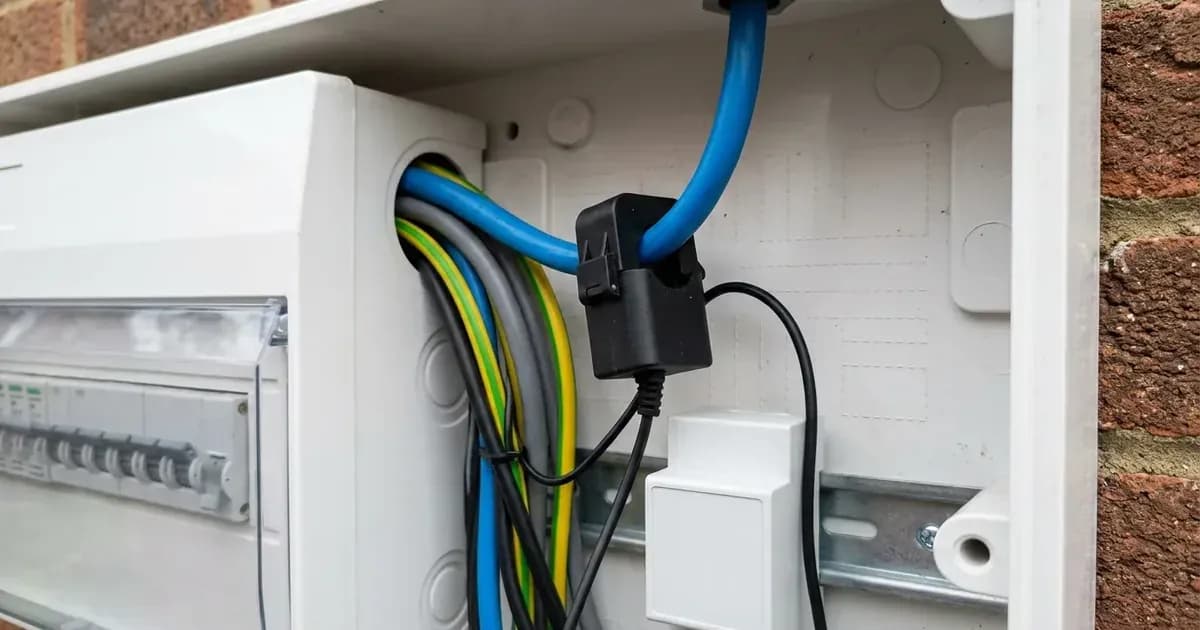
Sunsynk installation instructions specify: "Fit the coil (sensor) around the live cable on the main fuse feeding the building and run the cable back to the inverter."
In British domestic properties, this means clamping the sensor around the primary live service tail between the 100A distribution network operator cutout fuse and the electricity supplier meter: "The primary side of the CT needs to be clamped on the Grid live line."
Critical Installation Mistakes
- Never clamp around neutral: Enclosing the blue or black neutral conductor will generate erratic readings due to shared return pathways.
- Never clamp both conductors: Enclosing both live and neutral together allows equal and opposite magnetic fields to cancel out completely, producing zero current detection.
- Observe Arrow Direction: The directional arrow stamped on the plastic housing of the CT coil must point towards the hybrid inverter rather than back towards the incoming street mains.
Secondary Terminal Connections
At the inverter connection bay: "Connect the other end of the CT coil to the inverter terminals marked as CT coil."
Ensure secondary conductors are tightly clamped into their spring-loaded or screw terminals, verifying correct polarity between positive and negative sensor leads. Additional wiring rules for domestic renewable systems are outlined in our UK solar electrical installation guide.
The definitive five-step kettle load test
Do not rely on instantaneous solar readings to verify CT operation, as fluctuating irradiance masks wiring reversals. Instead, Sunsynk technical engineering mandates a structured five-step test using a controlled resistive load:
Step 1: Isolate Solar Generation
"1. Turn Off the PV Isolator to remove the PV Input." Switching off the rotary DC isolator ensures variable solar generation cannot mask domestic grid interactions.
Step 2: Inhibit Battery Storage Discharge
"In System Mode > System1 Timers, set Target SOC of current time to 100% to stop the Batteries discharging." Setting target state of charge to 100% locks the battery in standby, ensuring household circuits draw energy solely from the incoming AC supply.
Step 3: Open the System Status Display
"Return to Display Home Screen (with the 4x Dials) and touch AC Load Dial to view System Status Screen." Accessing the status sub-screen provides raw telemetry dials for grid, inverter, and load parameters.
Step 4: Locate the Grid Power Register
"On Status Screen view the Grid Power section (Upper middle)" Observe the numerical value displayed in the upper middle area of the touchscreen.
Step 5: Execute the Resistive Kettle Test
"The HM or CT Reading MUST be a positive reading. Put a Kettle on to see the Grid Power reading increase."
- When a high-consumption appliance like an electric kettle switches on, the Grid Power reading must show a decisive positive jump corresponding to the appliance wattage.
- If the reading turns negative or registers increased export when the kettle boils, the CT clamp is installed backwards or the secondary sensor leads are reversed.
To rectify a reversed reading, either unclip the CT coil and flip its orientation on the live cable, or swap the positive and negative wire terminations at the inverter CT terminals.
Distance limitations and Eastron meter integration
Where the main electrical intake is located far from the inverter, direct analog CT extension becomes impractical due to signal attenuation and electromagnetic interference.
Direct Cable Distance Limits
Sunsynk documentation notes: "If using an external meter, you can extend the cable for more than 10 metres. Plese consult the meter manual on distance."
When installing over longer physical paths: "installing a system with a CT run of greater than 15m* you will need to install an external CT meter."
RS485 Modbus Telemetry
Rather than sending delicate analog micro-current signals across long spans, an external digital energy meter—such as an Eastron SDM120CT single-phase or SDM630 three-phase unit—samples current locally at the main intake. The measured data is transmitted over shielded twisted-pair cabling: "grid power is then sent to the inverter over RS485 using a data cable of up to 1200m** from the meter to the inverter."
This digital serial bus allows reliable communication over distances up to 1200m across large residential or agricultural properties.
Diagnosing warning W04: Meter Comm Fail
When operating with an external digital energy meter, the inverter supervisory system monitors the serial bus. If data packets cease arriving, the inverter posts warning code W04: "W04 Meter Comm fail indicates there an issue with the communication between the inverter and your external meter."
Troubleshooting Checklist for W04
- Verify Meter Power: Confirm that the Eastron meter LCD screen is illuminated and displaying active voltage readings.
- Check Modbus Polarity: Ensure terminal A on the meter connects to terminal A on the inverter RS485 port, and terminal B connects to terminal B.
- Verify Baud Rate and Address: Ensure the meter Modbus address is set to 1 and the communication baud rate matches the inverter specification.
- Inspect Cable Shielding: Verify that shielded data cable is grounded at one end only to prevent ground loop noise from corrupting data frames.
Resolving metering faults promptly ensures that your hybrid system maintains optimized battery charging from low-cost off-peak tariffs and accurate export tracking under our Smart Export Guarantee guide.
Frequently asked questions
Which way should the arrow point on a Sunsynk CT clamp?
The primary side of the CT must be clamped on the Grid live line, with the orientation arrow pointing towards the hybrid inverter rather than towards the incoming grid supply.
How do you verify whether a Sunsynk CT clamp is wired correctly?
Isolate solar generation, set target SOC to 100% to stop battery discharge, navigate to the status screen, and boil a kettle. The grid power reading must register a positive increase.
What does error W04 mean on a Sunsynk inverter?
Warning W04 indicates W04 Meter Comm fail, confirming a communication failure between the inverter and an external Modbus RS485 energy meter such as an Eastron unit.
When is an external Eastron energy meter required instead of a standard CT coil?
For cable runs greater than 15m between the main incoming electrical cutout and the inverter location, an external meter must be installed using RS485 data cabling.
References
- Sunsynk Single-Phase Inverter User Manual — accessed 29 August 2026
- Sunsynk Knowledge Base CT Coil Check — accessed 29 August 2026
- Sunsynk Eastron Meter CT Selection Guide — accessed 29 August 2026
- Sunsynk Technical Support Solution W04 — accessed 29 August 2026
Related guides
More from inverter errors & fixes.