Wiring Multiple Sunsynk Batteries for Your South African Solar System
Updated 16 September 2026 · By SolarNevs Research Desk, Dealer surveys + verified sources · 10 sources · Method ↗
Key Takeaways
- The maximum number of Sunsynk low-voltage batteries you can connect varies significantly by model, from 4 to 32 units.
- When mixing compatible battery models, the total number of batteries is limited by the lowest maximum connection capacity of any model in the system.
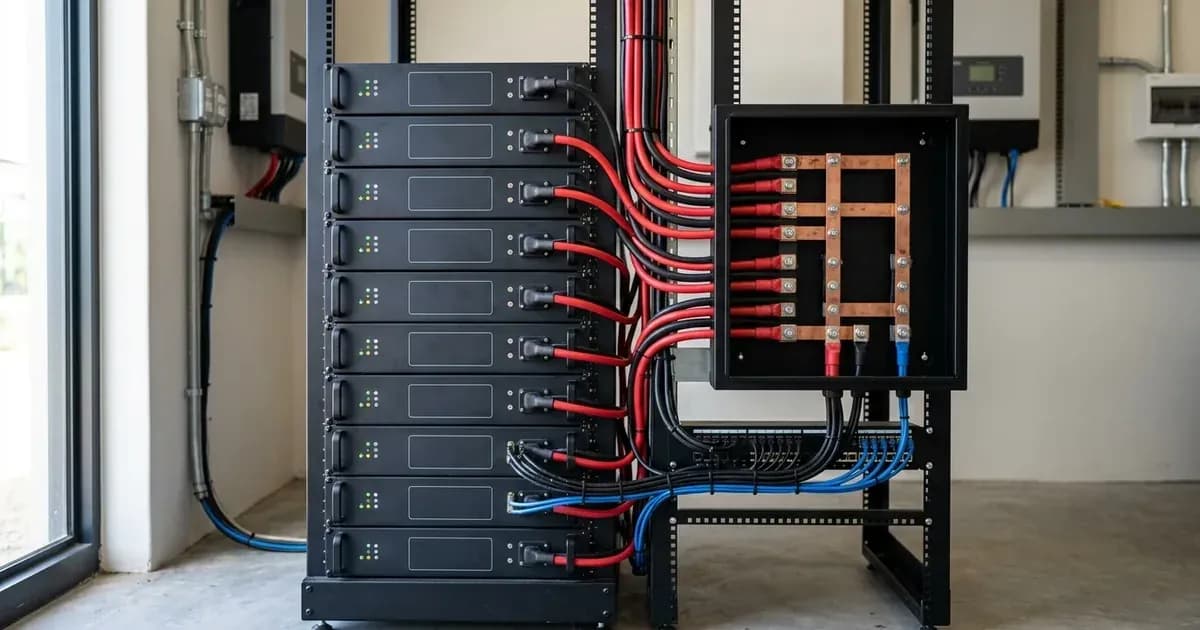
- A DC busbar is required for systems with three or more batteries connected to a single inverter, or for any number of batteries connected to multiple inverters.
- Always ensure all interconnecting battery cables are the same length to prevent voltage imbalances and that communication cables are correctly wired for your specific battery series.
How Many Sunsynk Batteries Can You Connect?
The number of Sunsynk low-voltage batteries you can connect in parallel depends on the specific battery model. Sunsynk provides clear maximum limits for each of its low-voltage battery series. It is crucial to adhere to these limits to ensure the safe and efficient operation of your solar energy system.
If you are mixing different, but compatible, low-voltage battery models within the same system, the total number of batteries you can wire together is limited by "the smallest number between all the different models that have been installed." This means if you combine a model with a maximum of 8 connections with another that allows 32, your system's limit becomes 8 batteries.
Maximum Low-Voltage Battery Connections by Model
The following table outlines the maximum number of low-voltage batteries that can be wired together for various Sunsynk models. This information is critical when designing or expanding your battery bank.
Model | Max Number Connected (LV) | Notes |
|---|---|---|
SSLB1 /CATL | 16 | No longer sold by Sunsynk |
SUN-BATT 5.12/BYD | 8 | No longer sold by Sunsynk |
SUN-BATT 5.12R/BYD | 8 | No longer sold by Sunsynk |
SUN-BATT 5.32/REPT | 8 | Currently sold by Sunsynk |
SUN-BATT 5.32R/REPT | 8 | Currently sold by Sunsynk |
SUN-BATT 10.65 | 15 |
|
L3.0 | 4 | Currently sold by Sunsynk |
G3.0 | 4 |
|
L5.1 | 32 | Currently sold by Sunsynk |
L5.3 | 32 | Currently sold by Sunsynk |
G5.3 | 32 | Currently sold by Sunsynk |
W5.3 | 32 | Currently sold by Sunsynk |
W10.64 | 32 |
|
Wiring Multiple Batteries: Busbars, Breakers, and Cable Sizing
Proper physical wiring is essential for safety and performance when connecting multiple batteries. This includes the use of busbars, appropriate circuit breakers, and correctly sized cables.
For systems with up to two batteries connected to a single inverter, "No bus bar required, and a single battery breaker is sufficient." However, for systems with "3 or more batteries and 1 inverter," a "Bus bar is required and a battery breaker per battery is needed." The same busbar and individual breaker requirement applies to "any batteries and 2 or more inverters."
Regarding cable sizing, Sunsynk states that "standard battery cables for Sunsynk batteries are 25mm in size, which can handle a maximum charge/discharge rate of 122.5 A." For inverters with a capacity of "8 kW or larger," you "will need to consider upgrading to a larger power cable size to fully utilize the maximum charge/discharge rates." It is also critical to "ensure all interconnecting battery cable sizes are the same length as cables of differing lengths can cause battery unbalances." For detailed guidance on selecting appropriate cable sizes and fuse ratings for your inverter and battery bank, please refer to our guide on /za/guides/fixes/sunsynk-battery-charge-discharge-rates.
Safety Warning: Working with high-current DC wiring can be extremely dangerous. Always isolate power from all sources (PV, battery, AC grid) before working on battery connections. Use insulated tools. Shorting battery terminals can result in severe injury, fire, or equipment damage. This work must be performed by a registered person.
Ensuring Communication Between Multiple Batteries
Effective communication between your Sunsynk batteries and the inverter, as well as between the batteries themselves, is vital for the Battery Management System (BMS) to function correctly. The BMS ensures balanced charging, discharging, and overall battery health.
The battery "must be set to the correct Modbus protocol" on the battery settings page of the inverter. For some battery models, "BMS communications can also be controlled via DIP switches." The specific "installation guide/manual will likely have a DIP switch configuration you must follow for successful communications."
Communication cabling varies by battery series:
- SSLB1/CAT-L Batteries: The "CAN" socket on the master battery connects to the "BMS CAN-CAN/RS485-CAN" socket on the inverter. For battery-to-battery communication, the "Right Socket" on the master connects to the "Left Socket" on the slave.
- SUN-BATT Batteries: The "CAN" socket on the master battery connects to the "BMS CAN-CAN/RS485-CAN" socket on the inverter. For battery-to-battery communication, "LINK OUT" on the master connects to "Link IN" on the slave.
- L/G/W Series Batteries: The "PCS" socket on the master battery connects to the "BMS CAN-CAN/RS485-CAN" socket on the inverter. For battery-to-battery communication, "OUT" on the master connects to "IN" on the slave.
For older Sunsynk SUN-BATT batteries, if you are combining a newer model with an older model, the "newer model MUST be installed as the master battery for communications to work." Newer SUN-BATT models can be identified by "An additional red ON/OFF slider switch" and "A port for a datalogger connection." The red slider switch acts as a BMS reset and must be in the ON position for operation.
Parallel Communications for More Than Five SSLB1 Units
When connecting more than five SSLB1 batteries in parallel, specific modifications to the communication cables are required to prevent interference. For the cable connecting battery 5 and battery 6, you "must strip away the unused cores to prevent the interference." The "two pins which should remain connected by the two cores from a CAT 5 or CAT 6 cable are the RS485-A and RS485-B which uses pins 2 and 3 (2=A and 3=B) or pins 6 and 7 (6=B and 7=A) and the other cores must be terminated so that they are not making a connection to the RJ45 connector." It is also recommended to run the parallel communication cables "IN to the right hand side CAN/RS485 port (closest to the green dry connector strip) and running OUT of the left hand side."
If you experience communication issues, our guide on /za/guides/fixes/sunsynk-bms-communication-fault provides further troubleshooting steps.
What You Can Change Yourself, and What You Cannot
As a system owner, you can monitor your battery's State of Charge (SOC) and overall system performance through the Sunsynk app or inverter display. You can also adjust settings related to time-of-use or charging schedules within the inverter's user interface, provided these do not impact grid protection or export limits.
However, any physical modification to the battery wiring, adding or removing batteries, or configuring critical inverter settings such as maximum charge/discharge currents or battery type, must be performed by a registered person. This includes ensuring correct cable sizing, fuse ratings, and BMS communication setup. In South Africa, such work requires a Certificate of Compliance (CoC) to ensure safety and adherence to national electrical standards. Attempting these changes yourself can void warranties, create safety hazards, and lead to non-compliance with local regulations.
What the Published Sources Do Not Tell You
While Sunsynk provides comprehensive technical articles, some visual aids and specific diagrams are referenced but not provided as text. For instance, specific pinout diagrams for SSLB1 communication cables (inverter to battery, battery to battery), and detailed DIP switch configurations for SSLB1 batteries are mentioned as being available in images within the original support articles or manuals. Similarly, visual guidance for doubling positives and negatives in a daisy-chained stack to prevent unbalance, or for HV battery connection methods, is referenced but not explicitly detailed in text.
For these specific visual details, always consult the official Sunsynk installation manuals or the referenced support articles directly, as they may contain the necessary diagrams or images to clarify the procedures. Firmware versions and exact menu paths can also vary between inverter models and firmware updates, so always refer to your specific inverter's manual for the most accurate navigation.
Frequently asked questions
How many Sunsynk low-voltage batteries can I connect in parallel?
The maximum number of Sunsynk low-voltage batteries you can connect varies by model. The L3.0, for example, is capped at 4 units while the L5.1, L5.3, G5.3 and W5.3 allow up to 32. The full per-model list is in the table below, taken from Sunsynk's own low-voltage wiring document. Always check the specific limits for your battery model.
What happens if I mix different Sunsynk battery models in one system?
When mixing compatible low-voltage battery models, the total number of batteries you can wire together is limited by the smallest maximum connection number among all the different models installed. This ensures system stability and compatibility.
Do I need a busbar when connecting multiple Sunsynk batteries?
Yes, a DC busbar is required when connecting three or more batteries to a single inverter, or for any number of batteries connected to two or more inverters. For systems with only one or two batteries and a single inverter, a busbar is not typically required.
How do I ensure proper communication between multiple Sunsynk batteries and the inverter?
Proper BMS communication is crucial. Ensure the battery is set to the correct Modbus protocol, and follow specific wiring instructions for communication cables between the master battery and the inverter, and between slave batteries. For more than five SSLB1 units, specific cable modifications are needed.
What are the safety considerations for wiring multiple batteries?
Wiring multiple batteries involves high currents and voltages. Always ensure power is isolated before working, use insulated tools, and ensure all interconnecting battery cables are the same length to prevent unbalances. This work should ideally be performed by a registered person to ensure safety and compliance.
References
- Sunsynk: LV Battery Specification — accessed 27 August 2026
- Sunsynk: Low Voltage Wiring Information for Multiple Batteries — accessed 27 August 2026
- Sunsynk: LV Battery Model Compatibility — accessed 27 August 2026
- Sunsynk: Recommended Battery Quantity — accessed 27 August 2026
- Sunsynk: Unbalanced Batteries — accessed 27 August 2026
- Sunsynk: BMS Communications — accessed 27 August 2026
- Sunsynk: SSLB1 Parallel Communications for More Than 5 Units — accessed 27 August 2026
- Sunsynk: Battery Cable Sizing — accessed 27 August 2026
- Sunsynk: Recommended Fuse Ratings — accessed 27 August 2026
- Sunsynk: Selecting Battery Charge Discharge Rates — accessed 27 August 2026
Related guides
More from sizing, net billing & installation.