Fronius Smart Meter IP and Solar.web Zero Export Guide
Updated 6 September 2026 · By SolarNevs Research Desk, Dealer surveys + verified sources · 2 sources · Method ↗
Key Takeaways
- A Fronius Smart Meter supports data reporting to Solar.web and export limiting in systems not configured as Victron ESS.
- Specific configuration details for a dedicated "Fronius Smart Meter IP" model and its direct Modbus TCP setup are not detailed in published sources.
- Fronius PV inverters require specific settings, such as "Setup MG50", for optimal operation within micro-grid environments.
- For light flickering issues, contact Fronius Tech Support to acquire specific firmware updates if the inverter was produced before 2018-week 16.
Understanding the Fronius Smart Meter's Role
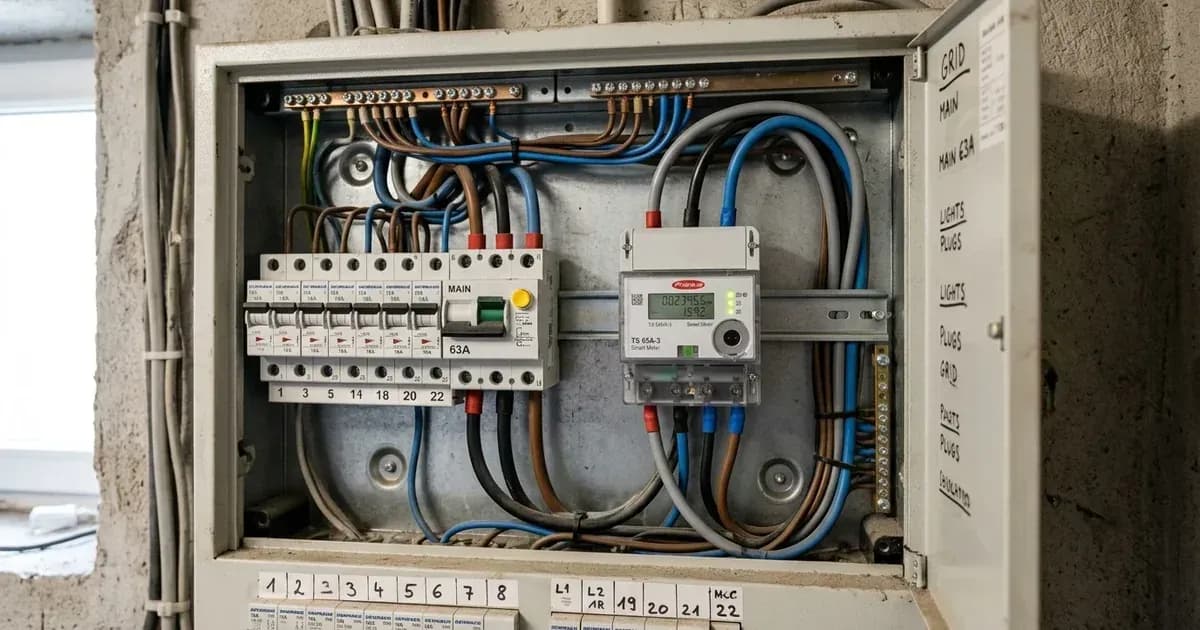
The Fronius Smart Meter serves two primary functions within a solar energy system. It can be used solely for reporting system data to the Fronius Solar.web telemetry platform. Alternatively, it can be employed for limiting export to the grid in installations where the Victron system is not configured as an Energy Storage System (ESS). It is important to note that the Fronius Smart Meter cannot be used for the Fronius built-in export limiting feature when the system is part of a Victron ESS.
Integrating Fronius Devices for Data Communication
Effective communication between Fronius devices, such as PV inverters and Smart Meters, and other system components like a GX Device, is essential for monitoring and control. Both the Fronius device and the GX Device need to be connected on the same Local Area Network (LAN), which can be established either via Wi-Fi or Ethernet.
For certain Fronius inverter models, a Datamanager 2.0 is required for communication. Symo Light, IG Plus, and Agilo inverters require the purchase and installation of a Datamanager 2.0. For Symo, Galvo, Primo, and Eco models, the Datamanager card is installed from the factory, meaning no additional accessory is needed.
When configuring the Datamanager, ensure the "IP Switch" is in the "B" (default) position to allow the Fronius device to obtain its IP address via DHCP. If a link-local address is desired, the "IP Switch" should be set to position "A".
For Fronius GEN24 devices running software version 1.14 or higher, the Solar API interface is not activated by default. This interface must be activated if required, and the setting can be found on the inverter's user interface under "Communication" - "Solar API".
The GX Device will automatically scan for PV-inverters on the local network if none were found previously. If the automatic scan does not locate the inverter, the IP address of the Fronius Datamanager can be added manually to the GX Device.
Configuring for Export Limitation
The Fronius Smart Meter plays a role in managing energy export to the grid. When used for limiting export, it is typically in systems where the Victron system is not configured as an ESS. In such scenarios, the Smart Meter provides the necessary data for the system to manage power flow.
It is possible to create a Zero feed-in system with Victron and Fronius components. In this setup, a Venus device controls the Fronius output power to prevent export.
Fronius Inverter Settings for Micro-Grid Operation
For optimal performance in micro-grid environments, Fronius PV inverters require specific configuration. The inverter must be set to "Setup MG", which stands for Micro-Grid. During the commissioning process for 50Hz systems, the PV Inverter should be set to "Setup MG50". For 60Hz systems, the corresponding setting is "Setup MG60".
For data export via Modbus, the setting should be configured to "tcp". Additionally, the SunSpec Model Type should be set to "int + SF" for proper communication and data interpretation.
Setting / Parameter | Specification / Action | Technical Reference |
|---|---|---|
PV Inverter Micro-Grid Setup | Set to | Victron Energy Live |
PV Inverter Micro-Grid Frequency (50Hz) | Set to | Victron Energy Live |
Data export via Modbus | Set to | Victron Energy Live |
SunSpec Model Type | Set to | Victron Energy Live |
Datamanager IP Switch (DHCP) | Position | Victron Energy Live |
Datamanager IP Switch (Link-local) | Position | Victron Energy Live |
GEN24 Solar API (software v1.14+) | Activate under "Communication" - "Solar API" | Victron Energy Live |
Installation Safety and Switchgear Requirements
Working with solar PV systems involves high voltages and currents. Always ensure all AC, DC, and battery breakers are open and locked out before performing any installation, maintenance, or troubleshooting. Verify zero voltage with a suitable meter. Wear appropriate Personal Protective Equipment (PPE), including insulated gloves and eye protection. Only qualified and authorised technicians should perform internal wiring or modifications to inverter enclosures. No specific safety facts for the Fronius Smart Meter IP or general hardware class were found in the provided documents; therefore, general electrical safety practices must be strictly followed.
What the published sources do not tell you
The provided documentation offers a general overview of Fronius Smart Meter capabilities and inverter integration, particularly within Victron Energy systems. However, several specific details relevant to a dedicated "Fronius Smart Meter IP" model are not available.
There are no specific model numbers, detailed technical specifications, or direct setup instructions for a dedicated "Smart Meter IP" device. While Modbus TCP is mentioned for Fronius inverters, explicit instructions for configuring a "Fronius Smart Meter IP" for direct Ethernet Modbus TCP communication are absent. Furthermore, the sources do not provide detailed configuration steps for dynamic export limiting specifically using the Smart Meter itself, nor do they offer specific steps for connecting the Smart Meter IP to Solar.web for detailed telemetry. Error codes for Fronius inverters or Smart Meters were also not accessible from the provided source.
Add a battery at a surveyed price
Installers quote supply and fitting of the battery on this page for your existing or new system.
How this pays for the site: installers pay SolarNevs a fixed introduction fee when we pass them a genuine enquiry. They cannot pay to appear higher, and our surveyed prices are published before any introduction. You can also take our dated price tables straight to any installer.
Frequently asked questions
What are the primary uses for a Fronius Smart Meter?
A Fronius Smart Meter can be used for reporting data to Solar.web or for limiting export in systems where a Victron system is not configured as an ESS system.
Can a Fronius Smart Meter be used for export limiting in a Victron ESS system?
No, the Fronius Smart Meter cannot be used for the Fronius built-in export limiting feature when it is part of a Victron ESS system.
How do Fronius inverters and GX Devices communicate on a local network?
Both the Fronius inverter and the GX Device must be connected to the same Local Area Network (LAN), either via Wi-Fi or Ethernet, for data communication.
What setting is recommended for Fronius PV inverters in a 50Hz micro-grid?
During commissioning, the Fronius PV Inverter should be set to Setup MG50 for 50Hz micro-grid systems.
How can light flickering issues with Fronius inverters be addressed?
Fronius offers a special firmware to fix light flickering issues. For inverters produced after 2018-week 16, the fix is included. For older models, contact Fronius Tech Support for the fro29130.upd file.
References
- Victron Energy Live - AC Coupling Fronius — accessed 29 August 2026
- Fronius International GmbH - Service & Support — accessed 29 August 2026
Related guides
More from what to buy — and how not to get cheated.