GoodWe SEC1000B Smart Energy Controller Wiring and Setup Guide
Updated 6 September 2026 · By SolarNevs Research Desk, Dealer surveys + verified sources · 3 sources · Method ↗
Key Takeaways
- The GoodWe SEC1000 integrates with GoodWe inverters for real-time data collection and performance management.
- Correct AC input voltage (60-280Vac) and protective earthing are critical to prevent equipment damage.
- RS485 communication requires shielded twisted pair cables with a conductor area of at least AWG14.
- Installation and maintenance of the SEC1000 must be performed by qualified personnel in compliance with local electrical standards.
How to Wire the GoodWe SEC1000B Smart Energy Controller for Communication and Export Control
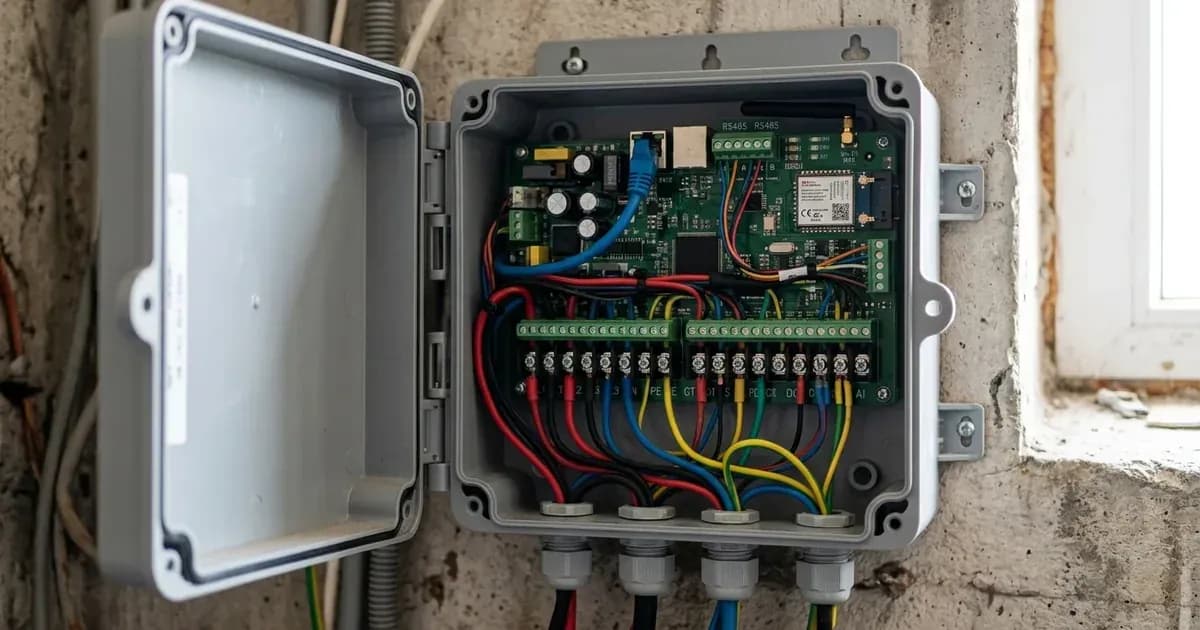
The GoodWe SEC1000B Smart Energy Controller is designed to work with GoodWe solar inverters to provide real-time data collection, performance management, and dynamic zero export control. Proper wiring of its communication interfaces and current transformers (CTs) is essential for its functionality. This guide focuses on the physical wiring and initial network setup for the SEC1000 model.
Understanding the GoodWe SEC1000's Role in a Solar System
The SEC1000 is a smart energy controller entirely developed by GoodWe. It functions as a central management unit, composed of GoodWe's three-phase meter and control board. When combined with a GoodWe solar inverter, it achieves real-time data collection and analysis. This allows for the control and management of inverter performance, including export power control, by connecting with the SEMS monitoring platform. The SEC1000 integrates an EzLogger Pro datalogger for network configurations and monitoring, and its parameters can be configured using the ProMate software.
GoodWe SEC1000 Specifications and Wiring Procedures
The SEC1000 controller supports a range of operational parameters and requires specific wiring for communication and current measurement.
GoodWe SEC1000 Model Specifications
Parameter | Specification |
|---|---|
Max. Inverters Supported | 60 |
RS485 Interface | 3 |
Ethernet | 1 × RJ45, 10 / 100 Mbps |
Datalogger | EzLogger Pro × 1 |
Meter | GM3000 × 1 + CT Adapter Module × 1 |
Power Supply | 60-280Vac, 50 / 60Hz |
Power Consumption | ≤10W |
Dimensions (W × H × D) | 350 × 460 × 143 mm |
Weight | 6 kg |
Ingress Protection Rating | IP65 |
Operating Temperature Range | -25 ~ +60°C |
Storage Temperature Range | -40 ~ +70°C |
Relative Humidity | 0 ~ 100% |
Max. Operating Altitude | 2000m |
For the SEC1000S model, it supports a maximum of 10 inverters and is specifically designed for export power control and parallel control of ET 5-10kW Series inverters (up to 10 units).
Communication and Current Transformer (CT) Wiring
The SEC1000 uses RS485 for inverter communication and external CTs for current measurement, crucial for export control.
Setting / Parameter | Specification / Action | Technical Reference |
|---|---|---|
RS485 Communication Cable | Use shielded twisted pair, conductor area ≥AWG14. Connect RS485+ and RS485- lines. | "Wire specification and installation: It is recommended to use shielded twisted pair cables with conductor area ≥AWG14 for 485 communication cables. ... Line Function 1 RS485+ 2 RS485-" |
CT Placement (3-phase) | Install three external CTs. Clamp A+A-, B+B-, and C+C- of CTs to L1, L2, and L3 respectively. | "Install three external CTs at the current input ports. Clamp the A+A-, B+B-, and C+C- of the CT to L1, L2, and L3 respectively." |
ProMate Configuration (Network) | Set computer IP to 192.168.1.xxx (1 ≤XXX ≤250 and XXX ≠200) to connect to SEC1000's default static IP (192.168.1.200). | "After restart, SEC1000 will be switched to static IP mode(default IP:192.168.1.200), then use cables to connect SEC1000“NET” port to the Ethernet port of the computer.At the same time, the IP address of the computer needs to be modified. The IP address and the default gateway should be set at 192.168.1.xxx segment (1 ≤XXX ≤250 and XXX ≠200)." |
Backflow Prevention Function | Configure Total Capacity, Power Limit, Ratio of CT (external CT), and enable Export. | "Firstly, set the Total Capacity, Power Limit and the Ratio of CT( of external CT) , and then check the Export Enable (as shown in the figure below), so that the active voltage, current and power data can be monitored in real time." |
Status Indicators
The SEC1000 provides LED indicators to convey its operational status:
Indicator | Status | Meaning |
|---|---|---|
RUN | Blue light continue On or Off | SEC1000 is not running properly |
SERVER | Blue light Off | EzLogger Pro network is not connected |
COM1/2/3 | Blue light Off | No inverter data acquired by SEC1000 |
COM4 | Blue light Off | Not connected to external device like environmental monitor, or ProMate settings not configured |
Installation
[!CAUTION] Always isolate all DC and AC electrical supplies and use insulated tools before undertaking terminal connections. Safety and Switchgear Requirements
Installation and maintenance of the SEC1000 must be performed by qualified personnel in compliance with local electrical standards and regulations. Failure to follow instructions can lead to equipment damage or personal injury.
To avoid electric shock, ensure that the connection between the SEC1000 and the AC output of the inverter, and between the SEC1000 and the Grid, is disconnected before performing any installation or maintenance. This involves opening all relevant AC and DC breakers.
Ensure that the AC input voltage and current match the rated voltage and current of the SEC1000 (60-280Vac, 50/60Hz) to prevent components from being damaged or working improperly. The SEC1000 has internal lightning protection modules; therefore, it is critical to connect the internal protective earth (PE) with the ground during installation.
What the published sources do not tell you
The official documentation for the GoodWe SEC1000, including its datasheet and user manual, has certain limitations regarding detailed information:
- Specific Numeric Error Codes: The documentation does not list specific numeric error codes (e.g., "Error 03", "F13") for the controller itself. Troubleshooting relies on interpreting LED indicator statuses as fault conditions rather than precise error codes.
- Detailed Fault Modes/Troubleshooting: While safety warnings and indicator statuses imply fault conditions, a comprehensive list of fault modes with specific symptoms, causes, and detailed troubleshooting steps for the SEC1000B is not provided.
- Battery/Inverter Pairing Settings Details: The manual mentions "Max. Inverters Supported" and "RS485 interface" but does not provide a detailed table of specific settings (e.g., Modbus registers, communication speeds, specific values) required for pairing with various GoodWe inverters or batteries. Users may need to consult inverter-specific manuals or GoodWe technical support for these details.
Add a battery at a surveyed price
Installers quote supply and fitting of the battery on this page for your existing or new system.
How this pays for the site: installers pay SolarNevs a fixed introduction fee when we pass them a genuine enquiry. They cannot pay to appear higher, and our surveyed prices are published before any introduction. You can also take our dated price tables straight to any installer.
Frequently asked questions
What is the GoodWe SEC1000B Smart Energy Controller used for?
The SEC1000 is a smart energy controller developed by GoodWe for real-time data collection and analysis when combined with a GoodWe solar inverter. It manages inverter performance and facilitates export power control.
How do I wire the RS485 communication cable for the SEC1000?
Use shielded twisted pair cables with a conductor area of at least AWG14. Connect RS485+ and RS485- lines according to the specified pinout. Ensure all power connections are disconnected before wiring.
What are the power supply requirements for the GoodWe SEC1000?
The SEC1000 requires a power supply of 60-280Vac at 50/60Hz. Its power consumption is ≤10W. Ensure the AC input voltage and current match these ratings to prevent damage.
How do I configure the network settings for the SEC1000 using ProMate software?
Connect the SEC1000's 'NET' port to your computer. The SEC1000 defaults to a static IP of 192.168.1.200. Set your computer's IP address to 192.168.1.xxx (where 1 ≤XXX ≤250 and XXX ≠200) to access the controller for configuration.
What does it mean if the RUN indicator light on the SEC1000 is continuously on or off?
If the RUN indicator light is continuously on or off, it indicates that the SEC1000 is not running properly. This suggests a potential operational issue that requires further investigation.
References
- GoodWe SEC1000 Datasheet — accessed 29 August 2026
- GoodWe SEC1000 User Manual — accessed 29 August 2026
- GoodWe SEMS Portal User Manual — accessed 29 August 2026
Related guides
More from what to buy — and how not to get cheated.