GoodWe SEC1000 Smart Energy Controller: Zero Export and Multi-Inverter Management Guide
Updated 6 September 2026 · By SolarNevs Research Desk, Dealer surveys + verified sources · 4 sources · Method ↗
Key Takeaways
- The GoodWe SEC1000 enables dynamic export power limitation and multi-inverter management for solar installations.
- Accurate current transformer (CT) installation is critical for the SEC1000's backflow prevention (zero export) functionality.
- Configuration and network settings for the SEC1000 and its integrated EzLogger Pro are managed via the ProMate software.
- The SEC1000 supports up to "60" inverters, while the SEC1000S supports up to "10" inverters, facilitating scalable system control.
- Installation and maintenance of the SEC1000 must be performed by qualified personnel to ensure safety and compliance.
Understanding the GoodWe SEC1000 Smart Energy Controller
The GoodWe SEC1000 Smart Energy Controller is a device developed by GoodWe Technologies Co., Ltd. designed for advanced management of solar power plants. Its primary functions include real-time data collection, analysis, and automatic adjustment of inverter output parameters such as active power, power factor, and AC output limitation to the grid. This controller is essential for implementing zero export (backflow prevention) and managing multiple GoodWe solar inverters within a single system.
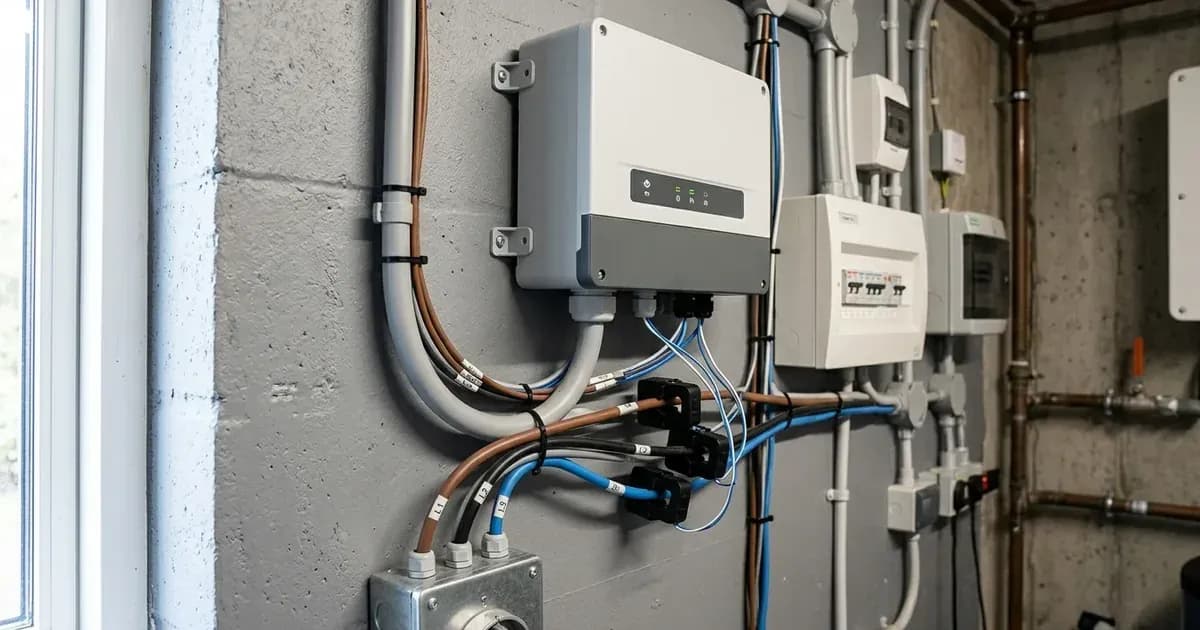
The SEC1000 integrates an EzLogger Pro datalogger and a GM3000 meter with a CT Adapter Module. It communicates with GoodWe inverters via RS485 and connects to the SEMS Portal for remote monitoring and management.
How the SEC1000 Manages Export and Multiple Inverters
The SEC1000 operates by continuously monitoring the grid connection point using its integrated meter and external current transformers (CTs). This allows it to detect power flow to and from the grid. Based on configured settings, it then communicates with connected GoodWe inverters to adjust their power output, preventing unwanted energy export or limiting it to a specified level.
For multi-inverter management, the SEC1000 acts as a central control unit. The SEC1000 model can support up to "60" inverters, while the SEC1000S model supports up to "10" inverters. It uses its "3" RS485 interfaces to communicate with these inverters, coordinating their operation to meet the overall system's power management objectives. The controller is specifically designed for a "three-phase four-wire grid structure only".
GoodWe SEC1000 Model Specifications
Model | Key Specification | Value |
|---|---|---|
SEC1000 | Max. Inverters Supported | "60" |
SEC1000S | Max. Inverters Supported | "10" |
SEC1000 | RS485 interfaces | "3" |
SEC1000 | Ethernet | "1 × RJ45, 10 / 100 Mbps" |
SEC1000 | Power Supply | "60-280Vac, 50 / 60Hz" |
SEC1000 | Power Consumption | "≤10 W" |
SEC1000 | Dimensions (W × H × D) | "350 × 460 × 143 mm" |
SEC1000 | Weight | "6 kg" |
SEC1000 | Operating Temperature Range | "-25 ~ +60 °C" |
SEC1000 | Ingress Protection Rating | "IP65" |
SEC1000S | Functionality | "export power control and ET 5-10kW Series inverter parallel control (up to 10 units)" |
Installation and Initial Setup
The physical installation of the SEC1000 involves mounting and wiring. The unit supports "Wall mounting, bracket mounting, pole mounting". Ensure adequate clearances are maintained: "Upward----------200mm", "Downward-------500mm", "Front--------------500mm", "Both sides-------200mm". The SEC1000 has an Ingress Protection Rating of "IP65", but should be installed "without sunshine, rain and snow" and "where there is no significant shaking, shock vibration and no direct rain or snow."
For electrical connections, the SEC1000 requires a power supply of "60-280Vac, 50 / 60Hz". It is crucial to "Make sure that the AC input voltage and input current match the rated voltage and current of SEC1000". The unit also requires proper earthing; "Make sure to connect the internal PE with the ground when intalling SEC1000."
Current Transformer (CT) Installation
Correct CT installation is fundamental for zero export functionality. "Install three external CTs at the current input ports. Clamp the A+A-, B+B-, and C+C- of the CT to L1, L2, and L3 respectively." These CTs measure the current flow at the grid connection point, providing the SEC1000 with the data needed for backflow prevention.
Configuration and Zero Export Settings
Configuration of the SEC1000 and its integrated EzLogger Pro is primarily done using the "ProMate" software. This software allows you to "configure the number of connected inverters" and "modify the network IP address of Ezlogger Pro and SEC1000".
For zero export, or "Backflow Prevention", the "Export Enable" setting "Must be checked to monitor active voltage, current, and power data in real time for backflow prevention". You will also need to configure "Configurable Parameters" such as "Total Capacity, Power Limit and the Ratio of CT( of external CT)" within ProMate.
The SEC1000 supports both dynamic and static IP modes. You can switch between these modes by pressing a button on the unit: "Long press the button for 10s to switch the SEC1000 from dynamic IP mode to static IP mode." and "Long press the button for 3s to switch the SEC1000 from static IP mode to dynamic IP mode." The "default IP:192.168.1.200" is used when in static IP mode.
Status Indicators and Troubleshooting
The SEC1000 provides several LED indicators to convey its operational status and assist with basic troubleshooting:
Indicator | State | Description |
|---|---|---|
POWER | Blue light On | "Power supply is normal" |
RUN | Blue light flashes (1s On/Off alternately) | "SEC1000 is running properly" |
RUN | Blue light continue On or Off | "SEC1000 is not running properly" |
SERVER | Blue light continue On | "EzLogger Pro can communicate with the server properly" |
SERVER | Blue light Off | "EzLogger Pro network is not connected" |
COM1/2/3 | Blue light Off | "No inverter data acquired by SEC1000" |
COM4 | Blue light Off | "Not connected to external device like environmental monitor. Or the ProMate settings is not configured." |
Meter LED | Steady on | "Importing from the grid." |
Meter LED | Blinking | "Exporting to the grid." |
Meter LED | Off | "Meter has no communication connection." |
If the "RUN" indicator shows "Blue light continue On or Off", the "SEC1000 is not running properly". A "SERVER" indicator that is "Blue light Off" suggests the "EzLogger Pro network is not connected". If "COM1/2/3" indicators are "Blue light Off", it means "No inverter data acquired by SEC1000".
Installation Safety and Switchgear Requirements
Working with electrical equipment carries inherent risks. "Installation.maintenance of SEC1000 must be performed by qualified personnel."
Before performing any installation or maintenance, "To avoid electric shock,make sure the connection between SEC1000 and AC output of inverter. SEC1000 and Grid, is disconnected". This involves isolating all AC and DC power sources to the inverters and the SEC1000 itself. Ensure appropriate lockout/tagout procedures are followed.
During operation, "users should not touch any of the electrical parts of SEC1000". Also, "When in operation, do not plug or unplug cables of SEC1000." All electrical installations must comply with local electrical standards and obtain necessary permissions from local power authorities.
Ensure the "AC input voltage and input current match the rated voltage and current of SEC1000". Proper grounding is mandatory; "Make sure to connect the internal PE with the ground when intalling SEC1000." The SEC1000 "must be Installed out of reach of children."
What the published sources do not tell you
While the GoodWe SEC1000 documentation provides a solid foundation, certain details are not explicitly covered. The manuals do not provide specific numerical error codes for the SEC1000 itself, focusing instead on LED indicator states. Detailed configuration values, such as default ranges or specific guidance for determining "Total Capacity, Power Limit and the Ratio of CT" for various installations, are also not provided.
The "ProMate" software is mentioned for configuration, but detailed screenshots or step-by-step instructions for its use are absent. Furthermore, while the SEC1000 supports multi-inverter communication via RS485, the specific communication protocols or detailed wiring diagrams for complex multi-inverter setups are not elaborated upon. The documentation implies compatibility with GoodWe inverters, but explicit statements regarding compatibility or incompatibility with other brands are not present. Advanced troubleshooting steps beyond basic indicator interpretations are also not detailed.
Add a battery at a surveyed price
Installers quote supply and fitting of the battery on this page for your existing or new system.
How this pays for the site: installers pay SolarNevs a fixed introduction fee when we pass them a genuine enquiry. They cannot pay to appear higher, and our surveyed prices are published before any introduction. You can also take our dated price tables straight to any installer.
Frequently asked questions
What is the GoodWe SEC1000 Smart Energy Controller used for?
The GoodWe SEC1000 is a device developed by GoodWe Technologies Co., Ltd. for real-time data collection, analysis, and automatic adjustment of solar power plant parameters, including active power output, power factor, and AC output limitation to the grid. It integrates with GoodWe solar inverters and the SEMS Portal for monitoring and management.
How many inverters can the GoodWe SEC1000 manage?
The SEC1000 model can support up to "60" inverters, while the SEC1000S model supports up to "10" inverters. This allows for scalable multi-inverter power management in solar installations.
How do I configure the GoodWe SEC1000 for zero export?
Zero export functionality, also known as backflow prevention, is a core function of the SEC1000. It requires enabling "Export Enable" and configuring parameters such as "Total Capacity, Power Limit and the Ratio of CT( of external CT)" using the ProMate software. Correct CT installation is crucial for accurate measurement.
What are the physical dimensions and ingress protection of the SEC1000?
The SEC1000 has dimensions of "350 × 460 × 143 mm" (W × H × D) and weighs "6 kg". It features an Ingress Protection Rating of "IP65", indicating protection against dust and water jets.
What are the power requirements for the GoodWe SEC1000?
The SEC1000 operates on a power supply of "60-280Vac, 50 / 60Hz" and has a power consumption of "≤10 W". Ensure the AC input voltage and current match these rated specifications.
References
- GoodWe SEC1000 Datasheet — accessed 29 August 2026
- GoodWe SEC1000 User Manual — accessed 29 August 2026
- GoodWe SEMS Portal User Manual — accessed 29 August 2026
- GoodWe Technologies Co., Ltd. Product Lineage — accessed 29 August 2026
Related guides
More from what to buy — and how not to get cheated.