Battery Terminal Corrosion and Loose Joint Fixes Guide
Updated 6 September 2026 · By SolarNevs Research Desk, Dealer surveys + verified sources · 2 sources · Method ↗
Key Takeaways
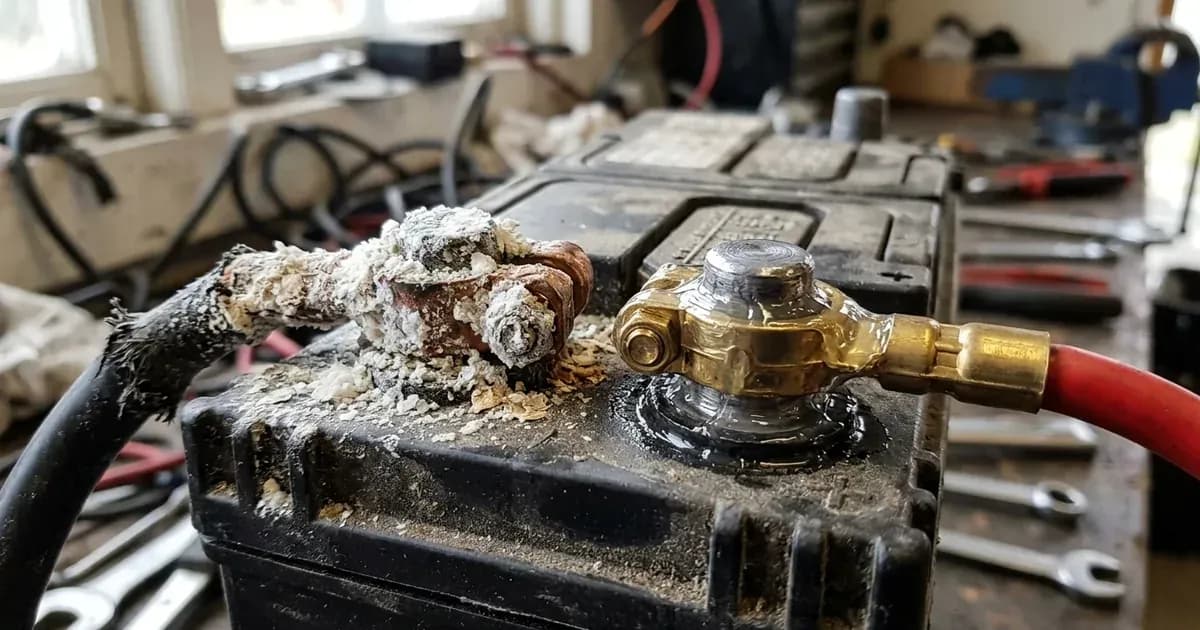
- White/bluish crust on terminals is sulfate crust formed when escaping acid mist reacts with exposed metallic connections.
- Kill power first and use insulated tools whenever disconnecting or cleaning terminals (because a spanner across terminals shorts a bank that can deliver hundreds of amps); neutralize corrosion using a baking soda (sodium bicarbonate) and water solution, scrub clean, rinse with pure distilled water, and dry thoroughly.
- Always apply protective petroleum jelly or terminal grease AFTER tightening mechanical connections, never inside the joint or between mating surfaces.
- Loose bolt-nut joints heat under load, melt lugs, and drop voltage under load (while reading fine unloaded).
- Pakistani brands publish no torque specifications; standard US maker reference (Trojan User's Guide) specifies 95–105 in-lb (≈11–12 Nm) for bolt-nut terminals; always kill power first and use insulated tools when torquing connections because a spanner across a bank shorts hundreds of amps.
Why are corroded and loose battery terminals dangerous?
Corroded and loose battery terminal connections are among the cheapest faults to fix in a Pakistani solar or UPS installation, and among the easiest to prevent. Every amp your inverter draws through the evening passes through bolt-nut terminal lugs — the terminal style used across locally made flooded tubular batteries (Osaka, Volta, Phoenix, Exide, AGS, Daewoo).
When a terminal joint is loose or encrusted with non-conductive sulfate crust, electrical contact resistance increases sharply. Joule's electrical heating mechanism does the rest: resistance in the joint converts discharge current straight into heat at the post. Loose bolt-nut joints heat under load, melt lugs, damage battery casing seals, and drop voltage across the joint under load — which is why a corroded bank can read perfectly normal on a resting voltmeter and still collapse the instant the inverter pulls.
Symptoms and Root Causes of Terminal Degradation
Understanding what causes terminal corrosion prevents recurring buildup:
Observable Symptom | Underlying Root Cause | Chemical / Electrical Mechanism | Corrective Fix |
|---|---|---|---|
White powdery crust on positive (+) post | Acid mist from gassing during charging or overfilling | Sulfuric acid vapors reacting with lead post alloy to form sulfate crust | Neutralize with baking soda solution, scrub, rinse, dry. |
Bluish-green crust on copper cable lug | Acid mist reacting with exposed copper | Copper sulfate formation from unsealed cable crimps and acid exposure | Kill power first and disconnect negative first using an insulated tool (a spanner across terminals shorts a bank delivering hundreds of amps), clean with baking soda, dry, seal with heat-shrink. |
Terminal bolt becomes scalding hot under load | High contact resistance from loose bolt-nut joint | Loose bolt-nut joints heat under load, melt lugs, and drop voltage under load | Kill power first and clean mating surfaces using insulated tools, then re-snug firmly (Trojan's published 95–105 in-lb / ≈11–12 Nm is the only manufacturer figure available as a reference; PK brands publish none; a spanner across terminals shorts a bank delivering hundreds of amps). |
Inverter trips on low DC voltage under load | High voltage drop across loose or corroded joint | Terminal joint drops voltage under load; undersized or aged bank sags to low-DC cutoff | Kill power first and disassemble using insulated tools (a spanner across terminals shorts a bank delivering hundreds of amps), polish metal surfaces to bare metal, reassemble, tighten. |
Melted plastic around terminal post base | Severe localized thermal heating | A loose joint under heavy inverter load heated enough to melt lugs and soften lid plastic around the post | Isolate damaged battery; post repair required. |
Step-by-Step Terminal Cleaning and Rebuilding Workflow
Follow this professional procedure to restore oxidized and corroded battery terminals:
- Safety Isolation:
- Turn off the solar inverter and trip the main DC battery circuit breaker to remove all electrical currents. Inverter capacitors hold lethal charge up to 5 min after shutdown; PV conductors live in daylight.
- Wear safety goggles and neoprene gloves to protect against acidic chemical residue (electrolyte is sulfuric acid).
- Disconnect Battery Terminals in Proper Sequence:
- Kill power first and always disconnect the Negative (−) black cable first using an insulated tool, because a spanner across terminals shorts a bank that can deliver hundreds of amps. This eliminates the risk of an accidental wrench-to-ground short circuit.
- Disconnect the Positive (+) red cable second.
- Neutralize Acid Crust with Baking Soda:
- Stir baking soda (sodium bicarbonate) into warm water until the water will take no more.
- Apply the solution to the corroded posts and lugs using an old nylon toothbrush. The mixture will fizz vigorously as it chemically neutralizes the acidic sulfate crust.
- Scrub and Polish to Bare Metal:
- Use a wire battery terminal brush or fine emery sandpaper to scrub the lead post, bolt hardware, and copper cable lug surfaces until shiny, bare metal is exposed.
- Wipe clean with a damp rag using pure distilled water and dry completely with a clean towel.
- Reassemble and Torque Connections:
- Kill power first and use insulated tools when reassembling and tightening hardware, because a spanner across terminals shorts a bank that can deliver hundreds of amps.
- Reconnect the Positive (+) red cable first, followed by the Negative (−) black cable second.
- Tighten bolt-nut hardware firmly. No Pakistani battery maker publishes a torque figure at all; the only manufacturer-published number we could find is the Trojan Battery User's Guide spec of 95 to 105 in-lb (≈11 to 12 Nm) for flooded bolt-nut terminals, quoted here as a US-maker reference rather than a spec for your brand. Treat it as the target, and settle for solid and snug with zero play — don't hammer lugs and do not over-tighten soft lead posts.
- Apply Protective Anti-Corrosion Coating:
- Crucial Rule: Apply a thin coat of petroleum jelly (Vaseline) or specialized battery terminal grease over the entire assembled exterior joint AFTER tightening.
- Never Apply Grease Inside the Joint: Grease applied between mating contact faces acts as an electrical insulator, increasing contact resistance.
Inspect proper battery cable sizing in our guide on solar battery installation mistakes and cable sizing. If battery cases exhibit distortion, consult battery swelling causes and safety.
Preventing Terminal Corrosion in Flooded Solar Banks
Preventing recurring terminal corrosion requires active maintenance discipline:
- Avoid Overfilling Electrolyte: Wear eye protection and top up with distilled/demineralized water ONLY; never tap water, never acid. Never top up water above the maximum float level indicator line. Overfilling causes electrolyte to vent through caps during absorption charging. Review correct water procedures in our tubular battery water topping guide.
- Inspect Post Seal Bushings: Check the rubber grommets sealing the lead posts to the plastic battery lid. If acid leaks from the base of the post, seal with acid-resistant epoxy.
- Routine Torque Checks: Make re-snugging every terminal bolt using an insulated tool after isolating DC power part of the same walk-around where you check water levels (a spanner across terminals shorts a bank delivering hundreds of amps). Thermal expansion and contraction cycles work bolt-nut joints loose over time, and since no local maker publishes a re-torque interval, tying the check to a maintenance visit you already make is more reliable than inventing a schedule.
- Install Protective Rubber Terminal Boots: Cover exposed metal terminal lugs with flexible rubber terminal boots to prevent accidental tool shorts and shield metallic surfaces from airborne dust and moisture.
Summary Maintenance Checklist for Terminal Connections
Follow this quick inspection checklist during routine solar maintenance:
- Inspect all positive and negative terminals for white or blue sulfate crust buildup.
- Feel cable lugs after a sustained stretch of heavy inverter operation; any lug that feels hot indicates high resistance from loose bolt-nut joints.
- Check bolt tightness using an insulated wrench after isolating DC power, because a spanner across terminals shorts a bank that can deliver hundreds of amps.
- Ensure protective petroleum jelly forms an unbroken moisture seal over clean, tightened hardware.
Safety: Working with DC Battery Connections
Observe these mandatory safety protocols during terminal maintenance:
- Arc-Flash Short Circuit Danger: A 48V battery bank will dump enormous current into anything that bridges its posts, and a dropped spanner welds itself in place before you can pull it off. Kill power first and never lay metal tools across battery tops. Use fully insulated tools because a spanner across a bank shorts hundreds of amps.
- Hydrogen Gas Ignition: Flooded lead-acid batteries gas hydrogen on charge (equalization deliberately enters gassing region ~2.4V/cell). Ventilate the room, and keep flames and sparks away from the bank.
- Acid Handling: The electrolyte is sulfuric acid. Wear eye protection whenever you are working over open cells, and remember the standing rule for flooded banks — add water only, never acid.
- Wait Before You Open Anything: Inverter capacitors hold lethal charge up to 5 min after shutdown, and PV conductors live in daylight. Trip the DC breaker, then wait before putting an insulated spanner near the bank.
- Do Not Lift Alone: Tall tubular batteries weigh 55 to 73 kg on Osaka's own technical data sheet. If terminal repair means moving a battery off the rack, that is a two-person lift.
- Terminal Work Safety: Terminal work requires killing power first, disconnecting negative first, using insulated tools (because a spanner across a bank shorts hundreds of amps), torquing to specification, and never hammering lugs.
When to call a technician instead
Contact a certified solar technician or battery service center under the following conditions:
- A lead terminal post has partially melted or sheared off due to severe joint overheating.
- Battery cables exhibit charred, brittle, or melted insulation along the conductor.
- Battery bank temperature reaches 50°C+ to the touch (off charge immediately — community-reported threshold, PakWheels).
- Deep pitting on terminal faces prevents achieving a flat, low-resistance mechanical joint.
For professional maintenance standards, consult our guide on when to call a solar technician.
Figures as of August 2026.
Still showing the fault? Book a technician
If the steps above did not clear it, tell us the inverter or battery and the exact code. We pass it to a technician who covers your city; visit charges are quoted before they come.
How this pays for the site: the technician or verifier pays SolarNevs a fixed introduction fee. Nobody pays to be recommended, and you are free to use our free guides instead.
Frequently asked questions
What causes white or bluish powder to build up on solar battery terminals?
The white powder (lead sulfate or copper sulfate crust) is caused by escaping sulfuric acid vapors reacting with lead posts, copper cable lugs, and brass hardware. Acid mist vents through overfilled cell caps or during charging gassing.
How do I safely clean corroded solar battery terminals?
Kill power first and use an insulated tool (because a spanner across terminals shorts a bank that can deliver hundreds of amps). Disconnect the battery (negative terminal first). Stir baking soda into warm water until the water will take no more. Apply the solution with a stiff nylon brush to neutralize the acid (it will fizz). Scrub clean, rinse with distilled water, dry thoroughly, and reassemble.
Should I apply petroleum jelly before or after tightening terminal bolts?
Always apply petroleum jelly or terminal grease AFTER tightening the bolt-nut joint. Applying grease between mating contact faces before tightening creates an insulating barrier that increases electrical contact resistance and causes joint heating.
What is the recommended torque for lead-acid battery terminal bolts?
Pakistani battery manufacturers publish no torque specifications; the only manufacturer figure found is the Trojan Battery User's Guide specification of 95 to 105 in-lb (≈11 to 12 Nm) for flooded bolt-nut terminals, cited here as a US manufacturer reference. When tightening, kill power first and use an insulated tool (a spanner across terminals shorts a bank that can deliver hundreds of amps). Connections should be snug and firm with zero play without over-tightening or stripping soft lead posts.
Why do battery terminal cables get extremely hot during inverter operation?
Extreme cable and lug heating is caused by high electrical contact resistance in loose or corroded bolt-nut joints. Resistance in the joint turns inverter discharge current straight into heat at the post, which is why a loose or crusted terminal can melt lugs and post seals while reading fine unloaded.
References
- Trojan Battery User's Guide — accessed 23 August 2026
- Osaka Tubular Technical Data Sheet — accessed 23 August 2026
Related guides
More from inverter errors & fixes.