FoxESS Hybrid Inverter and Energy Cube Battery Setup Guide
Updated 6 September 2026 · By SolarNevs Research Desk, Dealer surveys + verified sources · 2 sources · Method ↗
Key Takeaways
- FoxESS H1 and H3 hybrid inverters use high-voltage DC battery interfaces with Energy Cube storage.
- Energy Cube battery modules stack in series, with a master controller managing system safety.
- Commissioning, operating mode selection, and firmware updates are managed through the FoxCloud mobile app.
- Always switch off the DC battery isolator and wait at least 5 minutes for internal capacitors to discharge before working on the system.
Setting Up Your FoxESS Hybrid Inverter and Energy Cube Battery System
Setting up your FoxESS H1 or H3 hybrid inverter with an Energy Cube battery system involves specific steps for safe and efficient operation. This guide covers the essential connections, safety protocols, and commissioning procedures for these high-voltage DC battery storage systems.
Understanding Your FoxESS Hybrid System
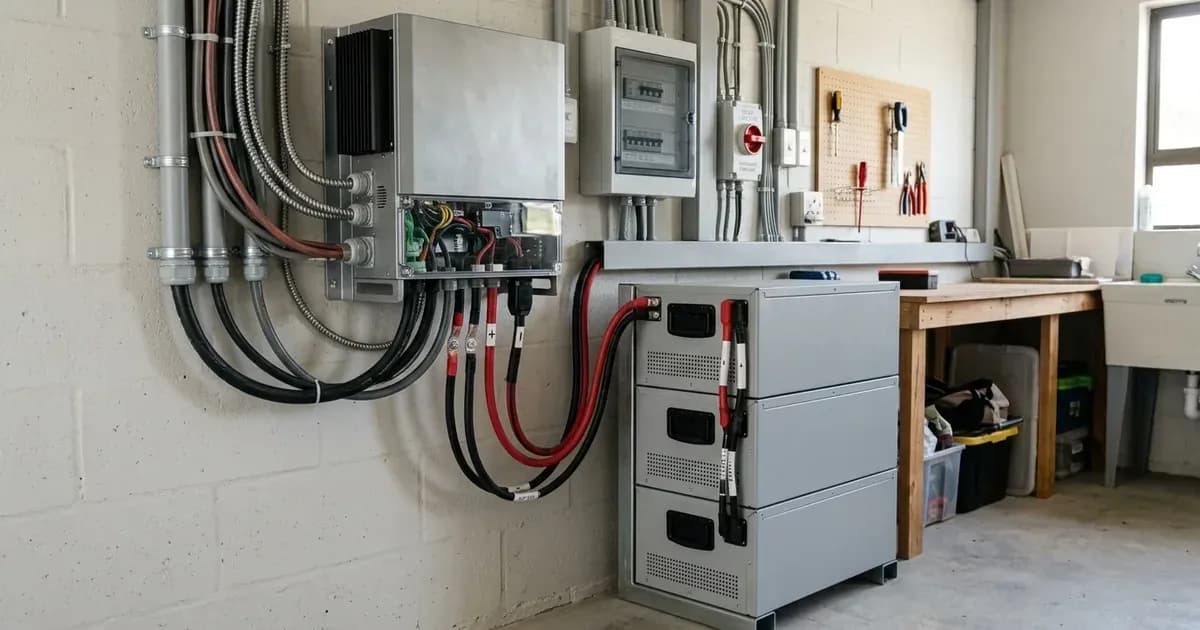
FoxESS H1 (single-phase) and H3 (three-phase) hybrid inverters feature high-voltage DC battery interfaces. These interfaces are specifically designed to pair with Energy Cube storage modules. The Energy Cube system uses modular battery stacking, where individual battery modules stack in series. A master controller module then manages the overall system safety and performance.
System Component | Specification / Architecture | Interface & Stacking Rules |
|---|---|---|
FoxESS H1 | Single-phase hybrid inverter | High-voltage DC interface, CAN-Bus BMS communication |
FoxESS H3 | Three-phase hybrid inverter | High-voltage DC interface, CAN-Bus BMS communication |
Energy Cube Battery | Modular high-voltage LFP storage | Series-stacked modules (maximum 7 modules per master) |
Master Controller | Dedicated stack management module | System safety control, balancing, and inverter BMS sync |
EPS Backup Port | Dedicated Emergency Power Supply | Automated off-grid power for essential circuits |
These systems are compatible with standard single-phase and three-phase electrical distribution systems globally. They are engineered for both residential and commercial off-grid and grid-parallel energy storage applications worldwide.
Essential Pre-Installation Checks and Safety
Before beginning any physical installation or wiring, it is crucial to understand and follow safety protocols.
- System Isolation: Always switch off the DC battery isolator before making or breaking any connections. After switching off, wait at least 5 minutes for internal capacitors to discharge. This prevents electrical shock and damage to components.
- Protective Earthing: You must bond the inverter chassis ground and the battery metal enclosure to the main installation earthing terminal. This ensures proper electrical safety and fault protection.
- Battery Stacking Limits: In FoxESS Energy Cube setups, never exceed the maximum allowed stacking limit of 7 battery modules per master controller. Exceeding this limit can compromise system safety and performance.
- Anti-Islanding Protection: The system complies with international microgeneration safety and grid protection standards. This ensures the inverter safely disconnects from the grid during an outage, preventing power from being fed back into a de-energised network.
Connecting the Energy Cube Batteries
The Energy Cube battery system communicates with the FoxESS inverter using a CAN-Bus Battery Management System (BMS).
- Modular Stacking: Physically stack the Energy Cube battery modules in series according to the manufacturer's instructions. Ensure each module is securely connected.
- BMS Communication: Connect the master battery BMS CAN communication cable to the dedicated BMS port on the inverter. This cable facilitates data exchange between the battery management system and the inverter, allowing for optimal charging, discharging, and safety monitoring.
- DC Power Connection: Connect the high-voltage DC battery cables from the Energy Cube system to the designated DC battery terminals on the FoxESS inverter. Ensure polarity is correct and connections are tight. When tightening or disconnecting terminals, always kill power first and use insulated tools. A spanner across a battery bank can short hundreds of amps, causing severe damage or injury.
Setting Up EPS Backup Loads
FoxESS hybrid inverters include a dedicated EPS (Emergency Power Supply) backup output. This output is designed to provide power to essential circuits during a grid outage.
- Circuit Identification: Identify the essential circuits in your property that you wish to power during an outage (e.g., lighting, refrigeration, critical communication equipment).
- Connection to EPS Terminal: Connect these essential circuits to the dedicated EPS backup output terminal on the inverter. This configuration enables automated off-grid power supply to these specific loads when the main grid supply is interrupted. The inverter will automatically switch to battery power for these circuits.
Commissioning with FoxCloud
The commissioning process, operating mode selection, and firmware updates for your FoxESS system are managed through the FoxCloud mobile app or the FoxESS Web Commissioning Portal.
- Network Connection: Ensure your FoxESS inverter is connected to the internet, typically via Wi-Fi or Ethernet, to enable communication with the FoxCloud platform.
- App/Portal Access: Download the FoxCloud mobile app or access the FoxESS Web Commissioning Portal. Create an account and register your inverter.
- Initial Setup: Follow the on-screen prompts within the app or portal to perform the initial system setup. This includes configuring grid parameters, battery settings, and desired operating modes (e.g., self-consumption, time-of-use).
- Firmware Updates: The FoxCloud platform also supports remote firmware and configuration management. Regularly check for and apply firmware updates to ensure your system operates with the latest features and security enhancements.
What you can check yourself, and what you cannot
You can perform visual inspections of cabling, ensure all isolators are in the correct position, and monitor system performance via the FoxCloud app. You can also verify earthing connections and confirm that the battery stacking limit has not been exceeded.
However, any internal work on the inverter or battery modules, including opening the enclosure, replacing components, or re-pinning connectors, is authorised-service work only. For such tasks, you must isolate PV, battery, and AC breakers, wait the manual's specified capacitor-discharge time (at least 5 minutes after switching off the DC battery isolator), and then contact an accredited installer. Changing grid-protection settings yourself can breach your connection agreement with your network operator.
What the published sources do not tell you
While the FoxESS documentation provides comprehensive setup instructions, specific network rules for grid connection in Great Britain can vary by Distribution Network Operator (grid operator). These rules, particularly regarding export limits or specific protection settings, are not universally published by inverter manufacturers and may require direct consultation with your grid operator or an accredited installer. Furthermore, detailed internal schematics or specific component-level troubleshooting guides are typically proprietary and not publicly available.
Still showing the fault? Book a technician
If the steps above did not clear it, tell us the inverter or battery and the exact code. We pass it to a technician who covers your city; visit charges are quoted before they come.
How this pays for the site: the technician or verifier pays SolarNevs a fixed introduction fee. Nobody pays to be recommended, and you are free to use our free guides instead.
Frequently asked questions
What FoxESS inverters are covered in this setup guide?
This guide covers the FoxESS H1 single-phase and H3 three-phase hybrid inverters, designed to work with Energy Cube battery storage systems.
How do Energy Cube battery modules connect to the inverter?
Energy Cube battery modules stack in series, with a master controller managing the system. A dedicated CAN communication cable connects the master battery's BMS to the inverter's BMS port.
How many Energy Cube battery modules can I stack?
You must never exceed the maximum allowed stacking limit of 7 battery modules per master controller in an Energy Cube setup.
What is the EPS backup output used for?
The dedicated EPS backup output on FoxESS inverters is for connecting essential circuits, providing automated off-grid power to these loads during a mains outage.
How is the FoxESS system commissioned and updated?
System commissioning, operating mode selection, and firmware updates are managed remotely through the FoxCloud mobile app or the FoxESS Web Commissioning Portal.
References
- FoxESS official downloads (H1/AC1 hybrid inverter manuals) — accessed 27 August 2026
- FoxESS FoxCloud 2.0 App User Manual — accessed 27 August 2026
Related guides
More from inverter errors & fixes.