Fronus Inverter Beeping Continuously: Overload Fix
Updated 6 September 2026 · By SolarNevs Research Desk, Dealer surveys + verified sources · 1 source · Method ↗
Key Takeaways
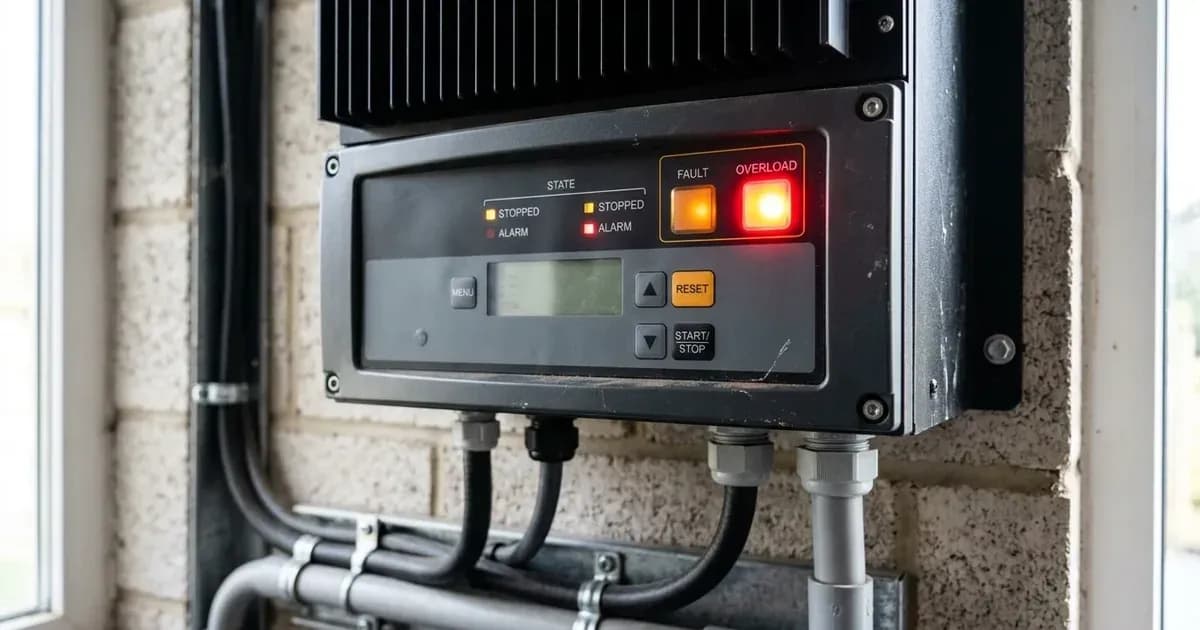
- A continuous beep and red LED on your Fronus inverter most often signals an overload (Fault Code 07).
- The immediate action is to reduce the connected load by switching off non-essential appliances.
- If basic troubleshooting does not resolve the issue, or if internal component faults are indicated, contact a qualified technician.
Why is my Fronus inverter beeping continuously with a red light?
A continuous beep accompanied by a red LED on your Fronus inverter typically indicates a critical fault condition. The most common cause for this symptom is an overload error, often displayed as Fault Code 07. This means the inverter's output capacity has been exceeded by the connected electrical load.
Diagnosis Steps for Continuous Beeping
Follow these steps to diagnose the cause of your Fronus inverter's continuous beep and red LED.
- Check the Inverter Display for Fault Codes:
- What to check: Look at the inverter's LCD screen for any displayed fault codes.
- What it means:
- Fault Code 07 (Overload time out): This is the most frequent cause. The inverter has detected that the load connected to it is too high for an extended period.
- Fault Code 02 (Over temperature): The internal temperature of an inverter component is over 100°C.
- Fault Code 05 (Output short circuited or over temperature): The output is short-circuited, or an internal converter component's temperature is over 120°C.
- Other codes (e.g., 08, 52, 53, 55, 58, 59): These indicate internal component issues or specific electrical problems. Refer to the table below for meanings and recommended actions.
- Assess the Connected Load:
- What to check: Identify all appliances currently drawing power from the inverter. Compare their combined wattage to your inverter's rated output power. For example, a 1.5KW model has a rated output power of 1.5KVA/1.5KW, a 3KW model is 3KVA/3KW, and a 5KW model is 5KVA/5KW.
- What it means: If the total load exceeds the inverter's capacity, it will trigger an overload. This is especially true if the inverter is already derating its output due to other factors like high PV input voltage.
- Inspect for Environmental Factors and Airflow:
- What to check: Ensure the inverter's ventilation openings are not blocked. Check the ambient temperature around the inverter.
- What it means: Blocked airflow or high ambient temperatures can lead to overheating, triggering Fault Code 02 or 05, which will cause the continuous beep and red LED. Before checking airflow, ensure the inverter is completely powered off and disconnected from all AC and DC sources. Refer to the Safety section for detailed precautions. Do not open the unit; if internal access is required, contact a qualified technician to avoid electric shock and maintain warranty.
- Verify PV Input Voltage (for Fault Code 07 or 59):
- What to check: If your system includes solar panels, check the PV input voltage displayed on the inverter or with a multimeter.
- What it means: If the PV input voltage is higher than the inverter's specification, the output power may be derated. For instance, the 1.5KW model has a Max. PV Array Open Circuit Voltage of 400Vdc, while 3KW and 5KW models have a Max. PV Array Open Circuit Voltage of 500Vdc. If the connected load then exceeds this derated output power, it will cause an overload (Fault Code 07). Fault Code 59 specifically indicates "PV voltage is over limitation."
Fronus Inverter Fault Codes and Fixes
Symptom detail | Likely cause | Fix |
|---|---|---|
Buzzer beeps continuously and red LED is on. Fault code 07. | Overload error. The inverter is overload 110% and time is up. | Reduce the connected load by switching off some equipment. |
Buzzer beeps continuously and red LED is on. Fault code 07. | If PV input voltage is higher than specification, the output power will be derated. At this time, if connected loads is higher than derated output power, it will cause overload. | Reduce the number of PV modules in series or the connected load. |
Buzzer beeps continuously and red LED is on. Fault code 05. | Temperature of internal converter component is over 120°C. | Before checking airflow, ensure the inverter is completely powered off and disconnected from all AC and DC sources. Refer to the Safety section for detailed precautions. Do not open the unit; if internal access is required, contact a qualified technician to avoid electric shock and maintain warranty. |
Buzzer beeps continuously and red LED is on. Fault code 02. | Internal temperature of inverter component is over 100°C. | Before checking airflow, ensure the inverter is completely powered off and disconnected from all AC and DC sources. Refer to the Safety section for detailed precautions. Do not open the unit; if internal access is required, contact a qualified technician to avoid electric shock and maintain warranty. |
Output short circuited or over temperature is detected by internal converter components. (Fault Code 05) | Output short circuited or over temperature is detected by internal converter components. | Check if wiring is connected well and remove abnormal load. |
Over temperature (Fault Code 02) | Over temperature | Before checking airflow, ensure the inverter is completely powered off and disconnected from all AC and DC sources. Refer to the Safety section for detailed precautions. Do not open the unit; if internal access is required, contact a qualified technician to avoid electric shock and maintain warranty. |
PV voltage is over limitation (Fault Code 59) | PV voltage is over limitation | Reduce the number of PV modules in series. |
Inverter Settings and Overload Prevention
Understanding and correctly configuring your Fronus inverter's settings can help prevent overloads and manage system behavior.
- Setting 01: Output source priority: This setting configures which power source (utility, solar, or battery) the inverter prioritizes for your loads.
-
Utility first (default): Prioritizes grid power. -
Solar first: Prioritizes solar power. -
SBU priority: Prioritizes solar, then battery, then utility. If you are frequently overloading inSolar firstorSBU prioritymode, ensure your PV array and battery bank can handle the peak loads.
-
- Setting 23: Overload bypass: This setting determines how the inverter reacts to an overload when operating in battery mode.
-
Bypass disable (default): If an overload occurs in battery mode, the unit will not transfer to line mode. This can lead to shutdown. -
Bypass enable: When enabled, the unit transfers to line mode if an overload occurs in battery mode. This can help maintain power to your loads by switching to the grid, but it does not resolve the underlying overload condition.
-
If you are experiencing frequent overloads, consider reducing your peak load demand or upgrading your inverter to a higher capacity model.
Safety
Working with solar inverters and electrical systems carries significant risks. Always prioritize safety.
- Read the Manual: Always read all instructions and cautionary markings on the unit, batteries, and manual before use.
- Disconnect Power: To reduce the risk of electric shock, disconnect all wirings before attempting any maintenance or cleaning. Be sure that AC power source is disconnected before attempting to hardwire it to the unit.
- Qualified Personnel: Only qualified personnel can install this device with battery. Only qualified service persons are able to service this device.
- No Disassembly: Do not disassemble the unit. Take it to a qualified service center when service or repair is required.
- No Short Circuits: NEVER cause AC output and DC input short circuited. Do NOT connect to the mains when DC input short circuits.
- Insulated Tools: Be very cautious when working with metal tools on or around batteries to avoid sparks or short circuits. Use insulated tools.
- Proper Wiring: Use appropriate cable size for battery connection for system safety and efficient operation. Ensure correct polarity (+ to + and - to -) for DC connections.
- Mounting: Do not mount the inverter on flammable construction materials. It is suitable for mounting on concrete or other non-combustible surface only.
When to call a technician instead
While basic troubleshooting can resolve many common issues, some problems require professional intervention. You should call a qualified technician if:
- The inverter displays fault codes indicating internal component failure, such as Fault Code 08 (Bus voltage is too high), Fault Code 52 (Bus voltage is too low), Fault Code 53 (Inverter soft start failed), Fault Code 55 (Over DC voltage in AC output), or Fault Code 58 (Output voltage is too low).
- The continuous beeping and red LED persist after you have reduced the load, checked for overheating, and verified PV input voltage.
- You suspect a short circuit in your wiring that you cannot safely identify or fix.
- An internal fuse has tripped, as this requires contacting a repair center for replacement.
- You are uncomfortable or unsure about any step in the troubleshooting process involving electrical connections.
Attempting to repair internal components or disassembling the unit yourself can void your warranty and pose serious safety risks.
Still showing the fault? Book a technician
If the steps above did not clear it, tell us the inverter or battery and the exact code. We pass it to a technician who covers your city; visit charges are quoted before they come.
How this pays for the site: the technician or verifier pays SolarNevs a fixed introduction fee. Nobody pays to be recommended, and you are free to use our free guides instead.
Frequently asked questions
What does a continuous beep and red light mean on my Fronus inverter?
A continuous beep and red LED on your Fronus inverter typically indicate an overload error, often accompanied by Fault Code 07. This means the connected load exceeds the inverter's capacity.
How do I fix a Fronus inverter overload?
To fix an overload, immediately reduce the connected load by switching off some appliances. If the issue persists, check for high PV input voltage which can derate output power, and reduce the number of PV modules in series if necessary.
Can high ambient temperature cause a Fronus inverter to beep continuously?
Yes, high ambient temperature or blocked airflow can cause the inverter's internal components to overheat, triggering Fault Code 02 (over temperature) or 05 (output short/over temperature) which also results in a continuous beep and red LED. Before checking airflow, ensure the inverter is completely powered off and disconnected from all AC and DC sources. Refer to the Safety section for detailed precautions. Do not open the unit; if internal access is required, contact a qualified technician to avoid electric shock and maintain warranty.
What is the maximum output power for Fronus inverters?
Fronus inverters have different rated output powers. For example, the 1.5KW model has a rated output power of 1.5KVA/1.5KW, the 3KW model is 3KVA/3KW, and the 5KW model is 5KVA/5KW.
When should I call a technician for a beeping Fronus inverter?
You should call a qualified technician if the inverter continues to beep after you have reduced the load and checked for temperature issues, or if the fault code indicates an internal component failure like Bus voltage too high (08) or Inverter soft start failed (53).
References
- Axpert VM III Manual — accessed 23 August 2026
Related guides
More from inverter errors & fixes.