Understanding SBU, SUB, and SOL Output Priority Settings for Your Solar Inverter
Updated 7 September 2026 · By SolarNevs Research Desk, Dealer surveys + verified sources · 6 sources · Method ↗
Key Takeaways
- SBU, SUB, and SOL are common terms for how your inverter prioritizes power sources: solar, battery, and utility grid.
- The chosen setting directly impacts your electricity bill, battery lifespan, and energy independence.
- Always refer to your inverter's specific manual for the exact meaning and configuration steps for these settings.
- Incorrect settings can lead to unexpected power outages or inefficient energy use; stop if you are unsure.
What do SBU, SUB, and SOL output priority settings mean?
SBU, SUB, and SOL are common acronyms used in solar inverters to define the order in which your system draws power from available sources: solar panels, battery storage, and the utility grid. These settings are crucial for managing your energy flow, optimizing self-consumption, and potentially reducing your electricity costs. The specific behavior of each mode can vary slightly between inverter brands, so always consult your model's manual.
How to Check and Change Your Inverter's Output Priority Settings
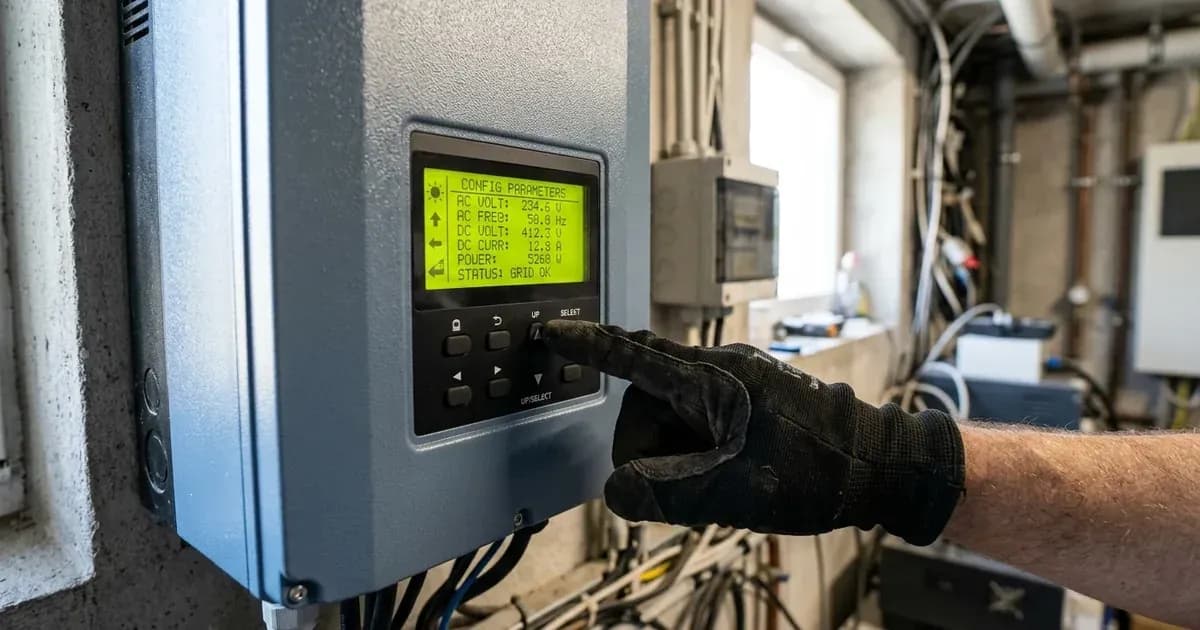
Checking and changing your inverter's output priority settings typically involves navigating the inverter's LCD display menu or using its dedicated monitoring software. The exact steps differ by manufacturer and model.
- Access the Menu: Most inverters have a physical button interface on the unit itself. Press the "Enter" or "Menu" button to access the main settings.
- Navigate to Settings: Use the arrow keys to scroll through the menu options until you find "Output Source Priority," "Work Mode," or a similar designation.
- Select the Desired Mode: Choose between options like SBU, SUB, SOL, or other specific modes offered by your inverter.
- Confirm Selection: Press "Enter" or "Save" to apply the new setting.
- Monitor System Behavior: After changing a setting, observe your system's energy flow to ensure it operates as expected.
For specific instructions, refer to your inverter's user manual. For example, Axpert VM III inverters typically use "Output source priority" settings, while Solis S5-EH1P-L models use "Storage Mode Select."
Inverter Output Priority Modes Explained
The following table outlines how different inverter brands define and implement their output priority settings.
Inverter Brand & Model | Setting Name | Description |
|---|---|---|
Axpert VM III | Output source priority: Utility first | Utility will provide power to the loads as first priority. Solar and battery energy will provide power to the loads only when utility power is not available. |
Axpert VM III | Output source priority: Solar first | Solar energy provides power to the loads as first priority. If solar energy is not sufficient, battery energy will supply power. Utility provides power only when solar is not available or battery voltage drops to low-level warning. |
Axpert VM III | Output source priority: SBU priority | Solar energy provides power to the loads as first priority. If solar energy is not sufficient, battery energy will supply power. Utility provides power only when battery voltage drops to low-level warning. |
Deye SG03LP1 | System Work Mode: Selling First | PV energy used for load, then charge battery, then excess to grid. Power source priority for load: 1. Solar Panels. 2. Grid. 3. Batteries. |
Deye SG03LP1 | System Work Mode: Zero Export To Load | Hybrid inverter only provides power to backup load. No power to home load or grid. Built-in CT detects power flowing back to grid and reduces inverter power to supply local load and charge battery. |
Deye SG03LP1 | System Work Mode: Zero Export To CT | Hybrid inverter provides power to backup load and home load. If PV/battery insufficient, grid supplements. No power sold to grid. External CT detects power flowing back to grid and reduces inverter power to supply local load, charge battery, and home load. |
Deye SG03LP1 | Energy pattern: Batt First | PV power is firstly used to charge the battery and then used to power the load. If PV power is insufficient, grid will make supplement for battery and load simultaneously. |
Deye SG03LP1 | Energy pattern: Load First | PV power is firstly used to power the load and then used to charge the battery. If PV power is insufficient, grid will make supplement for battery and load simultaneously. |
Deye SG03LP1 | Time Of Use | Program when to use grid or generator to charge the battery, and when to discharge the battery to power the load. |
Fox ESS H1(G2)/AC1(G2) | Work mode: Self-use (with PV Power) | Priority: load>battery>grid. PV energy optimizes self-consumption, excess charges batteries, then exported to grid. |
Fox ESS H1(G2)/AC1(G2) | Work mode: Self-use (without PV Power) | When no PV supplied, battery discharges for local loads first, grid supplies power when battery capacity is not enough. |
Fox ESS H1(G2)/AC1(G2) | Work mode: Feed in priority | Priority: load>grid>battery. External generator power supplies local loads first, then exports to grid. Redundant power charges battery. |
Fox ESS H1(G2)/AC1(G2) | Work mode: Force time use | Priority (charging): battery>load>grid. Priority (discharging): load>battery>grid. Flexible charging/discharging time, option to charge from grid. |
Fox ESS H1(G2)/AC1(G2) | Work mode: Back up mode | When grid is off, system supplies emergency power from PV or battery to home loads (Battery is necessary in EPS mode). |
GoodWe ET Series | Operation Mode I | PV energy optimizes self-consumption, excess charges batteries, remaining excess exported to grid. |
GoodWe ET Series | Operation Mode II | If PV not generating and battery charged, loads supplied by battery and grid. |
GoodWe ET Series | Operation Mode III | If grid fails, system switches to back-up mode. Back-up loads supplied by PV and battery. |
GoodWe ET Series | Operation Mode IV | Battery charged by grid, charge time/power configurable via PV Master App. |
Growatt SPF ES | Output source priority: Solar first | Solar energy provides power to the loads as first priority. If solar energy is not sufficient, battery energy will supply power. Utility provides power only when solar is not available or battery voltage drops to low-level warning. |
Growatt SPF ES | Output source priority: Utility first | Utility will provide power to the loads as first priority. Solar and battery energy will provide power to the loads only when utility power is not available. |
Growatt SPF ES | Output source priority: SBU priority | Solar energy provides power to the loads as first priority. If solar energy is not sufficient, battery energy will supply power. Utility provides power only when battery voltage drops to low-level warning. |
Growatt SPF ES | Output source priority: SUB priority | Solar energy provides power to the loads as first priority. If solar energy is not sufficient, solar and utility will power loads. Battery provides power only when solar energy is not sufficient and there is no utility. |
Solis S5-EH1P-L | Storage Mode Select: Self Use | PV Power Using Priority: Load>Battery>Grid; Load Support Priority: PV>Battery>Grid; Battery Charging Power from PV (or Grid if allowed). |
Solis S5-EH1P-L | Storage Mode Select: Feed In Priority | PV Power Using Priority: Load>Grid>Battery; Load Support Priority: PV>Battery>Grid; Battery Charging Power from PV (or Grid if allowed). |
Solis S5-EH1P-L | Storage Mode Select: Backup Mode | Keep the Battery at a certain SOC and only use it during power outage. PV Power Using Priority: Battery>Load>Grid; Load Support Priority: PV>Grid>Battery; Battery Charging Power from PV (or Grid if allowed). Not applicable for Lead-acid batteries. |
Solis S5-EH1P-L | Storage Mode Select: Off-Grid Mode | For Off-grid use and AC-Grid Port Disconnected. PV Power Using Priority: Load>Battery; Load Support Priority: PV>Battery. |
Understanding the Different Priority Modes
The main output priority modes you will encounter are:
SBU (Solar-Battery-Utility) Priority
This mode prioritizes using solar energy first. If solar power is insufficient to meet the load demand, the inverter will then draw power from the batteries. The utility grid is only used as a last resort, typically when the battery voltage drops to a predefined low-level warning. This setting is ideal for maximizing self-consumption and achieving greater energy independence. For example, Axpert VM III and Growatt SPF ES inverters offer an "SBU priority" option where solar energy powers loads first, then battery energy, and utility power only when battery voltage is low.
SUB (Solar-Utility-Battery) Priority
In this mode, solar energy is the primary source. If solar production is not enough, the inverter will switch to drawing power from the utility grid. Battery power is reserved and only used if both solar and utility power are unavailable. This setting can help preserve battery life by reducing the number of charge/discharge cycles, but it means you will rely more on the grid when solar is low. Growatt SPF ES offers a "SUB priority" where solar powers loads first, then solar and utility, and battery only when solar is insufficient and no utility is present.
SOL (Solar First) Priority
This is a general term often used interchangeably with SBU priority. It means the inverter prioritizes solar energy to power the loads. If solar is not sufficient, battery power is used. The utility grid provides power only when solar is unavailable or the battery voltage drops below a specified threshold. Axpert VM III and Growatt SPF ES both have an "Output source priority: Solar first" setting that follows this logic.
Utility First Priority
This mode prioritizes drawing power from the utility grid. Solar and battery energy are only used when the utility power is unavailable. This setting is often used in areas with stable grids where the primary goal is to have a backup power source rather than maximizing self-consumption or reducing grid reliance. Both Axpert VM III and Growatt SPF ES offer an "Output source priority: Utility first" mode.
Other Advanced Modes
Some inverters offer more nuanced control:
- Self-Use (Solis S5-EH1P-L, Fox ESS H1(G2)/AC1(G2)): These modes focus on optimizing self-consumption, often with priorities like Load > Battery > Grid for PV power usage.
- Feed-In Priority (Solis S5-EH1P-L, Fox ESS H1(G2)/AC1(G2)): Prioritizes feeding excess solar power back to the grid after meeting local loads, then charging batteries.
- Backup Mode (Solis S5-EH1P-L, Fox ESS H1(G2)/AC1(G2)): Designed to keep batteries at a certain state of charge (SOC) and only use them during power outages. Solis notes this is "Not applicable for Lead-acid batteries."
- Time Of Use (Deye SG03LP1, Fox ESS H1(G2)/AC1(G2)): Allows you to program specific times for charging batteries from the grid or generator, and for discharging batteries to power loads, to take advantage of varying electricity tariffs.
- Zero Export (Deye SG03LP1): Prevents any excess solar power from being sent back to the grid, ensuring all generated power is consumed locally or stored in batteries.
Safety Considerations When Adjusting Settings
When you adjust inverter settings, you are directly influencing the electrical behavior of your solar system. Always follow these safety guidelines:
- Consult the Manual: Every inverter model has specific instructions and safety warnings. Read your manual thoroughly before making any changes.
- Understand the Impact: Be aware of how each setting change will affect your system's operation, especially regarding battery discharge levels and grid interaction.
- Power Down if Necessary: For some advanced configurations or if you are unsure, it may be necessary to isolate PV, battery, and AC breakers. Wait the manual's specified capacitor-discharge time before proceeding.
- Professional Help: If you are uncomfortable or uncertain about any setting, contact a qualified solar technician.
When to call a technician instead
While adjusting output priority settings is often a user-level task, there are situations where professional help is advisable:
- Unexpected System Behavior: If your inverter does not respond as expected after changing settings, or if it displays error codes related to power flow.
- Persistent Issues: If your system frequently switches between power sources in an undesirable way, or if your batteries are not charging/discharging correctly despite correct settings.
- Complex System Requirements: For systems with specific grid export limitations, advanced time-of-use scheduling, or integration with other smart home devices, a technician can ensure optimal configuration.
- Warranty Concerns: Some advanced settings or modifications might affect your inverter's warranty if not performed correctly. Always check your warranty terms.
Still showing the fault? Book a technician
If the steps above did not clear it, tell us the inverter or battery and the exact code. We pass it to a technician who covers your city; visit charges are quoted before they come.
How this pays for the site: the technician or verifier pays SolarNevs a fixed introduction fee. Nobody pays to be recommended, and you are free to use our free guides instead.
Frequently asked questions
What is SBU output priority?
SBU (Solar-Battery-Utility) priority means your inverter will use solar power first, then battery power, and only switch to utility power when the battery voltage drops to a low-level warning. This setting maximizes self-consumption from solar and battery storage.
What is SUB output priority?
SUB (Solar-Utility-Battery) priority means your inverter prioritizes solar power first. If solar is insufficient, it will use utility power. Battery power is only used if both solar and utility power are unavailable. This mode aims to reduce battery cycling.
What is SOL output priority?
SOL (Solar First) priority, also known as Solar-Battery-Utility, is a common setting where solar energy powers loads first. If solar is not sufficient, battery energy supplies power. Utility power is used only when solar is unavailable or the battery voltage drops to a low-level warning.
Why are output priority settings important?
Output priority settings determine how your solar inverter manages the flow of electricity from solar panels, batteries, and the utility grid to your home's loads. Correct settings ensure efficient energy use, optimize battery lifespan, and manage grid interaction according to your preferences.
Can I change my inverter's output priority settings?
Yes, most inverters allow you to change output priority settings through their display panel or monitoring software. Always consult your specific inverter's manual for detailed instructions, as the exact steps and available options vary by model and brand.
References
- Solis Manual S5-EH1P(3-6)K-L EUR V1,3(20230808) — accessed 23 August 2026
- Axpert VM III Manual — accessed 23 August 2026
- Manual SUN 3.6-6K SG03LP1 EU Deye Ver2.2 — accessed 23 August 2026
- Manual SPF 3500-5000 Growatt — accessed 23 August 2026
- GW ET User Manual-EN GoodWe — accessed 23 August 2026
- ENH1AC1G2ManualV1.0.8 Fox ESS — accessed 23 August 2026
Related guides
More from inverter errors & fixes.