Three Single-Phase Sunsynk Inverters on a Three-Phase Supply
Updated 16 September 2026 · By SolarNevs Research Desk, Dealer surveys + verified sources · 2 sources · Method ↗
Key Takeaways
- All Classic, Acure, or Elite inverters in a three-phase setup must have identical MCU and LCD firmware.
- The LCD/Comms firmware version must not exceed E.4.3.6 to prevent display errors.
- A common battery bank connected to all inverters is essential for parallel operation.
- Each inverter acts as a master for its assigned phase, with the phase A master handling the battery's BMS connection.
- Incorrect CT clamp wiring can lead to misleading readings, even if the system is otherwise functional.
Configuring Sunsynk Classic, Acure, or Elite Inverters for Three-Phase Power
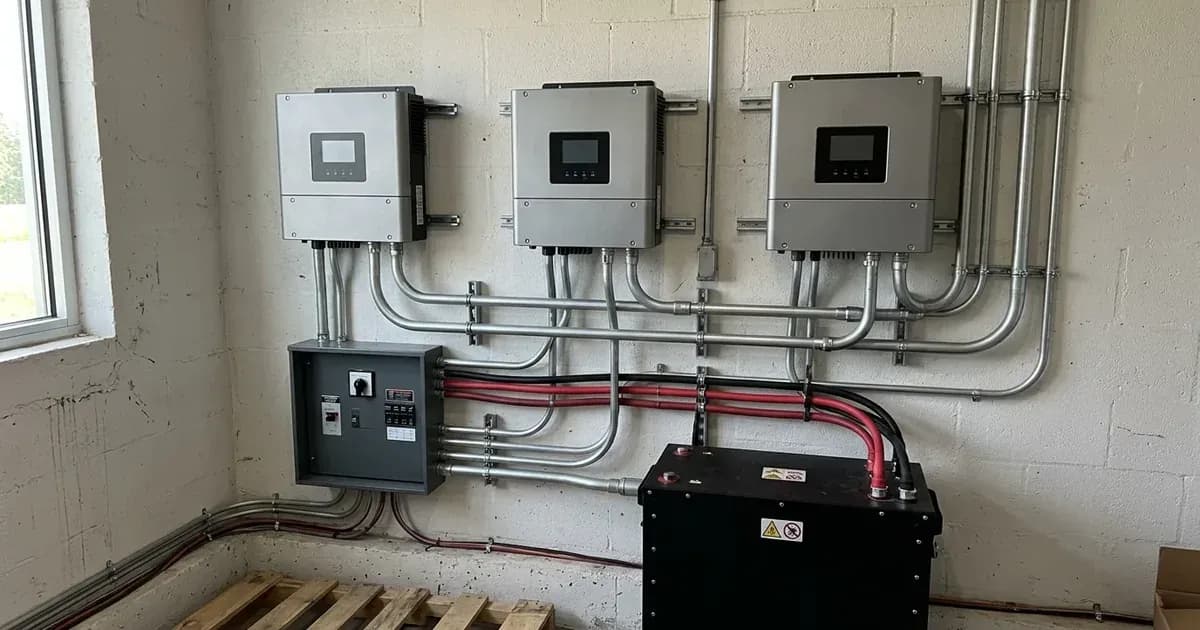
You can use three single-phase Sunsynk Classic, Acure, or Elite hybrid inverters to manage a three-phase electrical supply. This setup involves assigning each inverter to a specific phase (A, B, or C) to balance the load across your property. This configuration differs from a dedicated three-phase inverter, which is a single unit designed to handle all three phases internally. With this approach, each single-phase inverter operates independently on its assigned phase while coordinating with the others.
What is actually going on
When you connect three single-phase inverters to a three-phase supply, each inverter is responsible for one of the three phases. For example, one inverter handles phase A, another phase B, and the third phase C. This allows the system to draw power from, or supply power to, each phase independently.
For this setup to work correctly, the inverters must communicate with each other to ensure balanced operation and proper power flow. This communication relies on specific firmware versions and a shared battery resource. The system treats each inverter as a master for its phase, coordinating their activities to manage the overall three-phase load.
Essential Firmware and Hardware Requirements
Parameter / Component | Configuration Requirement | Purpose & Constraint |
|---|---|---|
MCU & LCD Firmware | Identical version installed across all units | Ensures synchronous multi-inverter communication |
LCD / Comms Firmware Version | Maximum E.4.3.6 (must not exceed) | Higher versions create a phantom negative UPS load display error |
Battery Bank | Single shared common bank connected to all inverters | Enables coordinated 3-phase charging and discharging |
Phase A Master | Advance settings: Master on Phase A | Serves as primary unit; connects to battery BMS comms cable |
Phase B & C Masters | Advance settings: Master on Phase B / Phase C | Manages respective phase regulation in sync with Phase A |
System Expansion (>3 units) | 1 Master per phase; remaining units set as Slaves | Multi-inverter capacity scaling per phase |
Initial Setup State | Normal mode on battery only; AC and PV isolated | Safe baseline parameter entry prior to energisation |
For correct operation of three single-phase Classic, Acure, or Elite inverters across a three-phase supply, specific firmware and hardware conditions must be met.
Firmware Synchronisation
All inverters in the setup "must have the same MCU and LCD firmware installed for correct operation." This ensures consistent behaviour and communication between the units.
LCD/Comms Firmware Limit
There is a critical limit for the LCD/Comms firmware: it "must NOT be any higher than E.4.3.6 at this time until further notice." Higher versions have been observed to "show a phantom negative UPS Load which matches the actual Load and cancels the House Load out," leading to incorrect display readings.
Common Battery Bank
A shared battery resource is fundamental. "The batteries must be within a common battery bank and connected to all inverters for parallel to work." This allows all inverters to draw from and charge the same battery capacity, enabling coordinated power management across the phases.
Setting Up Your Three-Phase System
The initial setup process requires careful attention to ensure all inverters are correctly configured before connecting to the grid or PV.
Initial Inverter State
Before proceeding with configuration, "First ensure the inverters are all in normal mode running only from batteries with AC and PV isolated." This isolates the inverters from external power sources, allowing for safe setup.
Master Inverter Configuration
In this three-phase setup, each inverter acts as a master for its assigned phase. You "must enter and set advance settings for each inverter as the Master on its respective phase."
If your installation involves more than three inverters (e.g., six inverters for a larger system), there will still be "1 master per phase and all other inverters are then set as slaves."
The inverter designated as the master for phase A holds a special role: "The master should be phase A" and "this is the inverter that batteries BMS cable will connect too." This ensures the primary inverter manages battery communication.
Troubleshooting Common Display Issues
Even if your system appears to be functioning normally, incorrect display readings can indicate a configuration problem.
Incorrect CT Clamp Readings
If you observe "Incorrect readings but system is in normal," this "could be down to the CT clamps being connected to the wrong phases." This is a common issue in multi-phase installations and requires checking the physical wiring of your CT clamps. For detailed troubleshooting steps related to CT clamp issues, refer to our guide on /za/guides/fixes/sunsynk-ct-coil-wrong-readings.
A common symptom of incorrect phase assignment or CT clamp wiring is the W03 fault code. If you encounter this, consult our guide on /za/guides/fixes/sunsynk-fault-codes-explained for corrective actions.
What you can change yourself, and what you cannot
As an owner, you can monitor your system's performance and observe the display readings. You can also verify the firmware versions on your inverters.
However, the physical installation and configuration of a three-phase system, including the connection of multiple inverters, battery wiring, and CT clamp installation, must be performed by a registered person. This work involves high voltages and currents and requires a Certificate of Compliance (CoC) in South Africa. Attempting to change these settings or connections without proper qualifications can be dangerous and may invalidate your warranty or CoC.
What the published sources do not tell you
The Sunsynk documentation provides clear instructions for the firmware synchronisation and limits, as well as the battery connection requirements. However, it does not detail the specific menu paths within the inverter display or Sunsynk Connect to set each inverter as a master for its phase. This path may vary slightly depending on the specific firmware version and model of your Classic, Acure, or Elite inverter. Always consult your inverter's manual or the Sunsynk support portal for the most accurate menu navigation for your device.
Frequently asked questions
Can I use three single-phase Sunsynk inverters on a three-phase supply?
Yes, Sunsynk Classic, Acure, and Elite inverters can be configured to operate across a three-phase supply. This requires specific firmware versions, a common battery bank, and correct master/slave settings for each inverter.
What firmware is required for three single-phase Sunsynk inverters on a three-phase supply?
All inverters in the setup must have identical MCU and LCD firmware. The LCD/Comms firmware must not be higher than E.4.3.6 to avoid issues like a phantom negative UPS Load.
How do I connect batteries to multiple Sunsynk inverters in a three-phase setup?
The inverters must share a common battery bank. All inverters must be connected to this same battery bank for the parallel operation to function correctly.
Which inverter is the master in a three-phase Sunsynk setup?
Each phase will have a master inverter. In a three-inverter setup, each inverter acts as a master for its respective phase. The master for phase A is typically designated as the primary master, and its BMS cable connects to the battery.
What is the difference between this setup and a true three-phase inverter?
This setup uses three individual single-phase inverters, each handling one phase of the supply. A true three-phase inverter is a single unit designed to manage all three phases simultaneously, often offering integrated control and balancing.
References
- Sunsynk Support: Classic/Acure/Elite - Three single phase inverters on a three phase supply — accessed 27 August 2026
- Sunsynk Support: Classic/Acure/Elite - New Sell Feature — accessed 27 August 2026
Related guides
More from sizing, net billing & installation.