Hoymiles DTU Pro S Zero Export And Modbus Meter Wiring Guide
Updated 15 September 2026 · By SolarNevs Research Desk, Dealer surveys + verified sources · 3 sources · Method ↗
Key Takeaways
- RS485 communication between the DTU-Pro-S and a smart meter requires shielded twisted pair cabling.
- For effective zero export, the smart meter must be installed at the main grid connection point.
- All system commissioning, including zero export settings, needs verification using official mobile tools.
- High-voltage DC, AC grid, and switchgear modifications must be carried out by certified, licensed personnel.
Understanding the Hoymiles DTU-Pro-S and Zero Export
The Hoymiles DTU-Pro-S is a data transfer unit (DTU) designed to manage and monitor Hoymiles microinverter systems. It acts as a communication gateway, collecting performance data from microinverters and sending it to the S-Miles Cloud monitoring platform. Crucially, the DTU-Pro-S also facilitates zero export power limiting, a function that prevents your solar system from sending excess electricity back to the national grid.
Zero export is often a requirement in Great Britain to comply with local network operator rules, especially for larger installations or where grid capacity is limited. This function relies on a smart meter, such as the Chint DTSU666, to measure the power flow at your property's main grid connection. The DTU-Pro-S then uses this information to dynamically adjust the output of your microinverters, ensuring no power is exported.
Wiring the Chint DTSU666 Smart Meter to the DTU-Pro-S
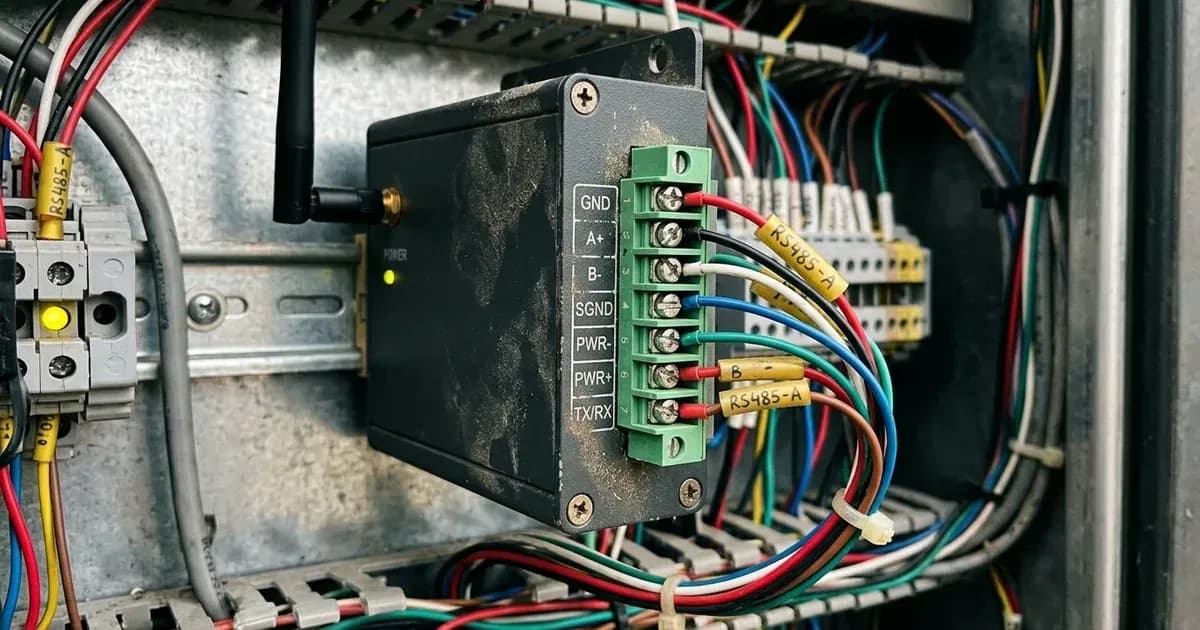
Connecting a Modbus smart meter like the Chint DTSU666 to the Hoymiles DTU-Pro-S is essential for enabling zero export functionality. This connection typically uses an RS485 communication protocol. The DTU-Pro-S has dedicated terminals for RS485, which will connect to corresponding terminals on the smart meter.
For reliable communication, "Communication wiring must use shielded twisted pair cabling." This type of cable helps prevent electrical interference from affecting the data signals between the DTU and the meter. Ensure the correct A, B, and ground (GND) terminals are matched between both devices. Incorrect wiring can lead to communication errors, preventing the zero export function from operating correctly.
Safety Warning: "High-voltage DC, AC grid interconnection, and switchgear modifications must be performed by certified, licensed personnel." Attempting these connections yourself without proper qualifications can be extremely dangerous and may void warranties or insurance.
Configuring Zero Export Power Limiting
Once the Chint DTSU666 smart meter is physically wired to the DTU-Pro-S, the system needs to be configured for zero export. The smart meter's role is to accurately measure the power flowing in and out of your property at the point where it connects to the national grid. For this to work correctly, "Smart meters must be positioned at the main grid connection point." This ensures that all household consumption and solar generation are accounted for, allowing the DTU-Pro-S to make precise adjustments.
The DTU-Pro-S continuously reads data from the smart meter. If it detects that power is about to be exported to the grid, it sends commands to the microinverters to reduce their output. This dynamic limiting ensures that your solar system generates only enough power to meet your property's demand, preventing any unwanted export. The specific zero export settings are typically configured through the DTU-Pro-S interface or the S-Miles Cloud platform during commissioning.
Commissioning and S-Miles Cloud Setup
After the physical installation and wiring are complete, the system requires commissioning. This involves activating the DTU-Pro-S, connecting it to your local network, and linking it to the Hoymiles S-Miles Cloud monitoring platform. The S-Miles Cloud provides a comprehensive overview of your system's performance, allowing you to monitor energy generation, consumption, and the status of individual microinverters.
"System commissioning must be verified via official mobile tools." These tools, typically a dedicated app provided by Hoymiles, guide installers through the setup process, ensuring all components are communicating correctly and that settings, including zero export limits, are applied as intended. This verification step is crucial for confirming that your system is operating safely and efficiently, and in compliance with local regulations.
What You Can Check Yourself, and What You Cannot
System Component / Task | Homeowner Scope (Visual & Cloud) | Accredited Electrician Scope |
|---|---|---|
DTU-Pro-S Status & Telemetry | Check status LEDs and monitor generation in S-Miles Cloud app | Commission DTU-Pro-S and verify settings via official mobile tools |
RS485 Communication Cable | Visual inspection of external shielded cabling for physical damage | Wire and terminate shielded twisted pair to RS485 A/B/GND terminals |
Chint DTSU666 Smart Meter | Observe power flow readings on meter display and cloud dashboard | Install smart meter at main grid connection point and terminate live AC |
Zero Export Limitation | Confirm zero export mode is active and export remains limited | Configure export power limiting thresholds in DTU-Pro-S / S-Miles Cloud |
AC Switchgear & Protection | Report inverter or communication fault alerts to installer | Execute AC grid interconnection, switchgear alterations, and isolation |
As a homeowner, there are certain checks you can perform to ensure your Hoymiles DTU-Pro-S system is functioning as expected. You can visually inspect the communication cabling for any obvious damage or disconnections. You can also check the DTU-Pro-S status indicators and verify its network connection. Monitoring your system's performance data through the S-Miles Cloud app is another way to confirm it is generating power and that zero export is active.
However, any work involving high-voltage DC, AC grid interconnection, or modifications to switchgear must be left to accredited professionals. This includes the initial wiring of the smart meter to the grid, any internal wiring within the DTU-Pro-S, or adjustments to grid protection settings. These tasks require specific electrical qualifications and adherence to safety standards. Do not attempt to open the DTU-Pro-S enclosure or modify its internal wiring.
What the published sources do not tell you
While official documentation provides critical installation requirements, it does not detail the specific pinout for RS485 connections on either the Hoymiles DTU-Pro-S or the Chint DTSU666 meter. These details are typically found in the respective product manuals or installation guides. Similarly, the exact steps for configuring zero export limits within the S-Miles Cloud or the official mobile tools are not provided. These are dynamic software interfaces that can evolve, and precise instructions are usually found in the most current version of the software documentation. Specific fault codes or diagnostic procedures for communication issues are also beyond the scope of general certified specifications and would be found in detailed troubleshooting guides.
Add a battery at a surveyed price
Installers quote supply and fitting of the battery on this page for your existing or new system.
How this pays for the site: installers pay SolarNevs a fixed introduction fee when we pass them a genuine enquiry. They cannot pay to appear higher, and our surveyed prices are published before any introduction. You can also take our dated price tables straight to any installer.
Frequently asked questions
What are the primary technical requirements for hoymiles dtu pro s zero export and modbus meter wiring guide?
Key requirements include compliance with local grid codes, correct equipment certification, and proper electrical isolation.
Who is authorized to install and inspect hoymiles dtu pro s zero export and modbus meter wiring guide?
All high-voltage DC, AC grid tie-in, and switchboard modifications must be performed by a qualified, accredited electrical professional.
How is export power limited in hoymiles dtu pro s zero export and modbus meter wiring guide?
Export limiting is achieved using certified bidirectional smart meters or power sensors providing dynamic feedback to the inverter system.
References
- Hoymiles DTU-Pro-S product page: zero export control, power export limiting and S-Miles Cloud monitoring — accessed 6 September 2026
- NEPRA (Prosumer) Regulations 2026, SRO 251(I)/2026 - bidirectional metering and export of surplus energy to the distribution licensee — accessed 6 September 2026
- NEPRA (Technical Standards for Grid Connectivity) Regulations 2026, SRO 693(I)/2026 - interconnection compliance for generation facilities — accessed 6 September 2026
Related guides
More from what to buy — and how not to get cheated.