Huawei Dtsu666 H Smart Power Sensor Wiring And Zero Export Guide
Updated 15 September 2026 · By SolarNevs Research Desk, Dealer surveys + verified sources · 4 sources · Method ↗
Key Takeaways
- The Huawei DTSU666-H is a three-phase smart power sensor enabling closed-loop grid export limitation.
- CT clamp arrows must point towards the household loads, away from the grid incomer.
- RS485 communication wires connect the sensor to the inverter's Meter port.
- Zero export is configured in FusionSolar settings by enabling Feed-in Limitation and setting maximum export to 0 Watts.
Understanding the Huawei DTSU666-H for Zero Export
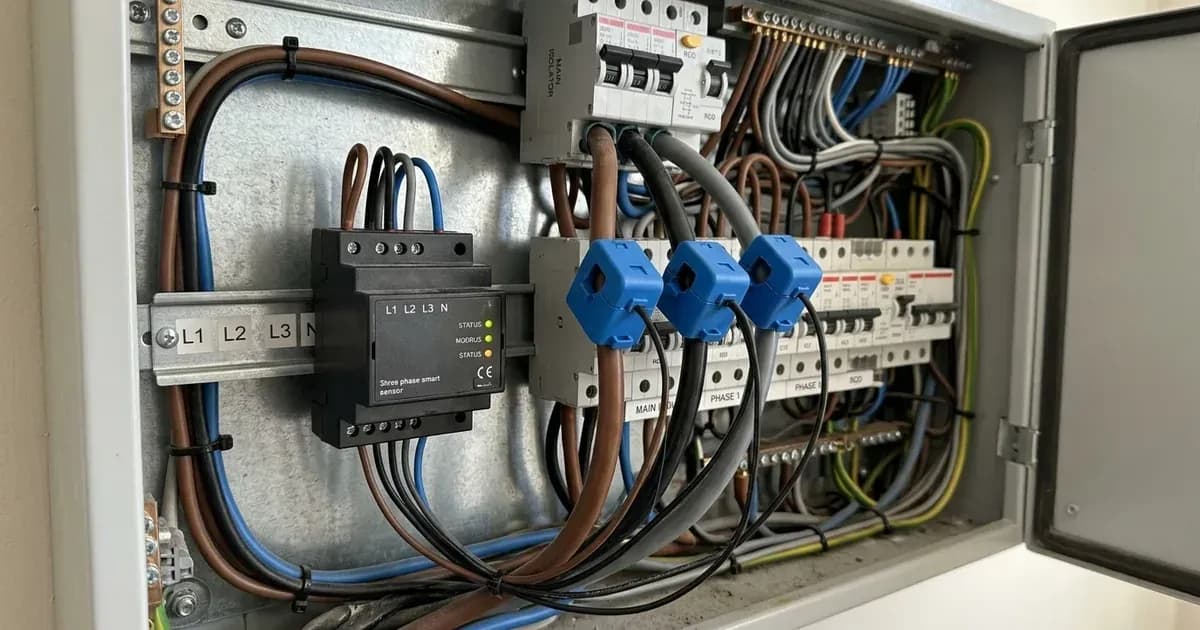
The Huawei DTSU666-H is a three-phase smart power sensor designed to manage power flow in solar PV installations. Its primary function is to enable closed-loop grid export limitation, preventing your system from sending excess electricity back to the grid. This sensor communicates with your Huawei inverter using the RS485 Modbus RTU protocol.
This sensor complies with international microgeneration safety and grid protection standards. It is compatible with standard single-phase and three-phase electrical distribution systems globally, engineered for both residential and commercial grid-parallel energy storage systems. The DDSU666-H is its single-phase counterpart, serving the same function for single-phase installations.
Correct Wiring of the Huawei DTSU666-H Smart Power Sensor
Accurate wiring of the DTSU666-H is critical for its proper operation and for achieving effective zero export. This involves connecting the RS485 communication cables and correctly installing the Current Transformer (CT) clamps.
RS485 Communication Wiring
The DTSU666-H uses RS485 for communication with the inverter. You must connect RS485 differential communication wires A and B from the smart meter to the Meter port on the inverter. It is important to maintain shielded twisted-pair cabling for these connections to ensure signal integrity. You should also verify proper RS485 communication baud rate settings in the inverter configuration.
Current Transformer (CT) Clamp Installation
The CT clamps measure the current flowing through your main incomer cables. Their orientation is crucial. Install Current Transformer clamps with arrows pointing towards the household loads away from the grid incomer. This ensures the sensor correctly identifies power consumption versus export.
The DTSU666-H comes pre-wired with colour-coded CT leads. These leads must not be spliced or lengthened. Altering them can compromise the accuracy of the sensor's readings and its ability to manage export effectively.
Earthing and Safety Protocols
For safety, bond the inverter chassis ground and battery metal enclosure to the main installation earthing terminal. Before installing CT clamps on live busbars, ensure complete AC circuit isolation and lock-out. This prevents electrical shock and ensures installer safety.
Configuring Zero Export with FusionSolar
Once the DTSU666-H is correctly wired, you need to configure the zero export function within the FusionSolar management system. This is a software setting that tells your inverter to limit power export to the grid.
To enable closed-loop zero export, you must enable Feed-in Limitation in FoxCloud settings and configure maximum allowable export power to 0 Watts. This setting instructs the inverter to modulate its output, ensuring that no power is sent back to the grid. The system's ESS assistant dynamically manages battery charge and discharge based on grid tariffs and load, working in conjunction with the sensor data to optimise energy use.
Troubleshooting Common DTSU666-H Issues
Correct installation and configuration are key to preventing issues. However, if you encounter problems, some diagnostic checks can help identify the cause.
Issue | What it means | What to do |
|---|---|---|
Negative power flow during high household consumption | Indicates inverted CT clamp installation. | Check the orientation of the Current Transformer clamps; arrows must point towards the household loads away from the grid incomer. |
Communication errors or no data from sensor | Potential issue with RS485 wiring or settings. | Verify RS485 differential communication wires A and B are correctly connected to the inverter's Meter port. Ensure shielded twisted-pair cabling is used and check baud rate settings. |
System still exporting power despite zero export setting | Feed-in Limitation not correctly configured or sensor not communicating. | Confirm Feed-in Limitation is enabled in FoxCloud settings and maximum allowable export power is set to 0 Watts. Check RS485 communication integrity. |
What you can check yourself, and what you cannot
As a homeowner, you can perform basic visual checks and monitor your system's performance through the FusionSolar app. You can verify that the DTSU666-H is powered on and that communication indicators (if present) are active. Monitoring for negative power flow during consumption, as described above, is also a homeowner check.
However, any physical wiring changes, especially involving live AC circuits or opening the inverter, must be performed by an accredited installer. This includes installing or re-orienting CT clamps, connecting or disconnecting RS485 wiring, and making changes to the main earthing terminal protective bonding. These tasks involve high voltages and require specific electrical safety knowledge and tools. Changing inverter settings beyond what is available in the user-level app should also be left to a qualified professional, as incorrect settings can affect grid protection and system operation.
What the published sources do not tell you
While official documentation provides essential wiring and configuration details, it does not specify the exact RS485 pinout numbers for the A and B terminals on the DTSU666-H itself, only that they connect to the inverter's Meter port. Specific baud rate values for RS485 communication are also not detailed, requiring reference to the inverter's manual or installer settings. The document does not provide a specific list of compatible inverters, though it implies broad compatibility within the Huawei ecosystem. Furthermore, it does not detail specific fault codes that might appear on the DTSU666-H display, focusing instead on diagnostic symptoms like negative power flow.
Add a battery at a surveyed price
Installers quote supply and fitting of the battery on this page for your existing or new system.
How this pays for the site: installers pay SolarNevs a fixed introduction fee when we pass them a genuine enquiry. They cannot pay to appear higher, and our surveyed prices are published before any introduction. You can also take our dated price tables straight to any installer.
Frequently asked questions
What are the primary technical requirements for huawei dtsu666 h smart power sensor wiring and zero export guide?
Key requirements include compliance with local grid codes, correct equipment certification, and proper electrical isolation.
Who is authorized to install and inspect huawei dtsu666 h smart power sensor wiring and zero export guide?
All high-voltage DC, AC grid tie-in, and switchboard modifications must be performed by a qualified, accredited electrical professional.
How is export power limited in huawei dtsu666 h smart power sensor wiring and zero export guide?
Export limiting is achieved using certified bidirectional smart meters or power sensors providing dynamic feedback to the inverter system.
References
- Huawei DTSU666-H and DTSU666-H 250 A/50 mA Smart Power Sensor Quick Guide (PDF, Issue 03) — accessed 6 September 2026
- Huawei DTSU666-H 100A Smart Power Sensor specifications (3P3W/3P4W, RS485, Modbus-RTU, 9600 bps) — accessed 6 September 2026
- Huawei DTSU666-H 100A Download & Support page (datasheet and quick guide) — accessed 6 September 2026
- NEPRA (Prosumer) Regulations, 2026 (SRO 251(I)/2026, PDF) — accessed 6 September 2026
Related guides
More from what to buy — and how not to get cheated.