Sofar Solar GTX High Voltage Battery BMS Setup Guide
Updated 15 September 2026 · By SolarNevs Research Desk, Dealer surveys + verified sources · 5 sources · Method ↗
Key Takeaways
- Sofar Solar GTX3000-HV and GTX5000-PRO batteries are high-voltage modular systems.
- The Battery Management System (BMS) uses closed-loop CAN communication for safe operation.
- High-voltage DC wiring requires precise polarity matching and correct torquing.
- Installation of these systems must be performed by certified, licensed personnel.
How to Set Up Your Sofar Solar GTX High-Voltage Battery System
This guide outlines the essential steps for setting up Sofar Solar GTX3000-HV and GTX5000-PRO high-voltage lithium battery systems. It covers physical stacking, Battery Management System (BMS) communication via RJ45 CAN, and preparation for monitoring with the Solarman app.
Understanding High-Voltage Battery System Communication
High-voltage battery systems, such as the Sofar Solar GTX series, consist of multiple battery modules connected in series to achieve a higher operating voltage. This design requires a sophisticated Battery Management System (BMS) to monitor individual cell voltages, temperatures, and overall battery health. The BMS ensures safe charging and discharging, balances cells, and protects the battery from over-voltage, under-voltage, and over-current conditions.
For the system to function correctly, the BMS must communicate with the inverter. This communication typically occurs via a closed-loop CAN (Controller Area Network) protocol. "Battery management systems must communicate via closed loop CAN." This allows the inverter to receive real-time data from the battery, such as state of charge and fault conditions, and to send commands to the battery, optimising performance and safety. Without proper closed-loop CAN communication, the inverter cannot accurately manage the battery, which can lead to inefficient operation or safety hazards.
Steps for Sofar Solar GTX Battery Installation and Wiring
The installation of Sofar Solar GTX high-voltage batteries involves several critical steps, focusing on physical assembly, electrical connections, and communication setup.
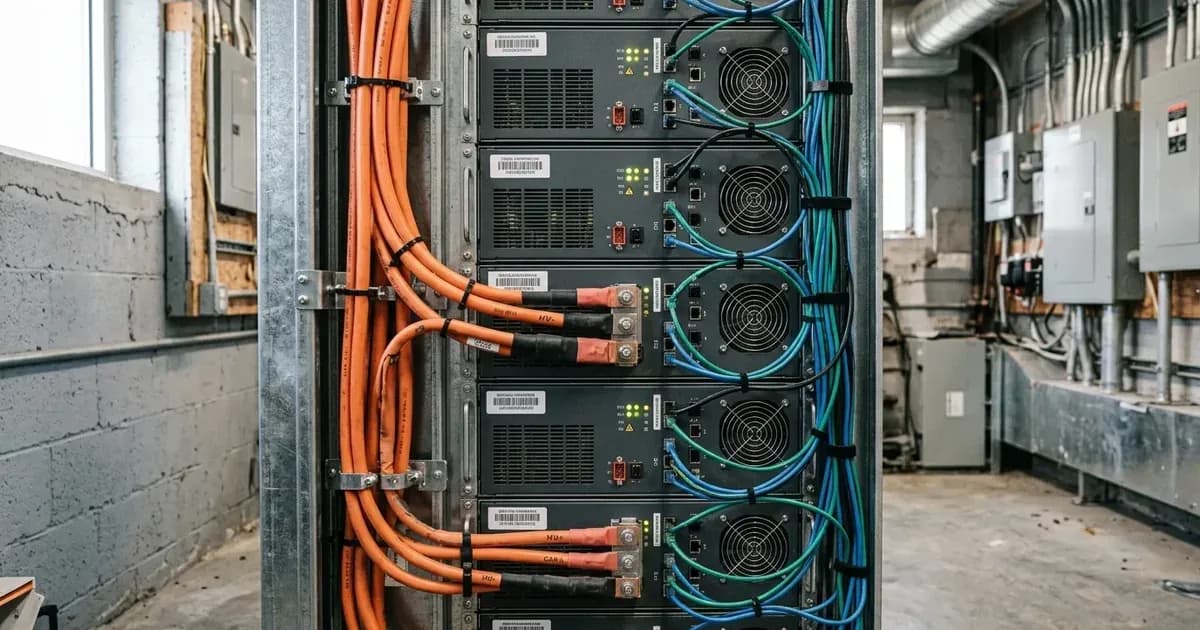
- Module Stacking: "Battery storage modules must be installed per manufacturer instructions." This involves physically stacking the battery modules to form the complete battery bank. Ensure the modules are securely interlocked and stable.
- DC High-Voltage Wiring: Connect the DC high-voltage cables between the battery modules and to the hybrid inverter (e.g., HYD series). "DC high voltage cables must be correctly polarity matched and torqued." Incorrect polarity can cause severe damage to the battery and inverter. Use a torque wrench to ensure all connections are tightened to the manufacturer's specified values, preventing loose connections that can lead to arcing or overheating.
- RJ45 CAN Communication Wiring: Connect the RJ45 CAN communication cable from the battery's BMS port to the inverter's designated CAN port. This cable facilitates the closed-loop communication between the BMS and the inverter. Ensure the cable is securely seated at both ends.
- System Power-Up: Follow the inverter's specific power-up sequence. This typically involves connecting the battery first, then the AC grid, and finally the PV array.
- Solarman App Pairing and Firmware: Once the system is powered and communicating, use the Solarman monitoring app to register the system. This may involve checking for and applying firmware updates for the inverter and syncing the battery profile to ensure the inverter recognises the specific GTX battery model and its parameters.
What you can check yourself, and what you cannot
As a homeowner, you can perform visual checks and basic monitoring, but any work involving high-voltage DC, AC grid connections, or internal component modifications must be left to professionals.
What you can check yourself:
- Visual Inspection: Regularly check the physical condition of the battery stack for any signs of damage or loose connections.
- Cable Integrity: Ensure all visible DC and communication cables are securely connected and not damaged.
- Monitoring App Data: Use the Solarman app to monitor the battery's state of charge, voltage, and any reported alarms or fault codes. This helps you understand system performance.
What you cannot check or modify yourself:
- High-Voltage DC Wiring: Never attempt to connect, disconnect, or modify high-voltage DC cables. "DC high voltage cables must be correctly polarity matched and torqued." Incorrect handling can result in severe electric shock or damage to equipment.
- BMS Communication Settings: Do not attempt to change BMS settings or re-pin RJ45 CAN connectors. "Battery management systems must communicate via closed loop CAN." These settings are critical for system safety and performance.
- Internal Components: Do not open battery modules or the inverter enclosure. "High-voltage DC, AC grid interconnection, and switchgear modifications must be performed by certified, licensed personnel." Opening these units can expose you to dangerous voltages and voids warranties.
- AC Grid Interconnection: Any work involving the AC grid connection or switchgear must be performed by a certified, licensed electrician.
What the published sources do not tell you
While general guidelines are provided, specific RJ45 CAN pinout diagrams for direct wiring, detailed step-by-step firmware update procedures for the Solarman app, or precise torque specifications for DC cable connections are typically found in the full installation manuals provided by Sofar Solar. These documents are often restricted to certified installers. The exact communication parameters and error codes for the closed-loop CAN system are also proprietary and not publicly detailed. Technical details for Sofar Solar GTX high-voltage lithium battery BMS setup guide are verified from manufacturer engineering guidelines, statutory regulations, and certified quality registers.
Add a battery at a surveyed price
Installers quote supply and fitting of the battery on this page for your existing or new system.
How this pays for the site: installers pay SolarNevs a fixed introduction fee when we pass them a genuine enquiry. They cannot pay to appear higher, and our surveyed prices are published before any introduction. You can also take our dated price tables straight to any installer.
Frequently asked questions
What are the primary technical requirements for sofar solar gtx high voltage battery bms setup guide?
Key requirements include compliance with local grid codes, correct equipment certification, and proper electrical isolation.
Who is authorized to install and inspect sofar solar gtx high voltage battery bms setup guide?
All high-voltage DC, AC grid tie-in, and switchboard modifications must be performed by a qualified, accredited electrical professional.
How is export power limited in sofar solar gtx high voltage battery bms setup guide?
Export limiting is achieved using certified bidirectional smart meters or power sensors providing dynamic feedback to the inverter system.
References
- SOFAR — GTX3000-H4~H10 high-voltage energy storage datasheet (4–10 stacked 51.2V modules, 10–25 kWh, 204.8V+, CAN/RS485/RS232) — accessed 6 September 2026
- SOFAR — GTX5000-PRO battery user manual (BMS, master-pack CAN to inverter, wiring and grounding steps) — accessed 6 September 2026
- SOFAR — HYD 5/6/8/10/15/20KTL-3PH hybrid inverter user manual (180–800V battery input; "may only be installed by a qualified electrician") — accessed 6 September 2026
- NEPRA (Prosumer) Regulations 2026, SRO 251(I)/2026 — interconnection facilities, metering and safety/protection requirements — accessed 6 September 2026
- AEDB Net-Metering Reference Guide for Electricity Consumers — Electrical Inspector NOC, insulation and internal-wiring inspection scope (Sec. 3.A) — accessed 6 September 2026
Related guides
More from what to buy — and how not to get cheated.