Victron Orion-Tr Non-Isolated DC-DC Converter Installation Guide
Updated 6 September 2026 · By SolarNevs Research Desk, Dealer surveys + verified sources · 1 source · Method ↗
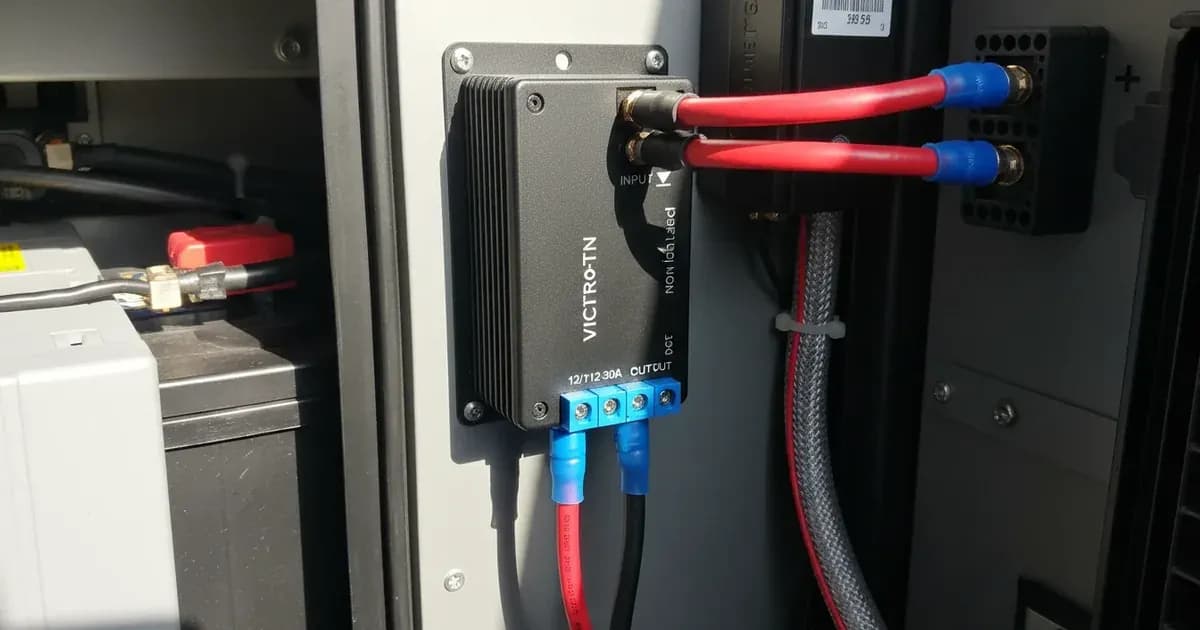
Key Takeaways
- Always isolate power sources and disconnect battery negative cables using insulated tools to prevent accidental short circuits before installing in-line fuses.
- Mount the converter with screw terminals facing downwards to maintain its IP43 water ingress protection.
- Ensure your input voltage is within the 18V to 35V range for proper operation.
- Do not exceed the continuous output current rating for your specific model, especially in high ambient temperatures.
How do I install a Victron Orion-Tr Non-Isolated DC-DC Converter?
Installing a Victron Orion-Tr non-isolated DC-DC converter involves careful attention to wiring, mounting, and safety to ensure reliable 24V to 12V power conversion. The most common issues arise from incorrect mounting orientation or inadequate cable sizing. Begin by confirming your input voltage and preparing your wiring according to the converter's specifications.
Diagnosis and Installation Steps
- Verify Input Voltage: Use a multimeter to check the 24V nominal input voltage at the source. It must be within the 18V to 35V DC range for the converter to operate correctly. If the input voltage falls below 18V, the converter will cease operation.
- Check Mounting Orientation: Ensure the converter is mounted on a non-flammable vertical surface with the screw terminals oriented downwards. This is crucial for maintaining the IP43 ingress protection rating and preventing liquid damage.
- Inspect Cable Connections and Gauge: Confirm that all DC connections are secure and that the cable cross-section meets the specifications. For the Orion-Tr 24/12-5 model, use cables up to 3.3 mm² (AWG 12). For Orion-Tr 24/12-10, Orion-Tr 24/12-15, and Orion-Tr 24/12-20 models, use cables up to 6 mm² (AWG 10). Loose or undersized cables can lead to voltage drop and overheating.
- Confirm Inline Fuses: Verify that appropriately rated in-line DC fuses are installed on the positive input line, close to the primary power source. This protects the system from overcurrent events.
- Measure Output Voltage: After installation and power-up, use a multimeter to measure the output voltage. The Orion-Tr 24/12-5 model should provide 12.7V DC, while the Orion-Tr 24/12-10, Orion-Tr 24/12-15, and Orion-Tr 24/12-20 models should provide 12.5V DC.
Common Installation Issues and Fixes
Symptom detail | Likely cause | Fix |
|---|---|---|
Converter not powering on or outputting 12V | Input voltage outside 18V-35V range | Check 24V source; ensure it's within 18V to 35V DC. |
Reduced output current or converter shutting down in warm conditions | Thermal derating due to high ambient temperature or exceeding continuous current | Ensure adequate ventilation; do not exceed continuous output current (e.g., 5A for Orion-Tr 24/12-5, 10A for Orion-Tr 24/12-10); output current derates 3% per °C above 40°C. |
Water ingress or premature failure in damp environments | Incorrect mounting orientation | Mount with screw terminals oriented downwards to maintain IP43 rating. |
Output voltage drops or intermittent operation | Loose or undersized cable connections | Tighten all screw terminals; ensure cable cross-section is up to 3.3 mm² (AWG 12) for 5A models or 6 mm² (AWG 10) for 10A, 15A, 20A models. |
No output, but input voltage is present | Missing or blown in-line fuse | Install or replace appropriately rated in-line DC fuse on the positive input line. |
Understanding Victron Orion-Tr Non-Isolated Converter Operation and Setup
Victron Orion-Tr non-isolated DC-DC converters are designed for straightforward installation and operation, converting a 24V nominal DC input to a stable 12V output. These units are "non-isolated," meaning they share a common negative ground between the input and output. This characteristic is important for system design, as it implies a common galvanic path.
The converters operate autonomously, requiring no external programming or software. Their compact form factor allows for direct installation in various environments, including vehicle dashboards, engine sub-compartments, or marine consoles.
Mounting and Ingress Protection: The IP43 ingress protection rating is maintained only when the unit is installed with its screw terminals oriented downwards. This prevents water or dust from entering the enclosure. The operating temperature range is -20°C to +55°C, but continuous output current derates by 3% per °C above 40°C ambient temperature.
Wiring and Connections: The converters utilize heavy-duty screw terminals for DC connections. The maximum cable cross-section supported is 3.3 mm² (AWG 12) for the 5A model (Orion-Tr 24/12-5) and 6 mm² (AWG 10) for the 10A, 15A, and 20A models (Orion-Tr 24/12-10, Orion-Tr 24/12-15, Orion-Tr 24/12-20). These terminals do not require specialized crimping tools.
For more complex Victron installations, you might find guides on Victron SmartShunt and Lynx Distributor Wiring or Victron Lynx Distributor and Modular DC Busbar Wiring Guide helpful. If you are working with a dual battery setup, consider reviewing the Victron Orion-Tr Smart DC-DC Charger and Dual Battery Setup Guide.
Safety: Critical Guidelines for Installation
Always prioritize safety when working with DC electrical systems.
- Disconnect Power: Always disconnect battery negative cables before installing or wiring any DC-DC converter connections. This prevents accidental short circuits and electrical shock.
- Fusing: Install appropriately rated in-line DC fuses on the positive input line, close to the primary power source. This protects the converter and your system from overcurrents.
- Mounting: Ensure the converter is mounted on a non-flammable vertical surface. The screw terminals must be oriented downwards to maintain the IP43 ingress protection rating.
When to call a technician instead
While basic installation is DIY-friendly, certain situations warrant professional assistance. If you encounter persistent issues such as the converter not providing the specified output voltage despite correct input, or if thermal derating occurs frequently even with proper ventilation, it may indicate an internal fault. Any signs of physical damage to the unit, or if you are unsure about cable sizing for your specific load requirements, are also reasons to consult a qualified technician. Attempting repairs on internal components can void your warranty and pose safety risks.
Add a battery at a surveyed price
Installers quote supply and fitting of the battery on this page for your existing or new system.
How this pays for the site: installers pay SolarNevs a fixed introduction fee when we pass them a genuine enquiry. They cannot pay to appear higher, and our surveyed prices are published before any introduction. You can also take our dated price tables straight to any installer.
Frequently asked questions
What is the input voltage range for Victron Orion-Tr non-isolated converters?
The Victron Orion-Tr non-isolated DC-DC converters accept an input voltage range of 18V to 35V DC across all 24/12 models. This allows them to operate from standard 24V nominal DC supplies.
What is the output voltage of the Orion-Tr 24/12-5 model?
The Orion-Tr 24/12-5 model provides a fixed output voltage of 12.7V DC. For the 10A, 15A, and 20A models, the output is fixed at 12.5V DC.
How should I mount the Victron Orion-Tr non-isolated converter to maintain its IP43 rating?
To maintain the IP43 ingress protection rating, the converter must be installed with its screw terminals oriented downwards. This prevents liquid ingress into the unit.
Do Victron Orion-Tr non-isolated converters require programming?
No, these converters are designed for completely autonomous plug-and-play operation. They do not require any external programming or software tools for setup.
What cable sizes are recommended for the Orion-Tr non-isolated converters?
For the 5A model, the maximum cable cross-section is 3.3 mm² (AWG 12). For the 10A, 15A, and 20A models, the maximum cable cross-section is 6 mm² (AWG 10).
References
- Victron Energy Datasheet - Orion-Tr DC-DC converters non-isolated — accessed 23 August 2026
Related guides
More from what to buy — and how not to get cheated.