GivEnergy Gen 3 Hybrid Inverter and Giv-Bat Setup Guide
Updated 6 September 2026 · By SolarNevs Research Desk, Dealer surveys + verified sources · 2 sources · Method ↗
Key Takeaways
- GivEnergy Gen 3 hybrid inverters integrate solar MPPTs and bi-directional battery chargers into one unit.
- Always switch off the DC battery isolator and wait at least 5 minutes before working on the system.
- For multiple Giv-Bat units in parallel, ensure battery DIP switches are correctly set.
- Protective earth bonding is essential for both the inverter and battery enclosures.
How to Set Up Your GivEnergy Gen 3 Hybrid Inverter and Giv-Bat System
Setting up a GivEnergy Gen 3 hybrid inverter with Giv-Bat lithium storage involves careful wiring, communication setup, and cloud commissioning. These systems are designed for both residential and commercial applications, providing integrated solar and battery management. The process ensures your system operates safely and efficiently, providing reliable power and emergency backup.
Understanding the Integrated System Architecture
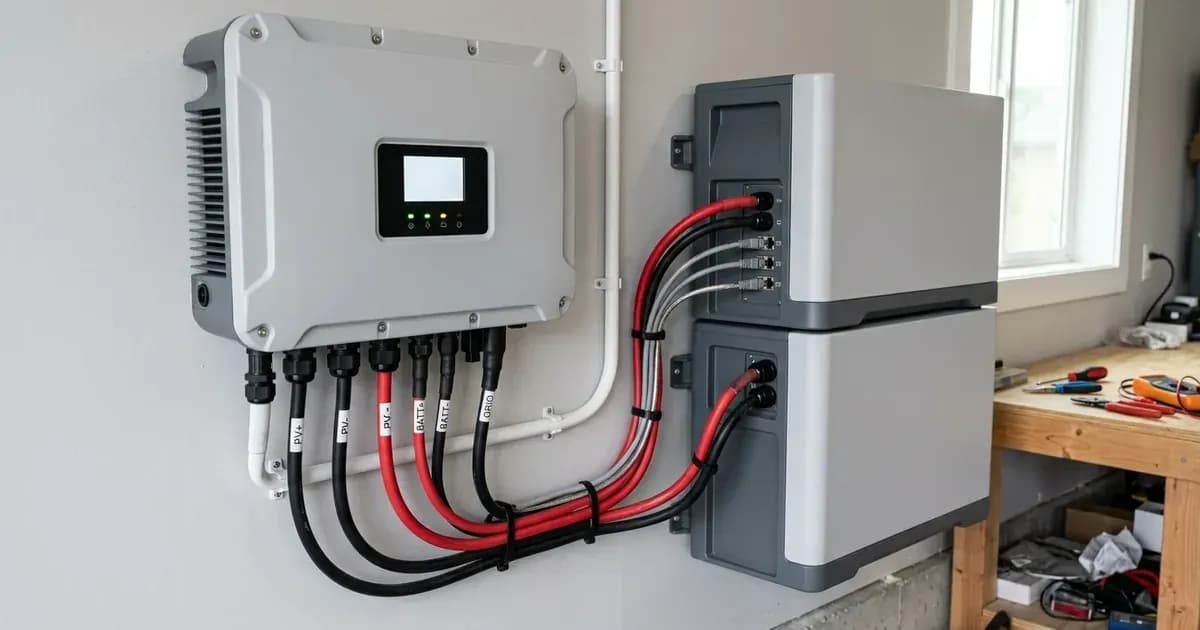
The GivEnergy Gen 3 hybrid inverter features an integrated architecture. It combines solar MPPTs (Maximum Power Point Trackers) and bi-directional battery chargers within a single enclosure. This design streamlines the installation process and centralises control over solar generation and battery charging/discharging.
Giv-Bat lithium iron phosphate batteries connect to the inverter using dedicated DC power leads and RJ45 communication cables. The inverter communicates with the battery's Battery Management System (BMS) via a dedicated CAN-bus protocol. This communication is vital for accurate state of charge management and overall system health.
The inverter also includes a dedicated Emergency Power Supply (EPS) terminal. This terminal provides automated emergency power backup during grid power outages. This ensures that essential loads remain powered when the main grid supply is interrupted.
Installation Steps and Communication Checklist
The installation of your GivEnergy system requires adherence to specific wiring and communication protocols. This table outlines the key connections and their purpose.
Connection Type | What it means | What to do |
|---|---|---|
DC Power Leads | Connects Giv-Bat lithium iron phosphate batteries to the inverter. | Use dedicated DC power leads for secure and efficient power transfer between the battery and inverter. |
RJ45 Communication Cables | Facilitates CAN-bus BMS data communication between the inverter and battery. | Connect RJ45 cables for the inverter to manage the battery's state of charge and health. |
Protective Earth Bonding | Ensures safety by grounding the inverter chassis and battery enclosure. | Bond the inverter chassis ground and battery metal enclosure to the main installation earthing terminal. |
EPS Terminal Wiring | Connects critical loads for automated emergency power backup. | Wire essential circuits to the dedicated EPS terminal to maintain power during grid outages. |
GivEnergy Portal Setup | Configures commissioning, charging schedules, and telemetry monitoring. | Access the GivEnergy cloud portal for initial setup and ongoing system management. |
What You Can Check Yourself, and What You Cannot
Before any work on your GivEnergy system, always prioritise safety. You can perform basic visual checks and follow critical safety procedures. However, complex electrical connections and grid integration must be handled by an accredited installer.
What you can check yourself:
- Safety Disconnect: Before touching any internal components or wiring, switch off the DC battery isolator. Wait at least 5 minutes for internal capacitors to discharge. This is a crucial safety step to prevent electric shock.
- Visual Inspection: Ensure all visible cables are securely connected and free from damage. Check that the inverter chassis ground and battery metal enclosure are bonded to the main installation earthing terminal.
- DIP Switch Settings (for multiple batteries): If you are connecting multiple Giv-Bat units in parallel, ensure the battery DIP switches are properly set according to the manufacturer's instructions. Incorrect settings can prevent proper communication and operation.
What you cannot do yourself:
- Electrical Wiring: Do not attempt to wire the inverter to your property's electrical distribution system or connect it to the grid. This requires a qualified and accredited electrician.
- Internal Component Access: Opening the inverter enclosure or accessing internal components beyond specified user-serviceable parts should only be done by authorised service personnel.
- Grid Connection Approval: The inverter's anti-islanding protection ensures compliance with international microgeneration safety and grid protection standards. However, the final connection to the grid requires approval from your Distribution Network Operator (grid operator).
Cloud Commissioning with the GivEnergy Portal
The GivEnergy Portal is a cloud-based platform essential for commissioning and managing your system. Commissioning, charging schedule programming, and telemetry monitoring are configured via this portal. It allows for remote firmware and configuration management, providing flexibility and convenience for system owners and installers.
Through the portal, you can:
- Set up initial operating parameters.
- Program specific charging and discharging schedules to optimise energy usage and take advantage of different electricity tariffs.
- Monitor system performance and energy flows in real-time.
- Receive remote diagnostics and updates.
What the Published Sources Do Not Tell You
While the technical specifications provide a solid foundation, certain operational details and specific scenarios are not always explicitly covered in general documentation.
One key detail often found outside primary specification sheets relates to the configuration of multiple battery units. For GivEnergy systems, when connecting multiple Giv-Bat units in parallel, ensuring battery DIP switches are properly set is critical for correct operation and communication. This specific configuration detail is vital for the battery system to function as a single, cohesive unit.
Furthermore, while the system is designed for global electrical grid compliance and certified anti-islanding protection, the specific requirements for grid connection can vary significantly by local Distribution Network Operator (grid operator) in Great Britain. These grid operator-specific rules, including export limits or specific protection settings, are not typically found in manufacturer datasheets and must be obtained directly from your local grid operator or through your accredited installer. These variations mean that while the equipment is capable, its deployment must align with local network rules, which are often not publicly available in a consolidated format.
Still showing the fault? Book a technician
If the steps above did not clear it, tell us the inverter or battery and the exact code. We pass it to a technician who covers your city; visit charges are quoted before they come.
How this pays for the site: the technician or verifier pays SolarNevs a fixed introduction fee. Nobody pays to be recommended, and you are free to use our free guides instead.
Frequently asked questions
What is the GivEnergy Gen 3 hybrid inverter?
The GivEnergy Gen 3 hybrid inverter integrates solar MPPTs and bi-directional battery chargers within a single enclosure, managing both solar power generation and battery storage.
How do Giv-Bat batteries communicate with the inverter?
Giv-Bat lithium iron phosphate batteries communicate with the inverter's Battery Management System (BMS) using a dedicated CAN-bus protocol for state of charge management.
What is the purpose of the EPS terminal on the Gen 3 inverter?
The dedicated EPS terminal provides automated emergency power backup during grid power outages, ensuring critical loads remain powered.
How do I commission a GivEnergy system?
Commissioning, charging schedule programming, and telemetry monitoring are configured via the GivEnergy cloud portal, allowing remote management.
What safety step is crucial before working on the inverter?
Before any work, switch off the DC battery isolator and wait at least 5 minutes for internal capacitors to discharge to prevent electrical hazards.
References
- GivEnergy Gen 3 Hybrid Inverter Installation Manual — accessed 27 August 2026
- GivEnergy Installer Portal Commissioning Guide — accessed 27 August 2026
Related guides
More from inverter errors & fixes.