GoodWe Inverter VAC Fail: Troubleshooting and Fixes
Updated 6 September 2026 · By SolarNevs Research Desk, Dealer surveys + verified sources · 4 sources · Method ↗
Key Takeaways
- A VAC Fail error means the grid AC voltage is outside the inverter's acceptable range.
- Always check for grid power availability and the status of your AC breaker first.
- Before touching any internal components, disconnect all power sources and wait at least 5 minutes.
- If the fault persists after basic checks and restarts, contact a qualified service technician.
What does a GoodWe VAC Fail error mean?
A GoodWe inverter displaying a VAC Fail error signifies that the inverter detects the AC voltage from the utility grid is beyond the normal operating range required by the safety country. This condition prevents the inverter from connecting to or feeding power into the grid. The most common cause is an issue with the grid connection itself, such as a power outage or incorrect AC wiring.
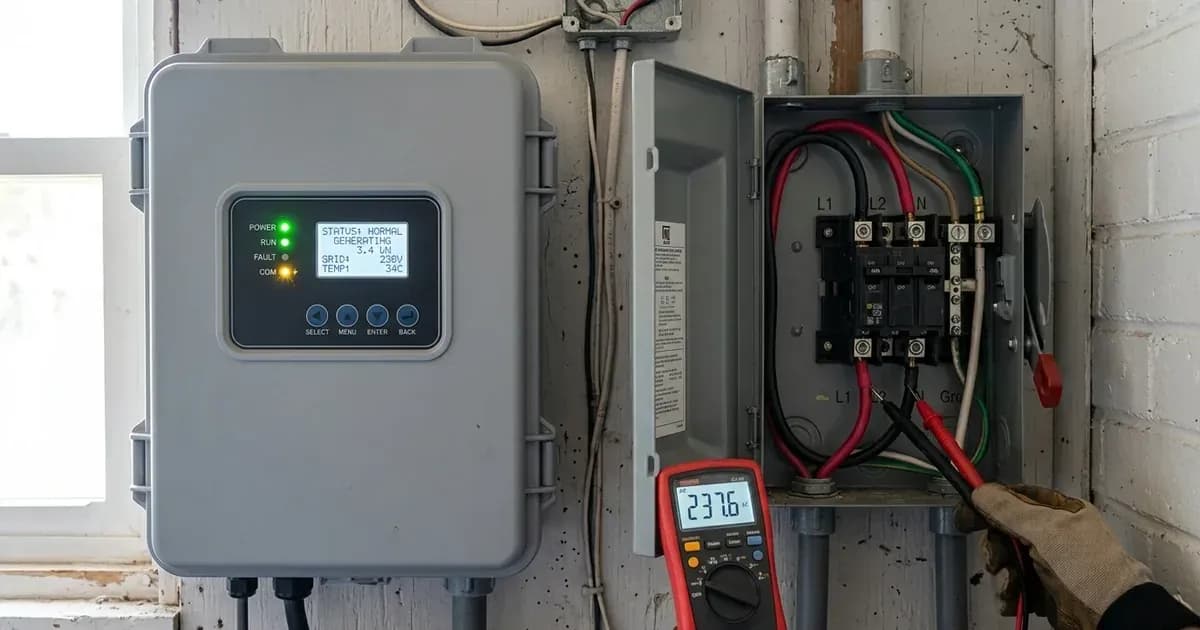
The first step in troubleshooting is to verify grid power availability and inspect all AC connections and breakers.
IMPORTANT SAFETY WARNING: GoodWe inverters operate at high voltages. All physical inspections, checks, and interventions described below must only be performed by qualified electricians who have read and understood the 'Safety: Working with GoodWe Inverters' section of this article and the inverter's official manual. Failure to do so can result in severe injury or death, and may void your warranty.
Diagnosing a GoodWe VAC Fail
Follow these steps to diagnose the cause of a VAC Fail error on your GoodWe inverter:
- Check Grid Power Availability:
- Action: Look for power in your home or facility. Check if other appliances are working or if neighbours have power.
- Meaning: If there is a general power outage, the inverter cannot detect a stable grid voltage and will report a VAC Fail or Utility Loss.
- Inspect the AC Breaker:
- Action: Locate the AC breaker connected to your inverter. Ensure it is in the "on" position.
- Meaning: A tripped AC breaker will cut off the inverter's connection to the grid, leading to a VAC Fail or Utility Loss (Code 09). Reset the breaker if it is tripped.
- Examine AC Wiring and Connections:
- Action: Visually inspect all AC cables connected to the inverter and the main electrical panel. Look for any loose, damaged, or corroded connections.
- Meaning: Loose or faulty wiring can cause intermittent or incorrect voltage readings, triggering a VAC Fail. Ensure all connections are tight.
- Verify Inverter Display or App for Specific Codes:
- Action: Check the inverter's display screen or the GoodWe PV Master/SolarGo app for specific error codes.
- Meaning: While "VAC Fail" is a general symptom, specific codes like 23 ("Vac Consistency Failure"), 09 ("Utility Loss"), 17 ("ac Failure"), or 29 ("FAC Failure") provide more precise information about the fault.
- Perform an Inverter Restart:
- Action: If the grid is active and connections appear secure, try restarting the inverter. First, turn off the AC breaker, then any DC isolators (PV and battery). Wait for 5 minutes for internal capacitors to safely discharge, then turn them back on in reverse order (DC, then AC).
- Meaning: A simple restart can sometimes clear temporary communication glitches or minor inconsistencies that trigger a VAC Fail.
WARNING: All physical checks and interventions in this table involve high voltage and must only be performed by qualified electricians after consulting the 'Safety: Working with GoodWe Inverters' section and the inverter's manual. Ensure all power sources are disconnected and wait 5 minutes for capacitor discharge before touching any components. Unauthorized modifications may void your warranty.
Cause and Fix Table for GoodWe VAC Fail
Symptom detail | Likely cause | Fix |
|---|---|---|
Inverter displays "VAC Failure" | Inverter detects that AC voltage is beyond the normal range required by the safety country. | Make sure grid power is available. Check AC cables are connected tightly. Verify AC breaker functions. Ensure AC connection is correct. Try turning off/on AC breaker after 5 minutes. |
Inverter displays "Utility Loss" or Code 09 | Public grid power is not available (power lost or on-grid connection fails). | Make sure grid power is available. Check AC cables are connected tightly. Verify AC breaker functions. Ensure AC connection is correct. Try turning off/on AC breaker after 5 minutes. |
Inverter displays "ac Failure" or Code 17 | General AC connection issue. | Make sure grid power is available. Check AC cables are connected tightly. Verify AC breaker functions. Ensure AC connection is correct. Try turning off/on AC breaker after 5 minutes. |
Inverter displays "FAC Failure" or Code 29 | Grid frequency is beyond the normal range required by the safety country. | Make sure grid power is available. Check AC cables are connected tightly. Verify AC breaker functions. Ensure AC connection is correct. Try turning off/on AC breaker after 5 minutes. |
Inverter displays "Relay check failure" or Code 25 | Neutral & ground cables are not connected well on AC side or just an occasional failure. | Have a qualified electrician measure voltage between ground and neutral on grid (<10V). Have a qualified electrician measure resistance between ground and neutral on backup output (<10Ohm). Contact service centre if issue persists. |
Inverter displays 'Code 23' or 'Vac Consistency Failure' | Internal inverter fault related to AC voltage sensing. | Restart the inverter. If the fault reoccurs, contact a service centre. |
Inverter displays "GFCI - Consistency Failure Device check failure" or Code 06 | Internal inverter fault related to ground fault circuit interrupter. | Restart the inverter. If the fault reoccurs, contact a service centre. |
Inverter displays "Fac Consistency Failure" or Code 22 | Internal inverter fault related to AC frequency sensing. | Restart the inverter. If the fault reoccurs, contact a service centre. |
Inverter displays "Reference Voltage Check Failure" | Internal inverter fault related to voltage reference. | Restart the inverter. If the fault reoccurs, contact a service centre. |
Inverter-Side vs. Grid-Side Checks
When troubleshooting a VAC Fail, it is important to distinguish between issues originating from the utility grid and those within your inverter system.
Grid-Side Checks: These checks focus on the quality and presence of the AC power supplied by your utility.
- Grid Power Availability: Confirm that there is no general power outage in your area.
- AC Breaker Status: Ensure the main AC breaker for your inverter is not tripped. An external AC breaker is needed for on-grid connection to isolate the inverter from the utility grid. Absence of an AC breaker will lead to inverter damage if an electrical short circuit happens on the grid side.
- AC Cable Integrity: Verify that all AC cables connecting your inverter to the grid are securely fastened and free from damage.
- Grid Voltage and Frequency: While you may not have tools to measure these precisely, the inverter's display or monitoring app (PV Master or SolarGo) will often indicate if voltage or frequency is out of range, leading to errors like "VAC Failure" or "FAC Failure".
Inverter-Side Checks: These checks focus on the inverter's internal components and settings.
- Error Codes: Pay attention to specific error codes displayed. Codes like 23 ("Vac Consistency Failure"), 06 ("GFCI - Consistency Failure Device check failure"), or 22 ("Fac Consistency Failure") often point to internal inverter issues that may require professional attention.
- Firmware: Ensure your inverter's firmware is up to date. While not a direct fix for VAC Fail, outdated firmware can sometimes lead to stability issues.
- Restart Procedure: A controlled restart of the inverter can resolve transient internal faults.
Safety: Working with GoodWe Inverters
Always prioritize safety when working with solar inverters. GoodWe inverters, like the ET, A-ES, and ES series, operate at high voltages.
- Qualified Personnel Only: Installation, operation, and maintenance must be performed by qualified electricians.
- High Voltage/Electric Shock: There is a danger of high voltage and electric shock. Always wait at least 5 minutes after disconnecting all power (PV, battery, and AC) before touching internal parts. This allows internal capacitors to discharge.
- Hot Surface: The inverter surface can exceed 60℃ during operation. Ensure it has cooled down before touching.
- Unauthorized Modifications: Do not open the inverter cover or change components without the manufacturer's authorization, otherwise the warranty is invalid.
- Disconnect All Power: Before any inspection or work on AC connections, ensure the AC breaker is off, and all DC power sources (PV and battery) are disconnected.
When to call a technician instead
While basic troubleshooting can resolve many issues, certain situations require professional intervention to ensure safety and proper system function. You should call a qualified technician if:
- The VAC Fail error persists after you have performed all the recommended basic checks and restarts.
- The inverter displays internal consistency failure codes such as Code 23 ("Vac Consistency Failure"), Code 06 ("GFCI - Consistency Failure Device check failure"), or Code 22 ("Fac Consistency Failure"). These often indicate an internal hardware fault.
- You are unsure about checking electrical connections or feel uncomfortable working with high voltage.
- The issue is intermittent and difficult to diagnose.
- Any physical damage is observed on the inverter or its wiring.
Attempting unauthorized repairs or modifications can void your warranty. GoodWe states that unauthorized modifications will invalidate the warranty. For issues beyond simple external checks, contacting a GoodWe authorized service centre is the safest and most effective course of action.
Still showing the fault? Book a technician
If the steps above did not clear it, tell us the inverter or battery and the exact code. We pass it to a technician who covers your city; visit charges are quoted before they come.
How this pays for the site: the technician or verifier pays SolarNevs a fixed introduction fee. Nobody pays to be recommended, and you are free to use our free guides instead.
Frequently asked questions
What does a GoodWe VAC Fail error mean?
A GoodWe inverter displaying a VAC Fail error indicates that the inverter detects the AC voltage from the utility grid is beyond the normal range required by the safety country. This prevents the inverter from connecting to or feeding power into the grid.
What should I check first if my GoodWe inverter shows a VAC Fail?
WARNING: High voltage present. All physical checks and interventions must only be performed by qualified electricians after consulting the 'Safety: Working with GoodWe Inverters' section and the inverter's manual. Ensure all power sources are disconnected and wait 5 minutes for capacitor discharge before touching any components. Unauthorized modifications may void your warranty. First, verify that grid power is available. Then, check all AC cables for tight connections and ensure the AC breaker is functioning correctly. If the grid is active and connections are secure, try restarting the inverter by cycling the AC breaker.
Can a tripped AC breaker cause a GoodWe VAC Fail?
WARNING: High voltage present. All physical checks and interventions must only be performed by qualified electricians after consulting the 'Safety: Working with GoodWe Inverters' section and the inverter's manual. Ensure all power sources are disconnected and wait 5 minutes for capacitor discharge before touching any components. Unauthorized modifications may void your warranty. Yes, a tripped AC breaker can cause a VAC Fail or Utility Loss error (Code 09) because it interrupts the AC connection to the inverter. Ensure the breaker is in the 'on' position and has not tripped due to an overload or fault.
When should I contact a service centre for a GoodWe VAC Fail?
If the VAC Fail error persists after you have checked grid power, AC connections, and restarted the inverter, or if the inverter displays internal consistency failures (e.g., Code 23, Code 06, Code 22), you should contact a qualified service centre.
What is the meaning of 'Utility Loss' on a GoodWe inverter?
Utility Loss (Code 09) means that public grid power is not available, either due to a power outage or a failure in the on-grid connection. This is a common cause for the inverter to disconnect from the grid.
References
- GoodWe ET User Manual — accessed 23 August 2026
- GoodWe A-ES User Manual — accessed 23 August 2026
- GoodWe ES User Manual — accessed 23 August 2026
- GoodWe ESS Troubleshooting Guide EMEA — accessed 23 August 2026
Related guides
More from inverter errors & fixes.