Troubleshooting Growatt SPF ES Overload and Fan Faults
Updated 7 September 2026 · By SolarNevs Research Desk, Dealer surveys + verified sources · 1 source · Method ↗
Key Takeaways
- Most overload faults (Code 07) are caused by too many appliances drawing power simultaneously.
- The first check for any fault is to reduce the connected load and restart the inverter.
- WARNING: To reduce risk of electric shock, disconnect all wirings before attempting any maintenance or cleaning. Turning off the unit will not reduce this risk. This includes PV, battery, and AC connections.
- Stop DIY troubleshooting and contact a qualified service center if faults persist or require opening the inverter's casing.
What causes Growatt SPF ES overload and fan faults?
The Growatt SPF ES series inverters, including the SPF 3500 ES and SPF 5000 ES models, are designed to provide reliable off-grid power, but like any electrical system, they can encounter faults. The most common issues related to system stability are overload conditions and fan malfunctions. An overload occurs when the total power demand from your connected appliances exceeds the inverter's capacity, leading to Fault Code 07 or 51. Fan faults, indicated by Fault Code 01, typically arise from mechanical issues with the cooling fans, which are crucial for maintaining the inverter's internal temperature.
Diagnosis Section
This section will guide you through diagnosing overload and fan faults on your Growatt SPF ES inverter. Always prioritize safety by disconnecting power before any physical inspection.
- Check the Inverter Display for Fault Codes.
- If Fault Code 07 is displayed: This indicates an "Overload time out". The inverter has detected a load exceeding its capacity for too long. The buzzer will "Beep once every 0.5 second".
- If Fault Code 01 is displayed: This signifies a "Fan fault". The inverter's cooling fan is not operating correctly.
- If Fault Code 51 is displayed: This indicates an "Over current or surge" fault, which is a severe overload or short-circuit condition.
- Other indications: If the inverter is beeping "twice every 3 seconds", it may be in "Output power derating" (Warning Code 10), meaning it's reducing output due to conditions like high temperature or input voltage issues, which can precede an overload fault.
- Evaluate Your Connected Load.
- Compare the total power consumption of all active appliances to your inverter's rated output power. The SPF 3500 ES model has a "Rated Output Power: 3.5KVA/3.5KW", and the SPF 5000 ES has a "Rated Output Power: 5KVA/5KW".
- The inverter has "Overload Protection" that allows it to handle loads of "5s@≥150% load" or "10s@110%~150% load". If your load exceeds these temporary limits, a fault will occur.
- Consider the "Surge Capacity" which is "2* rated power for 5 seconds". This is for brief startup currents, not continuous operation.
- Result: If the total load exceeds the inverter's continuous rating or its temporary overload limits, you have identified the likely cause of an overload fault.
- Inspect the Inverter's Cooling Fans and Airflow.
- WARNING: To reduce risk of electric shock, disconnect all wirings before attempting any maintenance or cleaning. Turning off the unit will not reduce this risk. This includes PV, battery, and AC connections.
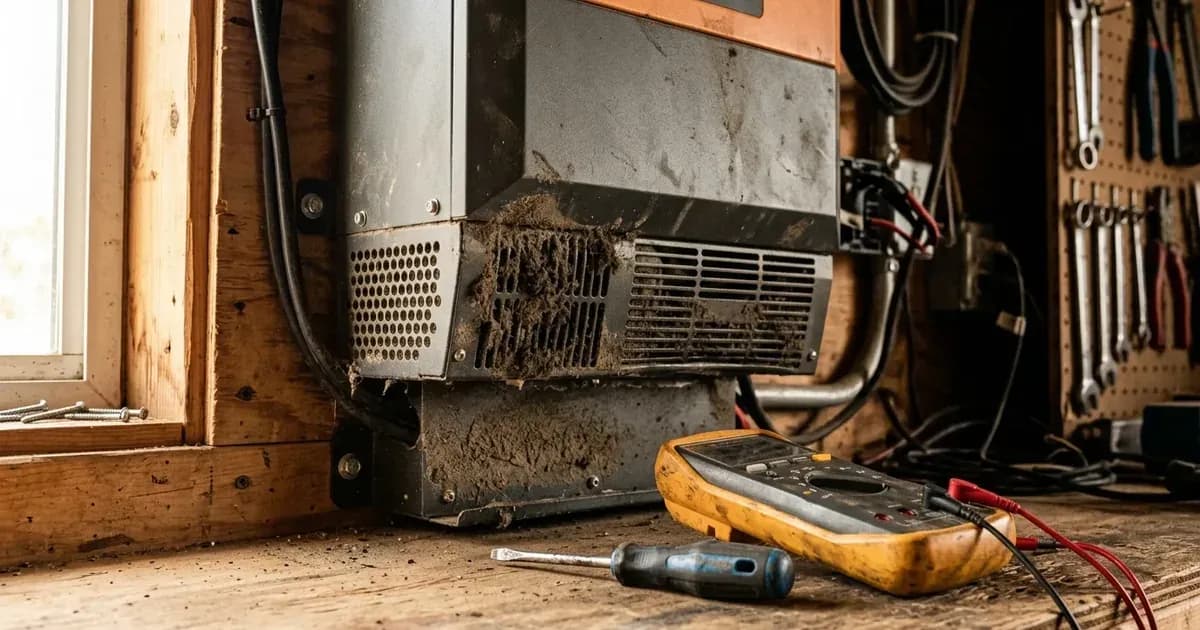
- Visually inspect the inverter's exterior vents for obstructions such as dust or debris. If Fault Code 01 is present, or if you suspect a fan issue, contact a qualified service center for inspection and replacement, as disassembling the unit yourself poses a severe electric shock risk and is not recommended.
- Ensure that the inverter's ventilation openings are not blocked and there is adequate clear space around the unit for proper airflow.
- Result: If a fan is not spinning, is making unusual noises, or if airflow is restricted, this points to a fan fault (Code 01) or contributes to an over-temperature condition (Fault Code 02, not directly covered here but related to cooling).
- Check Wiring Connections.
- WARNING: Be very cautious when working with metal tools on or around batteries. A potential risk exists to drop a tool to spark or short circuit batteries or other electrical parts and could cause an explosion.
- Ensure all AC output wiring is securely connected and that there are no visible signs of damage or short circuits in the load circuits. A "Fault code 05 Output short circuited" indicates a direct short.
- Verify that the recommended AC breaker is installed between the inverter and the AC input power source. The recommended specification of AC breaker is "40A for SPF 3500 ES" and "50A for SPF 5000 ES". This breaker helps protect against overcurrents.
- Result: Loose or damaged wiring, or an incorrectly sized breaker, can lead to intermittent overloads or short circuits.
Cause/fix table section
Symptom detail | Likely cause | Fix |
|---|---|---|
Inverter displays Fault Code 07, beeps once every 0.5 second | Overload time out: Connected load exceeds inverter's capacity for too long. | Reduce the connected load by switching off some equipment. Ensure total load is within the inverter's rated output power ("3.5KVA/3.5KW" for SPF 3500 ES, "5KVA/5KW" for SPF 5000 ES). |
Inverter displays Fault Code 01 | Fan is locked: Cooling fan is obstructed or faulty. | Visually inspect the inverter's exterior vents for obstructions such as dust or debris. If Fault Code 01 is present, or if you suspect a fan issue, contact a qualified service center for inspection and replacement, as disassembling the unit yourself poses a severe electric shock risk and is not recommended. |
Inverter displays Fault Code 51 | Over current or surge: Severe overload or short circuit. | WARNING: To reduce risk of electric shock, disconnect all wirings before attempting any maintenance or cleaning. Turning off the unit will not reduce this risk. Check AC output wiring for short circuits and remove abnormal loads. Restart the unit. If the error happens again, "return to repair center". |
Inverter beeps twice every 3 seconds (Warning Code 10) | Output power derating: Inverter is reducing output power due to internal conditions. | This often precedes an overload. Reduce connected loads. Check for adequate ventilation and ambient temperature. |
Inverter shuts down under load without specific fault code | Overload, but fault code not registered or immediate shutdown. | Reduce connected loads. Check inverter's rated output power and ensure loads do not exceed it. |
Inverter runs hot, even under moderate load | Inadequate cooling due to fan issue or blocked airflow. | WARNING: To reduce risk of electric shock, disconnect all wirings before attempting any maintenance or cleaning. Turning off the unit will not reduce this risk. Check ventilation openings for external obstructions. If internal fan cleaning or inspection is suspected, contact a qualified service center, as disassembling the unit yourself poses a severe electric shock risk and is not recommended. |
Understanding Growatt SPF ES Overload and Cooling
The Growatt SPF ES series inverters, including the SPF 3500 ES and SPF 5000 ES models, are designed with internal protection mechanisms to prevent damage from excessive loads or thermal stress.
Overload Protection: Your inverter continuously monitors the output load. If the load exceeds the inverter's rated capacity, its "Overload Protection" activates. For example, the inverter can sustain a load "5s@≥150% load" or a load "10s@110%~150% load". If the overload persists beyond these specified durations, the inverter will trigger "Fault code 07 The inverter is overload 110% and time is up" and shut down to protect its internal components. A more severe "Over current or surge" (Fault Code 51) indicates an immediate and potentially damaging overcurrent event, often requiring a unit restart and load reduction.
To prevent overloads, it is crucial to understand the continuous power rating of your specific model: "3.5KVA/3.5KW" for the SPF 3500 ES and "5KVA/5KW" for the SPF 5000 ES. When planning your system or adding new appliances, ensure the total running wattage does not exceed these figures. Brief "Surge Capacity" of "2* rated power for 5 seconds" is available for motor startup, but this is not for sustained operation.
Cooling System and Fan Faults: The inverter generates heat during operation, especially under heavy loads. Cooling fans are integral to dissipating this heat and maintaining the internal temperature below critical levels. If the fans fail or airflow is restricted, the inverter's internal temperature can rise, potentially leading to "Fault code 02 Internal temperature of component is over 100℃" (over temperature) or, more directly, "Fault code 01 Fan fault" if a fan is locked or not spinning.
Regular inspection of the inverter's exterior ventilation openings for dust accumulation or obstructions is a good practice. If Fault Code 01 appears, it means "Fan fault". The manual suggests to "Check whether all fans are working properly" and to "Replace the fan" if necessary. However, fan replacement involves opening the inverter, which should only be done by qualified personnel.
Preventative Measures:
- Load Management: Be mindful of the total power drawn by your appliances. Avoid running multiple high-power devices simultaneously.
- Proper Sizing: Ensure your inverter is appropriately sized for your typical and peak load requirements.
- Ventilation: Install the inverter in a well-ventilated area, away from direct sunlight or heat sources, and ensure its vents are clear.
- AC Breaker: Install an appropriately sized AC breaker between the inverter and the AC input power source. The recommended specification of AC breaker is "40A for SPF 3500 ES" and "50A for SPF 5000 ES". This protects the inverter and wiring from overcurrents.
Safety: Handling Growatt SPF ES Inverter Faults
Working with solar inverters and battery systems involves significant electrical hazards. Always adhere to strict safety protocols.
- Qualified Personnel: "All wiring must be performed by a qualified person." Do not attempt complex repairs or installations unless you are certified.
- Disconnect All Power: Before inspecting or working on any part of the inverter, including checking fans or wiring, you MUST "disconnect all wirings before attempting any maintenance or cleaning". "Turning off the unit will not reduce this risk".
- Capacitor Discharge: Even after disconnecting power, internal capacitors can retain a dangerous charge. The manual does not specify a discharge time, so assume a waiting period or defer to a technician.
- No Disassembly: "Do not disassemble the unit". If a fault requires opening the inverter's casing, such as for fan replacement, it should only be done by a qualified service center. "Incorrect re-assembly may result in a risk of electric shock or fire".
- Metal Tools: "Be very cautious when working with metal tools on or around batteries. A potential risk exists to drop a tool to spark or short circuit batteries or other electrical parts and could cause an explosion." Use insulated tools where possible.
- Grounding: This inverter should be "connected to a permanent grounded wiring system". "Be sure to comply with local requirements and regulation to install this inverter".
When to call a technician instead
While some basic troubleshooting steps can be performed by the user, certain Growatt SPF ES inverter faults require professional intervention.
- Persistent Faults: If Fault Code 07 (overload) or Fault Code 51 (over current or surge) persists even after reducing loads and restarting the unit, there may be an underlying internal issue.
- Internal Component Failure: Faults like "Fault code 09/53/57 Internal components failed" or "Fault code 51 Over current or surge" (if persistent) explicitly instruct you to "Restart the unit, if the error happens again, please return to repair center."
- Fan Replacement: If a fan fault (Code 01) is confirmed and requires fan replacement, this involves opening the inverter's casing. The manufacturer explicitly states: "Do not disassemble the unit. Take it to a qualified service center when service or repair is re quired."
- Unresolved Issues: Any fault that you cannot resolve by following the diagnostic steps, or if you are uncomfortable performing any of the checks, warrants calling a qualified solar technician. Attempting repairs beyond your expertise can pose significant safety risks.
Still showing the fault? Book a technician
If the steps above did not clear it, tell us the inverter or battery and the exact code. We pass it to a technician who covers your city; visit charges are quoted before they come.
How this pays for the site: the technician or verifier pays SolarNevs a fixed introduction fee. Nobody pays to be recommended, and you are free to use our free guides instead.
Frequently asked questions
What does Growatt SPF ES Fault Code 07 mean?
Growatt SPF ES Fault Code 07 indicates that the inverter is experiencing an overload condition and the allowed time for the overload has expired. The inverter will beep once every 0.5 second.
How do I fix a Growatt SPF ES fan fault (Code 01)?
For a Growatt SPF ES fan fault (Code 01), visually inspect the inverter's exterior vents for obstructions such as dust or debris. If Fault Code 01 is present, or if you suspect a fan issue, contact a qualified service center for inspection and replacement, as disassembling the unit yourself poses a severe electric shock risk and is not recommended.
What is the overload protection for Growatt SPF ES inverters?
The Growatt SPF ES inverters have overload protection that allows them to handle loads of 5s@≥150% load; 10s@110%~150% load. Exceeding these limits triggers a fault.
What is the maximum output power for Growatt SPF ES models?
The SPF 3500 ES model has a rated output power of 3.5KVA/3.5KW, while the SPF 5000 ES has a rated output power of 5KVA/5KW. Ensure your connected loads do not exceed these ratings.
When should I call a technician for Growatt SPF ES faults?
You should call a technician if faults like Over current or surge (Fault 51) or internal component failures persist after restarting the unit. For fan replacement or internal issues, professional service is required due to the risk of electric shock and the manufacturer's instruction not to disassemble the unit.
References
- Growatt SPF 3500 ES SPF 5000 ES User Manual — accessed 23 August 2026
Related guides
More from inverter errors & fixes.