Lightning Surge Damaged Solar Inverter: Repair vs. Replace in Pakistan
Updated 6 September 2026 · By SolarNevs Research Desk, Dealer surveys + verified sources · 7 sources · Method ↗
Key Takeaways
- Lightning and power surge damage are typically not covered by manufacturer warranties, making replacement often necessary.
- External Surge Protection Devices (SPDs) are crucial for preventing damage, as internal inverter protection may be limited.
- Always disconnect all power sources and wait at least 5 minutes for capacitors to discharge before touching any internal components.
- Opening an inverter yourself will likely void the warranty and poses severe electric shock risks; only qualified technicians should inspect or repair.
Is Your Inverter Damaged by Lightning or a Power Surge?
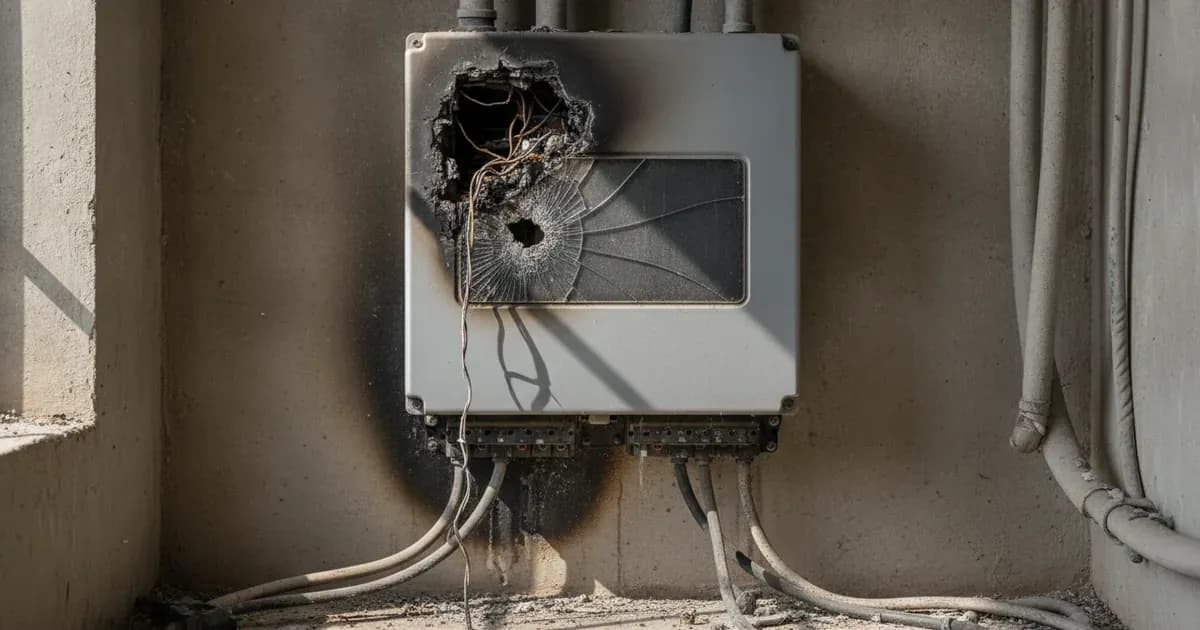
If your solar inverter stops working after a thunderstorm or a sudden power fluctuation, it may have suffered damage from a lightning strike or a power surge. The most common cause of such failures is a direct or indirect electrical overload that exceeds the inverter's protective capabilities. The first thing to check is for any visible signs of damage or error messages on the inverter's display.
Diagnosis: Identifying Lightning or Surge Damage
Diagnosing lightning or surge damage requires careful, systematic steps, prioritizing safety.
- Isolate the Inverter:
- Turn off the AC isolator at the grid connection point.
- Turn off the DC switch of the inverter.
- If your system includes batteries, turn off the DC switch between the inverter and the battery.
- For models like the GoodWe ET, Solis S5-EH1P, Huawei SUN2000-L1, and Fox ESS H1(G2), you must wait at least 5 minutes after disconnecting all power sources for the inverter's internal capacitors to discharge to a safe voltage. This is critical to avoid electric shock.
- "To reduce risk of electric shock, disconnect all wirings before attempting any maintenance or cleaning. Turning off the unit will not reduce this risk," as stated in the Axpert VM III, Deye SG03LP1, and Growatt SPF 5000 ES manuals.
- Visual Inspection:
- Carefully examine the inverter's exterior for any signs of physical damage, such as burn marks, melted plastic, cracked casing, or a burning smell.
- Check all connected cables (PV, AC, battery) for signs of damage or discoloration.
- Inspect the PV junction box for any damage. Axpert VM III, Deye SG03LP1, and Growatt SPF 5000 ES manuals caution that "It’s requested to use PV junction box with surge protection. Otherwise, it will cause damage on inverter when lightning occurs on PV modules."
- Check Inverter Display and Fault Codes:
- If the inverter powers on but does not operate correctly, check its display for any error messages or fault codes.
- For example, the Solis S5-EH1P inverter may display a "Surge Alarm On-site grid surge" fault message.
- Other inverters may show generic fault codes related to overvoltage or internal component failure. Consult your inverter's manual for specific fault code meanings.
- Test Connected Components (if safe and qualified):
- If you are a qualified technician, you might test the voltage and continuity of the PV strings, AC input, and battery connections. However, this should only be done by professionals due to high voltage risks.
Repair vs. Replace: Understanding Your Options
The decision to repair or replace a lightning-damaged inverter largely depends on the extent of the damage, the cost of repair, and critically, your warranty coverage.
Warranty Exclusions
- Deye SG03LP1: The manual states, "Factory warranty does not include damage due to the following reasons: ... Damage caused by natural disasters or force majeure (e.g. floods, lightning, overvoltage, storms, fires, etc.)."
- GoodWe ET: The manual notes, "The inverter is broken or damaged by any force majeure, such as lightening, earthquake, fire hazard, storm and volcanic eruption etc."
- Huawei SUN2000-L1: The manual specifies, "Huawei will not be liable for any consequences of the following circumstances: ... Equipment damage due to force majeure, such as earthquakes, fire, and storms."
If your inverter is under warranty, but the damage is due to a lightning strike, it is highly probable that the repair or replacement cost will not be covered. This often makes replacement a more straightforward and sometimes more cost-effective option than attempting an out-of-warranty repair, especially given the complexity of internal inverter components.
Preventing Future Damage
Investing in proper surge protection is the most effective way to mitigate the risk of lightning and surge damage.
Inverter Model | Internal Surge Protection | Recommended External Surge Protection |
|---|---|---|
Axpert VM III | External protection required | PV junction box with surge protection |
Deye SG03LP1 | DC Type II / AC Type III | PV junction box with surge protection |
Fox ESS H1(G2) | Over-voltage arresters required | Type 2 DC SPD at inverter & array (Type 3 if VP >1100V); Type 2 AC SPD at main AC cutout |
GoodWe ET | DC Type II / AC Type III Arresters | External SPDs for enhanced system defense |
Growatt SPF 5000 ES | External protection required | PV junction box with surge protection |
Huawei SUN2000-L1 | DC & AC Surge Protection Supported | External surge suppression and system grounding |
Solis S5-EH1P | Supported (Integrated) | External SPDs and dedicated earthing |
- PV Junction Box with Surge Protection: Manufacturers like Axpert VM III, Deye SG03LP1, and Growatt SPF 5000 ES recommend using a PV junction box with surge protection.
- External Surge Protection Devices (SPDs):
- Fox ESS H1(G2) states, "Over-voltage protection with surge arresters should be provided when the PV power system is installed."
- For DC systems, Fox ESS H1(G2) advises, "To protect the DC system, surge suppression device (SPD type2) should be fitted at the inverter end of the DC cabling and at the array located between the inverter and the PV generator, if the voltage protection level (VP) of the surge arresters is greater than 1100V, an additional SPD type 3 is required for surge protection for electrical devices."
- For AC systems, Fox ESS H1(G2) recommends, "To protect the AC system, surge suppression devices (SPD type2) should be fitted at the main incoming point of AC supply (at the consumer’s cutout), located between the inverter and the meter/distribution system; SPD (test impulse D1) for signal line according to EN 61632-1."
- Some inverters, like the Deye SG03LP1, GoodWe ET, Solis S5-EH1P, and Huawei SUN2000-L1, have internal surge protection (e.g., "Surge Protecon DC Type II / AC Type III" for Deye SG03LP1, "DC Surge Arrester Type II" and "AC Surge Arrester Type III" for GoodWe ET, or "Surge protection Yes" for Solis S5-EH1P, and "DC surge protection Supported" / "AC surge protection Supported" for Huawei SUN2000-L1). However, external SPDs provide an additional layer of defense.
Proper grounding of your solar system is also a critical safety measure that can help divert surge currents. You can learn more about this in our guide on /pk/guides/systems/solar-system-grounding-basics.
Safety: High Voltage Hazards
Working with a damaged inverter, especially one potentially affected by a high-voltage surge, is extremely dangerous.
- Electric Shock Hazard: Inverters contain high voltage components and capacitors that can retain a dangerous electrical charge even after being disconnected from power. "Danger to life due to high voltage. There is residual voltage in the inverter which needs 5 min to discharge. Wait 5 min before you open the upper lid or the DC lid," warns the Fox ESS H1(G2) manual. The Huawei SUN2000-L1 manual also states, "Residual voltage exists after the SUN2000 is powered off. It takes 5 minutes for the SUN2000 to discharge to the safe voltage."
- Do Not Disassemble: "Do not disassemble the unit. Take it to a qualified service center when service or repair is required. Incorrect re-assembly may result in a risk of electric shock or fire," is a common warning found in manuals for Axpert VM III, Deye SG03LP1, and Growatt SPF 5000 ES. Similarly, the Solis S5-EH1P manual states, "Risk of electric shock from energy stored in capacitors of the Inverter, do not remove cover for 5 minutes after disconnecting all power sources (service technician only)."
- Qualified Personnel Only: All manufacturers emphasize that only qualified or licensed personnel should perform installation, maintenance, or repair. For example, the Fox ESS H1(G2) manual states, "This manual is for qualified electricians. The tasks described in this manual only can be performed by qualified electricians." The GoodWe ET manual adds, "Any installation or operations on the inverter must be performed by qualified electricians in compliance with standards, wiring rules and the requirements of local grid authorities or companies (such as AS 4777 and AS/NZS 3000 in Australia)."
When to Call a Technician Instead
Given the safety risks and warranty implications, attempting DIY repair on a lightning-damaged inverter is strongly discouraged.
- Warranty Voidance: "Do not open the inverter cover or change any components without manufacturer's authorization. Otherwise, the warranty for the inverter will be invalid," warns the GoodWe ET manual. The Solis S5-EH1P manual also states, "Warranty may be voided if the cover is removed without authorization."
- Complex Diagnostics: Internal damage from surges can be complex and require specialized tools and knowledge to diagnose accurately.
- Safety: The primary reason to call a professional is safety. "Warning!! Only qualified service persons are able to service this device. If errors still persist after following troubleshooting table, please send this inverter/charger back to local dealer or service center for maintenance," states the Axpert VM III manual.
If your inverter shows any signs of damage after a lightning strike or power surge, contact a qualified solar technician or the inverter manufacturer's authorized service center. They can safely assess the damage, advise on repair feasibility, and guide you through the process of potential replacement. For general troubleshooting, you can refer to our guide on /pk/guides/fixes/common-solar-inverter-problems. Understanding /pk/guides/systems/understanding-solar-safety is also crucial for any solar system owner.
Still showing the fault? Book a technician
If the steps above did not clear it, tell us the inverter or battery and the exact code. We pass it to a technician who covers your city; visit charges are quoted before they come.
How this pays for the site: the technician or verifier pays SolarNevs a fixed introduction fee. Nobody pays to be recommended, and you are free to use our free guides instead.
Frequently asked questions
Does an inverter warranty cover lightning or surge damage?
Most inverter manufacturers explicitly state that damage caused by natural disasters or force majeure, such as lightning or overvoltage, is not covered under their factory warranty. This is true for Deye SG03LP1, GoodWe ET, and Huawei SUN2000-L1 inverters.
How can I protect my solar inverter from lightning strikes and power surges?
Manufacturers like Axpert VM III, Deye SG03LP1, and Growatt SPF 5000 ES recommend using a PV junction box with surge protection. Fox ESS H1(G2) suggests fitting Type 2 SPDs at the inverter end of DC cabling and at the array, and Type 2 SPDs at the main AC incoming point.
What are the first steps to take if I suspect my inverter is damaged by a lightning surge?
Immediately disconnect all AC and DC power sources to the inverter. Wait the manufacturer-specified capacitor discharge time, which is typically 5 minutes for models like GoodWe ET, Solis S5-EH1P, Huawei SUN2000-L1, and Fox ESS H1(G2), before proceeding with any inspection.
Can a lightning-damaged inverter be repaired by myself?
No. Opening an inverter typically voids its warranty and exposes you to high voltage risks. Manufacturers like Axpert VM III, Deye SG03LP1, Growatt SPF 5000 ES, GoodWe ET, Solis S5-EH1P, Huawei SUN2000-L1, and Fox ESS H1(G2) state that only qualified or licensed technicians should perform installation, maintenance, or repairs.
What are common signs of lightning or surge damage to a solar inverter?
Signs can include the inverter not powering on, displaying specific fault codes like 'Surge Alarm' (Solis S5-EH1P), visible burn marks, or a burning smell. However, internal damage may not always be visible externally.
References
- Axpert VM III Manual — accessed 23 August 2026
- Deye SUN_3.6_6K_SG03LP1_EU Manual — accessed 23 August 2026
- Growatt SPF 5000 ES Manual — accessed 23 August 2026
- GoodWe ET User Manual — accessed 23 August 2026
- Solis S5-EH1P Manual — accessed 23 August 2026
- Huawei SUN2000-L1 User Manual — accessed 23 August 2026
- Fox ESS H1(G2) Manual — accessed 23 August 2026
Related guides
More from inverter errors & fixes.