Solis Hybrid Inverter BMS CAN Communication Setup Guide
Updated 7 September 2026 · By SolarNevs Research Desk, Dealer surveys + verified sources · 1 source · Method ↗
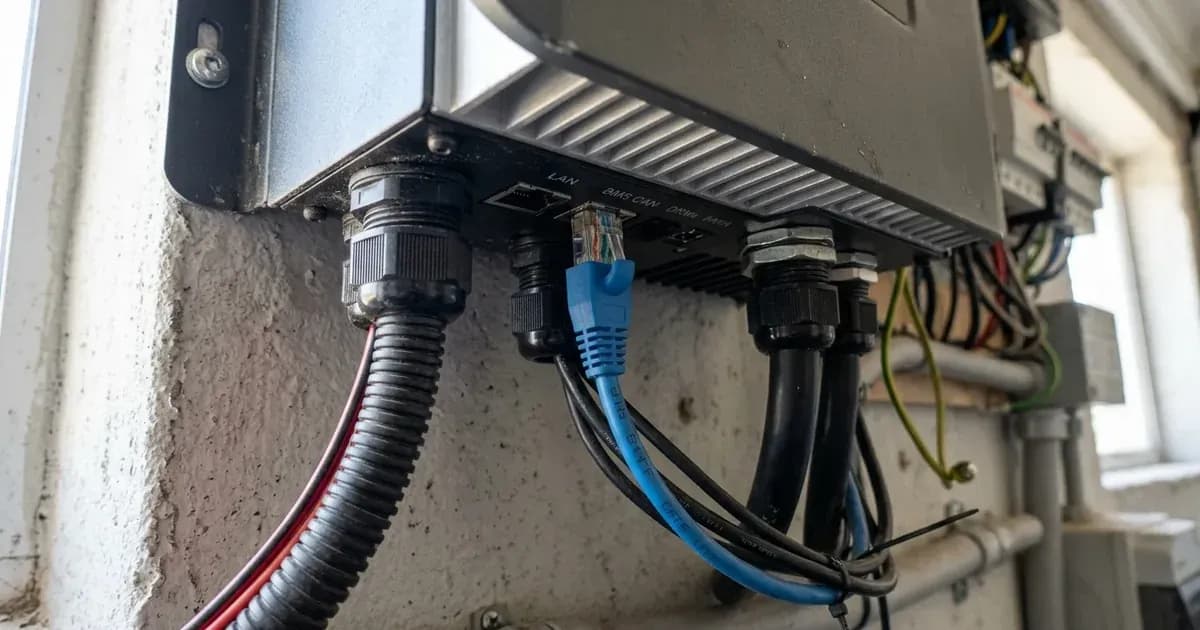
Setting up Battery Management System (BMS) CAN communication between your Solis S5 or S6 hybrid inverter and compatible low-voltage lithium batteries is crucial for optimal performance and safety. This guide provides a complete engineering overview for connecting Pylontech, Dyness, and Freedom Won batteries, detailing wiring, battery activation, DIP switch configuration, and SolisCloud integration.
Why BMS Communication is Essential for Your Solis Hybrid System
BMS CAN communication allows your Solis hybrid inverter to directly interface with your lithium battery's management system. This direct link enables the inverter to receive critical data like State of Charge (SOC), voltage, current, and temperature, ensuring the battery operates within safe parameters and prolonging its lifespan. Without proper BMS communication, the inverter cannot accurately manage battery charging and discharging, potentially leading to performance issues or damage.
Solis hybrid inverters, specifically the S5-EH1P(3-6)K-L and S6-EH1P(3-6)K-L series, are designed for low-voltage lithium battery storage systems in single-phase residential applications worldwide. They communicate with lithium battery management systems via dedicated CAN bus RJ45 ports.
Compatible Solis Inverters and Lithium Batteries
This guide applies to the following Solis inverter models and battery brands:
- Solis Inverter Series:
- Solis S5-EH1P(3-6)K-L Hybrid Series
- Solis S6-EH1P(3-6)K-L Hybrid Series
- Compatible Batteries:
- Pylontech (US2000C, US3000C, US5000)
- Dyness
- Freedom Won
Step-by-Step BMS CAN Communication Setup
Follow these steps to establish reliable BMS CAN communication between your Solis inverter and lithium battery bank.
1. Safety First: Isolate All Power Sources
Before performing any wiring or configuration, ensure all power sources are safely isolated.
Procedure:
- Switch DC battery circuit breaker to OFF.
- Wait at least 5 minutes for internal capacitors to discharge before servicing.
- Safety Warning: Always wear appropriate personal protective equipment (PPE) and use insulated tools. A spanner across a battery bank can short hundreds of amps, causing severe injury or equipment damage.
2. Prepare Your Lithium Batteries
Proper battery preparation, especially for multi-battery stacks or batteries in deep sleep, is critical.
Battery Awake Activation
If your lithium batteries have entered a deep sleep protection mode, they will not communicate with the inverter.
Procedure:
- Press the manual battery wake button on each battery before initiating inverter setup. This brings the battery out of deep sleep and allows it to communicate.
Master-Slave DIP Switch Setup (for Multi-Battery Stacks)
For systems with multiple batteries connected in parallel, you must configure DIP switches to assign master and slave roles.
Procedure:
- Configure the master battery DIP switches to establish address
0001. - Ensure slave batteries remain
0000.
3. Wiring the CAN Bus Communication Cable
The CAN bus connection uses a standard RJ45 cable.
RJ45 Pinout Wiring
Solis hybrid inverters use specific pins on the RJ45 port for CAN communication.
Procedure:
- Connect an RJ45 cable between the inverter's BMS CAN port and the battery's communication port.
- Ensure the wiring adheres to the standard CAN communication pinouts:
- Pin 4 (CAN-H)
- Pin 5 (CAN-L)
Grounding and Cable Shielding
Proper grounding is essential for safety and signal integrity.
Procedure:
- Ensure battery chassis ground is bonded to the main electrical earthing terminal using appropriately sized copper conductor.
- Use shielded RJ45 cables to minimize electromagnetic interference.
4. Configure the Solis Inverter
Once the physical connections are made, configure the inverter's battery settings.
Battery Model Selection Menu
The inverter needs to know which battery protocol to use for effective communication.
Procedure:
- Navigate to the inverter's LCD battery setup menu.
- Select the matching battery protocol (e.g., 'Pylontech' or 'User-Defined').
- Note: When connecting third-party lead-acid or custom lithium batteries, configure charging voltage parameters manually under 'User-Defined' battery mode.
5. SolisCloud Integration for Monitoring and Control
SolisCloud provides advanced monitoring and configurable settings for your battery system.
Real-Time Monitoring
After successful setup, you can monitor your system remotely.
Procedure:
- Access the SolisCloud portal.
- Monitor real-time battery state of charge, charge current, and operating temperatures wirelessly via the SolisCloud portal.
Configurable Depth of Discharge (DoD)
Protect your battery longevity by setting appropriate discharge limits.
Procedure:
- In the Solis Cloud mobile app, set minimum backup reserve SOC and discharge cut-off SOC to safeguard battery longevity.
Troubleshooting Common BMS Communication Issues
If your inverter is not communicating with the battery, check the following:
- Battery Awake Button: Confirm the battery is not in deep sleep mode and has been activated.
- RJ45 Wiring: Verify that Pin 4 (CAN-H) and Pin 5 (CAN-L) are correctly wired and that the cable is securely connected at both ends.
- DIP Switch Settings: For multi-battery systems, ensure the master battery is set to
0001and slaves to0000. - Inverter Menu Selection: Confirm the correct battery protocol (e.g., 'Pylontech') is selected in the inverter's LCD battery setup menu. If using an unsupported battery, ensure 'User-Defined' mode is selected and parameters are set manually.
Conclusion
Establishing robust BMS CAN communication is fundamental for the safe and efficient operation of your Solis S5 or S6 hybrid inverter with compatible lithium batteries. By following these detailed steps, you ensure your system benefits from intelligent battery management, leading to improved performance, extended battery life, and reliable energy supply.
Still showing the fault? Book a technician
If the steps above did not clear it, tell us the inverter or battery and the exact code. We pass it to a technician who covers your city; visit charges are quoted before they come.
How this pays for the site: the technician or verifier pays SolarNevs a fixed introduction fee. Nobody pays to be recommended, and you are free to use our free guides instead.
Frequently asked questions
What are the essential requirements for solis hybrid inverter bms can communication setup guide?
Verify system specifications, local regulations, and standard installation safety procedures prior to commissioning.
How do I ensure regulatory compliance?
Ensure all equipment is approved on relevant regulatory registries and installed by accredited certified professionals.
References
- Solis S6 Series Hybrid Inverter User Manual (S6-EH1P(3-8)K-L-PRO) — accessed 27 August 2026
Related guides
More from inverter errors & fixes.