Victron Cyrix-ct Intelligent Battery Combiner Installation and Troubleshooting Guide
Updated 6 September 2026 · By SolarNevs Research Desk, Dealer surveys + verified sources · 3 sources · Method ↗
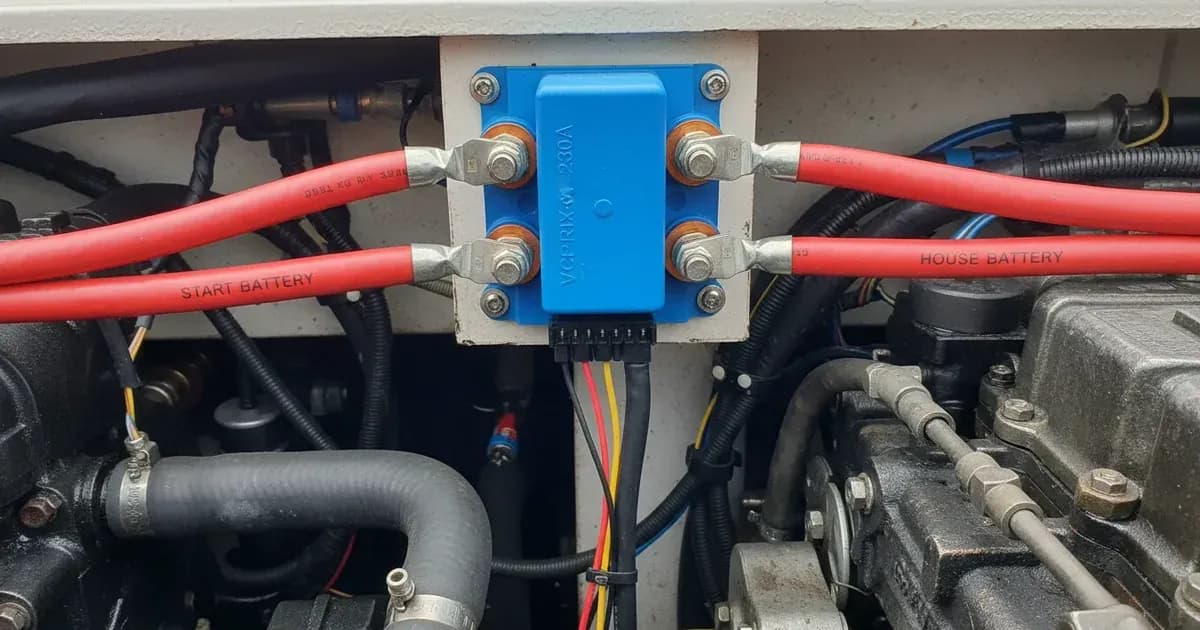
Key Takeaways
- The most common installation issue is an omitted or incorrect negative ground connection.
- Always check all cable connections, especially the thin ground wire, before assuming a fault.
- Disconnect battery negative cables before working on high-current battery systems to prevent short circuits.
- Do not attempt to open the Cyrix-ct unit; internal repairs are not user-serviceable.
Why is my Victron Cyrix-ct not connecting or disconnecting batteries?
Your Victron Cyrix-ct intelligent battery combiner may not be connecting or disconnecting as expected due to an incorrect installation, an omitted ground connection, or a sustained over-current condition. The most common cause is a missing or faulty connection to the common negative ground, which prevents the internal microprocessor from sensing battery voltages.
Diagnosis: How to check your Cyrix-ct combiner
Follow these steps to diagnose issues with your Victron Cyrix-ct unit. Always disconnect battery negative cables before making or checking high-current connections.
- Verify Ground Connection (Pin 86):
- Check: Ensure the thin black wire from terminal 86 (Ground) is securely connected to the common negative busbar or chassis ground. This connection is essential for the microprocessor's sensing circuit.
- Result: If this wire is loose or disconnected, the Cyrix-ct cannot operate. Reconnect it firmly.
- Check Main Battery Connections:
- Check: Inspect the heavy-gauge cables connected to the main terminals (M6 or M8 studs) for tightness and corrosion. Ensure they are connected to the correct battery positive terminals.
- Result: Loose or corroded connections can cause voltage drops, preventing the Cyrix-ct from accurately sensing battery voltage or carrying its rated current. Tighten connections and clean any corrosion.
- Confirm System Voltage:
- Check: The Cyrix-ct automatically adjusts to a 12V or 24V system upon power connection. For the Cyrix-ct 24/48V-120A model, it adjusts to 24V or 48V. Measure the voltage of both the starter and auxiliary batteries with a multimeter.
- Result: If a battery voltage is critically low (e.g., below 11.0V for a 12V system), the Cyrix-ct will not connect, or it will immediately disconnect to protect the starter battery.
- Observe Connection/Disconnection Delays:
- Check: The Cyrix-ct uses intelligent voltage trend monitoring with specific delays. For a 12V system, it connects after 4 seconds if voltage exceeds 13.9V, 30 seconds between 13.7V and 13.9V, or 120 seconds between 13.0V and 13.7V. It disconnects with delays ranging from 10 seconds to 3 minutes, or immediately below 11.0V.
- Result: If the batteries are not connecting or disconnecting instantly, it might be operating within these programmed delays, which are designed to prevent false triggering.
- Test Emergency Start Assist (if wired):
- Check: If you have an emergency start assist button wired to the 'start assist' terminal (85), momentarily connect this terminal to battery positive.
- Result: The relay should engage for 30 seconds, forcing the batteries into parallel. If it does not, check the wiring to terminal 85.
- Check for Thermal Overload:
- Check: Feel the Cyrix-ct unit for excessive heat. The unit disengages in case of excessive contact temperature.
- Result: If the unit is hot and disengaged, it has tripped its internal thermal protection. It will re-engage once it has cooled down. This often indicates sustained over-current.
- Verify Fusing:
- Check: Ensure that power cables connecting the starter and auxiliary batteries are protected with appropriately sized fuses at both ends.
- Result: Blown fuses will prevent current flow and Cyrix-ct operation. Replace blown fuses with the correct rating.
Victron Cyrix-ct Troubleshooting Table
Symptom detail | Likely cause | Fix |
|---|---|---|
Cyrix-ct does not click or connect batteries | Missing or faulty common negative ground connection (pin 86) | Ensure the thin black wire from terminal 86 is securely connected to a common negative point. |
Cyrix-ct connects but then quickly disconnects | Battery voltage below immediate disconnect threshold (e.g., below 11.0V for 12V system) | Charge the low battery. Check for excessive loads or battery health issues. |
Cyrix-ct gets hot and disconnects, then reconnects after cooling | Sustained over-current exceeding continuous rating (120A or 230A) | Reduce load on the combined battery bank or verify the Cyrix-ct model matches the expected current draw. |
Cyrix-ct does not connect even when one battery is charging | Incorrect system voltage or positive ground vehicle installation | Verify the Cyrix-ct is installed in a negative ground system. Check battery voltages are within operating range (12V, 24V, or 48V). |
Emergency start assist button does not force connection | Faulty wiring to 'start assist' terminal (85) or button | Check wiring from the button to terminal 85 and ensure the button provides a momentary positive pulse. |
Batteries not charging bidirectionally | Missing or faulty main battery connections | Inspect and tighten all main battery cable connections. Ensure fuses are intact. |
Understanding Cyrix-ct Operation and Settings
The Victron Cyrix-ct is a microprocessor-controlled heavy-duty relay designed for automatic battery combining. It monitors the voltage trend over time, not just instantaneous voltage, to prevent false triggering.
- Automatic Voltage Detection: The Cyrix-ct 12/24V-120A and 12/24V-230A models automatically detect whether they are operating in a 12V or 24V system. The Cyrix-ct 24/48V-120A model detects 24V or 48V.
- Continuous Current Ratings: The Cyrix-ct 120A models (12/24V-120A, 24/48V-120A) are rated for a continuous current of 120A. The Cyrix-ct 12/24V-230A model is rated for a continuous current of 230A.
- Cranking Current Ratings: For short durations (5 seconds), the 120A models can handle 180A, while the 230A model can handle 500A.
- Intelligent Connect/Disconnect Logic (12V system example):
- Connect: The Cyrix-ct will connect the batteries after a 4-second delay if the voltage exceeds 13.9V. For voltages between 13.7V and 13.9V, the delay is 30 seconds. A longer delay of 120 seconds applies for voltages between 13.0V and 13.7V.
- Disconnect: Disconnection occurs with a 10-second delay if voltage drops between 11.5V and 12.8V. An immediate disconnect happens if voltage falls below 11.0V to protect the starter battery. For higher voltages, a 3-minute delay applies between 12.8V and 13.0V, and a 10-second delay between 13.0V and 13.2V.
- Bidirectional Sensing: The Cyrix-ct senses voltage on both connected batteries. This means if your auxiliary battery is being charged (e.g., by a solar MPPT or shore power charger), the Cyrix-ct will engage, allowing the starter battery to also receive a charge.
- Emergency Start Assist: A dedicated terminal (85) allows for an optional emergency start assist button. When pulsed to battery positive, the relay engages for 30 seconds, forcing the batteries into parallel for engine starting.
- Low Standby Current: When the relay is open, the 120A models consume less than 4 mA, and the 230A model consumes less than 5 mA. This minimizes drain on your batteries.
- Thermal Overload Protection: The unit includes automatic thermal overload protection. If the internal contact temperature becomes excessive due to high current or ambient heat, the Cyrix-ct will disengage and re-engage once it has cooled down.
For monitoring your battery system, consider integrating a Victron SmartShunt or battery monitor. These devices provide detailed information on battery state of charge, voltage, and current, which can help diagnose issues with charging systems. You can find setup guides for these at /pk/guides/buying/victron-smartshunt-and-lynx-distributor-wiring and /pk/guides/buying/victron-victron-smartshunt-battery-monitor-settings-and-calibration-guide. For protecting your auxiliary battery from over-discharge, a Victron Lynx Distributor can be useful; a setup guide is available at /pk/guides/buying/victron-lynx-distributor-and-modular-dc-busbar-wiring-guide.
Safety: Working with high-current battery systems
Working with high-current battery systems carries significant risks. Always prioritize safety to prevent injury or damage to equipment.
- Disconnect Power: Always disconnect battery negative cables before installing or modifying high-current battery connections. This prevents accidental short circuits.
- Fusing: Ensure all power cables connecting the starter and auxiliary batteries are protected with appropriately sized fuses at both ends. This protects against over-current events.
- Common Negative Ground: The Cyrix-ct must only be installed in systems with a common negative ground. Connecting it in positive ground vehicles will cause short circuits.
- Insulated Tools: Use insulated tools to avoid accidental short circuits when working near battery terminals. A spanner across a battery bank can short hundreds of amps, causing severe burns or explosions.
- Ventilation: Ensure adequate ventilation when working with lead-acid batteries, as they can produce explosive hydrogen gas during charging.
When to call a technician instead
While many Cyrix-ct issues can be resolved with basic troubleshooting, some situations require professional assistance.
- If you have followed all diagnostic steps and the Cyrix-ct still does not function correctly, there may be an internal fault.
- If you are uncomfortable working with high-current electrical systems or lack the necessary tools (e.g., a multimeter), it is safer to consult a qualified marine, automotive, or solar technician.
- Do not attempt to open the Cyrix-ct unit. It is not designed for user repair, and doing so may void any warranty.
- If you suspect a fault with your batteries or charging sources (alternator, solar charger), a technician can perform more advanced diagnostics.
Add a battery at a surveyed price
Installers quote supply and fitting of the battery on this page for your existing or new system.
How this pays for the site: installers pay SolarNevs a fixed introduction fee when we pass them a genuine enquiry. They cannot pay to appear higher, and our surveyed prices are published before any introduction. You can also take our dated price tables straight to any installer.
Frequently asked questions
What is the continuous current rating for Victron Cyrix-ct combiners?
The Cyrix-ct 120A models (12/24V-120A, 24/48V-120A) have a continuous current rating of 120A. The Cyrix-ct 230A model (12/24V-230A) has a continuous current rating of 230A.
How does the Victron Cyrix-ct handle emergency starting?
The Cyrix-ct features an emergency start assist function. If the 'start assist' terminal is momentarily connected to battery positive, the relay will engage for 30 seconds, forcing parallel connection of the batteries to aid engine starting.
What causes a Victron Cyrix-ct to disconnect due to thermal overload?
The Cyrix-ct disengages automatically if its internal contact temperature becomes excessive. This can be caused by sustained high current overloads or high ambient temperatures. The unit will re-engage once it has cooled down.
What is the standby current consumption of a Victron Cyrix-ct combiner?
When the relay is open, the Cyrix-ct 120A models consume less than 4 mA. The Cyrix-ct 230A model consumes less than 5 mA when open.
Can the Victron Cyrix-ct charge my starter battery from my solar array?
Yes, the Cyrix-ct uses bidirectional voltage sensing. If your auxiliary battery is being charged by a solar MPPT or mains charger, the Cyrix-ct will sense this voltage rise and engage, allowing the starter battery to also receive a charge.
References
- Victron Energy Cyrix-ct 120A Manual — accessed 23 August 2026
- Victron Energy Cyrix-ct 230A Manual — accessed 23 August 2026
- Victron Energy Cyrix-Li-ion 120A Datasheet — accessed 23 August 2026
Related guides
More from what to buy — and how not to get cheated.