Sofar Solar Smart Meter Wiring and Anti-Reflux Guide
Updated 8 September 2026 · By SolarNevs Research Desk, Dealer surveys + verified sources · 1 source · Method ↗
Key Takeaways
- Sofar Solar inverters use Chint DTSU666 (three-phase) and DDSU666 (single-phase) smart meters for anti-reflux.
- RS485 communication wires connect the meter to the inverter's "Meter" port.
- CT clamp arrows must point towards household loads, away from the grid incomer.
- Enable "Anti-Reflux mode" in the inverter menu and set the export limit to 0kW.
Understanding Sofar Solar Anti-Reflux Zero Export
Anti-reflux mode, also known as zero export, prevents your solar photovoltaic (PV) system from sending surplus electricity back to the national grid. This is often a requirement from Distribution Network Operators (grid operators) in Great Britain to manage grid stability and capacity. Sofar Solar inverters achieve this by using a smart meter to monitor the power flow at your property's incomer.
The smart meter, either a Chint DTSU666 for three-phase systems or a Chint DDSU666 for single-phase systems, communicates with the inverter via an RS485 Modbus RTU protocol. This communication allows the inverter to dynamically adjust its power output, ensuring that only enough electricity is generated to meet your household's immediate consumption, with no excess exported. The system is designed to comply with international microgeneration safety and grid protection standards.
Wiring Your Sofar Solar Smart Meter
Correct wiring of the smart meter is critical for accurate power measurement and reliable anti-reflux operation.
RS485 Communication Connections
The smart meter communicates with the inverter using RS485 differential communication.
- Connect RS485 differential communication wires A and B from the smart meter to the Meter port on the inverter.
- Ensure you use shielded twisted-pair cabling for these connections to maintain signal integrity and prevent interference.
- Verify that the proper RS485 communication baud rate settings are configured on both the inverter and the smart meter.
CT Clamp Installation and Direction
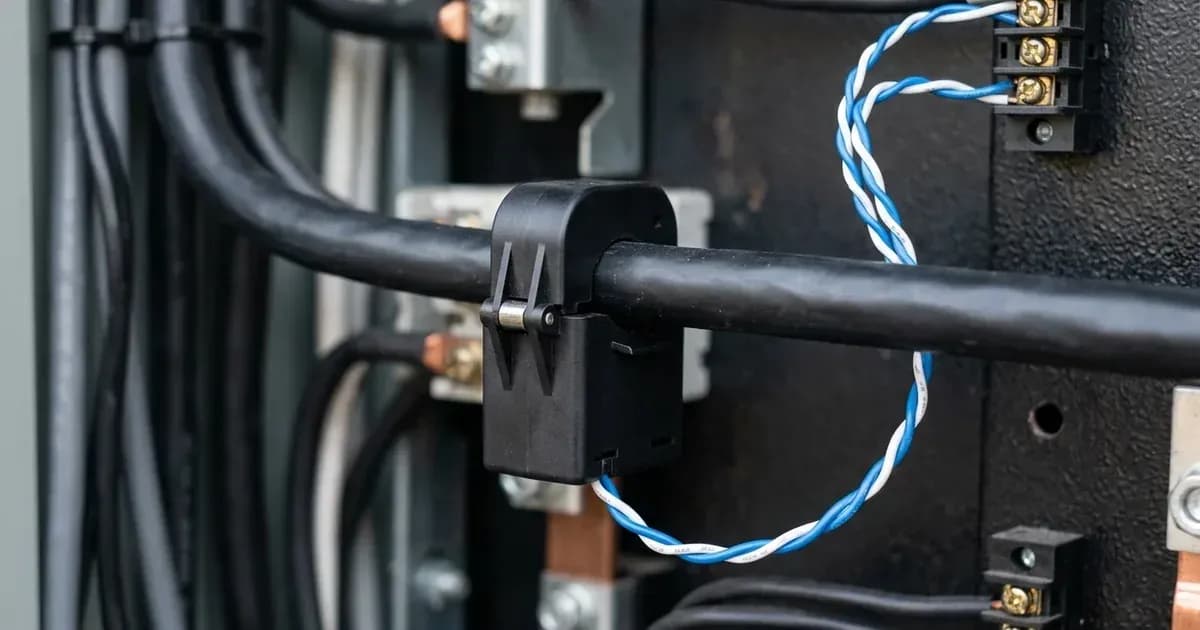
Current Transformer (CT) clamps measure the current flowing into or out of your property. Their directional placement is crucial.
- Install Current Transformer clamps with arrows pointing towards the household loads away from the grid incomer. This orientation ensures the meter correctly identifies export and import power.
- For three-phase installations, ensure a CT clamp is installed on each phase.
Safety First: Installing CT Clamps
Installing CT clamps involves working with live electrical circuits.
- Ensure complete AC circuit isolation and lock-out before installing CT clamps on live busbars. This means turning off and securing the main AC breaker to prevent accidental re-energisation.
- Always use appropriate personal protective equipment (PPE), including insulated gloves and eye protection.
- Bond inverter chassis ground and battery metal enclosure to the main installation earthing terminal. This provides essential safety grounding for the system.
Configuring Anti-Reflux Mode in the Inverter
Once the smart meter is wired, you need to configure the inverter to activate anti-reflux functionality.
Inverter Menu Settings
- Enable Anti-Reflux mode in the inverter menu. This setting activates the zero export control logic.
- Set the export power limit to 0kW. This explicitly tells the inverter not to send any power to the grid.
Meter Address for Three-Phase Systems
For three-phase Sofar Solar inverters, an additional step is required for the smart meter.
- When configuring Anti-Reflux on Sofar three-phase inverters, verify the meter address is set to Address 1 in meter settings. This ensures the inverter correctly communicates with the Chint DTSU666 meter.
Troubleshooting Common Anti-Reflux Issues
If your anti-reflux system is not performing as expected, consider these common issues.
Reverse CT Polarity
- Negative power flow during high household consumption indicates inverted CT clamp installation. If you observe the inverter reporting negative export values when your home is consuming power, it suggests the CT clamps are installed backwards. Correct their orientation so the arrows point towards the loads.
Communication Problems
- If the inverter is not reacting to grid conditions, check the RS485 communication. Ensure the shielded twisted-pair cabling is intact and securely connected at both the meter and the inverter.
- Verify that the baud rate settings on both devices match.
Issue | What it means | What to do |
|---|---|---|
Negative power flow during high consumption | CT clamp installed backwards | Re-orient CT clamp so arrow points towards household loads |
Inverter not limiting export | Anti-Reflux mode not enabled or export limit not 0kW | Enable Anti-Reflux mode and set export limit to 0kW in inverter menu |
Inverter not communicating with meter | RS485 wiring issue or incorrect settings | Check RS485 wires A and B, ensure shielded twisted-pair, verify baud rates |
Three-phase system not working | Incorrect meter address | For three-phase, set meter address to Address 1 |
What the Published Sources Do Not Tell You
While the provided documentation covers essential wiring and configuration, specific details such as the exact menu navigation steps for "Anti-Reflux mode" or "export power limit" settings can vary slightly between inverter firmware versions. Always refer to your specific inverter model's user manual for precise menu paths. Additionally, while the system is compatible with standard single-phase and three-phase electrical distribution systems globally, local grid operator requirements in Great Britain may have specific connection procedures or additional approvals needed beyond the inverter's internal settings. These are not covered by the generic smart meter documentation.
Frequently asked questions
What Sofar Solar smart meters are compatible with anti-reflux mode?
Sofar Solar inverters use Chint DTSU666 for three-phase systems and Chint DDSU666 for single-phase systems to manage anti-reflux zero export functionality.
How do I wire the RS485 communication for a Sofar Solar smart meter?
Connect the RS485 differential communication wires A and B from the smart meter directly to the Meter port on the Sofar Solar inverter. Use shielded twisted-pair cabling.
Which direction should the CT clamps face for Sofar Solar anti-reflux?
Install the Current Transformer clamps with their arrows pointing towards the household loads, away from the grid incomer. This ensures correct power flow measurement.
How do I enable anti-reflux zero export mode on a Sofar Solar inverter?
Enable Anti-Reflux mode within the inverter's menu system. After activation, set the export power limit to 0kW to prevent any energy from being sent to the grid.
What does negative power flow indicate during high consumption?
Negative power flow observed during periods of high household consumption typically indicates that the CT clamp installation is inverted, meaning it is installed backwards.
References
- SOFAR 7K-10.5KTLM-G3 Inverter User Manual (Anti-Reflux / Export Limit) — accessed 27 August 2026
Related guides
More from sizing, net billing & installation.